IS_BL9
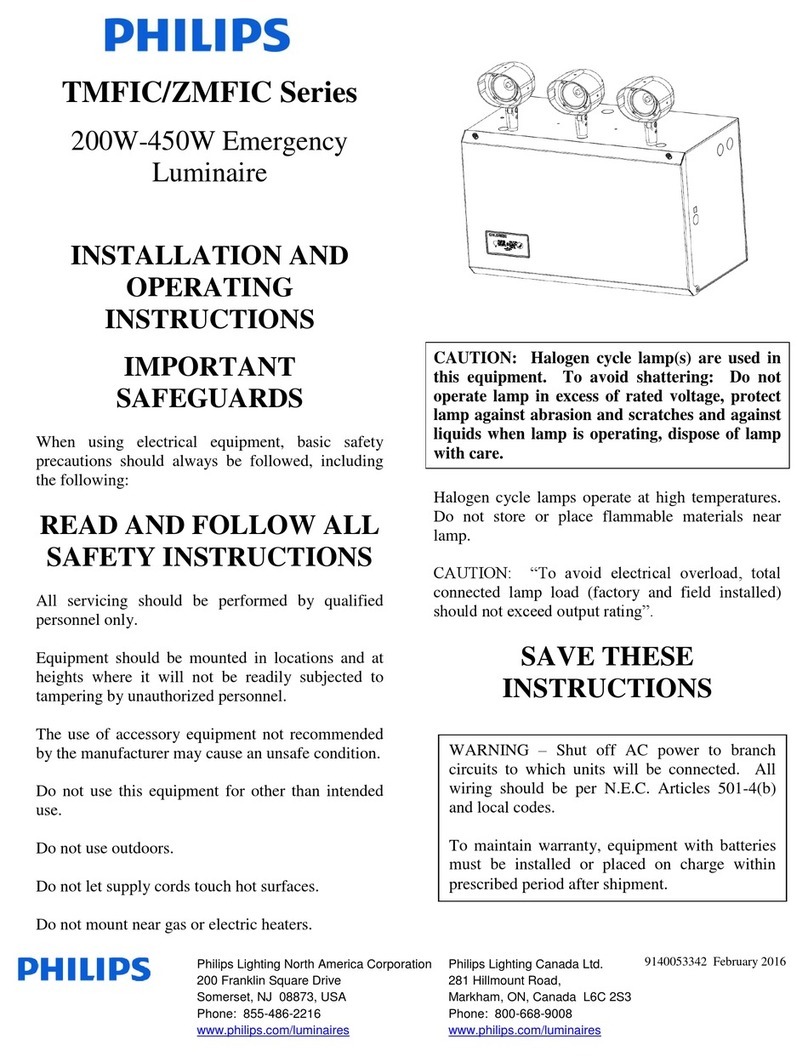
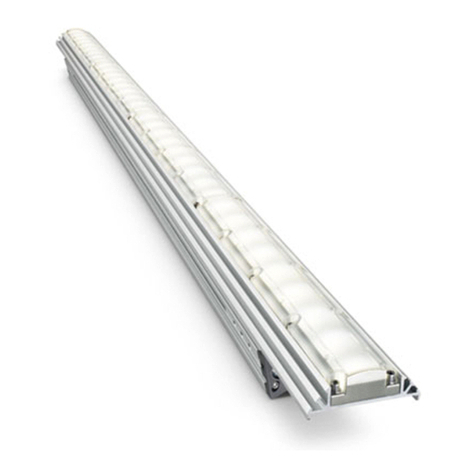
Landscape, FlexScape LED, Accent luminaire
Page 2 of 2
IS_BL9 04/14 page 2 of 2
© 2014 Koninklijke Philips N.V. All rights reserved.
Specifications are subject to change without notice.
www.philips.com/luminaires
Philips Lighting
North America Corporation
200 Franklin Square Drive
Somerset, NJ 08873
Phone: 855-486-2216
Philips Lighting Company
281 Hillmount Road
Markham ON, Canada L6C 2S3
Phone: 800-668-9008
MOUNTING
"FEET"
INSTALLATION INSTRUCTIONS:
Make sure power is turned OFF before installing or servicing this fixture.1.
This fixture must be mounted to a junction box or mounting stake, a S7 stake is supplied with each fixture (see2.
page 1). Other mounting accessories are available by Philips.
Remove shroud by pushing down and rotating it counter clockwise. The mounting "feet" must clear the3.
mounting bosses to open.
5. Replace shroud by pushing down and rotating it clockwise. Shroud can be
installed in one of two different orientations.
6. Loosen screw in arm, aim fixture as desired and tighten screw.
7. Adjust lumen output switch by turning the switch in the driver housing
with a Phillips PH2 screw driver. There are 4 different settings ranging
from 230mA to 1500mA, see chart for approximate lumen values (page 1).
Driver housing has a "+" and "-" symbol to illustrate strength of driver current.
8. Wire fixture following instructions below.
LOW VOLTAGE CABLE INSTRUCTIONS
Gel filled wire nuts to be used with 10 or 12 gauge supply cable and 18 gauge fixture cable. Philips recommends using SPT-3
water resistant (marked "WA", "W" or similar marking) supply cable such as our SCW500-10 or our SCW100-12. Philips also
recommends ordering the entire system, which includes the power console (maximum 25 Amps, 15 Volts per circuit), MA22
silicone wire nuts, and the supply cable to ensure proper installation and operation. When using Philips' supply cable, it can be
laid on top of the ground, placed under "ground cover" (that is, shallow burial less than 6 inches or 15.2 cm deep), or directly
buried in accordance with the NEC. If not using our cable, per UL 1838-Standard for Low Voltage Landscape Lighting Systems,
the secondary cable must be SPT-3 or suitable for wet locations, sunlight resistant and direct burial per UL 493 and sized per UL
1838, and it must be buried less than 6 inches (15.2 cm). Philips recommends a minimum depth of 4 inches when burying in
the lawn to prevent damage from aerators or other lawn plugging equipment. The 18 gauge fixture wire (provided with
fixture) must be protected by routing in close proximity to the fixture or secured to a building structure such as a house or
deck. The fixture wire must be cut off so that it is connected to the low voltage cable within 6 inches (15.2 cm) of the fixture or
the building structure. When making an underground connection to the 10 or 12 gauge supply cable (not provided), the
fixture wire must not be buried more than 6 inches (15.2 cm).
WARNING-Mount the luminaire in or on non-combustible mounting surfaces only.
WARNING-Risk of Electric Shock. Install all luminaires 10 feet (3.05m) or more from a pool, spa, or fountain.
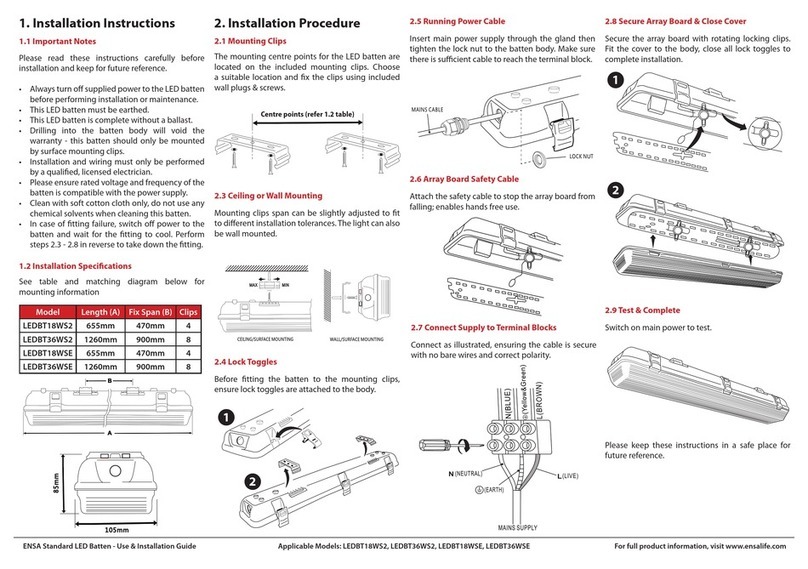
1. Strip the 18 gauge wire from the fixture.
2. Cut and strip the 10 or 12 gauge supply cable located near the fixture.
3. Use gel filled wire nuts (two) to connect the fixture wire to the supply cable(s).
4. Connect the supply cable to the terminals on the power console (transformer) and turn ON.
5. Fixtures will light as soon as the transformer is turned on.
page 2 of 2
32002039, revision A © 2014 Koninklijke Philips N.V. (Royal Philips). All rights reserved.
BOSS
MOUNTING
4. Adjust zoom lens by turning the white zoom dial as desired for the appropriate
beam angle. Zoom dial has a "+" and "-" symbol on top surface in order to
illustrate degree of beam angle, see page 1.
Spot (15 deg) - at lowest position, clockwise "-"
Medium flood (35 deg) - at highest position (shown), counter clockwise "+"
-OR-
Replace zoom lens with the wide flood lens (supplied) by turning and
pulling the white dial off of assembly. Remove zoom lens and place
the wide flood lens, with the concave surface facing down, inside the
path of the zoom dial. Push zoom dial until it snaps onto holder.
Wide flood (60 deg) - stationary at top of holder.
Note: Zoom lens must be removed in order to acquire the 60 degree
beam angle.
ZOOM LENS FLOOD LENS
SWITCH
SCREW
CONCAVE TO
FACE DOWN
MOUNTING
"FEET"
INSTALLATION INSTRUCTIONS:
Make sure power is turned OFF before installing or servicing this fixture.1.
This fixture must be mounted to a junction box or mounting stake, a S7 stake is supplied with each fixture (see2.
page 1). Other mounting accessories are available by Philips.
Remove shroud by pushing down and rotating it counter clockwise. The mounting "feet" must clear the3.
mounting bosses to open.
5. Replace shroud by pushing down and rotating it clockwise. Shroud can be
installed in one of two different orientations.
6. Loosen screw in arm, aim fixture as desired and tighten screw.
7. Adjust lumen output switch by turning the switch in the driver housing
with a Phillips PH2 screw driver. There are 4 different settings ranging
from 230mA to 1500mA, see chart for approximate lumen values (page 1).
Driver housing has a "+" and "-" symbol to illustrate strength of driver current.
8. Wire fixture following instructions below.
LOW VOLTAGE CABLE INSTRUCTIONS
Gel filled wire nuts to be used with 10 or 12 gauge supply cable and 18 gauge fixture cable. Philips recommends using SPT-3
water resistant (marked "WA", "W" or similar marking) supply cable such as our SCW500-10 or our SCW100-12. Philips also
recommends ordering the entire system, which includes the power console (maximum 25 Amps, 15 Volts per circuit), MA22
silicone wire nuts, and the supply cable to ensure proper installation and operation. When using Philips' supply cable, it can be
laid on top of the ground, placed under "ground cover" (that is, shallow burial less than 6 inches or 15.2 cm deep), or directly
buried in accordance with the NEC. If not using our cable, per UL 1838-Standard for Low Voltage Landscape Lighting Systems,
the secondary cable must be SPT-3 or suitable for wet locations, sunlight resistant and direct burial per UL 493 and sized per UL
1838, and it must be buried less than 6 inches (15.2 cm). Philips recommends a minimum depth of 4 inches when burying in
the lawn to prevent damage from aerators or other lawn plugging equipment. The 18 gauge fixture wire (provided with
fixture) must be protected by routing in close proximity to the fixture or secured to a building structure such as a house or
deck. The fixture wire must be cut off so that it is connected to the low voltage cable within 6 inches (15.2 cm) of the fixture or
the building structure. When making an underground connection to the 10 or 12 gauge supply cable (not provided), the
fixture wire must not be buried more than 6 inches (15.2 cm).
WARNING-Mount the luminaire in or on non-combustible mounting surfaces only.
WARNING-Risk of Electric Shock. Install all luminaires 10 feet (3.05m) or more from a pool, spa, or fountain.
1. Strip the 18 gauge wire from the fixture.
2. Cut and strip the 10 or 12 gauge supply cable located near the fixture.
3. Use gel filled wire nuts (two) to connect the fixture wire to the supply cable(s).
4. Connect the supply cable to the terminals on the power console (transformer) and turn ON.
5. Fixtures will light as soon as the transformer is turned on.
page 2 of 2
32002039, revision A © 2014 Koninklijke Philips N.V. (Royal Philips). All rights reserved.
BOSS
MOUNTING
4. Adjust zoom lens by turning the white zoom dial as desired for the appropriate
beam angle. Zoom dial has a "+" and "-" symbol on top surface in order to
illustrate degree of beam angle, see page 1.
Spot (15 deg) - at lowest position, clockwise "-"
Medium flood (35 deg) - at highest position (shown), counter clockwise "+"
-OR-
Replace zoom lens with the wide flood lens (supplied) by turning and
pulling the white dial off of assembly. Remove zoom lens and place
the wide flood lens, with the concave surface facing down, inside the
path of the zoom dial. Push zoom dial until it snaps onto holder.
Wide flood (60 deg) - stationary at top of holder.
Note: Zoom lens must be removed in order to acquire the 60 degree
beam angle.
ZOOM LENS FLOOD LENS
SWITCH
SCREW
CONCAVE TO
FACE DOWN
MOUNTING
"FEET"
INSTALLATION INSTRUCTIONS:
Make sure power is turned OFF before installing or servicing this fixture.1.
This fixture must be mounted to a junction box or mounting stake, a S7 stake is supplied with each fixture (see2.
page 1). Other mounting accessories are available by Philips.
Remove shroud by pushing down and rotating it counter clockwise. The mounting "feet" must clear the3.
mounting bosses to open.
5. Replace shroud by pushing down and rotating it clockwise. Shroud can be
installed in one of two different orientations.
6. Loosen screw in arm, aim fixture as desired and tighten screw.
7. Adjust lumen output switch by turning the switch in the driver housing
with a Phillips PH2 screw driver. There are 4 different settings ranging
from 230mA to 1500mA, see chart for approximate lumen values (page 1).
Driver housing has a "+" and "-" symbol to illustrate strength of driver current.
8. Wire fixture following instructions below.
LOW VOLTAGE CABLE INSTRUCTIONS
Gel filled wire nuts to be used with 10 or 12 gauge supply cable and 18 gauge fixture cable. Philips recommends using SPT-3
water resistant (marked "WA", "W" or similar marking) supply cable such as our SCW500-10 or our SCW100-12. Philips also
recommends ordering the entire system, which includes the power console (maximum 25 Amps, 15 Volts per circuit), MA22
silicone wire nuts, and the supply cable to ensure proper installation and operation. When using Philips' supply cable, it can be
laid on top of the ground, placed under "ground cover" (that is, shallow burial less than 6 inches or 15.2 cm deep), or directly
buried in accordance with the NEC. If not using our cable, per UL 1838-Standard for Low Voltage Landscape Lighting Systems,
the secondary cable must be SPT-3 or suitable for wet locations, sunlight resistant and direct burial per UL 493 and sized per UL
1838, and it must be buried less than 6 inches (15.2 cm). Philips recommends a minimum depth of 4 inches when burying in
the lawn to prevent damage from aerators or other lawn plugging equipment. The 18 gauge fixture wire (provided with
fixture) must be protected by routing in close proximity to the fixture or secured to a building structure such as a house or
deck. The fixture wire must be cut off so that it is connected to the low voltage cable within 6 inches (15.2 cm) of the fixture or
the building structure. When making an underground connection to the 10 or 12 gauge supply cable (not provided), the
fixture wire must not be buried more than 6 inches (15.2 cm).
WARNING-Mount the luminaire in or on non-combustible mounting surfaces only.
WARNING-Risk of Electric Shock. Install all luminaires 10 feet (3.05m) or more from a pool, spa, or fountain.
1. Strip the 18 gauge wire from the fixture.
2. Cut and strip the 10 or 12 gauge supply cable located near the fixture.
3. Use gel filled wire nuts (two) to connect the fixture wire to the supply cable(s).
4. Connect the supply cable to the terminals on the power console (transformer) and turn ON.
5. Fixtures will light as soon as the transformer is turned on.
page 2 of 2
32002039, revision A © 2014 Koninklijke Philips N.V. (Royal Philips). All rights reserved.
BOSS
MOUNTING
4. Adjust zoom lens by turning the white zoom dial as desired for the appropriate
beam angle. Zoom dial has a "+" and "-" symbol on top surface in order to
illustrate degree of beam angle, see page 1.
Spot (15 deg) - at lowest position, clockwise "-"
Medium flood (35 deg) - at highest position (shown), counter clockwise "+"
-OR-
Replace zoom lens with the wide flood lens (supplied) by turning and
pulling the white dial off of assembly. Remove zoom lens and place
the wide flood lens, with the concave surface facing down, inside the
path of the zoom dial. Push zoom dial until it snaps onto holder.
Wide flood (60 deg) - stationary at top of holder.
Note: Zoom lens must be removed in order to acquire the 60 degree
beam angle.
ZOOM LENS FLOOD LENS
SWITCH
SCREW
CONCAVE TO
FACE DOWN