manuals.online logo
Brands
  1. Home
  2. •
  3. Brands
  4. •
  5. Thermo Scientific
  6. •
  7. Laboratory Equipment
  8. •
  9. Thermo Scientific HyPerforma DynaDrive 500 L User manual

Thermo Scientific HyPerforma DynaDrive 500 L User manual

Other Thermo Scientific Laboratory Equipment manuals

Thermo Scientific FB1300 User manual

Thermo Scientific

Thermo Scientific FB1300 User manual

Thermo Scientific Nicolet iS50 GC-IR User manual

Thermo Scientific

Thermo Scientific Nicolet iS50 GC-IR User manual

Thermo Scientific Sorvall Legend XF User manual

Thermo Scientific

Thermo Scientific Sorvall Legend XF User manual

Thermo Scientific Cryotome Manual

Thermo Scientific

Thermo Scientific Cryotome Manual

Thermo Scientific TSE Series Operating instructions

Thermo Scientific

Thermo Scientific TSE Series Operating instructions

Thermo Scientific Fisherbrand GT4 User manual

Thermo Scientific

Thermo Scientific Fisherbrand GT4 User manual

Thermo Scientific Harris MBF-700 User manual

Thermo Scientific

Thermo Scientific Harris MBF-700 User manual

Thermo Scientific IMH 60 User manual

Thermo Scientific

Thermo Scientific IMH 60 User manual

Thermo Scientific Sorvall ST40R User manual

Thermo Scientific

Thermo Scientific Sorvall ST40R User manual

Thermo Scientific mDrop User manual

Thermo Scientific

Thermo Scientific mDrop User manual

Thermo Scientific 75007202 User manual

Thermo Scientific

Thermo Scientific 75007202 User manual

Thermo Scientific 8920 User manual

Thermo Scientific

Thermo Scientific 8920 User manual

Thermo Scientific SL40 User manual

Thermo Scientific

Thermo Scientific SL40 User manual

Thermo Scientific Smart-Vue User manual

Thermo Scientific

Thermo Scientific Smart-Vue User manual

Thermo Scientific SmartView SV100A User manual

Thermo Scientific

Thermo Scientific SmartView SV100A User manual

Thermo Scientific Thermo Scientific SL Plus Series User manual

Thermo Scientific

Thermo Scientific Thermo Scientific SL Plus Series User manual

Thermo Scientific Phadia 100 User manual

Thermo Scientific

Thermo Scientific Phadia 100 User manual

Thermo Scientific SPD131DDA User manual

Thermo Scientific

Thermo Scientific SPD131DDA User manual

Thermo Scientific IMC 18 User manual

Thermo Scientific

Thermo Scientific IMC 18 User manual

Thermo Scientific Haematocrit-Rotor 7500 3473 User manual

Thermo Scientific

Thermo Scientific Haematocrit-Rotor 7500 3473 User manual

Thermo Scientific 3920 Operating instructions

Thermo Scientific

Thermo Scientific 3920 Operating instructions

Thermo Scientific 88882013 User manual

Thermo Scientific

Thermo Scientific 88882013 User manual

Thermo Scientific Multidrop 384 User manual

Thermo Scientific

Thermo Scientific Multidrop 384 User manual

Thermo Scientific Heraeus Pico 21 User manual

Thermo Scientific

Thermo Scientific Heraeus Pico 21 User manual

Popular Laboratory Equipment manuals by other brands

Radleys Carousel 6 Plus instructions

Radleys

Radleys Carousel 6 Plus instructions

Hemotherm 400MR Operation & technical manual

Hemotherm

Hemotherm 400MR Operation & technical manual

mrclab DVO Series Operation manual

mrclab

mrclab DVO Series Operation manual

CoolLED pE-800 quick start guide

CoolLED

CoolLED pE-800 quick start guide

Luminex Guava easyCyte Maintenance Guide

Luminex

Luminex Guava easyCyte Maintenance Guide

IKA A10 basic operating instructions

IKA

IKA A10 basic operating instructions

Belden HIRSCHMANN RPI-P1-4PoE installation manual

Belden

Belden HIRSCHMANN RPI-P1-4PoE installation manual

Koehler K1223 Series Operation and instruction manual

Koehler

Koehler K1223 Series Operation and instruction manual

Globe Scientific GCM-12 quick start guide

Globe Scientific

Globe Scientific GCM-12 quick start guide

Getinge 86 SERIES Technical manual

Getinge

Getinge 86 SERIES Technical manual

CORNING Everon 6000 user manual

CORNING

CORNING Everon 6000 user manual

Biocomp GRADIENT MASTER 108 operating manual

Biocomp

Biocomp GRADIENT MASTER 108 operating manual

Cole Parmer Stuart SB3/1 instruction manual

Cole Parmer

Cole Parmer Stuart SB3/1 instruction manual

BEVS 2501/2A user manual

BEVS

BEVS 2501/2A user manual

Qiagen DML 3000 user manual

Qiagen

Qiagen DML 3000 user manual

Queensgate NANOSCAN OP400 Quick start instructions

Queensgate

Queensgate NANOSCAN OP400 Quick start instructions

Parr Instrument 4560 Operating instructions manual

Parr Instrument

Parr Instrument 4560 Operating instructions manual

Integra DOSE IT operating instructions

Integra

Integra DOSE IT operating instructions

manuals.online logo
manuals.online logoBrands
  • About & Mission
  • Contact us
  • Privacy Policy
  • Terms and Conditions

Copyright 2025 Manuals.Online. All Rights Reserved.

500 L HyPerforma DynaDrive Single-Use
Bioreactor Quick Start Guide
This Guide provides a brief overview of setting up the Thermo Scientific™HyPerforma™DynaDrive Single-Use Bioreactor (S.U.B.)
system. For more detailed information about the DynaDrive S.U.B., refer to the 50 and 500 L HyPerforma DynaDrive S.U.B. User’s
Guide (DOC0090).
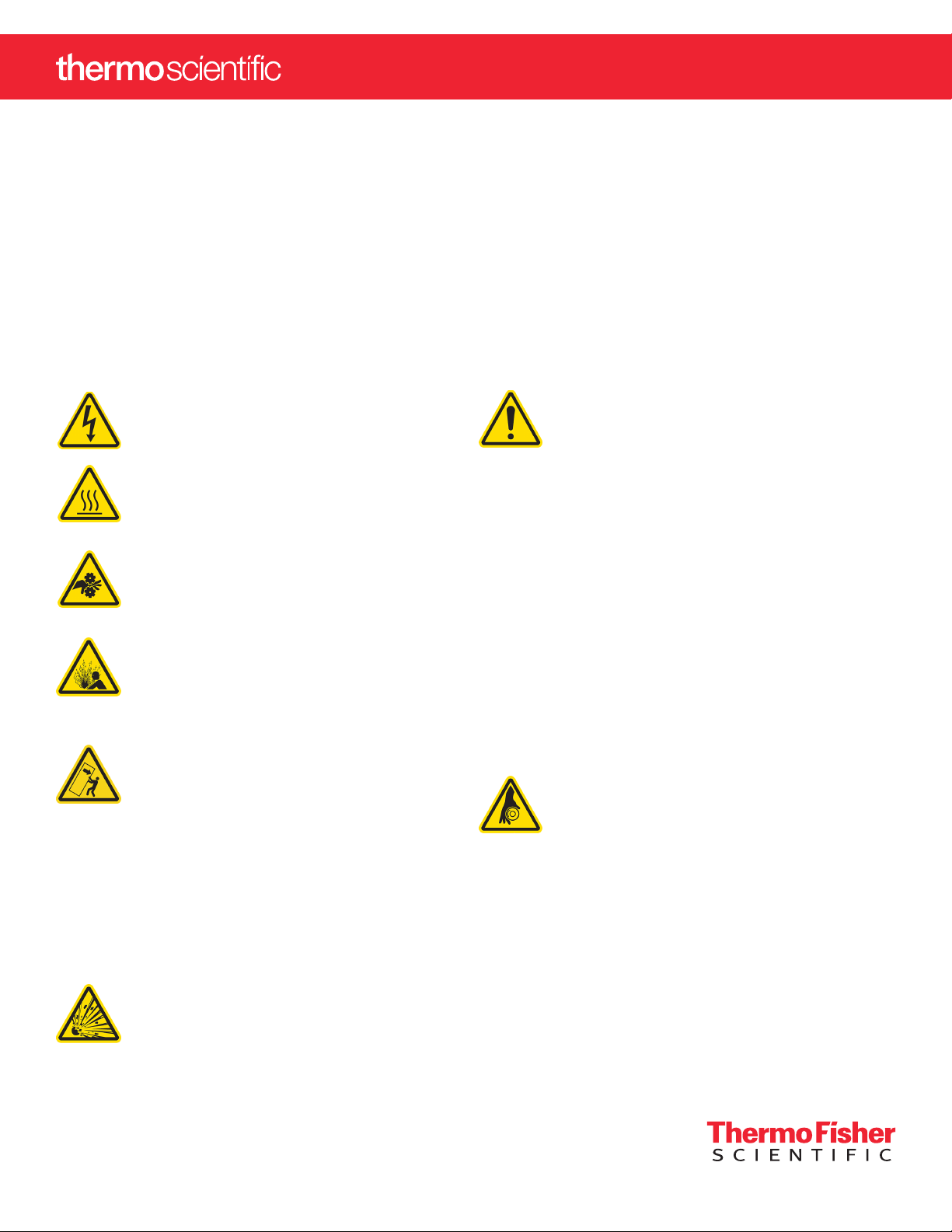
Warnings and safety
Hazardous voltage inside—risk of electrical
shock. Service should be provided by certified
personnel only.
Hot surface—do not touch.
The heating jacket is designed to heat the inner
vessel wall. Contact with surfaces may cause
burns.
Pinch hazard. Use caution when opening/
closing the door, securing the BPC to the
top and bottom ports in the tank, and during
operation of the DynaDrive S.U.B.
Burst hazard—air under pressure. Do not
exceed 30 mbar (0.5 psi) BPC pressure. Do
not exceed 34 mbar (5 psi) inlet pressure.
Ensure that the vent filter is correctly positioned
and working properly.
Tipping hazard. The vessel should only
be moved by pushing using the provided
handles or at the mid-point of the vessel.
If pulled or moved too quickly, the vessel can
tip, potentially leading to damage to equipment
or injury to personnel. To reduce the risk of
tipping, the vessel should only be moved
slowly over smooth, flat surfaces by at least
two qualified personnel. During movement, any
locking feet should be retracted, and casters
should be in the unlocked position. The vessel
should not be moved by pulling of any kind.
The Thermo Scientific HyPerforma
DynaDrive S.U.B. may not be installed in
a potentially explosive atmosphere as set
forth in the applicable EU ATEX Directive.
It is the responsibility of the end user to review
and understand the potential dangers listed in
the ATEX 2014/34/EU guidelines.
Static electricity may build up in BPCs.
• BioProcess Containers (BPCs) may act
as insulators for electrostatic charge. If
electrostatic charge is transferred to a BPC,
the charge may be stored in the BPC and/or
the product inside. This phenomena varies
by product and use; therefore, it is the sole
responsibility of the end user to ensure a
hazard assessment is conducted and the
risk of electrostatic shock is eliminated.
• Where applicable, a product contact
stainless steel coupler may be grounded
to the frame to dissipate electrostatic
buildup from the material within a BPC. It
is good practice to dissipate electrostatic
buildup by grounding all BPCs prior to
coming in contact with them. When working
with BPCs, the use of nonconductive
materials, such as nonconductive gloves, is
recommended.
Rotating parts—entanglement hazard.
Rotating and moving parts can cause injury.
Keep hands away from moving parts during
operation. Do not operate this equipment unless
the supplied guarding is in place and properly
functioning. It is the responsibility of the end
user to assess this equipment and ensure that
equipment and safeguards are in good working
condition, and that all operators are trained and
aware of entanglement hazards and associated
protective devices, such as hazard signs and
guarding.
2
Figure 1. Front view of the 500 L DynaDrive S.U.B.
Follow lockout/tagout procedures. To
prevent injury, when servicing equipment, use
your company’s lockout/tagout procedures
to isolate electrical, mechanical, pneumatic,
hydraulic, chemical, thermal, gravitational, or
any other potential energy and protect workers
from the release of hazardous energy.
Use caution with hazardous chemicals or
materials. Personnel servicing equipment
need to know the hazards of any chemicals
or materials that may be present on or in the
equipment. Use general hazard communication
techniques such as Safety Data Sheets, labels,
and pictograms to communicate any hazards.
Note that this machine does not produce or
process any toxic, corrosive, flammable, and
explosive substances, nor uses any additives,
compounds of mercury, cadmium, chromium,
asbestos, CFC, or HCFC for machine
maintenance purposes.
Use a properly configured and approved
power cord for voltage supply in your
facility.
Read and understand the user’s guide
before operating the equipment. The
HyPerforma DynaDrive S.U.B. is designed to
be operated under traditional eukaryotic cell
culture conditions. A general understanding
of bioreactor systems and their operation is
important prior to using the system for the first
time. Read and understand this user’s guide
before operating; failure to do so could result
in injury and potential loss of product. Only
trained operators should be allowed to operate
the equipment.
For complete warnings, safety, and warranty information,
refer to the 50 and 500 L HyPerforma DynaDrive S.U.B.
User’s Guide.
Unpacking the system
First, inspect the packaging for damage. Call your
Thermo Scientific sales representative if any damage is
present. Use the instructions provided in the 50 and 500 L
HyPerforma DynaDrive S.U.B. Unpacking Guide (DOC0149)
to unpack your S.U.B. unit from the shipping crate.
Electrical preparation (for systems with the
optional Thermo Scientific E-Box)
1. Using a flat-head screwdriver, open the E-Box
and locate the breakers for the pressure sensor,
continuous power outlets non E-stoppable (2), and
continuous power outlets E-stoppable (2) (Figure
2 on the following page). These breakers should
be in the “on” position (“up” position or pressed in,
depending on the breaker type) during operation.
For electrical schematics, please refer to the ETP,
which is provided on a USB drive.
3
2. Close the E-Box and lock the panel using a
flat-head screwdriver before continuing.
3. Connect all electrical plugs to facility power. Refer
to hardware/electrical labels and schematics to
ensure proper electrical voltage is connected to
the DynaDrive S.U.B. Note: The yellow plug and
receptacle are for 120 VAC, and the blue plug and
receptacle are for 240 VAC S.U.B.s.
Unlocking load cells
Figure 3 illustrates the location and components of load
cells on on a standard HyPerforma S.U.B. The location
and process is the same for DynaDrive S.U.B.s.
All load cells must be fully locked down in order to
move the DynaDrive S.U.B. For DynaDrive S.U.B.
hardware units purchased with factory-installed load
cells, the load cells are shipped in the locked position
(threaded up) for equipment protection.
1. To unlock the load cells (after the system is in its
final location), remove and discard the delrin slip
ring if it is present. Remove the tri-clamp.
2. Loosen the lockout nut, using an adjustable or
1.25 in. wrench (not supplied), until the nut is tight
against the base or leg of the S.U.B. Repeat this
process for each load cell until all of the lockout
nuts are disengaged from the lockout posts. Do
not reinstall the tri-clamp.
3. At this point, the DynaDrive S.U.B. hardware is
ready to be prepared for BPC loading.
Leveling and connecting the system
All manual movements of the DynaDrive S.U.B.
hardware should be over smooth surfaces, with the
S.U.B. empty and disconnected from all power and
gas/feed sources. All load cells must be fully locked
down in order to move a S.U.B.
1. Verify that the facility electrical supplies are
sufficient to support the power requirements of the
DynaDrive S.U.B. and ancillary components, such
as controllers or pumps.
VFD breaker
Continuous power
breaker
Temp.
display
breaker
Main power
breaker
E-Stop power
breaker
Pressure
sensor
breaker
Figure 2. DynaDrive S.U.B. E-Box interior.
A
Figure 3. Load cell schematic.
Lockout nut
Delrin slip
ring
Lockout
post
38.1 mm (1.5 in.)
Tri-clamp
4
2. Locate the outer support container in the area for
the cell culture run.
3. When monitoring the batch volume, the unit may be
placed on a weight scale if load cells are not part of
the system. Other methods may be used to measure
all incoming and outgoing liquids.
4. Level the platform by disabling the swivel casters on
the bottom of the outer support container. This is
accomplished by threading the leveling feet (at the
center of each caster) to the floor.
5. Verify the location of the pH/DO controllers and
ensure that the cable and tubing lengths are
sufficient.
6. Verify that the main power is off and the emergency
stop (E-Stop) is pulled out. Note: The E-Stop
disconnects all power to the system. An alarm
buzzer will sound when the E-Stop is activated.
7. Verify that the main motor power switch is in the
“off” position.
8. Connect all electrical plugs to facility power. Refer to
hardware/electrical labels and schematics to ensure
proper electrical voltage is connected to the S.U.B.
The main power switch can now be turned on.
9. Connect the inlet and outlet lines from the
temperature control unit (TCU) quick-connects to
the jacket (Figure 4). The inlet is typically on the right
side if you are facing the connectors; refer to the
permanent labels on the inlet and outlet lines.
Figure 4. Attaching water jacket port using a
tri-clamp.
Note: Refer to the TCU manufacturer’s guidelines for
detailed TCU setup information.
10. Use the tri-clamp fitting to attach the water jacket inlet/
outlet ports to the bottom of the outer support container
(Figure 5).
Figure 5. Removing the tri-clamp and attaching the fitting.
Note: Figure 5 shows the tri-clamp fitting and inlet/outlet
ports on a standard HyPerforma S.U.B. The location and
process is the same for DynaDrive S.U.B.s.
Loading the BPC
Use the following information to install and set up the BPC.
Checkpoints prior to BPC loading
9A 500 L DynaDrive BPC is being used for the
500 L outer support container.
9The outer support container is stationary, with the
casters locked in place.
9Two operators are available for BPC loading.
9The Thermo Scientific BPC Unpacking and Inspection
Guide (DOC0021) has been reviewed for information on
handling, transporting, and storing BPCs.
1. Open the door on the bioreactor outer support
container.
2. Use a safety cutter to slit the taped sides/ends of the
cardboard box in which the BPC is shipped (Figure 6).
The BPC will be secured to a cardboard insert inside the
box (Figure 7).
5
3. Carefully lift the BPC out of the box (Figure 8) and
place on a raised, flat surface. Fold up the cardboard
flaps to release the BPC from the cling wrap on the
cardboard insert. Remove and discard the insert
(Figure 9).
Figure 10. Cutting open the outer polybag.
Figure 11. Pulling the outer polybag away
from the BPC.
6. Ensure the DynaDrive S.U.B. door is still open. Push
the blue and black button on the hub cover located at
the top of the S.U.B. to unlock it (Figure 12). Swing the
cover open (Figure 13).
4. Use a safety cutter to carefully open the outer polybag
(Figure 10). Take care to not damage the BPC.
Figure 12. Pushing button on hub
cover.
Figure 13. Hub cover opened.
Figure 14. Raising BPC lift lever.
Figure 6. Slitting open taped
sides of the BPC box.
Figure 7. BPC secured to cardboard
insert in box.
Figure 8. Carefully lifting out the BPC. Figure 9. Folding up flaps
on the insert.
5. While another operator holds the exposed end of the
BPC in place, pull the outer polybag away from the
BPC (Figure 11). Repeat this step to remove the inner
polybag once the BPC is in the clean room and ready
to be loaded.
7. Raise the BPC lift mechanism lever fully, which will
simultaneously lower the bearing hub port (Figure 14).
6
8. Do not allow the BPC or line sets to touch the floor as
you carefully unfold the BPC and locate the top bearing
hub and front line sets. Do not remove the polybags
from the line sets at this stage, as the BPC may
become difficult to manage.
9. Ensure the line sets are facing the front, and align the
top bearing with the purple bearing hub (Figure 15).
Pull down on the black hub locking mechanism as you
insert the top bearing hub into the bearing. Ensure that
the locking mechanism fully engages; the lip at the
bottom should be completely hidden from view when
the locking mechanism retracts.
10. Pull down on the BPC lift mechanism lever (Figure
16). The lever will not move all the way down until
the black hub locking mechanism is pulled down, as
well. After the hub mechanism has been lowered and
subsequently raised, the purple bearing hub will lock
into place. Note: Ensure the hub and lift mechanism
lever are fully engaged by attempting to push the lever
back up. If the hub is not locked, the hub will fall out
and the arm will raise.
12. Locate the bottom hub at the bottom center of the
BPC. Pull the hub toward the center cutout at the
bottom front of the outer support container. Once the
hub is aligned with the correct cutout, slide it toward
the back of the DynaDrive S.U.B. until you feel it shift
into place (Figure 18).
11. Once the hub is locked into place, close and lock the
hub cover. The blue and black button must be pressed
again to lock the cover (Figure 17). The BPC should be
hanging freely.
Figure 15. Aligning bearing hub
with the bearing.
Figure 16. Pulling down on BPC
lift lever and locking mechanism.
Figure 17. Locking hub cover.
13. Use the following steps to lock the bottom hub in
place:
• Pull down the metal pin to open the gate.
• Swing the gate connected to the pin forward and
to the right (Figure 19) until the pin aligns with the
drilled hole on the right side of the bottom hub
cutout (Figure 20).
• Push the pin back up to lock the gate (Figure 21).
Figure 18. Sliding the bottom hub into
place in the front center cutout.
Bottom hub
7
14. Place the exhaust vent filter into the holder attached
to the pneumatic motor lift (Figure 22). Note: A ladder
may be required to reach the exhaust vent filter holder.
16. Attach the top back BPC tabs to the pins on the top
back of the outer support container. Note: A ladder is
needed to reach the top back BPC tabs.
17. Guide all line sets on the bottom of the BPC through
the bottom cutout in the outer support container
(Figure 25).
Figure 20. Closing the gate
completely.
Figure 21. Pushing the metal pin
up to lock the gate.
Figure 19. Swinging the gate to
the right.
Metal pin
Figure 22. Securing the exhaust
vent filter to the holder.
15. While holding the front linesets to keep them from
tangling, use the motor lift controller (see the user’s
guide (DOC0090) for information on using the motor
lift controller) to raise the pneumatic motor lift (Figures
23 and 24). After raising the motor lift to its highest
position, turn the lock dial on the motor lift controller.
Note: The controller cannot be locked unless the
motor lift has been fully raised.
Figure 23. Pneumatic motor lift
in lowest position.
Figure 24. Pneumatic motor lift
fully raised.
Figure 25. Line sets placed in bottom cutout.
Line set
placed in
outer support
container
cutout
Note: Verify that all line clamps are closed and
located as close as possible to the body of the BPC.
18. Attach the hanging tabs on the bottom of the BPC
to the pins at the bottom back of the outer support
container (Figure 26). Note: Do not attach the bottom
front BPC tabs.
19. Carefully close the door on the front of the outer
support container. Before latching the door shut,
ensure that one operator holds the front tubing line
sets above the door so none of the tubing is caught
as the door closes (Figure 27). Ensure that the row of
probe ports is aligned just below the bottom front of
the door (Figure 28).
21. Begin slowly filling the BPC with air to allow the drive
train to separate from the inside of the BPC. This also
aids in the proper alignment of the BPC in the outer
support container.
• Attach the air supply to one of the sparging gas
inlet lines after removing the bubble wrap from the
line set.
Note: Air pressure to the gas line on the DynaDrive
S.U.B. BPC should not exceed 34 mbar (0.5 psi).
• Begin air inflation through one of the sparging gas
lines. Times will vary based upon flow rate and inlet
pressure.
WARNING: The BPC is not rated as a
pressure vessel. DO NOT EXCEED 34
mbar (0.5 psi) within the BPC or the system
could fail, causing personal injury or damage
to equipment. DO NOT leave the BPC
unattended while inflating. Consult your sales
representative for recommended air flow rates.
The operating pressures at the level of the
DynaDrive S.U.B. are of primary importance,
and these values must be adhered to.
22. Check the BPC to ensure that the foam probe is
hanging freely, and is not entangled in the drive train.
23. Clamp (or slide on, from the front) the black top tab
holders on both sides of the outer support container
(Figure 31). Attach the two hanging tabs at the top front
side of the BPC to the black plastic pins on the top
front of the outer support container.
Figure 26. BPC bottom hanging tab
attached to bottom pin.
Figure 30. Closing and latching the top door latch.
Figure 27. Lifting tubing line sets above
the door while closing.
Figure 28. Probe port row aligned
underneath closed door (BPC shown filled).
20. Close and secure the latches at the top and bottom
of the door (Figure 30).
8
For Research or Further Manufacturing. Not for diagnostic use or direct administration into humans or animals.
© 2020 Thermo Fisher Scientific Inc. All rights reserved. All trademarks are the property of Thermo Fisher Scientific and its
subsidiaries unless otherwise specified. DOC0171 Revision A 1220
Find out more at thermofisher.com/dynadrive
Note: Attaching the top tabs will help keep the BPC
properly oriented inside the tank. Figure 32 shows the
top front BPC tab attached to the tab holder.
Figure 33. Inserting the RTD. Figure 34. RTD in a probe clip.
• Place a probe clip on the probe support hanger and
place the RTD so it is resting in the hook (Figure 34).
Figure 35. Foam probe in holder.
29. Clamp the black foam probe holder to the outer
support container, behind the top left tab holder, if
facing the front of the S.U.B. Insert the foam probe into
the foam probe holder on the outer support container
(Figure 35).
Figure 31. Placing black top tab
holders on the top front of tank.
Figure 32. Black top tab holder
with BPC tab attached.
24. Gently pull at the bottom corners of the BPC until the
sides of the BPC are straight. Note: You may need
to wait for the BPC to fill with more air before this is
possible.
25. While the BPC continues filling with air, remove all
bubble wrap and polybags from the line sets.
26. Remove the polybag from the drain line set, position
the line clamp as close as possible to the BPC port,
and then close the clamp. Use a cable tie around the
clamp to ensure it does not open.
27. Remove the plastic insert located in the thermowell, if
present.
28. Insert the resistance temperature detector (RTD) into
the thermowell (Figure 33) using the steps below. Note:
Due to the shorter thermowell on DynaDrive BPCs, the
15.24 cm (6 in.) RTD is the ONLY compatible size. DO
NOT use larger RTDs, which will damage the BPC.
• Place a small amount of glycerol (0.5 mL) in the
thermowell to aid in heat transfer. The glycerol also
serves as a lubricant and aids in insertion.
• The sensor should be inserted until the base of the
RTD meets the mouth of the thermowell.
• Secure by twisting the luer lock collar, if provided.
CAUTION:
• The foam probe must be placed into the foam
probe holder to prevent the foam sensor inside the
BPC from becoming entangled with the drive train.
• The 500 L foam probe holder must be removed
prior to raising or lowering the motor lift to avoid
damaging the BPC.
30. Optional: Connect a pressure sensor to the CPC
aseptic connector at the top of the BPC. Then connect
the appropriate pressure transducer cable to the third-
party controller.