manuals.online logo
Brands
  1. Home
  2. •
  3. Brands
  4. •
  5. Vicon
  6. •
  7. Card Reader
  8. •
  9. Vicon VAX-PCR-35L User manual

Vicon VAX-PCR-35L User manual

This manual suits for next models

3

Other Vicon Card Reader manuals

Vicon VAX-D403R User manual

Vicon

Vicon VAX-D403R User manual

Vicon VAX-300R User manual

Vicon

Vicon VAX-300R User manual

Vicon DS-K182HP User manual

Vicon

Vicon DS-K182HP User manual

Vicon VAX-D6.4R User manual

Vicon

Vicon VAX-D6.4R User manual

Vicon VAX-CR-35L User manual

Vicon

Vicon VAX-CR-35L User manual

Vicon VAX-D403R User manual

Vicon

Vicon VAX-D403R User manual

Vicon VAX-D3R-OSDP User manual

Vicon

Vicon VAX-D3R-OSDP User manual

Vicon VAX-D3R User manual

Vicon

Vicon VAX-D3R User manual

Vicon VAX-300R User manual

Vicon

Vicon VAX-300R User manual

Vicon VAX-P403R User manual

Vicon

Vicon VAX-P403R User manual

Vicon VAX-300R User manual

Vicon

Vicon VAX-300R User manual

Popular Card Reader manuals by other brands

RealTrace V8BT Comprehensive manual

RealTrace

RealTrace V8BT Comprehensive manual

Datalogic Touch 65 pro manual

Datalogic

Datalogic Touch 65 pro manual

Digitus DA-70318 user manual

Digitus

Digitus DA-70318 user manual

Salto WRDx0E4 Series installation guide

Salto

Salto WRDx0E4 Series installation guide

Lindy 43185 user manual

Lindy

Lindy 43185 user manual

Lindy 43185 user manual

Lindy

Lindy 43185 user manual

ViziT RD-4F operating instructions

ViziT

ViziT RD-4F operating instructions

Jinmuyu Electronics MR811 Series user manual

Jinmuyu Electronics

Jinmuyu Electronics MR811 Series user manual

Conrad PCMCIA operating instructions

Conrad

Conrad PCMCIA operating instructions

Lindy 51541 user manual

Lindy

Lindy 51541 user manual

Diapro T?bbi Ürünler Across System user manual

Diapro T?bbi Ürünler

Diapro T?bbi Ürünler Across System user manual

Johnson Controls Kantech tyco ioSmart installation guide

Johnson Controls

Johnson Controls Kantech tyco ioSmart installation guide

Secukey S2-MF user manual

Secukey

Secukey S2-MF user manual

Elecom MR-SMC07 series user manual

Elecom

Elecom MR-SMC07 series user manual

Alien ALR-9800 Quick installation guide

Alien

Alien ALR-9800 Quick installation guide

ACS ACR310 Operation manual

ACS

ACS ACR310 Operation manual

Datamars R-IN1300 MID user manual

Datamars

Datamars R-IN1300 MID user manual

Alarm Lock AL-PRE2 user guide

Alarm Lock

Alarm Lock AL-PRE2 user guide

manuals.online logo
manuals.online logoBrands
  • About & Mission
  • Contact us
  • Privacy Policy
  • Terms and Conditions

Copyright 2025 Manuals.Online. All Rights Reserved.

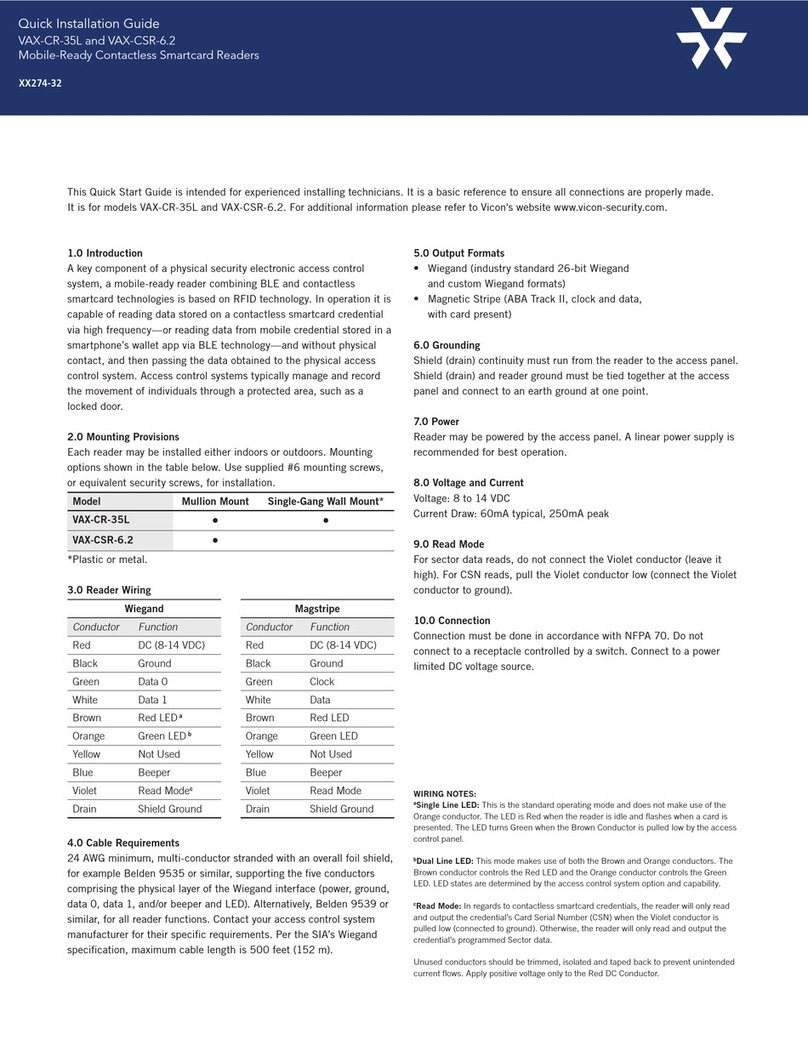
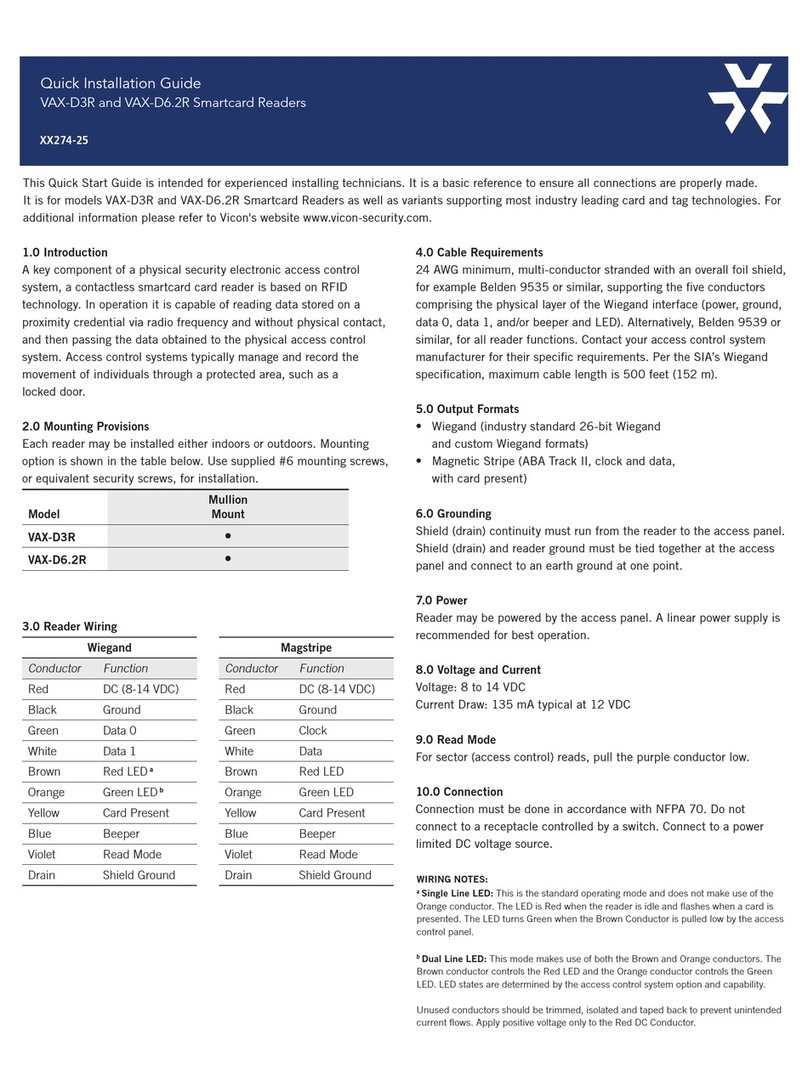
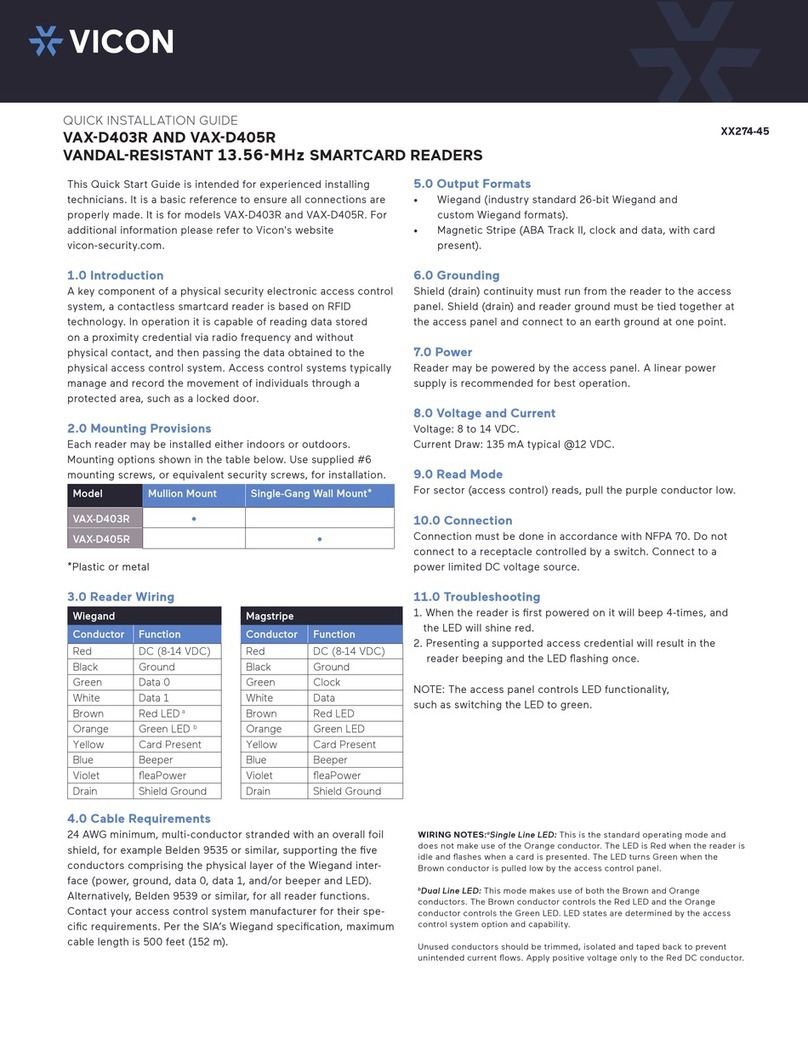
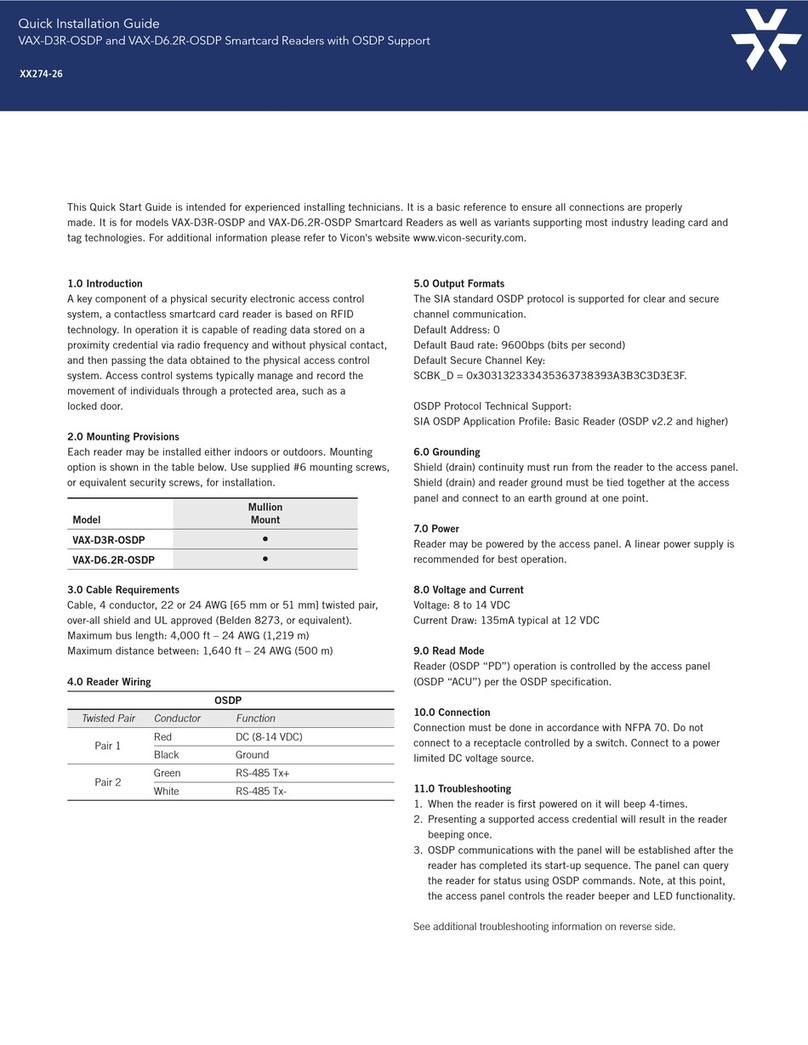
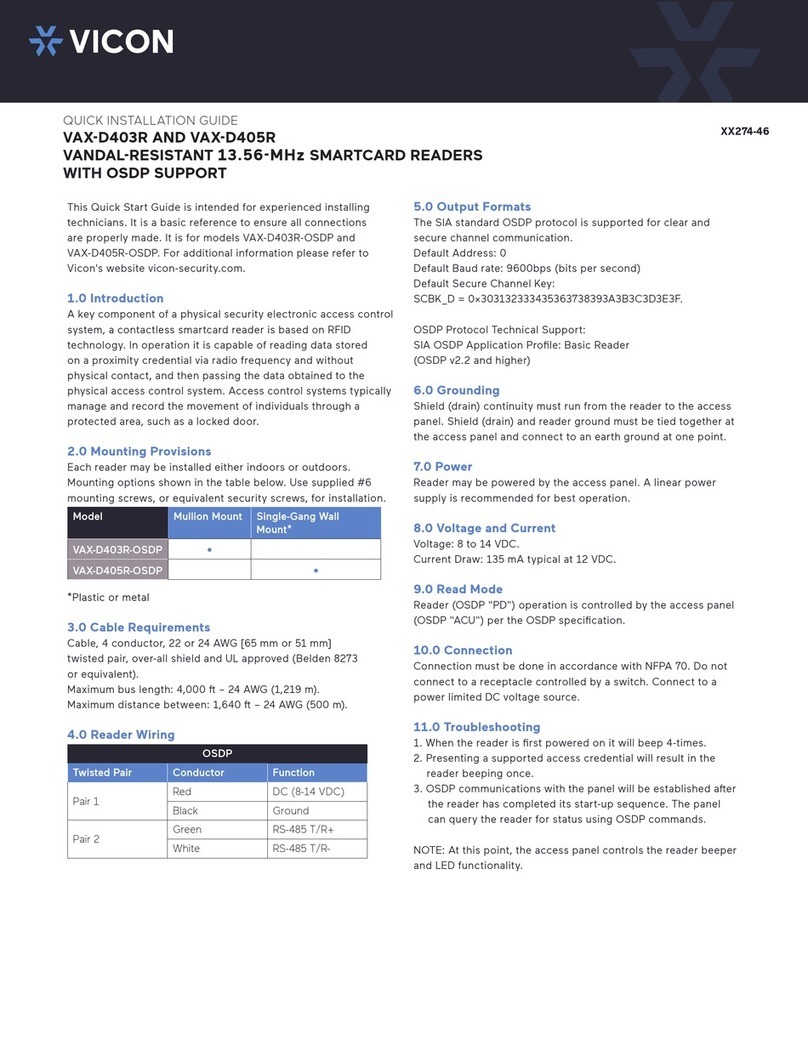
This Quick Start Guide is intended for experienced installing
technicians. It is a basic reference to ensure all connections
are properly made. It is for models VAX-PCR-35L-OSDP and
VAX-PCR-640L-OSDP. For additional information please refer to
Vicon's website vicon-security.com.
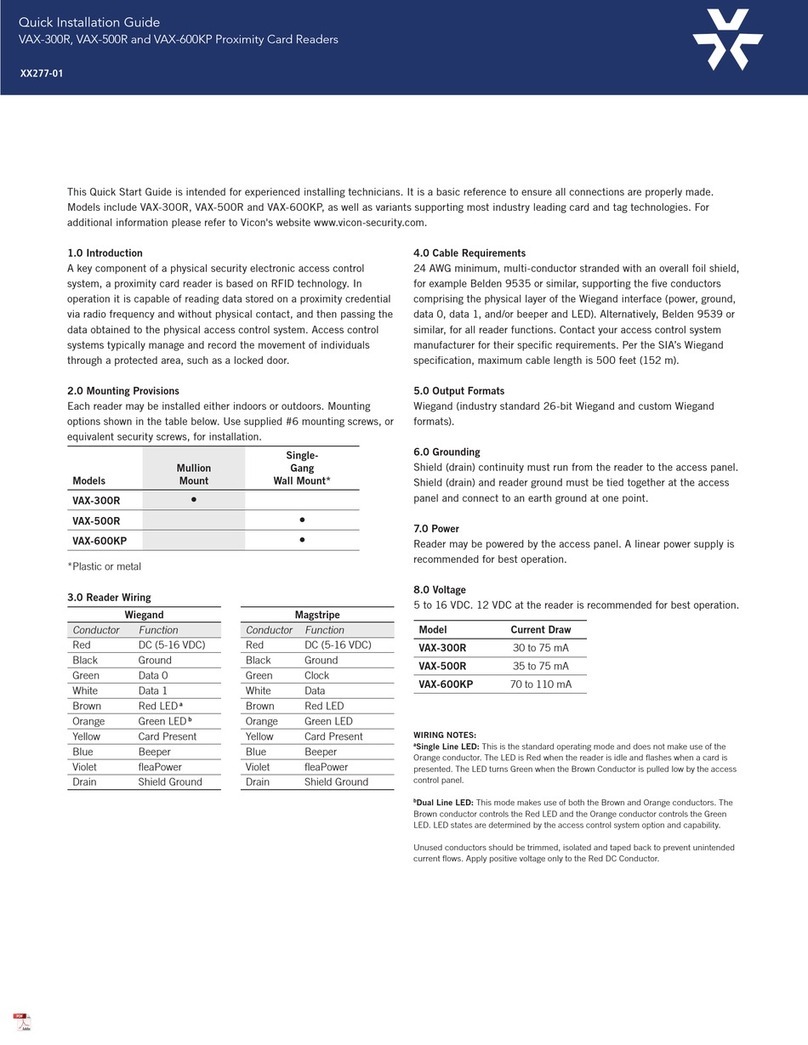
1.0 Introduction
A key component of a physical security electronic access control
system, a mobile-ready reader combining BLE and proximity
technologies is based on RFID technology. In operation it is capable
of reading data stored on a proximity credential via radio frequency—
or reading data from mobile credential stored in a smartphone’s
wallet app via BLE technology—and without physical contact, and
then passing the data obtained to the physical access control system.
Access control systems typically manage and record the movement of
individuals through a protected area, such as a locked door.
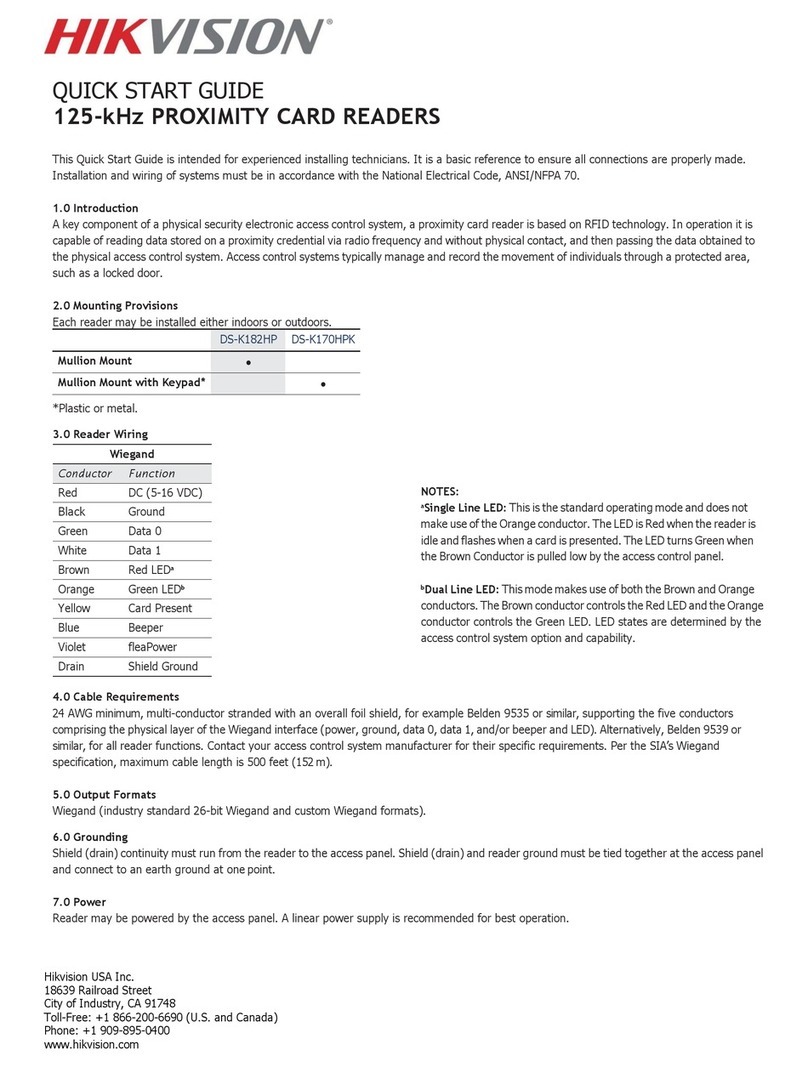
2.0 Mounting Provisions
Each reader may be installed either indoors or outdoors. Mounting
options shown in the table below. Use supplied #6 mounting screws,
or equivalent security screws, for installation.
Model Mullion Mount Single-Gang Wall Mount*
VAX-CR-35L-OSDP • •
VAX-CSR-6.4-OSDP •
*Plastic or metal.
3.0 Cable Requirements
Cable, 4 conductor, 22 or 24 AWG [65 mm or 51 mm] twisted pair,
over-all shield and UL approved (Belden 8273, or equivalent).


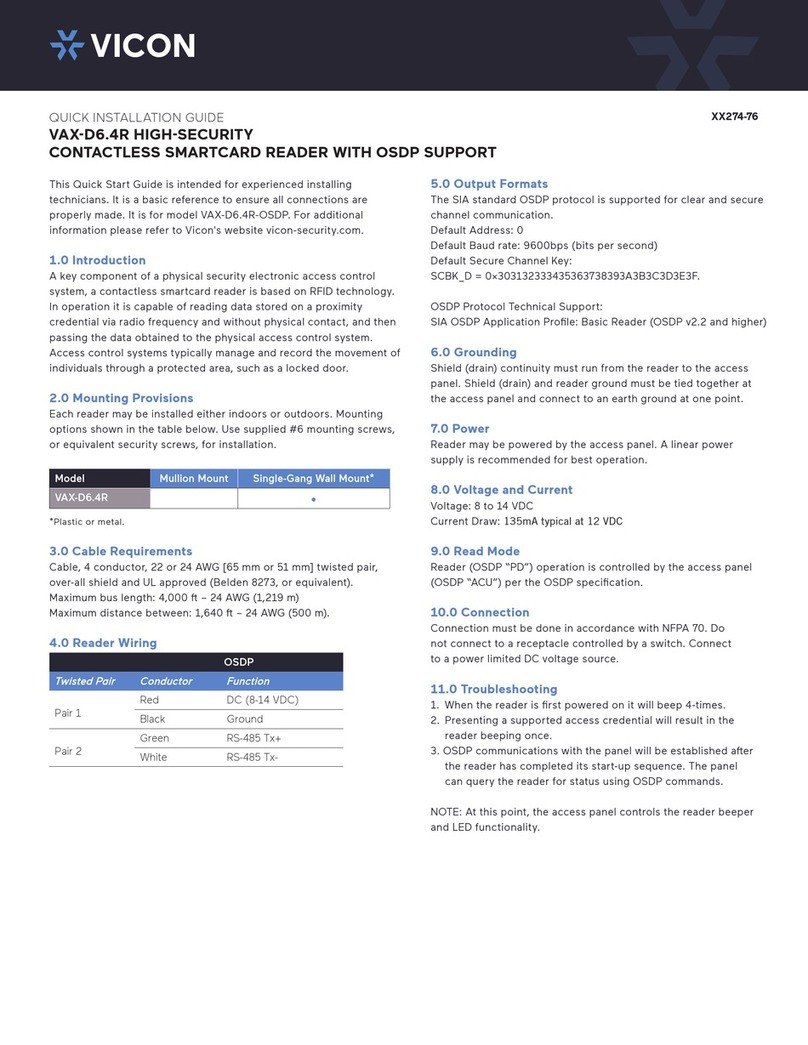
4.0 Reader Wiring
OSDP
Twisted Pair Conductor Function
Pair 1 Red DC (5-16 VDC)
Black Ground
Pair 2 Green RS-485 Tx+
White RS-485 Tx-
5.0 Output Formats
The SIA standard OSDP protocol is supported for clear and secure
channel communication.
Default Address: 0

Default Secure Channel Key:

OSDP Protocol Technical Support:

6.0 Grounding
Shield (drain) continuity must run from the reader to the access
panel. Shield (drain) and reader ground must be tied together at
the access panel and connect to an earth ground at one point.
7.0 Power
Reader may be powered by the access panel. A linear power
supply is recommended for best operation.
8.0 Voltage and Current
Voltage: 8 to 14 VDC

9.0 Connection
Connection must be done in accordance with NFPA 70. Do
not connect to a receptacle controlled by a switch. Connect
to a power limited DC voltage source.
10.0 Troubleshooting
 
and the LED will shine red.
2. Presenting a supported access credential will result in the

3. Mobile operation is optimized for smartphones supporting
BLE (Bluetooth LE) version 4.2 or newer. Further, for
the downloading of mobile access credentials, a stable,
high-quality internet connection is recommended.

the reader has completed its start-up sequence. The panel
can query the reader for status using OSDP commands.
NOTE: At this point, the access panel controls the reader beeper
and LED functionality.
XX274-86
QUICK INSTALLATION GUIDE



If the reader does not recognize the mobile credential or card or
refer to possibe OSDP communications
errors detected at the access control panel. Please see the table
below for possible causes and solutions.
Possible Cause Corrective Action


OSDP, secure channel
mismatch




address and speed.
Incorrect cabling Verify gauge, connections and
cabling length
Not enough power 12 VDC recommended
Incorrect
credential used
Verify if credential technology
is supported
Reader/access panel
not properly grounded
Earth ground needed—verify shield and
reader ground are tied at access panel
and connect to ground at one point
Supply generating
interfence
Linear power supply recommended,
verify switching power supply before use
Should any of the corrective actions mentioned above not improve
performance, disconnect the reader from the access panel and

card functionality, with an OSDP panel simulator if necessary. By
powering the readers separately, most variables that may lead

require a packet trace, which the installer or panel vendor should
be prepared to provide if there are problems. Should the problem
persist, please contact Vicon Technical Support.
Operating Temperature:
Operating Humidity:
IP Rating: IP67-rated for outdoor use

FCC Compliance Statement: This device complies with part 15 of the FCC
rules. Operation is subject to the following two conditions: (1) this device may
not cause harmful interference, and (2) this device must accept any interference
received, including interference that may cause undesired operation.

could void the user's authority to operate the equipment.
Product can be used without license conditions or restrictions in all European
Union countries, including Austria, Belgium, Bulgaria, Cyprus, Czech Republic,

Latvia, Lithuania, Luxembourg, Malta, Netherlands, Poland, Portugal, Romania,
Slovakia, Spain, Sweden, United Kingdom, as well as other non-EU countries,
including Iceland, Norway, and Switzerland.

with Innovation, Science and Economic Development Canada’s licence-exempt
RSS(s). Operation is subject to the following two conditions: (1) This device
may not cause interference. (2) This device must accept any interference,
including interference that may cause undesired operation of the device.

est conforme aux CNR d’Innovation, Sciences et Développement économique
Canada applicables aux appareils radio exempts de licence. L’exploitation est
autorisée aux deux conditions suivantes : (1) L’appareil ne doit pas produire de
brouillage; (2) L’appareil doit accepter tout brouillage radioélectrique subi,

Note: This equipment has been tested and found to comply with the limits
for a Class A digital device, pursuant to part 15 of the FCC Rules. These
limits are designed to provide reasonable protection against harmful
interference when the equipment is operated in a commercial environment.
This equipment generates, uses, and can radiate radio frequency energy and,
if not installed and used in accordance with the instruction manual, may cause
harmful interference to radio communications. Operation of this equipment
in a residential area is likely to cause harmful interference in which case the
user will be required to correct the interference at his own expense.

.
QUICK START GUIDE



Product specications are subject to change without notice. ©2022 Vicon Industries. All rights reserved. Vicon and its logo are registered U.S. trademarks and VAX and its
logo are trademarks of Vicon Industries Inc. All other trademarks are the property of their respective owners.

P/N: 8009-8274-86-00 l REV March 2022
Vicon Industries Inc.




800-34-VICON (800-348-4266)
