manuals.online logo
Brands
  1. Home
  2. •
  3. Brands
  4. •
  5. Welch Allyn
  6. •
  7. Medical Equipment
  8. •
  9. Welch Allyn 29350 User manual

Welch Allyn 29350 User manual

Other manuals for 29350

1

Other Welch Allyn Medical Equipment manuals

Welch Allyn Connex Spot Monitor Manual

Welch Allyn

Welch Allyn Connex Spot Monitor Manual

Welch Allyn PanOptic 118 Series Manual

Welch Allyn

Welch Allyn PanOptic 118 Series Manual

Welch Allyn Connex Integrated Wall System Manual

Welch Allyn

Welch Allyn Connex Integrated Wall System Manual

Welch Allyn 88000A User manual

Welch Allyn

Welch Allyn 88000A User manual

Welch Allyn CP 150 User manual

Welch Allyn

Welch Allyn CP 150 User manual

Welch Allyn Acuity Manual

Welch Allyn

Welch Allyn Acuity Manual

Welch Allyn Spot Vital Signs User manual

Welch Allyn

Welch Allyn Spot Vital Signs User manual

Welch Allyn MicroTymp 2 User manual

Welch Allyn

Welch Allyn MicroTymp 2 User manual

Welch Allyn 77535-C1 Manual

Welch Allyn

Welch Allyn 77535-C1 Manual

Welch Allyn Propaq CS 242 Manual

Welch Allyn

Welch Allyn Propaq CS 242 Manual

Welch Allyn CP 50 Manual

Welch Allyn

Welch Allyn CP 50 Manual

Welch Allyn Spot VS100 User manual

Welch Allyn

Welch Allyn Spot VS100 User manual

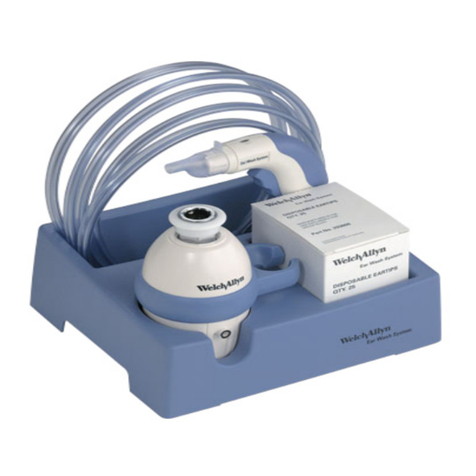
Welch Allyn 29350 Instruction Manual

Welch Allyn

Welch Allyn 29350 Instruction Manual

Welch Allyn Spot Vital Signs 4400 User manual

Welch Allyn

Welch Allyn Spot Vital Signs 4400 User manual

Welch Allyn KleenSpec 800 Series Manual

Welch Allyn

Welch Allyn KleenSpec 800 Series Manual

Welch Allyn Henry Schein 77790-HS User manual

Welch Allyn

Welch Allyn Henry Schein 77790-HS User manual

Welch Allyn Spot VS100 Installation guide

Welch Allyn

Welch Allyn Spot VS100 Installation guide

Welch Allyn 88000A Manual

Welch Allyn

Welch Allyn 88000A Manual

Welch Allyn 88002 User manual

Welch Allyn

Welch Allyn 88002 User manual

Welch Allyn Spot Vision Screener VS100 Manual

Welch Allyn

Welch Allyn Spot Vision Screener VS100 Manual

Welch Allyn Propaq LT User manual

Welch Allyn

Welch Allyn Propaq LT User manual

Welch Allyn Schiller SP-2 User manual

Welch Allyn

Welch Allyn Schiller SP-2 User manual

Welch Allyn Spot Vital Signs LXi Manual

Welch Allyn

Welch Allyn Spot Vital Signs LXi Manual

Welch Allyn AED 10 User manual

Welch Allyn

Welch Allyn AED 10 User manual

Popular Medical Equipment manuals by other brands

Itamar Medical WatchPAT Operation manual

Itamar Medical

Itamar Medical WatchPAT Operation manual

PROTEOR 1P650 KNEE Assembling and adjustment instructions

PROTEOR

PROTEOR 1P650 KNEE Assembling and adjustment instructions

Liberate Medical VentFree user manual

Liberate Medical

Liberate Medical VentFree user manual

Dicarre DA20 user guide

Dicarre

Dicarre DA20 user guide

Stryker Medical M Series Operation manual

Stryker Medical

Stryker Medical M Series Operation manual

Invacare ScanBed 750 user manual

Invacare

Invacare ScanBed 750 user manual

Getinge Arjohuntleigh Nimbus 3 Professional Instructions for use

Getinge

Getinge Arjohuntleigh Nimbus 3 Professional Instructions for use

Mettler Electronics Sonicator 730 Maintenance manual

Mettler Electronics

Mettler Electronics Sonicator 730 Maintenance manual

Pressalit Care R1100 Mounting instruction

Pressalit Care

Pressalit Care R1100 Mounting instruction

Denas MS DENAS-T operating manual

Denas MS

Denas MS DENAS-T operating manual

bort medical ActiveColor quick guide

bort medical

bort medical ActiveColor quick guide

AccuVein AV400 user manual

AccuVein

AccuVein AV400 user manual

agiliti NP Trio user manual

agiliti

agiliti NP Trio user manual

Rocket Medical Rocket Digital Oocyte Aspiration Pump Service manual

Rocket Medical

Rocket Medical Rocket Digital Oocyte Aspiration Pump Service manual

Monteris Medical Neuroblate Instructions for use

Monteris Medical

Monteris Medical Neuroblate Instructions for use

Otto Block 8E33 7 manual

Otto Block

Otto Block 8E33 7 manual

ADVANCED HOME CARE Helios Guide

ADVANCED HOME CARE

ADVANCED HOME CARE Helios Guide

NeuLog NUL-208 Guide

NeuLog

NeuLog NUL-208 Guide

manuals.online logo
manuals.online logoBrands
  • About & Mission
  • Contact us
  • Privacy Policy
  • Terms and Conditions

Copyright 2025 Manuals.Online. All Rights Reserved.

Printed in the U.S.A. 293063-1 Rev. D
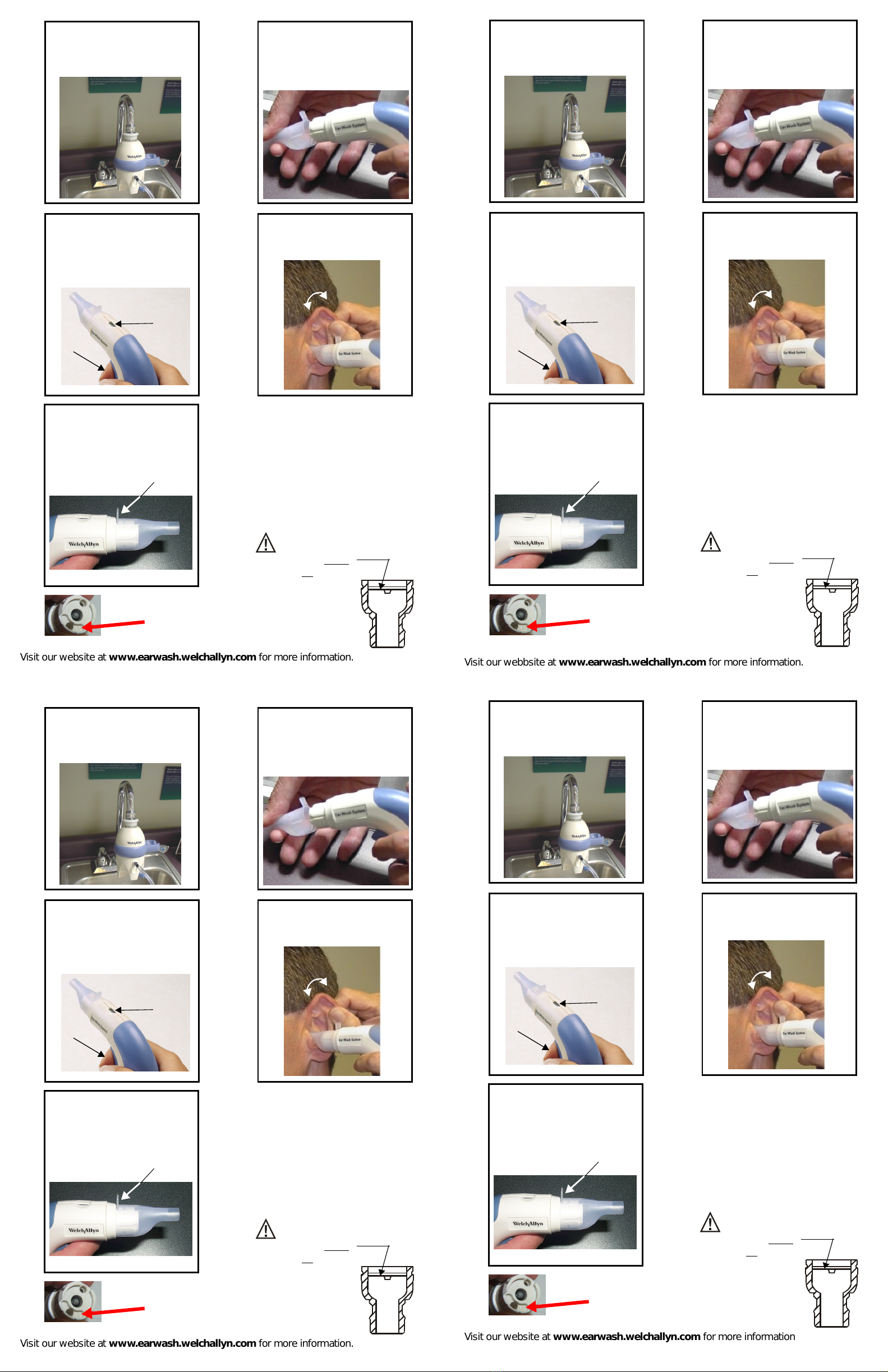
Quick Reference Guide
Remove the faucet
aerator.
Remove the paper tab
from the snap aerator and
add the Ear Wash System
snap aerator (adapter if
needed).
Push the black hose into
the black port and push
the blue hose into the
blue port until snug.
123
1Carefully grasp the pinna and
administer the ear wax softener. (not
required)
Initial Installation
Cleaning Procedure
2Attach the chamber to the sink by
pushing down on the whitering at
the top of the chamber and
snapping onto faucet.
Printed in the U.S.A. 293063-1 Rev. D
Quick Reference Guide
Remove the faucet
aerator.
Remove the paper tab
from the snap aerator and
add the Ear Wash System
snap aerator (adapter if
needed).
Push the black hose into
the black port and push
the blue hose into the
blue port until snug.
123
1Carefully grasp the pinna and
administer the ear wax softener. (not
required)
Initial Installation
Cleaning Procedure
2Attach the chamber to the sink by
pushing down on the whitering at
the top of the chamber and
snapping onto faucet.
Printed in the U.S.A. 293063-1 Rev. D
Quick Reference Guide
Remove the faucet
aerator.
Remove the paper tab
from the snap aerator and
add the Ear Wash System
snap aerator (adapter if
needed).
Push the black hose into
the black port and push
the blue hose into the
blue port until snug.
123
1Carefully grasp the pinna and
administer the ear wax softener. (not
required)
Initial Installation
Cleaning Procedure
2Attach the chamber to the sink by
pushing down on the whitering at
the top of the chamber and
snapping onto faucet.
Printed in the U.S.A. 293063-1 Rev. D
Quick Reference Guide
Remove the faucet
aerator.
Remove the paper tab
from the snap aerator and
add the Ear Wash System
snap aerator (adapter if
needed).
Push the black hose into
the black port and push
the blue hose into the
blue port until snug.
123
1Carefully grasp the pinna and
administer the ear wax softener. (not
required)
Initial Installation
Cleaning Procedure
2Attach the chamber to the sink by
pushing down on the whitering at
the top of the chamber and
snapping onto faucet.
Visit our website at www.earwash.welchallyn.com for more information.
Rotating the handle during the
procedure while holding the pinna
encourages wax removal.
(B)
Turn the hot and cold water on
full power. Adjust by turning the
cold down until the water is warm.
TIP: Hotter water is better.
Pull tabto remove the ear tip
from the handle and dispose of
properly.
Squeeze the Actuator (A) and
begin irrigating the ear when the
blue temperature sensor (B)
changes to white.
(A)
Attach the ear tip to the handle.
Verify the tab is on the top.
34
56
7
The water chamber is designed for
use ONLY with handle dated AFTER
02 (YEAR)
03 (MONTH)
Pull Tab
Always inspect the ear before
attempting any irrigation. If
perforation is suspected and
the tympanic membrane is
not visible, do not irrigate
with this device.
Refer to page 2 of Operating
Instruction Manual for further
information.
Plastic flow limiter must
be in place for allaerators.
See page 4 in manual.
For Safe Use

Visit our webbsite at www.earwash.welchallyn.com for more information.
Rotating the handle during the
procedure while holding the pinna
encourages wax removal.
(B)
Turn the hot and cold water on
full power. Adjust by turning the
cold down until the water is warm.
TIP: Hotter water is better.
Pull tabto remove the ear tip
from the handle and dispose of
properly.
Squeeze the Actuator (A) and
begin irrigating the ear when the
blue temperature sensor (B)
changes to white.
(A)
Attach the ear tip to the handle.
Verify the tab is on the top.
34
56
7
The water chamber is designed for
use ONLY with handle dated AFTER
02 (YEAR)
03 (MONTH)
Pull Tab
Always inspect the ear before
attempting any irrigation. If
perforation is suspected and
the tympanic membrane is
not visible, do not irrigate
with this device.
Refer to page 2 of Operating
Instruction Manual for further
information.
Plastic flow limiter must
be in place for allaerators.
See page 4 in manual.
For Safe Use
Visit our website at www.earwash.welchallyn.com for more information.
Rotating the handle during the
procedure while holding the pinna
encourages wax removal.
(B)
Turn the hot and cold water on
full power. Adjust by turning the
cold down until the water is warm.
TIP: Hotter water is better.
Pull tabto remove the ear tip
from the handle and dispose of
properly.
Squeeze the Actuator (A) and
begin irrigating the ear when the
blue temperature sensor (B)
changes to white.
(A)
Attach the ear tip to the handle.
Verify the tab is on the top.
34
56
7
The water chamber is designed for
use ONLY with handle dated AFTER
02 (YEAR)
03 (MONTH)
Pull Tab
Always inspect the ear before
attempting any irrigation. If
perforation is suspected and
the tympanic membrane is
not visible, do not irrigate
with this device.
Refer to page 2 of Operating
Instruction Manual for further
information.
Plastic flow limiter must
be in place for allaerators.
See page 4 in manual.
For Safe Use
Visit our website at www.earwash.welchallyn.com for more information
Rotating the handle during the
procedure while holding the pinna
encourages wax removal.
(B)
Turn the hot and cold water on
full power. Adjust by turning the
cold down until the water is warm.
TIP: Hotter water is better.
Pull tabto remove the ear tip
from the handle and dispose of

properly.
Squeeze the Actuator (A) and

begin irrigating the ear when the
blue temperature sensor (B)
changes to white.
(A)
Attach the ear tip to the handle.
Verify the tab is on the top.
34
56
7
The water chamber is designed for
use ONLY with handle dated AFTER
02 (YEAR)
03 (MONTH)
Pull Tab
Always inspect the ear before
attempting any irrigation. If
perforation is suspected and
the tympanic membrane is
not visible, do not irrigate
with this device.
Refer to page 2 of Operating
Instruction Manual for further
information.
Plastic flow limiter must
be in place for allaerators.
See page 4 in manual.
For Safe Use