manuals.online logo
Brands
  1. Home
  2. •
  3. Brands
  4. •
  5. Wilding Wallbeds
  6. •
  7. Indoor Furnishing
  8. •
  9. Wilding Wallbeds Sierra User manual

Wilding Wallbeds Sierra User manual

Other manuals for Sierra

1

Other Wilding Wallbeds Indoor Furnishing manuals

Wilding Wallbeds Brittany Installation and operation manual
Wilding Wallbeds

Wilding Wallbeds Brittany Installation and operation manual

Wilding Wallbeds C90 User manual

Wilding Wallbeds

Wilding Wallbeds C90 User manual
Wilding Wallbeds Monaco User manual

Wilding Wallbeds

Wilding Wallbeds Monaco User manual

Wilding Wallbeds Sierra User manual

Wilding Wallbeds

Wilding Wallbeds Sierra User manual

Wilding Wallbeds Brittany User manual

Wilding Wallbeds

Wilding Wallbeds Brittany User manual

Wilding Wallbeds PARK CITY User manual
Wilding Wallbeds

Wilding Wallbeds PARK CITY User manual

Wilding Wallbeds KING SIZE User manual
Wilding Wallbeds

Wilding Wallbeds KING SIZE User manual

Wilding Wallbeds King Size with Storage Headboard User manual
Wilding Wallbeds

Wilding Wallbeds King Size with Storage Headboard User manual

Wilding Wallbeds Studio Series User manual

Wilding Wallbeds

Wilding Wallbeds Studio Series User manual

Wilding Wallbeds PARK CITY User manual
Wilding Wallbeds

Wilding Wallbeds PARK CITY User manual

Wilding Wallbeds SANTA FE User manual

Wilding Wallbeds

Wilding Wallbeds SANTA FE User manual
Wilding Wallbeds Side Mount User manual

Wilding Wallbeds

Wilding Wallbeds Side Mount User manual

Wilding Wallbeds Studio Series User manual

Wilding Wallbeds

Wilding Wallbeds Studio Series User manual

Wilding Wallbeds Remington User manual
Wilding Wallbeds

Wilding Wallbeds Remington User manual

Wilding Wallbeds Brittany User manual

Wilding Wallbeds

Wilding Wallbeds Brittany User manual

Wilding Wallbeds Remington Queen User manual

Wilding Wallbeds

Wilding Wallbeds Remington Queen User manual

Popular Indoor Furnishing manuals by other brands

Regency LWMS3015 Assembly instructions

Regency

Regency LWMS3015 Assembly instructions

Furniture of America CM7751C Assembly instructions

Furniture of America

Furniture of America CM7751C Assembly instructions

Safavieh Furniture Estella CNS5731 manual

Safavieh Furniture

Safavieh Furniture Estella CNS5731 manual

PLACES OF STYLE Ovalfuss Assembly instruction

PLACES OF STYLE

PLACES OF STYLE Ovalfuss Assembly instruction

Trasman 1138 Bo1 Assembly manual

Trasman

Trasman 1138 Bo1 Assembly manual

Costway JV10856 manual

Costway

Costway JV10856 manual

moss DESIGN Caisson Credenza Assembly instructions

moss DESIGN

moss DESIGN Caisson Credenza Assembly instructions

Aquaglide FULL DECK 15.0 owner's manual

Aquaglide

Aquaglide FULL DECK 15.0 owner's manual

AREBOS AR-HE-SW30 user manual

AREBOS

AREBOS AR-HE-SW30 user manual

Till-Hilft Fulda 87005.330 Assembly instructions

Till-Hilft

Till-Hilft Fulda 87005.330 Assembly instructions

Twoey Outside 2010 quick start guide

Twoey Outside

Twoey Outside 2010 quick start guide

Hettich Easys 200 operating instructions

Hettich

Hettich Easys 200 operating instructions

The bedboss RELAX 404 Series owner's manual

The bedboss

The bedboss RELAX 404 Series owner's manual

Oeseder Möbelindustrie Bern 991 720 Assembly instructions

Oeseder Möbelindustrie

Oeseder Möbelindustrie Bern 991 720 Assembly instructions

Costway HW68469 user manual

Costway

Costway HW68469 user manual

Next ALIX A27743 Assembly instructions

Next

Next ALIX A27743 Assembly instructions

BROSA Hans Assembly guide

BROSA

BROSA Hans Assembly guide

Prodigg MINIKA PBA015T-FUR installation manual

Prodigg

Prodigg MINIKA PBA015T-FUR installation manual

manuals.online logo
manuals.online logoBrands
  • About & Mission
  • Contact us
  • Privacy Policy
  • Terms and Conditions

Copyright 2025 Manuals.Online. All Rights Reserved.

Side Mount
Revision 7/13 BK35
INSTRUCTION BOOKLET #35
WARNING! ALL MURPHY/WALLBED SYSTEMS CONTAIN STORED ENERGY. FAILURE
TO USE AND FOLLOW THESE INSTRUCTIONS DURING THE INSTALLATION PROCESS
COULD RESULT IN SEVERE PERSONAL INJURY TO USER OR DAMAGE TO PRODUCT.
PLEASE CONTACT CUSTOMER SERVICE AT 866-725-6401 FOR ANY QUESTIONS.
Model:
Sierra
With Storage Head Board
studsensor
Ratchet
1/2” Socket 7/16” Socket
3/8” Socket
Large regular screwdriver
Small regular screwdriver
Phillips screwdriver 1/2” open end wrench
Crescent wrench
Stud finder
STANLEY
Tape measure
Cordless screw driver
with Phillips bit
Step Ladder
1/4” Allen wrench
Tools Needed
1/4” wood drill bit
Bag 7
5/16’’ Plain
Hexagon Nut
5/16’’ Nylock
Hexagon Nut
3/4’’ Cam
Washer
5/16’’ Allen
Head Bolt
5/16’’ x 3/4’’
Hex Head Bolt
5/16’’ x 1 1/4’’
Flat Head Bolt
4 mm x 1/4’’
Flat Head Screw
7/8” Washer
10
6
2
2
10
2
4
4
Qty
Item
6
3/16” Washer
1/4” Star Washer
3/16’’ Nylock
Hexagon Nut
3/16’’x 1 Black
Flathead Screw
1/4’’
5/8’’ Pan
head Screw
3/16’’ x 1/2’’
Black Truss
head screw
2’’ Flathead
Wood Screw
Leg Stop
16
2
2
2
135
14
2
Item Qty
Bag 8
“L” Bracket
4 hole corner
bracket
Spacer Plate
1/4’’x 3/4’’
Hex Head Bolt
3/4’’ Flat head
Screw
2
6
4
3
2
Item Qty
1 left
1 right
()
Hardware Page
Sierra
Bed Models:
Bed Handles
1”
4
2
Other Hardware
Cam Fitting
Connecting Bolts
4
37
Item Qty
160
1 Square Drive Wood
Screw
1/4’’
1 Wood Screw
1/4’’
4
3 Wood Screw
1/2’’
3
Square Tip Bit
1
Step 1: Locate the left and right
Side Boards and then from the
square white box locate the two Lift
Mechanisms, hardware bags and
springs.
Left Side Board Right Side Board
Lift Mechanism
X 2
Page 1
Step 2: Install Springs in the Lift Mechanisms
Bed Size Number of Springs
Queen
Full/Double
Twin/Single
5
3
1
HELPFUL HINT: You may find it easier to fit the hook
under the Tension Arm if you pry up the Arm Bracket with
a wooden wedge or similar device.
IMPORTANT! Be sure that holes
of the Mounting Plate correspond
to the holes in the Tension Arm
and use the same number of
springs and the same configura-
tion on both Lift Mechanisms
(Center)
Hole #1
Hole #9
Hole #5
Tension Arm
Upturned edge of
mounting plate
(Center)
Hole #5
Arm Bracket
Illustration 1
(Right lift mechanism)
Repeat Step 2 for Left Lift Mechanism.
The number of springs in the Lift Mechanism required varies with the different weights of
mattresses. If you purchased your mattress with your bed from Wilding Wallbeds refer to the
chart to the right. This will also be a good reference point for mattresses not purchased with
your Wall Bed.
Install the first spring in hole #5 (center position) on both the Mounting Plate and the Tension Arm. Hook one end of the
spring under the upturned edge of the Mounting Plate. Lay the spring down and slide it under the matching hole in the
Tension Arm. See illustration 1.
Continue by working out from the
center, alternating top and bottom,
until you have installed the required
number of springs.
NOTE: After you have completed installing and checking operation of your Wall bed, you
may find it necessary to add or remove springs to achieve the correct lift effort of between
5 and 10 pounds.
Finished edge
Cut out for room
base molding
x 2
7/8” Washer
Hexagon Cam Washer
x 2
5/16” x 1 1/4” Flathead
Slot Machine Screw
x 8
5/16” Plain Hex Nut
x 8
Hardware needed for next 2 steps from Bag #7
Step 3: Install the Lift Mechanism by inserting a 5/16”
x 1 1/4” Flathead Machine Screw through holes “C”
and “D” from the outside (countersunk holes) of the
Right Side Board. Position the corresponding Right Lift
Mechanism holes. Loosely thread on a 5/16” Plain Hex
Nut on each. Insert the same type screw through holes
“A” and “B”. At hole “A” use one of the Hexagon
Cam Washers in the slot of the mounting plate so that
the LARGER PART OF THE CAM IS UP. At hole
“B” use a 5/16” x 7/8” washer. Thread a nut on each.
Tighten the four nuts evenly, making sure the hexagon
cam washer does not rotate while tightening.
See illustration 2.
Repeat step 3 with the Left Side Board and Lifting
Mechanism.
IMPORTANT! Over tightening the nuts will pull
the head of the screw too deeply into the Side Board.
Tighten only until the head of the screw is flush with
the Side Board.
Page 2
Hole A
Hole B
Hole C
Hole D
Finished Edge
Base Board
Notch
Right
Side Board
Illustration 2
All holes are countersunk
in this side of sideboard
Hardware needed for next step
Cam Fitting Connecting Bolt
x 7 x 22
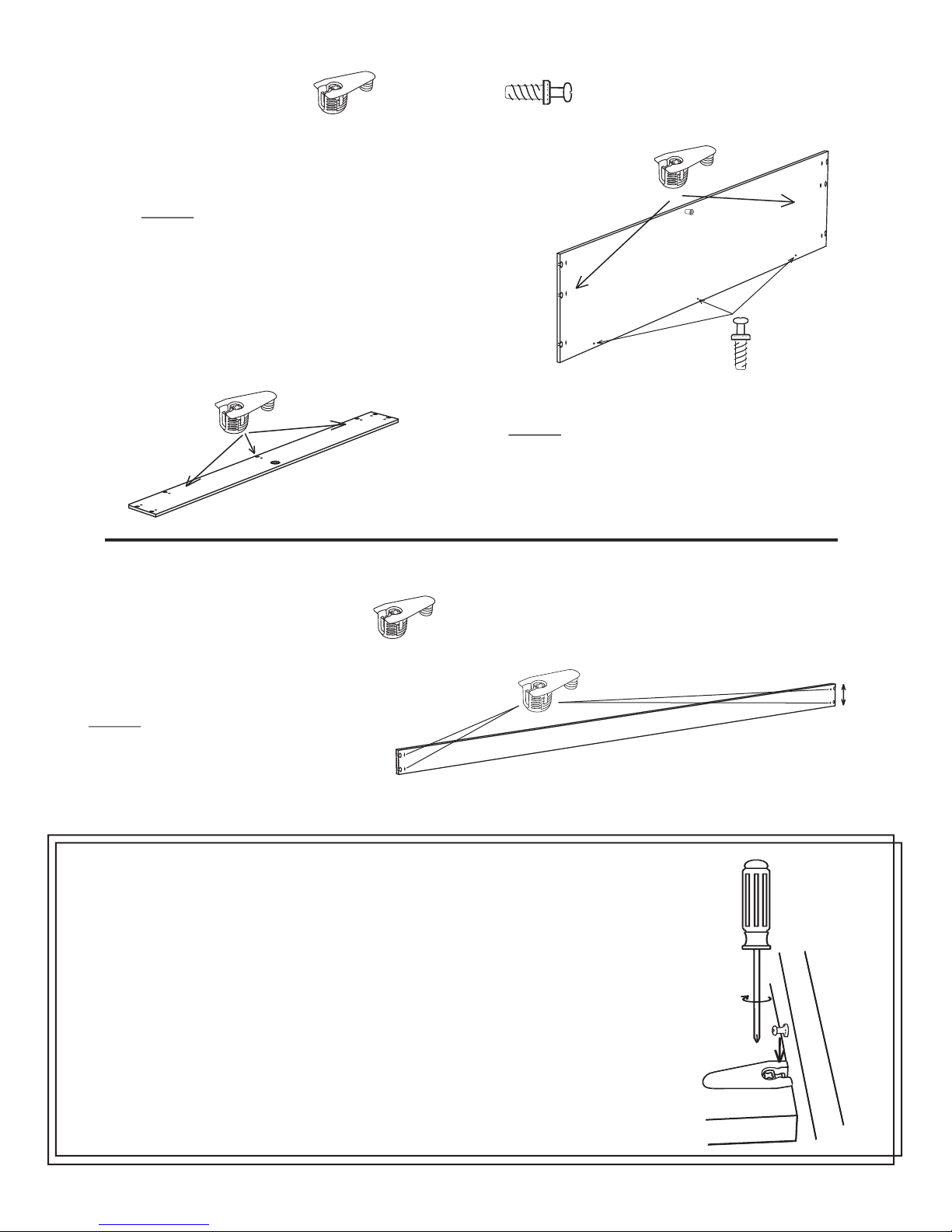
Step 4: Lay the right and left
Side Boards down as illustrated
and screw Connecting Bolts
into the holes provided and
place Cam Fittings into sockets
provided as shown.
Left Side
Board
Un-finished
Edges
Right Side
Board
Step 5: Locate the Bridge Board and
Insert 11 Connecting Bolts into the
holes provided. Screw the bolts in until
they tight against the bed part.
Page 3
Solid Wood Anchor
support
Hardware needed for next step
Connecting Bolt
x 11
Front Bridge Support
23/16”
x 4
Hardware needed for next step
Cam Fitting
Step 6: Locate the Bridge Support
and Insert 4 Cam Fittings.
Page 4
1/2 Turn to tight
Cam Fitting
Connecting Bolt
Step 7: Locate the Head Board and insert
6 Cam Fittings into the sockets provided.
Then screw 3 Connecting Bolts into holes
at the bottom edge of the Head Board.
Step 8: Locate the Head Board bottom
and insert 7 cam fittings into the sockets
provided.
Working with Cam Fittings
In the next steps you will work with Cam Fittings and Connecting Bolts in
attaching cabinet parts together. Take a minute and review this information
for ease of assembly.
- Slide the Cam Fitting over Connecting bolt.
- Hold parts snug together.
- Turn Cam Fitting 1/2 turn clockwise with a manual
screw driver. DO NOT USE POWER SCREW DRIVER.
Step 9: Locate the 2 Stretcher Boards
(equal in size) and insert four Cam Fittings
into the back of each Stretcher.
X 2
5”
x 8
Hardware needed for next step
Cam Fitting
x 13
Cam Fitting
Hardware needed for next step
Connecting Bolt
x 3
Page 5
Step 10: Assemble the Bed Cabinet face
down with the bottom of the bed nearer the
wall to which it will be installed by connect-
ing Bridge Board, Head Board, and the two
Stretchers as illustrated.
NOTE: The front stretcher is posi-
tioned so the cam fittings are on the
BOTTOM of the bed.
Step 11: Insert the Head Board bottom
into position as illustrated. Note the cam fit-
tings are facing down toward bed bottom.
Step 12: Install the hinged storage door
unit as illustrated.
Helpful hint: Lift the
center section to get the unit
positioned correctly
Front Stretcher
CAM FITTINGS ON BOTTOM
Head Board
Right Side
Board
Bed Bottom
Left Side Board
Bed Bottom
Down
Bed Bottom
Hinged storage doors
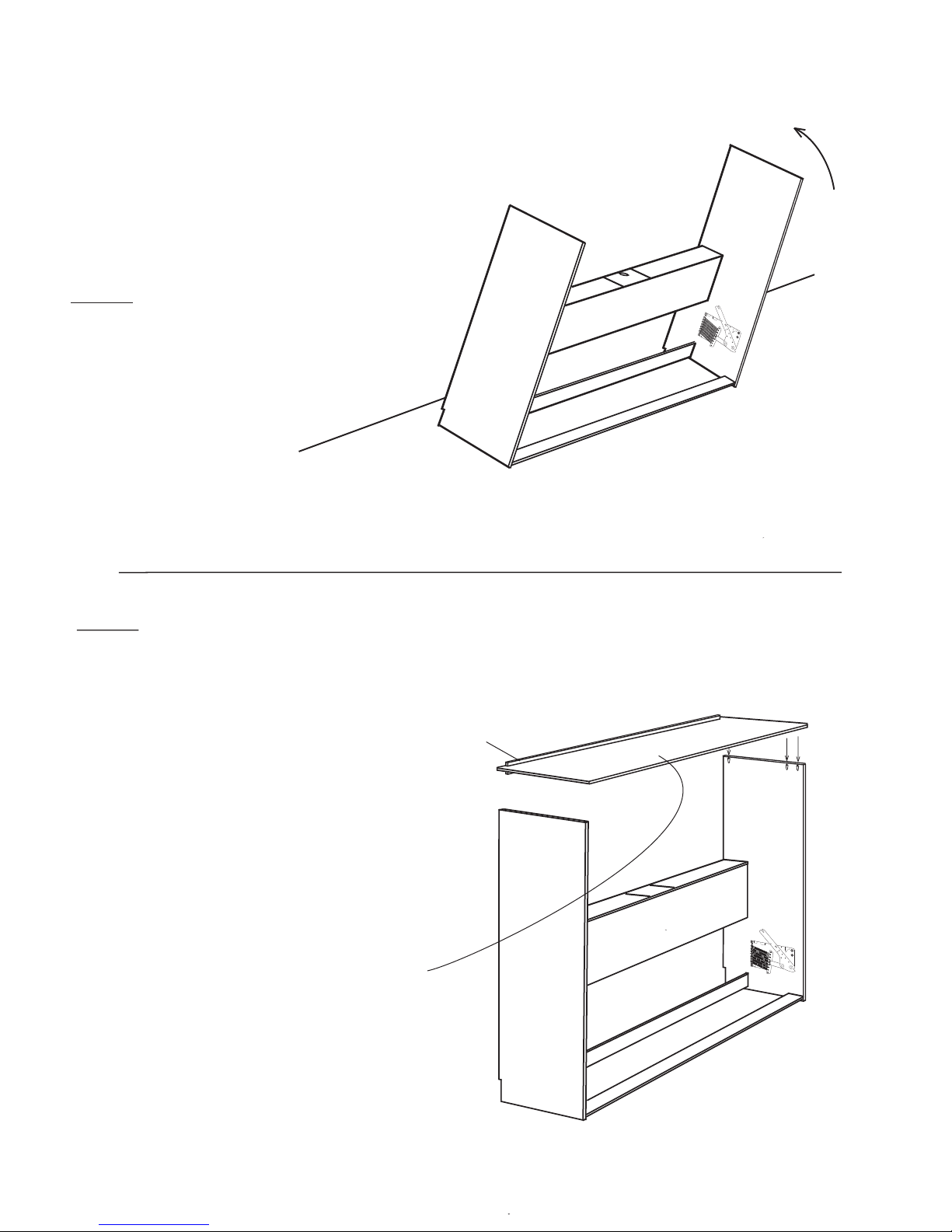
Step 13: Stand the bed cabinet up and
leave 2 feet between cabinet and the wall
so you have space to work behind the bed
INSTALLATION WALL
Page 6
Back
Anchor support
Step 14: Position the Bridge Board as
illustrated below. Place it on to the Side
Boards and tighten all Cam Fittings.
Finished edge