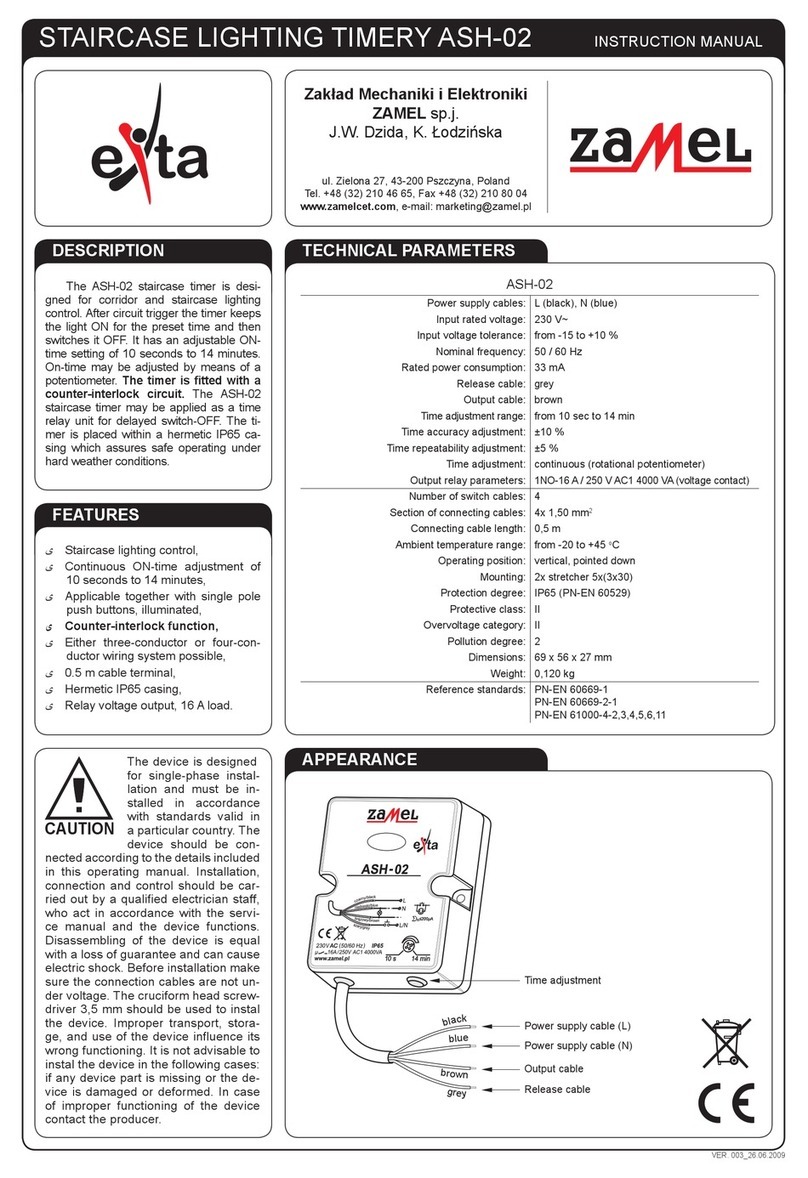
Zamel EXTA ASP-01 User manual

ASP - 01 STAIRCASE TIMER INSTRUCTION MANUAL
Zakład Mechaniki i Elektroniki
ZAMEL sp.j.
J.W. Dzida, K. Łodzińska
ul. Zielona 27, 43-200 Pszczyna, Poland
Tel. +48 (32) 210 46 65, Fax +48 (32) 210 80 04
www.zamelcet.com, e-mail: [email protected]
APPERANCE
FEATURES
DESCRIPTION
ی Staircase lighting control,
ی Continuous ON-time adjustment of 10
seconds to 16 minutes,
ی Soft start and switch-OFF (0.8 s),
ی Load ON indicator – red LED,
ی Device triggering by means of the L
wire,
ی Applicable together with single pole
push buttons, illuminated,
ی Two-conductor control system,
ی Easy applicable together with any
existing electrical system,
ی Supplied in series with load.
The ASP-01 staircase timer is designed
ASP - 01 for corridor and staircase lighting
control. After the circuit triggerring the timer
keeps the light ON for the preset time and
then switches it OFF. It has an adjustable
ON-time setting of 10 seconds to 16 min-
utes. ON-time may be adjusted by means
of a potentiometer. The ASP-01 staircase
timer may by applied as a time relay for
delayed switch-OFF. It is possible to mount
the device under a push button, in a deep
junction box of 60 mm diameter.
TECHNICAL DATA
ASP - 01
Power leads: L(black), brown - in series with the load
Rated voltage: 230 V~
Rated voltage tolerance: -15 ÷ +10 %
Rated frequency: 50 Hz
Rated current: 8 mA
Trigger conductor: IN (red)
Load supply: brown
ON-time adjustment range: 10 s ÷ 16 min
ON-time setting accuracy: ±3 %
ON-time setting repeatability: ±5 %
ON-time setting: continuous (potentiometer)
Load supply indicator: red LED
Permissible load: 30 ÷ 300 W
Fuse technical specication: 5 x 20 mm, ultra-fast, 2 A / 250 V
Control:
triac
Connection wires quantity: 3
Connection wire section: 1 mm2
Connection wire length: 10 cm
Operating temperature: -20 ÷ +45 oC
Operating position: optional
Casing fastening: for 60 mm junction box
Casing IP: IP40
Protection class: II
Overvoltage category: II
Pollution level: 2
Dimensions: 50 x 50 x 15 mm
Weight: 28 g
Standard conformity: PN-EN 60669-1; PN-EN 60669-2-1
PN-EN 61000-4-2,3,4,5,6,11
Load ON indicator
ON-time setting
Load supply lead
Power lead (L)
Fuse socket
Trigger lead (IN)
b
r
o
w
n
r
e
d
b
l
a
c
k
The device should be
connected to a single-
phase system accordin-
gly to current standards.
The device connection
swill be described in this
manual. Only qualied
electricians are allowed to connect,
assembly and adjust the timer. It is ne-
cessary to read this manual before the
timer mounting. Do not disassembly the
timer casing or you will lose any war-
ranty rights and expose yourself to the
electric shock hazard. Before mounting
operation make sure of disconnecting
the connection wires from the electric
network. Use a cross-head screwdriver
of 3.5 mm diameter to mount the devi-
ce. The timer should be carried, stored
and used in an appropriate way. Do not
mount the timer in case of any device
parts lack, damage or deformation. In
case of malfunction please notify the
manufacturer.
CAUTION

APPLICATION
CONNECTIONSASSEMBLY
OPERATION
The timer is ready to work just right
after its appropriate connecting. The
light will be ON for the preset ON-time
duration after the timer is triggered by
means of a single pole push button.
When the preset time is over, the light
will be OFF automatically until the timer
is triggered once again. The light is softly
ON and OFF (soft start, 0.8 s). The sta-
ircase timer may be connected either to
three-conductor or four-conductor wiring.
Check carefully if the trigger and load
circuits have been connected correctly.
The timer may be damaged if connected
inappropriately. In case of the counter-in-
terlock lack the light is continuously ON
when the trigger push button is blocked.
1. Disconnect the electric network by
means of an appropriate cut-off, cur-
rent-limiting circuit-breaker or sepa-
rator.
2. Check if there is no any voltage be-
tween power leads by means of an
appropriate gauge.
3. Place the ASP-01 device in a box
and connect wires accordingly to
electrical diagram.
4. Connect power supply circuit.
5. Adjust the light ON-time required by
means of the potentiometer.
CASING DIMENSIONS
UNIT DIAGRAM
TIME DIAGRAMS PRODUCT FAMILY
LOAD
The ASP-01 is a member of the ASx
staircase timer family.
μC
t
t t
b
r
o
w
n
r
e
d
b
l
a
c
k
b
r
ą
z
o
w
y
c
z
e
r
w
o
n
y
c
z
a
r
n
y
Device version:
01 – three - or four-conduc-
tor wiring
02 – built-in counter-intelock-
ing circuit
10 – dimmer function
Casing type:
M – single-module
N – surface-mounted
H – hermetic
P – for junction box mounting
Device symbol
24 V AC/DC version
for ASM-02 availalbe
ASx - xx (/24V)
Other Zamel Timer manuals
Zamel
Zamel exta ZCM-32 User manual
Zamel
Zamel EXTA ASH-01 User manual
Zamel
Zamel EXTA ASM-02 User manual
Zamel
Zamel EXTA ASM-03 User manual
Zamel
Zamel EXTA ASH-01 User manual
Zamel
Zamel EXTA ASH-02 User manual
Zamel
Zamel exta ZCM-12 User manual
Zamel
Zamel EXTA ASN-02 User manual
Zamel
Zamel ASM-04 User manual
Zamel
Zamel exta ASP - 10 User manual