manuals.online logo
Brands
  1. Home
  2. •
  3. Brands
  4. •
  5. Billion
  6. •
  7. Network Router
  8. •
  9. Billion BiPAC 7404V series User manual

Billion BiPAC 7404V series User manual

Other manuals for BiPAC 7404V series

5

Other Billion Network Router manuals

Billion myGuard 7500GL User manual

Billion

Billion myGuard 7500GL User manual

Billion BiPAC 7402R2 User manual

Billion

Billion BiPAC 7402R2 User manual

Billion BiPAC 711C2 User manual

Billion

Billion BiPAC 711C2 User manual

Billion BIPAC 7100G User manual

Billion

Billion BIPAC 7100G User manual

Billion BiPAC 7800 User manual

Billion

Billion BiPAC 7800 User manual

Billion BiPAC 8206AZ User manual

Billion

Billion BiPAC 8206AZ User manual

Billion BiPAC 7300N User manual

Billion

Billion BiPAC 7300N User manual

Billion BiPAC 8900AX-1600 R2 User manual

Billion

Billion BiPAC 8900AX-1600 R2 User manual

Billion BiPAC 5200S RC Series User manual

Billion

Billion BiPAC 5200S RC Series User manual

Billion BIPAC 6600 User manual

Billion

Billion BIPAC 6600 User manual

Billion BiPAC 7404VNOX User manual

Billion

Billion BiPAC 7404VNOX User manual

Billion BiPAC 5200W User manual

Billion

Billion BiPAC 5200W User manual

Billion BiPAC 7402G User manual

Billion

Billion BiPAC 7402G User manual

Billion BiPAC 7404VGOX User manual

Billion

Billion BiPAC 7404VGOX User manual

Billion BiPAC 7404VNOX User manual

Billion

Billion BiPAC 7404VNOX User manual

Billion BiPAC 6300NXL User manual

Billion

Billion BiPAC 6300NXL User manual

Billion BiPAC 7100 User manual

Billion

Billion BiPAC 7100 User manual

Billion BiPAC 5200 User manual

Billion

Billion BiPAC 5200 User manual

Billion BiPAC 7300N User manual

Billion

Billion BiPAC 7300N User manual

Billion BiPAC 5200W RC User manual

Billion

Billion BiPAC 5200W RC User manual

Billion BiPAC 7800(N) User manual

Billion

Billion BiPAC 7800(N) User manual

Billion BiPAC 4500NZ(L) User manual

Billion

Billion BiPAC 4500NZ(L) User manual

Billion BiPAC 7560G User manual

Billion

Billion BiPAC 7560G User manual

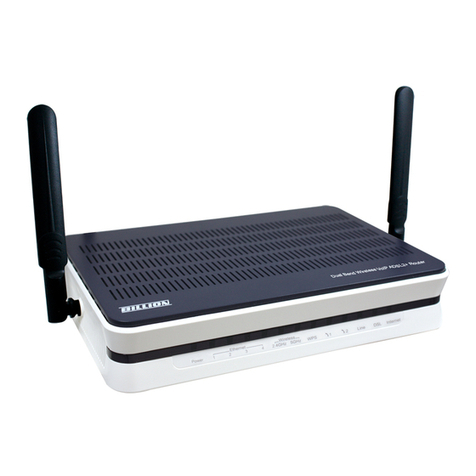
Billion BiPAC 7404V series User manual

Billion

Billion BiPAC 7404V series User manual

Popular Network Router manuals by other brands

TRENDnet TEW-435BRM - 54MBPS 802.11G Adsl Firewall M Quick installation guide

TRENDnet

TRENDnet TEW-435BRM - 54MBPS 802.11G Adsl Firewall M Quick installation guide

Siemens SIMOTICS CONNECT 400 manual

Siemens

Siemens SIMOTICS CONNECT 400 manual

Alfa Network ADS-R02 Specifications

Alfa Network

Alfa Network ADS-R02 Specifications

Barracuda Networks Link Balancer quick start guide

Barracuda Networks

Barracuda Networks Link Balancer quick start guide

ZyXEL Communications ES-2024PWR Support notes

ZyXEL Communications

ZyXEL Communications ES-2024PWR Support notes

HPE FlexNetwork 5510 HI Series Openflow configuration guide

HPE

HPE FlexNetwork 5510 HI Series Openflow configuration guide

Allied Telesis AT-AR236E quick start guide

Allied Telesis

Allied Telesis AT-AR236E quick start guide

ADTRAN NetVanta 3458-PoE quick start

ADTRAN

ADTRAN NetVanta 3458-PoE quick start

C&H Technologies EM405-8 manual

C&H Technologies

C&H Technologies EM405-8 manual

Huawei WiFi Mesh 3 Product description

Huawei

Huawei WiFi Mesh 3 Product description

Addonics Technologies ISC8P2G-S Quick install guide

Addonics Technologies

Addonics Technologies ISC8P2G-S Quick install guide

Atel W02 Arch+ Faqs

Atel

Atel W02 Arch+ Faqs

Allnet ALL0333AU user guide

Allnet

Allnet ALL0333AU user guide

Sercomm Genesis OC3505D Quick installation guide

Sercomm

Sercomm Genesis OC3505D Quick installation guide

TP-Link TD-8817 QIG

TP-Link

TP-Link TD-8817 QIG

Motorola MR1900 user guide

Motorola

Motorola MR1900 user guide

Cisco SOHO Series Regulatory compliance and safety information

Cisco

Cisco SOHO Series Regulatory compliance and safety information

NETGEAR WGE101 Reference manual

NETGEAR

NETGEAR WGE101 Reference manual

manuals.online logo
manuals.online logoBrands
  • About & Mission
  • Contact us
  • Privacy Policy
  • Terms and Conditions

Copyright 2025 Manuals.Online. All Rights Reserved.

Version Release 5.52
Last Revision Date: Aug 2007 tlg
BiPAC 7404V Series
VoIP/(802.11g) ADSL2 (VPN)
Firewall Router
User’s Manual
Table of Contents i
T
Ta
ab
bl
le
e
o
of
f
C
Co
on
nt
te
en
nt
ts
s
CHAPTER 1: INTRODUCTION ............................................................................................................. 4
INTRODUCTION TO YOUR ROUTER................................................................................................. 4
FEATURES .............................................................................................................................................. 4
CHAPTER 2: INSTALLING THE ROUTER ......................................................................................... 7
IMPORTANT NOTE FOR USING THIS ROUTER ............................................................................... 7
PACKAGE CONTENTS.......................................................................................................................... 7
THE FRONT LEDS ................................................................................................................................. 8
THE REAR PORTS.................................................................................................................................. 9
CABLING .............................................................................................................................................. 10
CHAPTER 3: BASIC INSTALLATION .................................................................................................11
CONNECTING YOUR ROUTER ......................................................................................................... 12
FACTORY DEFAULT SETTINGS........................................................................................................ 17
Web Interface (Username and Password) .......................................................................................... 17
Device LAN IP settings....................................................................................................................... 17
ISP setting in WAN site ....................................................................................................................... 17
D CP server ...................................................................................................................................... 17
LAN and WAN Port Addresses............................................................................................................ 17
INFORMATION FROM YOUR ISP ..................................................................................................... 18
CONFIGURING WITH YOUR WEB BROWSER............................................................................... 19
CHAPTER 4: CONFIGURATION......................................................................................................... 20
STATUS.................................................................................................................................................. 21
ARP Table ........................................................................................................................................... 21
Wireless Association Table
(Wireless Router only)
................................................................................ 21
Routing Table...................................................................................................................................... 21
D CP Table........................................................................................................................................ 22
PPTP Status (Only the 7404VGO has VPN features)......................................................................... 23
IPSec Status (Only the 7404VGO has VPN features)......................................................................... 23
L2TP Status (Only the 7404VGO has VPN features) ......................................................................... 24
Email Status........................................................................................................................................ 24
VoIP Status.......................................................................................................................................... 24
VoIP Call Log ..................................................................................................................................... 25
Event Log............................................................................................................................................ 25
Error Log............................................................................................................................................ 26
NAT Sessions ...................................................................................................................................... 26
Diagnostic........................................................................................................................................... 26
UPnP Portmap ................................................................................................................................... 27
QUICK START ...................................................................................................................................... 28
CONFIGURATION................................................................................................................................ 0
LAN - Local Area Network ................................................................................................................. 30
Bridge Interface .............................................................................................................................. 0
Ethernet........................................................................................................................................... 1
IP Alias............................................................................................................................................ 1
Ethernet Client Filter ...................................................................................................................... 2
Wireless
(Wireless Router only)
...........................................................................................................
Wireless Security (Wireless Router only) ...................................................................................... 5
Wireless Client / MAC Address Filter
(Wireless Router only)
............................................................ 7
Table of Contents iii
Port Setting ..................................................................................................................................... 8
DHCP Server .................................................................................................................................. 9
WAN - Wide Area Network.................................................................................................................. 40
ISP .................................................................................................................................................. 40
DNS ................................................................................................................................................ 50
ADSL.............................................................................................................................................. 51
System ................................................................................................................................................. 53
Time Zone....................................................................................................................................... 5
Remote Access................................................................................................................................ 54
Firmware Upgrade.......................................................................................................................... 55
Backup / Restore............................................................................................................................. 56
Restart Router................................................................................................................................. 57
User Management........................................................................................................................... 58
Firewall and Access Control .............................................................................................................. 59
General Settings.............................................................................................................................. 60
Packet Filter.................................................................................................................................... 61
Intrusion Detection ......................................................................................................................... 68
URL Filter....................................................................................................................................... 70
IM / P2P Blocking .......................................................................................................................... 72
Firewall Log ................................................................................................................................... 7
VPN - Virtual Private Networks (BiPAC 7404VGO Only) ................................................................. 74
PPTP (Point-to-Point Tunneling Protocol) ..................................................................................... 74
IPSec (IP Security Protocol)........................................................................................................... 82
L2TP (Layer Two Tunneling Protocol) .......................................................................................... 92
VoIP - Voice over Internet Protocol.................................................................................................. 104
Wizard........................................................................................................................................... 105
General Settings............................................................................................................................ 108
ONHOOK Setting .........................................................................................................................111
Phone Port .....................................................................................................................................112
PSTN Dial Plan (Router with LINE port only) .............................................................................114
VoIP Dial Plan ...............................................................................................................................117
Call Features................................................................................................................................. 122
Ring & Tone ................................................................................................................................. 12
Special Dial Codes ....................................................................................................................... 124
QoS - Quality of Service ................................................................................................................... 125
Prioritization ................................................................................................................................. 125
Outbound IP Throttling (LAN to WAN)....................................................................................... 127
Inbound IP Throttling (WAN to LAN) ......................................................................................... 128
Virtual Server (also known as Port Forwarding)............................................................................. 132
Add Virtual Server........................................................................................................................ 1
Edit DMZ Host ............................................................................................................................. 1 4
Edit DMZ Host ............................................................................................................................. 1 5
Edit One-to-One NAT (Network Address Translation) ................................................................ 1 6
Time Schedule................................................................................................................................... 139
Configuration of Time Schedule .................................................................................................. 140
Advanced .......................................................................................................................................... 141
Static Route................................................................................................................................... 141
Dynamic DNS .............................................................................................................................. 142
Check Email ................................................................................................................................. 14
Device Management ..................................................................................................................... 144
IGMP ............................................................................................................................................ 147
VLAN Bridge ............................................................................................................................... 147
SAVE CONFIGURATION TO FLASH............................................................................................... 151

LOGOUT.............................................................................................................................................. 151
Table of Contents iii
CHAPTER 5: TROUBLESHOOTING ................................................................................................ 152
PROBLEMS STARTING UP THE ROUTER ..................................................................................... 152
PROBLEMS WITH THE WAN INTERFACE .................................................................................... 152
PROBLEMS WITH THE LAN INTERFACE ..................................................................................... 152
APPENDIX A: PRODUCT SUPPORT AND CONTACT INFORMATION.................................... 153
Copyright 2007 Billion Electric Co. Ltd.
VoIP/(802.11g) ADSL2 (VPN) Firewall Router
Chapter 1: Introduction
4
Chapter 1: Introduction
Introduction to your Router
Welcome to the BiPAC 7404 VoIP/ 802.11g) ADSL2+ VPN) Firewall Router. The router is an “all-in-one”
VoIP ADSL router, combining an ADSL modem, ADSL router, Ethernet network switch and 2 ports for
Voice over IP facilities, providing everything you need to get the machines on your network connected to
the Internet over your ADSL broadband connection. With features such as an ADSL Quick-Start wizard
and DHCP Server, you can be online in no time at all and with a minimum of fuss and configuration,
catering for first-time users to the guru requiring advanced features and control over their Internet
connection and network.
Features
Voice over IP Compliance with SIP Standard
The router supports cost-effective, toll-quality voice calls over the Internet. It complies with the SIP
Standard protocol to ensure interoperability with SIP devices and major VoIP Gateways. The VoIP
ADSL router supports call waiting, silence suppression, voice activity detection VAD), comfort noise
generation CNG), line echo cancellation, caller ID Bell 202, V3) and so on.
Fixed-Line Support (Router with LINE port only)
The router integrates an RJ-11 FXO port for inbound and outbound calls transmitted through PSTN.

Users can receive phone calls from PSTN while enjoying VoIP call services at the same time. In
addition, the device automatically fallbacks to lifeline POTS to enable making normal phone calls
when there is power outage, or when the Internet connection is down.
Express Internet Access
The router complies with ADSL worldwide standards. It supports downstream rate up to 12/24 Mbps
with ADSL2/2+, 8Mbps with ADSL. Users can enjoy not only high-speed ADSL services but also
broadband multimedia applications such as interactive gaming, video streaming and real-time audio
much easier and faster than ever. It is compliant with Multi-Mode standard ANSI T1.413, Issue 2;
G.dmt ITU G.992.1); G.lite ITU G.992.2); G.hs ITU G994.1); G.dmt.bis ITU G.992.3);
G.dmt.bis.plus ITU G.992.5)).
Virtual Private Network (VPN) (BiPAC 7404VGO Only)
The router allows a user to set up a VPN tunnel with a remote site directly to secure the data
transmission among the connection. Users can use embedded PPTP and L2TP client/server, IKE
and IPSec which are supported by this router to make a VPN connection. Or users can run the PPTP
client in a PC with the router providing IPSec and PPTP pass through functions to establish a VPN
connection if the user prefers to run the PPTP client in his local computer.
802.11g Wireless AP with WPA Support (Wireless Router only)
With integrated 802.11g Wireless Access Point in the router, the device offers quick and easy access
among wired network, wireless network and broadband connection ADSL) with single device
simplicity, and as a result, mobility to the users. In addition to 54 Mbps 802.11g data rate, it also
interoperates with existing 802.11b equipment. The Wireless Protected Access WPA1 and WPA2)
and Wireless Encryption Protocol WEP) supported features enhance the security level of data
protection and access control via Wireless LAN.
Fast Ethernet Switch
A 4-port 10/100Mbps fast Ethernet switch is built in with automatic switching between MDI and
MDI-X for 10Base-T and 100Base-TX ports. An Ethernet straight or crossover cable can be used
directly for auto detection.
VoIP/(802.11g) ADSL2 (VPN) Firewall Router
Chapter 1: Introduction
5
Multi-Protocol to Establish a Connection
The router supports PPPoA RFC 2364 - PPP over ATM Adaptation Layer 5), RFC 1483
encapsulation over ATM bridged or routed), PPP over Ethernet RFC 2516), and IPoA RFC1577)
to establish a connection with the ISP. The product also supports VC-based and LLC-based
multiplexing.
Quick Installation Wizard
A WEB GUI page is provided to set up the device quickly. With this wizard, end users can easily
enter the information which they get from their ISP, then surf the Internet immediately.
Universal Plug and Play (UPnP) and UPnP NAT Traversal
This protocol is used to enable simple and robust connectivity among stand-alone devices and PCs
from many different vendors. It makes networking simple and affordable for users. UPnP
architecture leverages TCP/IP and the Web to enable seamless proximity networking in addition to
control and data transfer among networked devices. With this feature enabled, users can now
connect to Net meeting or MSN Messenger seamlessly.
Network Address Translation (NAT)
Allows multi-users to access outside resources such as the Internet simultaneously with one IP
address/one Internet access account. Many application layer gateways ALG) are supported,
includings web browser, ICQ, FTP, Telnet, E-mail, News, Net2phone, Ping, NetMeeting, IP phone
and others.
SOHO Firewall Security with DoS and SPI
Along with the built-in NAT natural firewall feature, the router also provides advanced hacker
pattern-filtering protection. It can automatically detect and block Denial of Service DoS) attacks. The
router is built with Stateful Packet Inspection SPI) to determine if a data packet is allowed through
the firewall to the private LAN.
Domain Name System (DNS) Relay
Provides an easy way to map the domain name a friendly name for users such as www.yahoo.com)
and IP address. When a local machine sets its DNS server with this router’s IP address, every DNS
conversion request packet from the PC to this router will be forwarded to the real DNS in the outside
network.
Dynamic Domain Name System (DDNS)
The Dynamic DNS service allows you to alias a dynamic IP address to a static hostname. This
dynamic IP address is the WAN IP address. For example, to use the service, you must first apply for
an account from a DDNS service like http://www.dyndns.org/. More than 5 DDNS servers are
supported.
Quality of Service (QoS)
QoS gives you full control over which types of outgoing data traffic should be given priority by the
router, ensuring important data like gaming packets, customer information, or management
information move through the router quickly, even under heavy load. The QoS features are
configurable by source IP address, destination IP address, protocol, and port. You can throttle the
speed at which different types of outgoing data pass through the router, to ensure P2P users don’t
saturate upload bandwidth, or office browsing doesn’t bring client web serving to a halt. In addition,
you can simply change the priority of different types of upload data and let the router sort out the
actual speeds.
VoIP/(802.11g) ADSL2 (VPN) Firewall Router
Chapter 1: Introduction
6
Virtual Server (“port forwarding”)
Users can specify some services to be visible from outside users. The router can detect incoming
service requests and forward either a single port or a range of ports to the specific local computer to
handle it. For example, a user can assign a PC in the LAN acting as a WEB server inside and expose
it to the outside network. Outside users can browse inside web servers directly while it is protected
by NAT. A DMZ host setting is also provided to a local computer exposed to the outside network,
Internet.
Rich Packet Filtering
Not only filters the packet based on IP address, but also based on Port numbers. It will filter packets
from and to the Internet, and also provides a higher level of security control.
Dynamic Host Configuration Protocol (DHCP) Client and Server
In the WAN site, the DHCP client can get an IP address from the Internet Service Provider ISP)
automatically. In the LAN site, the DHCP server can allocate a range of client IP addresses and
distribute them, including IP address, subnet mask as well as DNS IP address to local computers. It
provides an easy way to manage the local IP network.
Static and RIP1/2 Routing
Provides has routing capability and supports easy static routing table or RIP1/2 routing protocol.
Simple Network Management Protocol (SNMP)
Provides an easy way to remotely manage the router via SNMP.
Web based GUI
A web based GUI is provided for configuration and management. It is user-friendly and comes with
on-line help. It also supports remote management capability for remote users to configure and
manage this product.
Firmware Upgradeable
Device can be upgraded to the latest firmware through the WEB based GUI.
Rich Management Interfaces
The device supports flexible management interfaces with local console port, LAN port, and WAN
port. Users can use terminal applications through the console port to configure and manage the
device, or Telnet, WEB GUI, and SNMP through LAN or WAN ports to configure and manage the
device.
VoIP/(802.11g) ADSL2 (VPN) Firewall Router
Chapter 2: Installing the router
7
Chapter 2: Installing the Router
Important note for using this router
Package Contents
VoIP/ 802.11g) ADSL2+ VPN) Firewall Router
CD-ROM containing the online manual
RJ-11 ADSL/telephone Cable
Ethernet CAT-5 LAN) Cable
Console tool kit
AC-DC power adapter 12VDC, 1.2A)
A detachable antenna
Quick Start Guide



Do not use this router in high humidity or high temperatures.



Do not use the same power source for this router as other
equipment.



Do not open or repair the case yourself. If this router overheats,
turn off the power immediately and have it repaired at a qualified
service center.



Avoid using this product and all accessories outdoors.
Warning



Place this router on a stable surface.



Only use the power
adapter that comes with the package. Using
a different voltage rating power adaptor may damage this router.
Attention
VoIP/(802.11g) ADSL2 (VPN) Firewall Router
Chapter 2: Installing the router
8
The Front LEDs
LED Meaning
1 PWR Lit when power is ON.
2 SYS Lit when the system is ready.
3 – 6
LAN Port
1X — 4X
RJ-45 connector)
Lit when connected to an Ethernet device.
Green for 100Mbps; Orange for 10Mbps.
Blinking when data is Transmitted / Received.
7 WLAN
(Wireless Router only)
Lit green when the wireless connection is established.
Flashes when sending/receiving data.
8 – 9
Phone
1X — 2X
RJ-11 connector)
Lit green when the phone is off-hook.
10 LINE
(Router with LINE port only)
Lit when the inbound and outbound calls transmitted through
PSTN.
12
VoIP Port
1X — 2X
RJ-11 connector)
Lit when the SIP Registration is OK.
Green for Phone 1; Orange for Phone 2.
Note: Orange also referring to when both Phone 1 and 2 are registered
OK at the same time.
13 ADSL/PPP
Lit Green when successfully connected to an ADSL DSLAM,
“line synch”).
Lit Orange when there is a PPPoA / PPPoE connection.
VoIP/(802.11g) ADSL2 (VPN) Firewall Router
Chapter 2: Installing the router
9
The Ethernet Port #
4
can be
used as a
console
port
. You need a special
console tool which already includes in the package to connect with LAN
port 4 and PC’s RS-232 port (9-pin serial port).
The Rear Ports
Port
Meaning
1 Power Switch Power ON/OFF switch
2 PWR Connect the supplied power adapter to this jack.
3 RESET
To be sure the device is being turned on  press RESET button
for:
1-3 seconds: quick reset the device.
6 seconds above, and power off, power on the device:
restore to factory default settings. Cannot login to the router
or forgot your Username/Password. Press the button for more
than 6 seconds).
Caution: After pressing the RESET button for more than 6 seconds, to
be sure you power cycle the device again.
4
LAN
1X — 4X
RJ-45 connector)
Connect a UTP Ethernet cable Cat-5 or Cat-5e) to one of the
LAN ports when connecting to a PC or an office/home network
of 10Mbps or 100Mbps.
Caution: Port 4 can be either a LAN or Console port at a time but not
both.
4 Console Port (as LAN port 4)
RJ-45 connector)
Connect a UTP Ethernet cable Cat-5 or Cat-5e) to one of the
LAN ports when connecting to a PC or an office/home network
of 10Mbps or 100Mbps.
Caution: Port 4 can be either a LAN or Console port at a time but not
both.
5
Phone
1X — 2X
RJ-11 connector)
Connect RJ-11 cable to this port when connecting to an analog
phone set.
6
LINE
(Router with LINE port only)
Connect RJ-11 cable to this port when connecting to the
telephone wall jack.
1
3
5
6
2
4
8
7