manuals.online logo
Brands
  1. Home
  2. •
  3. Brands
  4. •
  5. CARTER-HOFFMANN
  6. •
  7. Commercial Food Equipment
  8. •
  9. CARTER-HOFFMANN PUCH-22 Owner's manual

CARTER-HOFFMANN PUCH-22 Owner's manual

This manual suits for next models

2

Other CARTER-HOFFMANN Commercial Food Equipment manuals
CARTER-HOFFMANN CW1 Owner's manual

CARTER-HOFFMANN

CARTER-HOFFMANN CW1 Owner's manual

CARTER-HOFFMANN EVOR230 Owner's manual

CARTER-HOFFMANN

CARTER-HOFFMANN EVOR230 Owner's manual

CARTER-HOFFMANN TC100 Owner's manual

CARTER-HOFFMANN

CARTER-HOFFMANN TC100 Owner's manual

CARTER-HOFFMANN HL5 Series Owner's manual

CARTER-HOFFMANN

CARTER-HOFFMANN HL5 Series Owner's manual

CARTER-HOFFMANN CD27 User manual

CARTER-HOFFMANN

CARTER-HOFFMANN CD27 User manual

CARTER-HOFFMANN VCNH3W2S User manual

CARTER-HOFFMANN

CARTER-HOFFMANN VCNH3W2S User manual
CARTER-HOFFMANN HL9 Series Owner's manual

CARTER-HOFFMANN

CARTER-HOFFMANN HL9 Series Owner's manual

CARTER-HOFFMANN WELLS KFC PACK LINE User manual

CARTER-HOFFMANN

CARTER-HOFFMANN WELLS KFC PACK LINE User manual

CARTER-HOFFMANN GardenChef GC42 User manual

CARTER-HOFFMANN

CARTER-HOFFMANN GardenChef GC42 User manual

CARTER-HOFFMANN TACO BELL TB-916 Owner's manual

CARTER-HOFFMANN

CARTER-HOFFMANN TACO BELL TB-916 Owner's manual

CARTER-HOFFMANN MC243S-2T User manual

CARTER-HOFFMANN

CARTER-HOFFMANN MC243S-2T User manual

CARTER-HOFFMANN Logix6 Series User manual

CARTER-HOFFMANN

CARTER-HOFFMANN Logix6 Series User manual

CARTER-HOFFMANN PUCA-22 Owner's manual

CARTER-HOFFMANN

CARTER-HOFFMANN PUCA-22 Owner's manual

CARTER-HOFFMANN PUCH-13 User manual

CARTER-HOFFMANN

CARTER-HOFFMANN PUCH-13 User manual

CARTER-HOFFMANN VCNH212S-2T Owner's manual

CARTER-HOFFMANN

CARTER-HOFFMANN VCNH212S-2T Owner's manual

CARTER-HOFFMANN CRISP N HOLD User manual

CARTER-HOFFMANN

CARTER-HOFFMANN CRISP N HOLD User manual

CARTER-HOFFMANN PUCA-24S Owner's manual

CARTER-HOFFMANN

CARTER-HOFFMANN PUCA-24S Owner's manual

CARTER-HOFFMANN LOGIX7 Series User manual

CARTER-HOFFMANN

CARTER-HOFFMANN LOGIX7 Series User manual

CARTER-HOFFMANN LOGIX9 Series Owner's manual

CARTER-HOFFMANN

CARTER-HOFFMANN LOGIX9 Series Owner's manual

CARTER-HOFFMANN HL6 Series User manual

CARTER-HOFFMANN

CARTER-HOFFMANN HL6 Series User manual

CARTER-HOFFMANN GardenChef GC42 User manual

CARTER-HOFFMANN

CARTER-HOFFMANN GardenChef GC42 User manual

CARTER-HOFFMANN EVOR208 User manual

CARTER-HOFFMANN

CARTER-HOFFMANN EVOR208 User manual

CARTER-HOFFMANN GARDENCHEF GC52 User manual
CARTER-HOFFMANN

CARTER-HOFFMANN GARDENCHEF GC52 User manual

CARTER-HOFFMANN HL8 Series User manual
CARTER-HOFFMANN

CARTER-HOFFMANN HL8 Series User manual

Popular Commercial Food Equipment manuals by other brands
Costco 5P-08WT manual

Costco

Costco 5P-08WT manual

Beper BT.651Y manual

Beper

Beper BT.651Y manual

Blue Seal EF30 Installation & operation manual
Blue Seal

Blue Seal EF30 Installation & operation manual

Tecfrigo Snelle 400 GS installation instructions
Tecfrigo

Tecfrigo Snelle 400 GS installation instructions

Follett PFT Series Operation and maintenance manual
Follett

Follett PFT Series Operation and maintenance manual

MEFE CAT 206 PTR User manual and maintenance

MEFE

MEFE CAT 206 PTR User manual and maintenance

Diamond AL1TB/H2-R2 Installation, Operating and Maintenance Instruction
Diamond

Diamond AL1TB/H2-R2 Installation, Operating and Maintenance Instruction

Salva IVERPAN FC-18 User instructions

Salva

Salva IVERPAN FC-18 User instructions
Allure Melanger JR6t Operator's manual

Allure

Allure Melanger JR6t Operator's manual

saro FKT 935 operating instructions

saro

saro FKT 935 operating instructions

Hussmann Rear Roll-in Dairy Installation & operation manual
Hussmann

Hussmann Rear Roll-in Dairy Installation & operation manual

Cornelius IDC PRO 255 Service manual

Cornelius

Cornelius IDC PRO 255 Service manual
Moduline HSH E Series Service manual

Moduline

Moduline HSH E Series Service manual
MINERVA OMEGA DERBY 270 operating instructions
MINERVA OMEGA

MINERVA OMEGA DERBY 270 operating instructions

Diamond OPTIMA 700 Installation, use and maintenance instructions

Diamond

Diamond OPTIMA 700 Installation, use and maintenance instructions

Diamond G9/PLCA4 operating instructions

Diamond

Diamond G9/PLCA4 operating instructions

Cuppone BERNINI BRN 280 Installation

Cuppone

Cuppone BERNINI BRN 280 Installation

Arneg Atlanta Direction for Installation and Use

Arneg

Arneg Atlanta Direction for Installation and Use

manuals.online logo
manuals.online logoBrands
  • About & Mission
  • Contact us
  • Privacy Policy
  • Terms and Conditions

Copyright 2025 Manuals.Online. All Rights Reserved.

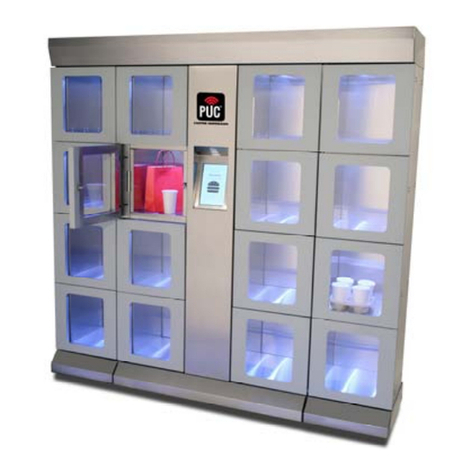
PUC HEATED PICK-UP CABINET
PUCH-22, PUCH-23 & PUCH-24
OWNER / OPERATOR’S MANUAL
Part Number: 18400-3251 Printed in the United States of America 012221KBA
MANUFACTURED BY:
CARTER-HOFFMANN
1551 McCormick Avenue
Mundelein, IL 60060 U.S.A.
Phone: 847-362-5500
Fax: 847-367-8981
Toll Free: 800-323-9793
Email: [email protected]
GENERAL INFORMATION
 This appliance is intended for use in commercial establish-
ments, where all operators are familiar with the appliance
use, limitations and associated hazards.
 Operating instructions and warnings must be read and un-
derstood by all operators and users.
 Cleanliness of this appliance is essential to good sanitation.
Read and follow all included cleaning instructions and
schedules to ensure the safety of the food product.
 All included instructions, component views and parts lists are
included for general reference, and are intended for use by
qualified service personnel.
 Knowledge of proper installation, operation and maintenance
procedures is essential to ensure the safe operation of this
cabinet. SERVICE / SAFETY
 Always have dry hands prior to using the piece of equip-
ment.
 Turn OFF the unit anytime the cabinet is not in use.
 If an electrical shock is felt when touching the cabinet, dis-
connect the power immediately and call Carter-Hoffmann
Technical Service for assistance.
 If the power cord is frayed or the plug damaged, DO NOT
plug into the electrical power receptacle. If it is already
plugged in, turn off the main circuit breaker, usually located
in the building’s breaker box, then disconnect the plug.
 Disconnect the power cord before attempting any repairs to
the cabinet.
 Repairs to this unit must be by qualified personnel.
 DO NOT SPRAY WITH WATER OR CLEANING SOLU-
TIONS, or submerge the appliance. Components and wiring
present a high shock hazard when wet.
Read entire manual before operating
this cabinet.
CAUTION: EQUIPMENT ELECTRICAL DAMAGE
Do not plug in or use this appliance until all Installa-
tion Instructions are read and followed.
This manual is considered to be a permanent part of this ap-
pliance and must remain with the appliance if it is sold or
moved to another location
TABLE OF CONTENTS
SAFETYPRECAUTIONS 2
SPECIFICATIONS 3
UNPACKINGANDINSTALLATION 4-5
NETWORKCONNECTION 6-8
STARTUPANDMANUALOPERATION 9-12
PROGRAMMINGTHETEMPERATURE 13-14
CLEANING 15
SERVICE AND SHIPPING DAMAGE PROCEDURE 16
WARRANTY 17
ORIGINAL INSTRUCTIONS
SAFETY PRECAUTIONS
NOTE:
The technical content of this manual, including any wiring diagrams, schematics, parts breakdown illustrations and/or adjustment
procedures, is intended for use by qualified technical personnel and is subject to change without notice.
IMPORTANT SAFETY INSTRUCTIONS
When using electrical appliances basic safety precautions should be adhered to, including the following:
1) Be familiar with the appliance use, limitations and associated restrictions. Operating instructions must be read and understood
by all persons using or installing this appliance.
2) This appliance must be grounded. Connect only to properly grounded outlet.
3) Use this appliance only for its intended use as described in this manual.
a. This equipment is specifically designed to hold pre-cooked food at temperature.
b.
This equipment is intended for use in commercial establishments only.
c. This equipment is not designed for industrial or laboratory use.
4) Cleanliness of this appliance and accessories is essential to good sanitation.
5) DO NOT submerge this appliance in water. This appliance is not jet stream approved. DO NOT direct water jet or steam jet at
this appliance, or at any control panel or wiring. DO NOT splash or pour water on, in or over any controls, control panel or
wiring. DO NOT use corrosive chemicals or vapors in this appliance.
6) DO NOT store this appliance outdoors. DO NOT use this product near water – for example, near a kitchen sink, in a wet
basement, or near a swimming pool, and the like.
7) DO NOT operate this appliance if it has a damaged cord or plug, if it is not working properly, or if it has been damaged or
dropped. Do not immerse cord or plug in water, keep cord away from heated surfaces, and do not let cord hang over
edge of table or counter.
8) Only qualified service personnel should service this appliance.
9) DO NOT cover or block any openings on the appliance.
These appliances are intended to be used for commercial applications, for example, in kitchens of restau-
rants, canteens, hospitals and in commercial enterprises such as bakeries, butcheries, etc., but not for con-
tinuous mass production of food.
This appliance can be used by children from 8 years and above, and persons with reduced physical, sensory
or mental capabilities or lack of experience, if they have been given supervision or instruction concerning
use of the appliance in a safe way and understand the hazards involved.
Children shall not play with the appliance.
Cleaning and user maintenance shall not be made by children without supervision
CAUTION: In order to avoid a hazard due to inadvertent resetting of the thermal cut-out, this appliance must
not be supplied through an external switching device, such as a timer, or connected to a circuit that is regu-
larly switched on and off by the utility.
WARNING! Scalding Hazard!
To avoid scalding, do not use loaded containers
with liquids or cooking goods which become
fluids by heating in higher levels than those
which can be easily observed.
DANGER! Electrical Shock Hazard!
This symbol draws attention to potential electrical
hazards (dangerous voltage). If you do not follow
the safety instructions, you may risk injury or
death
CAUTION!
This symbol highlights instructions,
which should be followed to avoid any
risk of damage, malfunctioning and/or
breakdown of the device.
CAUTION! Hot Surface!
This symbol is a warning that the device surface
is hot when in use. Ignoring this warning shall
result in burns!
NOTE!
This symbol highlights tips and infor-
mation, which have to be followed for
an efficient and trouble-free operation of
the device.
WARNING!
This symbol highlights hazards, which
could lead to injury. Please follow the
instructions very carefully and proceed
with particular attention in these cases
2
7
3
SPECIFICATIONS
Model Volts Amps Hz
PUCH-22 120 8 60
Phase
Single
Plug
NEMA 5-15P
PUCH-23 120 12 60 Single NEMA 5-15P
PUCH-24 120 16 60 Single NEMA 5-20P
Electrical Characteristics
Model Volts Amps Hz
PUCH-22 230 4 50
Phase
Single
Plug
Receptacle
C, E, F, G
PUCH-23 230 6 50 Single C, E, F, G
PUCH-24 230 8 50 Single C, E, F, G
Cord/Plug
Type
C, E, F, G
C, E, F, G
C, E, F, G
European Ratings
UNPACKING AND INSTALLATION
WARNING:
Risk of personal injury
Installation procedures must
be performed by a qualified technician
with full knowledge of all applicable
electrical codes. Failure can result in
personal injury and property damage.
CAUTION:
Electrical Shock Hazard
The ground prong of the power cord is
part of a system designed to protect
you from electric shock in the event of
internal damage. DO NOT cut off the
large round ground prong or twist a
blade to fit an existing receptacle.
IMPORTANT:
Power cord is 10' long.
If necessary, contact a li-
censed electrician to install
an appropriate electrical circuit and
proper receptacle. DO NOT use an
extension cord.
IMPORTANT:
Damage to unit due to being
connected to the wrong volt-
age or phase is NOT covered
by warranty.
IMPORTANT:
Place the cabinet in a space
that is 80°F (27°C) or below.
Temperatures above 80°F
(27°C) may affect performance.
4
DANGER: Electric Shock Hazard
All servicing requiring access to non-insulated components must be performed by qualified service personnel. Do
not open any access panels which require the use of tools. Failure to heed this warning can result in electrical
shock. Disconnect this appliance from electrical power before performing any maintenance or servicing.
WARNING: Injury Hazard
All installation procedures must be performed by qualified personnel with full knowledge of all applicable electrical
codes. Failure could result in property damage and personal injury.
WARNING Electric Shock Hazard
Appliance must be plugged into a properly grounded receptacle to prevent possible shock hazard. Electrical shock
will cause death or serious Injury.
UNPACKING
Unpack the appliance and any accessories according to the instructions below. Ensure
that all packing materials and protective plastic has been removed from the unit. In-
spect all components for completeness and condition.
NOTE: DO NOT discard the carton or other packing materials until you have inspected
the appliance for hidden damage and tested it for proper operation. Refer to SHIP-
PING DAMAGE CLAIM PROCEDURE on PAGE 16.
Tools Required:
Box cutter or knife to cut plastic
Tin snips to cut banding material
Forklift, pallet jack or other appropriate lifting device
1) Using box cutter or knife, remove
plastic that is wrapped around the
unit. Take care not to slice through
the cardboard as this could damage
the finish on the cabinet.
2) Using tin snips, remove and dis-
pose of metal banding. Then, remove
the cardboard and shipping foam.
UNPACKING AND INSTALLATION (continued)
GROUNDING INSTRUCTIONS
This appliance is equipped with a cord having a grounding wire with a grounding plug which must be plugged into an outlet that is
properly installed and grounded. In the event of an electrical short circuit, grounding reduces the risk of electric shock by providing
an escape wire for the electrical current.
WARNING-Improper use of the grounding can result in a risk of electric shock. Consult a qualified electrician or service agent
if the grounding instructions are not completely understood, or if doubt exists as to whether the appliance is properly grounded.
5
INSTALLATION
Plug the cabinet into a properly grounded, dedicated 120 volt electrical receptacle
with supplied power cord.
European units will need an appropriate 230 volt power plug installed to the sup-
plied cord by a licensed electrician.
See charts below and verify electrical information for your cabinet by consulting the
serial tag on the cabinet. DO NOT MODIFY CORD PLUG.
3) Using an appropriate device, such
as forklift or pallet jack, lift the unit off of
the pallet, remove the pallet, and then
lower the cabinet to the ground.
4) Move the cabinet to the desired
location.
5) Lock the front two casters to hold
the cabinet in place.
Appliance should be thoroughly
cleaned before use. See CLEANING
INSTRUCTIONS, page 15.
CAUTION:
In order to avoid a hazard
due to inadvertent resetting
of the thermal cut-out, this
appliance must not be supplied
through an external switching device,
such as a timer, or connected to a
circuit that is regularly switched on
and off by the utility.
CAUTION:
Maximum load of product,
per door, is 4 pounds (1.8
kg). Do not overload.
NOT PERFORMANCE TESTED
FOR THE STORAGE, DISPLAY
OR HOLDING OF POTENTIALLY
HAZARDOUS FOODS (Label Part
Number 18312-0698)
INSTALLATION CLEAR-
ANCES: Allow at least 2”
ventilation gap at the top,
sides and rear of the cabi-
net. Allow at least 36” clearance at
the front of the cabinet. Pass through
cabinets require 36” at the front and
rear of the cabinet.
Before using, familiarize
yourself with the
appliance controls. Read
entire manual before operating
Model Volts Amps Hz
PUCH-22 120 8 60
Phase
Single
Plug
NEMA 5-15P
PUCH-23 120 12 60 Single NEMA 5-15P
PUCH-24 120 16 60 Single NEMA 5-20P
ELECTRICAL INFORMATION
Model Volts Amps Hz
PUCH-22 230 4 50
Phase
Single
Plug
Receptacle
C, E, F, G
PUCH-23 230 6 50 Single C, E, F, G
PUCH-24 230 8 50 Single C, E, F, G
Cord/
Plug
Type
C, E, F, G
C, E, F, G
C, E, F, G
EUROPEAN RATINGS
UNPACKING AND INSTALLATION (continued)
CAUTION:
In order to avoid a hazard
due to inadvertent reset-
ting of the thermal cut-
out, this appliance must not be
supplied through an external
switching device, such as a timer,
or connected to a circuit that is
regularly switched on and off by
the utility.
CAUTION:
Maximum load of product,
per door, is 4 pounds (1.8
kg). Do not overload.
NOT PERFORMANCE TESTED
FOR THE STORAGE, DISPLAY
OR HOLDING OF POTENTIALLY
HAZARDOUS FOODS (Label Part
Number 18312-0698)
NETWORK CONNECTION
1) Plug network connection into the Ethernet jack, located at the rear top of the
cabinet. (Figure 1.1 or 1.2, depending on the style of cabinet)
2) If adding an ADD-ON cabinet, connect the ADD-ON cabinet with an Ethernet
cable to the unused jack on the MASTER CABINET and to any unused Ether-
net jack on the ADD-ON cabinet.
3) Proceed with the start-up procedure (page 7).
Figure 1.1
6
Figure 1.2
Plug Network connection into this jack.
Optional add-on cabinets
are connected to this jack
CONNECTING WIFI
On the ORDER MANAGEMENT screen, press the gear symbol
Push in ON/OFF switch
located at rear of cabinet.
The cabinet will turn on
and boot up to the HOME
screen.
START-UP: CONNECTING WI-FI
On the HOME SCREEN, enter
008 on the keypad to access
the ORDER MANAGEMENT
screen.
Then, press NETWORK
7
Select your preferred WIFi network
START-UP: CONNECTING WIFI (continued)
Enter the password for your
preferred WiFi network.
8
START-UP: OPERATION
9
MANUAL OPERATION
HOME SCREEN
Push in ON/OFF switch located at rear of
cabinet.
The cabinet will turn on and boot up to
the HOME SCREEN.
On the HOME Screen, then enter code 008 to access the Order Manage-
ment Screen.
To load an order, On the ORDER MANAGEMENT SCREEN, press the +
icon.
ORDER MANAGEMENT SCREEN
10
MANUAL OPERATION (continued)
At the NEW ORDER screen, type in the name and phone number for
the order.
NEW ORDER SCREEN
After entering the information, press NEXT
The screen will display the mobile phone number for the customer. If it is
correct press CONFIRM. The screen gives you an opportunity to change
the number if it is not correct.