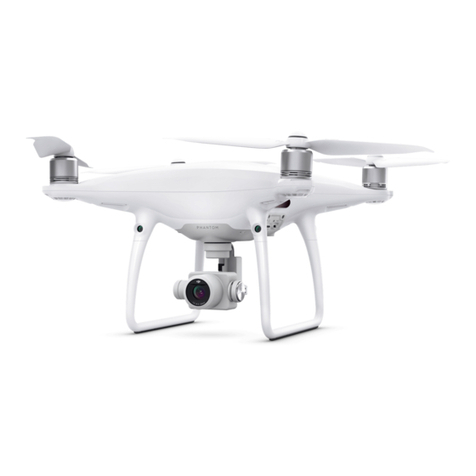
dji PHANTOM 4 Technical specifications

Phantom Flight Manual

Phantom Components
Remote Control & Ground
Station
Phantom 4 Agri Battery
Battery Charger

Radio Schematic
The Phantom can be flown in different modes. These modes can be selected by using the
flight mode switch on the top left of remote control. A brief description of each mode is
provided below: (for other modes, refer to the Dji Phantom Manual)
P-Mode : This mode allows for fully autonomous flight including taking off and landing. The
Phantom automatically takes off when the “Start mission” . The Phantom will fly along a
predefined mission path which is setup on and downloaded from the Ground Station. Once
the mission is completed the phantom will automatically land where it took off from.
Return to Launch: This mode automatically flies the Phantom back to its launch location
where it will land automatically.

Calibrations
Dji Phantom 4 - Compass
•Compass Calibration Procedures
•Choose an open area to carry out the following procedures.
•Ensure that the compass is calibrated. If you did not calibrate the compass as part of your pre-flight preparations, or if you have
moved to a new location since the last calibration, tap the Aircraft Status Bar in the app and select “Calibrate”, then follow the on-
screen instructions.
•Hold the aircraft horizontally and rotate 360 degrees.
The Aircraft Status Indicators will display a solid green light.
•Hold the aircraft vertically, with nose pointing downward, and
rotate it 360 degrees around the center axis. Recalibrate the
compass if the Aircraft Status Indicator glows solid red.

Calibrations
Dji Phantom 4 - IMU
•Choose a very flat surface for the Phantom 4 IMU calibration (very important)
•Remove the propellers before you start the compass calibration
•Have your batteries fully charged in the Phantom 4 quadcopter, the Remote Control and your tablet of smart cellphone
•Next, start up the Phantom 4 Remote Controller
•Start the DJI Go App
•Start up the Phantom 4 quadcopter
•In the DJI Go App, click on the “Camera” settings
•Up in the left hand corner, click on the little quadcopter (attitude) button which is the main settings page
•Scroll down and click on the “Advanced Settings”
•Click on “Sensors”
•Click on “IMU Calibration”
•Click on “Start Calibrating”
•A popup message will appear saying “Calibration Requires Approximately 5 Minutes. Do Not Move Aircraft During
Calibration”
•Click Ok and the IMU calibration will start
•Then next page will show you the IMU calibration progress. Stay on this page during the Phantom 4 IMU calibration.
•When the calibration reaches 100%, a popup message will appear stating “Calibration Complete. Restart Aircraft”
•Click ok
•Power down and then restart the Phantom 4 to complete the calibration process
•You will need to power down the Phantom 4 again and then put back on the propellers

Flight Controls (Manual Mode)
It is important to learn to fly the Phantom in Manual mode.
During any automated flight, the pilot should be ready and able
to take manual control if required.
forward
Reverse

Attaching the Propellers

Led Status and Battery level

Charging the Batteries
Notes
• You must fully charge the battery before your first flight
• Always turn off the battery before inserting it or removing it from the Phantom 4
• Never insert or remove the battery when it is active
Charging the Battery
• Connect the Battery charger to a power source
• Open the protection cap and connect the Intelligent Flight Battery to the Battery
Charger
• The Battery Level Indicator (LEDs) will display the current charge level
• The battery is fully charged when all of the LEDs have turned off
• Air-cool the battery after each flight, allowing it to reach room temperature before
storage
Notes
• Batteries must be charged using a DJI approved adapter (warranty will be voided if a
non-DJI charger causes issues)
• Wherever possible, don’t leave the battery unattended during charging

Flight Procedure
1. Plan a mission on the Aerobotics Mission Planner app.
2. Choose an appropriate place to takeoff and land. This area should be free of obstacles and near the highest
point of your mission.
3. Switch on your remote control (Press the power button briefly, press it again and hold it until it powers on).
4. Install the battery (fully charged)
5. Turn on the Phantom (Same procedure remote control).
6. Connect your ground station (tablet) to the remote control using the supplied usb cable.
7. Plug in the battery to the Multispectral camera.(wait for the green light on the sunshine sensor)
8. Double press the button on the Multispectral camera to start taking pictures.
9. Press the Start button on aerobotics app..
10.The phantom will automatically take off
11. Monitor the mission from the ground station.
12. Once the mission is completed the Phantom will return home and automatically land and disarm
13.Stop the mapping camera and unplug
14.Upload data. This can be done after multiple flights.
Other manuals for PHANTOM 4
9
Table of contents
Other dji Drone manuals
dji
dji MATRICE 600 User manual
dji
dji Mavic 2 Enterprise User manual
dji
dji Phantom 3 Advanced User manual
dji
dji PHANTOM 4 PRO User manual

dji
dji AGRAS T50 User manual
dji
dji SPARK User manual
dji
dji MAVIC 3 PRO User manual
dji
dji SPARK User manual
dji
dji RONIN-M User manual
dji
dji MATRICE 30 Dock Bundle Series User manual
dji
dji mavic User manual
dji
dji MATRICE 210 RTK V2 User manual
dji
dji INSPIRE 2 User manual
dji
dji Flamewheel F450 User manual

dji
dji PHANTOM Instruction manual

dji
dji MATRICE 350 RTK User manual
dji
dji MAVIC 2 PRO User manual

dji
dji Matrice 600 Pro Instruction Manual
dji
dji AGRAS T30 User manual
dji
dji Mini 3 User manual