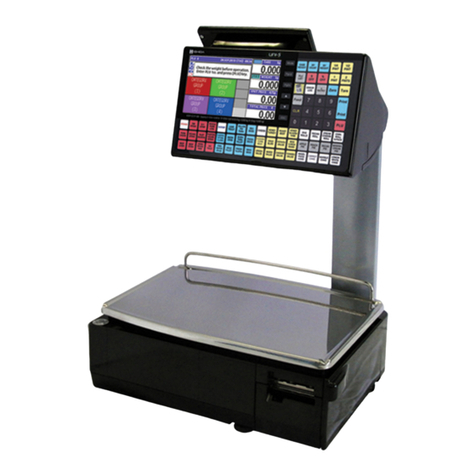
ISHIDA IPC User manual

OPERATION MANUAL
•
••
•Do not carry out installation, operation, service or
maintenance without thoroughly understanding of the
contents of this manual.
•
••
•Keep this manual available at all times during installation,
operation, service, and maintenance.
ISHIDA CO., LTD.
You can help improve this manual by calling attention to errors
and by recommending improvements.
Please convey your comments to the nearest Ishida Company
regional representative.
Thank you!
Copyright© 2002 by Ishida Co., Ltd. All rights Reserved.
No part of this manual may be reproduced in any form, by
mimeograph or any other means, without written permission of
the publisher.
1. Cautions for Handling
To ensure the safe operation of this machine, the general
safety considerations below must be followed:
- Always operate the scale on a level surface.
- Do not disassemble the scale.
- Do not allow any liquids to come into contact with the
scale.
- Do not drop or apply a strong shock to the scale.
- When cleaning the scale, only use a soft dry cloth wetted
with a neutral cleanser. Never use thinner or other
volatile liquids.
- Do not use your scale in abnormal conditions.
If smoke, disgusting smell, or any other abnormality
is detected from the scale, immediately disconnect the
power supply cable plug from the outlet and contact
the nearest ISHIDA regional representative for repair.
Continued use of scale under such abnormal
conditions may cause a fire or electric shock. For
your personal safety, never repair the scale by
yourself.
- Do not insert/remove the plug in/from the outlet with wet
fingers.
- Do not remake the electrical plug or power cable.
- Do not pull strongly, break, or remake the power cable.
- Do not leave any items on the weighing platter.
- Do not peel off the seal affixed to the scale body.
Always operate the scale with the same rated AC power
supply shown on the specification plate.
- Avoid Locating the Scale in the Following places:
- A place of low temperature, high temperature or high
humidity
- A place exposed to direct sunlight
- A place frequently exposed to vibration
On an unstable floor or table
- A place directly exposed to cold or hot air
2. Name and Function of Each Component
2-1 External View of the Scale
2-2 Function of Each Key
Used to turn ON/OFF power of the scale.
Used for zero adjustment.
Used to set tare weight.
Also Used for auto-power function.
Manual No. 0178A
When the Stable mark
stops flashing, the
weight is stable.
When the Zero mark
is displayed, the
actual weight is “0”
When the Tare mark
is displayed, the tare
weight is deducted.

3. Preparing the Scale
The following describes the procedure for preparing the scale
before operation.
1 Install Battery.
Open the lid on the bottom of the scale and install two
D-batteries.
Connect the AC Adaptor to the receptacle installed on the
bottom of the scale.
Warning: Do not connect the AC Adaptor, when using the
batteries.
2 Level the Scale.
Adjust the level adjustable feet until the air bubble inside the
level remains at the center of the circle.
3. Turn on the Power Switch
With nothing placed on the weighing platter, press the
key to turn on the power.
Make sure that display indicates all “0”s.
4. Adjust the Zero Point.
If the zero-point mark is not displayed, press the key.
5. Using Auto-power Off Function
Keep pressing the key for 6 sec to change auto-power
function mode.
Press the key to change the mode;
P 0: auto-power off
P 1: 20 min
P 2: 60 min (factory default)
Press the to set the mode.
4. Weighing
1 Set Tare Weight (if necessary)
Place a tare weight, and press the key.
2 Reset TARE Weight
Press the key with nothing on a platter.
3 Weigh an Item
Place the item to be weighed on the weighing platter.
When the marks stops flashing, the actual weight is
displayed.
6. Specifications
Platter Size <SMALL> 230 × 200 mm
<LARGE> 280 × 280 mm
Capacity
and
minimum
graduati n
APPROVAL SPEC.
NON
APPROV
AL SPEC.
<SMALL> 3 kg/1 g (0 - 1.5 kg),
2 g (1.5 - 3 kg)
3 kg/1 g
6 kg/2 g (0 - 3 kg),
5 g (3 - 6 kg)
6 kg/2 g
<LARGE> 15 kg/5 g (0 - 6 kg),
10 g (6 - 15 kg)
15 kg/5 g
30 kg/10 g (0 - 15
kg),
20 g (15 - 30 kg)
30 kg/10 g
POWER Dry Cell 2 pieces (* can be operated for 300
hours with alkaline dry D-Type batteries) or AC
Adaptor
(No Dry Cell and/or AC adaptor are included in
the shipment)
APPROVAL OIML, NTEP, CE conformity
Manual No. 0178A
Other ISHIDA Scale manuals
ISHIDA
ISHIDA IP-EMZ User manual
ISHIDA
ISHIDA AC-4000B User manual

ISHIDA
ISHIDA IWB Series User manual
ISHIDA
ISHIDA IWQ Series User manual
ISHIDA
ISHIDA Uni-3 User manual
ISHIDA
ISHIDA Uni-3 User manual

ISHIDA
ISHIDA Astra Instruction Manual
ISHIDA
ISHIDA NOVA-II User guide

ISHIDA
ISHIDA IGX Series User manual

ISHIDA
ISHIDA BC-4000 User manual
ISHIDA
ISHIDA IP-EMZ User manual

ISHIDA
ISHIDA AC-4000H User manual

ISHIDA
ISHIDA INS-100 User manual
ISHIDA
ISHIDA SR-2000 alpha Manual
ISHIDA
ISHIDA QB-150E Use and care manual
ISHIDA
ISHIDA AC-2000 User manual
ISHIDA
ISHIDA CWS-02 Quick guide
ISHIDA
ISHIDA Astra II Bench Installation manual
ISHIDA
ISHIDA BC-4000 User manual
ISHIDA
ISHIDA IPC-WP User manual