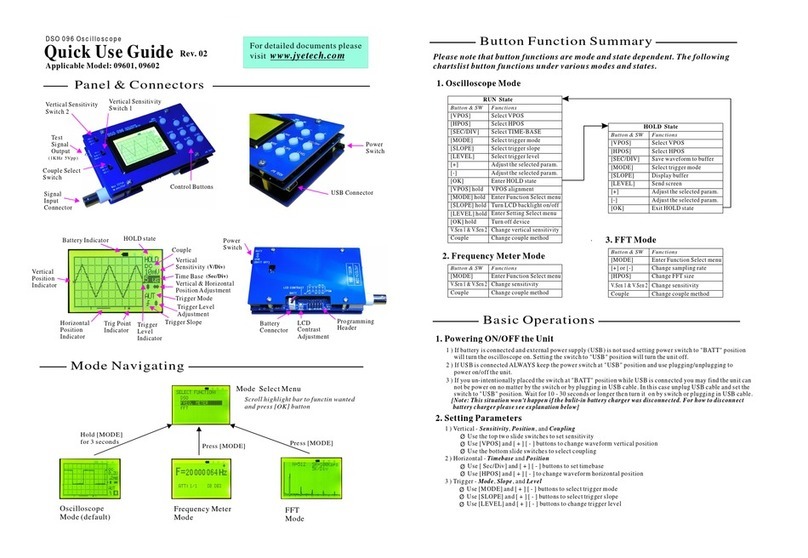
HOLDRUN/
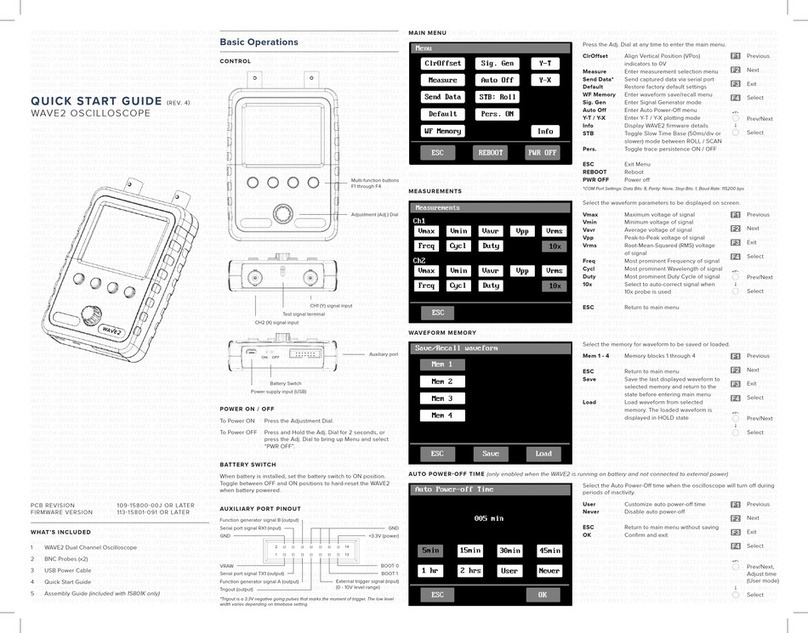
Connectors
forPowerSupply HOLDRUN/HOLDRUN/
TriggerLevel
Readout
Horizontal
Position
Oscilloscope
Mode
Connector
forProbe
Couple
Selection HOLDRUN/
Sensitivity
Selection1
Sensitivity
Selection2
Vertical
Position
Indicator
Sensitivity
Couple
Timebase
Trigger
Mode
Trigger
Slope Trigged”
Indicator
Trigger
Level
Indicator
Parameter
Selection
Parameter
Adjustment
Reset
Button
[+] or[-]:
[SEL]:
[OK]:
[CPL]:
[SEN1]:
[SEN2]:
HowtoUse
DisplayandControls
Connections
PowerSupply: ConnectDCpowersupply toJ9 orJ10.The power
supply voltage mustbe in the range of8 -12V.
Probe: Connectprobe toJ1.
Powersupplyvoltage mustnotexceed
12V.Otherwise U5willgethot.
Attention
1.
Allowedmaximum signalinputvoltage
is 50Vpk(100Vpp)withthe clipprobe.
2.
Operations
Presson[SEL]button: Selectparameterto be adjusted.The selected parameterwillbe highlighted.
Presson[+]or[-]button: Adjustthe parameterselected by [SEL]button.
Presson[OK]button: Freeze waveformrefresh(entering HOLDstate). Presson itagainwillde-freeze.
Change[CPL]switch: Setcouple to DC,AC, orGND.When GNDisselected the scope inputisisolated frominput
signaland connected to ground (0Vinput).
Change[SEN1]or[SEN2]switch: Adjustsensitivity. The productof[SEN1]and[SEN2]settingsmakesthe
actualsensitivity which isdisplayed atthe lower-leftcornerofthe panel.
Presson[Reset]button: Performasystemresetand re-bootsthe oscillscope.
0VLineAlignment
Sometimesyoumay find the 0Vline (the trace corresponding to 0Vinputvoltage)doesnotmatch withtheVPOS
indicatoratthe screenleftborder.Thiscan easily be fixed by performing the 0Vline alignment”function. First,
setthe couple switch [CPL]to GNDposition.Then presson [SEL]button to makeVPOS indicatorhighlighed and
hold down[OK]button forabout2 seconds.You willsetthe trace aligned to VPOSindicatorwhen yourelease
[OK]button.You may see some residue mismatch remainsatthe highestsensitivity settings.Thisisnormal.
ProbeCalibration
Because there isalwayssome capacitance between scope inputand
groundprobe needsto be calibratedto achieve bettermeasurement
resultsforhigh frequency signals.Thiscanbe done with the help of
the built-in testsignal.Todo thisplease followthe stepsbelow.
Connectredclipto
test signaloutput
Leaveblackclip
un-connected
Connectthe redcliptothetestsignalterminalandleave the
blackclipun-connected(see photoatright).
1.
Set[SEN1]switchto0.1Vand[SEN2]switchtoX5.
Set[CPL]switchtoACorDC.
2.
Adjusttimebaseto0.2ms.Youshouldsee waveformsimilar
tothatshowninphotos below. Iftraces arenotstable adjust
triggerlevel(the pinktriangle onrightscreenborder)soas
yougeta stable display.
3.
TurnC4(capacitortrimmer)withasmallscrewdriversothat
the waveform displays sharprightangle (photoC).
4.
C4
C6
Set[SEN1]switchto1Vand[SEN2]switchtoX1whilekeepallother
settings unchanged.AdjustC6sothatsharprightangle waveform is
displayed.
5.
A –Notenough B –Toomuch C –Good
Analogbandwidth
Sensitivityrange
Resolution
Recordlength
Maxrealtimesamplerate
Timebaserange
Maxinputvoltage
Inputimpedance
Powersupply
Currentconsumption
Dimension
Weight
1MSa/s
0--200KHz
10mV/div-5V/div
50Vpk(1Xprobe)
1Mohm/20pF
12bits
1024points
500s/Div-- 10us/Div
9VDC(8 –12V)
~120mA
117x76x15mm
70gram(withoutprobe)
Triggermodes
Triggerpositionrange Auto,Normal,andSingle
50%
Specifications
WaveformSave/Recall
Press[SEL]&[+]simultaneously:Savecurrentlydisplayedwaveformtonon-volatilememory.
www.jyetech.com
JYTTechLtd.
Tel.+86-0773-2113856
TriggersandTheirModes
Triggers are events thatindicate signalvoltageacrossing
a setlevel(i.e.triggerlevel)alonga specifieddirection
(i.e. triggerslope,risingorfalling). Oscilloscopeuses
triggers as reference pointsintimeforstable waveform
displayandmeasurements.
Inautomode oscilloscope willperform displayrefreshno
mattertriggershappenornot. Whentriggers aredetected
waveformdisplaywillbedisplayedwithreference to
triggerpoints.Otherwise,displaywaveform atramdom
referencepoints.
AutoMode
Innormalmode oscilloscope willonlyperformdisplay
refreshwhentherearetriggers. Ifnotriggers happen
waveformdisplaywillstayunchanged.
NormalMode
Singlemode is thesame asnormalmode exceptthat
oscilloscopewillenterHOLDstate aftera triggerhas been
detectedandwaveformdisplayhas beenupdated.
SingleMode
Normalandsinglemodes are usefulforcapturingsparse
orsinglewaveform.
Selection
(s/div)
(V/div)
TechSupport: www.jyetech.com/forum
Page3
- www.jyetech.com -
JYETechLtd.
TurnOn/Off Readouts
Press[SEL]sothattimebaseishighlighted.Holddown[OK]buttonforabout2seconds.This willturn
on/offmeasurementreadouts.
Press[SEL]&[-]simultaneously:Recallsavedwaveform