manuals.online logo
Brands
  1. Home
  2. •
  3. Brands
  4. •
  5. Pyle
  6. •
  7. Microphone System
  8. •
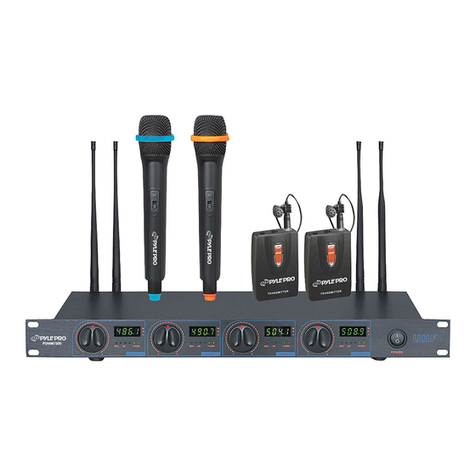
  9. Pyle PDWM4300 User manual

Pyle PDWM4300 User manual

This manual suits for next models

1

Other Pyle Microphone System manuals

Pyle PDWM8300 User manual

Pyle

Pyle PDWM8300 User manual

Pyle PDWM2800 User manual

Pyle

Pyle PDWM2800 User manual

Pyle PDWM2700 User manual

Pyle

Pyle PDWM2700 User manual

Pyle PDWM1902 User manual

Pyle

Pyle PDWM1902 User manual

Pyle PDWM 4520 User manual

Pyle

Pyle PDWM 4520 User manual

Pyle PDWM2550 User manual

Pyle

Pyle PDWM2550 User manual

Pyle PDMW420PG User manual

Pyle

Pyle PDMW420PG User manual

Pyle PDWM1902 User manual

Pyle

Pyle PDWM1902 User manual

Pyle PDWM5000 User manual

Pyle

Pyle PDWM5000 User manual

Pyle PDWM2120 User manual

Pyle

Pyle PDWM2120 User manual

Pyle PDWM2232 User manual

Pyle

Pyle PDWM2232 User manual

Pyle PDWM1902 User manual

Pyle

Pyle PDWM1902 User manual

Pyle PDWM4120 User manual

Pyle

Pyle PDWM4120 User manual

Pyle PDWM3360 User manual

Pyle

Pyle PDWM3360 User manual

Pyle PDWMRET76GL User manual

Pyle

Pyle PDWMRET76GL User manual

Pyle PDWM3450 User manual

Pyle

Pyle PDWM3450 User manual

Pyle PDWM8400 User manual

Pyle

Pyle PDWM8400 User manual

Pyle PDWM8325 User manual

Pyle

Pyle PDWM8325 User manual

Pyle PDWM3300 User manual

Pyle

Pyle PDWM3300 User manual

Pyle PDMW410BP User manual

Pyle

Pyle PDMW410BP User manual

Pyle PDWM2234 User manual

Pyle

Pyle PDWM2234 User manual

Pyle PDWM2560 User manual

Pyle

Pyle PDWM2560 User manual

Pyle PDWM2400 User manual

Pyle

Pyle PDWM2400 User manual

Pyle PDWM7300 User manual

Pyle

Pyle PDWM7300 User manual

Popular Microphone System manuals by other brands

INIM SAGITTARIUS VW2W instructions

INIM

INIM SAGITTARIUS VW2W instructions

AKG IVM 4500 User instructions

AKG

AKG IVM 4500 User instructions

Earthworks Audio PM40 manual

Earthworks Audio

Earthworks Audio PM40 manual

Nady Systems ENCORE 2 owner's manual

Nady Systems

Nady Systems ENCORE 2 owner's manual

Oklahoma Sound WM-200H instruction manual

Oklahoma Sound

Oklahoma Sound WM-200H instruction manual

Chiayo SDR-8200 Operation manual

Chiayo

Chiayo SDR-8200 Operation manual

Paso R824 quick start guide

Paso

Paso R824 quick start guide

Naxa NAM-982 instruction manual

Naxa

Naxa NAM-982 instruction manual

Xvive U3 user manual

Xvive

Xvive U3 user manual

Tekon DUOS installation guide

Tekon

Tekon DUOS installation guide

Heyuan Intelligence IOT-G2S-01 user manual

Heyuan Intelligence

Heyuan Intelligence IOT-G2S-01 user manual

Devine WMD-IE user manual

Devine

Devine WMD-IE user manual

LG LF-D7150 owner's manual

LG

LG LF-D7150 owner's manual

LD U305 HBH 2 user manual

LD

LD U305 HBH 2 user manual

Chainway URA8 user manual

Chainway

Chainway URA8 user manual

ORATOR D860TD instruction manual

ORATOR

ORATOR D860TD instruction manual

Sennheiser Evolution Wireless Digital EW-DX EM 2 quick guide

Sennheiser

Sennheiser Evolution Wireless Digital EW-DX EM 2 quick guide

Shure UA844 user guide

Shure

Shure UA844 user guide

manuals.online logo
manuals.online logoBrands
  • About & Mission
  • Contact us
  • Privacy Policy
  • Terms and Conditions

Copyright 2025 Manuals.Online. All Rights Reserved.

PDWM4300
VHFWIRELESSSYSTEM
PDWM4400
VHFWIRELESSSYSTEM
www.PyleUSA.com www.PyleUSA.com
VHF WIRELESS SYSTEM
OPERATION MANUAL
Please read through these operating instructions so you will
know how to operate your model properly. After you have
nished reading the instructions, put them away in a safe
place for future reference.
CONTENTS
P1 Precautions
P2 Products Figure
P3 Hand-held Microphone
P4 Bodypack Transmitter
P5 Receiver Front panel
P6 Receiver Rear Panel
P7 Installation
P8 Troubleshooting
P9 Specications
PRECAUTIONS
• Avoid expose of the system to rain or moisture.
• No user-serviceable parts inside the system. Refer all servicing
to qualied Technician only
• Handle the wireless system carefully, dropping or other shocks
may cause failure
• Avoid using the system where it may be subjected to heat, such
as direct sunlight near radiators or other heat sources.
• Should any liquid be spilt on the arrangement, stop using it
immediately. It may be possible to dry the system, but you
should have it checked by a qualied technician before using it
again.
• Take upkeep with the main power transcriber and lead.
If damaged in any way,do not use the system and refer to a
qualied technician for repair.
• Only use the system with the supply components. Do not
attempt to use with any other main power provision adapter.
• If the wireless system is not going to be used for a while,
remove the battery to prevent leak. In the event of electrolyte
leak interior the battery compartment, carefully remove the
leakage with a damp material. Take care not to get battery
electrolyte in contact lens with your skin, however if it does,
washables your hands under a running strike. If electrolyte
comes into contact with your heart,seek medical advice
immediately.
• Only replace the battery with the same or an equivalent type.
• Please dispose of old batteries in an environmentally friendly
manner in accordance with the relevant legislation.
• Do not use and solvents to clean any part of the wireless system.
1 2
SYSTEM DIAGRAM
PDWM4300
PDWM4400

www.PyleUSA.com www.PyleUSA.com
HAND-HELD MICROPHONE:
OPERATION
1. Unscrew the battery cover at the end of microphone, put 9V battery into compartment with correct polarities, then close the cover.
2. Move "ON/OFF" switch to "ON" position, "PWR" indicator will light for one second and then go off. This indicates correct operation.
If it doesn't turn ON, please check the battery voltage or polarities. If the "PWR" indicator lights red, this indicates the battery power is
low. Please replace with a fresh battery.
3 4
BODY PACK TRANSMITTER
OPERATION
• Open the battery cover to install 9V battery (check polarities). Move the power switch to ON position. The power Indicator will be
green to indicate normal operation. If the LOW BAT indicator turns red, replace with a fresh battery promptly.
• Before operation, please conrm that the frequency of transmitter is same as the frequency of receiver. Plug the 3.5mm headset mic
connector to screw-lock socket of transmitter. Move the audio switch to ON position. The MUTE switch cuts off the audio output
without shutting off the transmitter.
• ATTENUATlON is for volume adjustment. Move it to 0dB position to get normal volume output. Move to -20dB position to reduce
distortion and avoid feedback.
• If the system will not be used for a long time, please switch OFF the transmitter to avoid power oonsumptlon.
www.PyleUSA.com www.PyleUSA.com
RECEIVER
OPERATION
Attach the two antennas and extend them vertically. Switch on the receiver.The red power indicator will come on. Switch on the
transmitter. The red indicator RF/Channel1, RF/Channel2, RF/Channel3, RF/Channel4 will come on to indicate signal reception.The
green AF LEVEL meters indicate the audio level. Adjust the volume of receiver, transmitters and amplier. Please switch off the
receiver, transmitters and amplier when the wireless microphone system is not being used.
5 6
RECEIVER
SQUELCH
The squelch control on the rear of the receiver is preset at the factory. If you must use the system in an area with considerable RF
interference and there is some noise from the receiver when your transmitter is off, you can adjust the squelch control so that the
system will receive the signal from your transmitter only but squelch or eliminate the unwanted background RF noise. This adjustment
can cause reduction in useable range of the wireless transmitter, so set the control to the lowest position that reliablely mutes the
unwanted RF signals.
Note that switching the microphone on and o can cause interference that will be heard if the microphone volume level of the amplier
system is still set high.
FRONT PANEL
1. Power Indicator
2. Power Switch
3. Antenna
4. CH-1 RF Signal Indicator
5. CH-1 AF Indicator
6. CH-2 RF Signal Indicator
7. CH-2 AF Indicator
8. CH-3 RF Signal Indicator
9. CH-3 AF Indicator
10. CH-4 RF Signal Indicator
11. CH-4AF Indicator
12. CH-1Volume Control
13. CH-2 Volume Control
14. CH-3 Volume Control
15. CH-4 Volume Control
16. Rack Mounts
REAR PANEL
17. Balanced Output Jack
18. Mix output Jack
19. Individual Output Jack
20. DC Power IN
www.PyleUSA.com www.PyleUSA.com
INSTALLATION
Using the supplied audio cable, connect from the MIXED jack socket to the "MIC IN" / "LINE IN" socket on amplier. Alternatively, you
can connect an optional XLR cable from the "XLR MIXED" socket on the receiver to a professional mixer. Connect the mains power
adaptor from "DC 15V" jack to a suitable mains power socket.
Installation Location:
At least 3ft. above ground level
At Least 3 ft. away from wall
7 8
TROUBLESHOOTING
The on air indicator
does not light up
No sound
The sound is
distorted
A howling noise
heard from the
speakers.
The wireless microphone is not turned ON.
The microphone receiver is not turned ON.
The microphone receiver is not connected
properly.
The battery in the wireless microphone is weak.
The microphone receiver is not turned on.
The connected audio equipment is not turned on.
The speakers/headphones are not connected
to the audio equipment.
The battery in the wireless microphone is weak
The AUDIO OUT on the receiver is not set correctly.
The distance between the wireless
microphone and speakers are too close.
The battery in the wireless microphone is weak
Turn on the wireless microphone
Turn ON the microphone receiver and the
connected audio equipment
Turn on the microphone receiver and
the connected audio equipment
Replace the battery
Turn on the microphone receiver and
the connected audio equipment.
Turn on the audio equipment.
Connect the speakers/headphones
Replace the battery
Adjust the volume controls.
Move the wireless microphone away from the
speakers or change the direction of the microphone.
Replace the battery
www.PyleUSA.com
SPECIFICATIONS
A. Overall System
• Oscillation Mode: Quartz Controlled
• Carrier Frequency Range: VHF 174-216MHz
• Stability: ±0.005%
• Max Deviation: ±56KHz with level limiting
• Dynamic Range: >100dB
• S/N Ratio: ≥80db
• T.H.D.: ≤0.5%
• Squelch: “Pilotone & Noise Lock” dual squelch circuit
• Frequency Range: Up to 240 Feet
B. Receiver
• Sensitivity: 6dBµ V at S/N>90dB
• Image Rejection: >60dB
• Stability: >80dB
• Audio Output: -12dB/600ohms unbalanced and balanced
• Power Supply: 15VDC/0.5A
• Dimensions (m/m): 16.5x8.2x1.8 inch
C. Transmitter
• Mike Capsule: Dynamic Microphone (Handheld mic)
Condenser Microphone (Headset mic/clip-on mic)
• Antenna: Built-in Housing (Handheld Transmitter)
External (Belt pack Transmitter)
• RF Output: <10mW
• Spurious: <-40dB
• Battery: one 9V Battery
9