2 S&C Instruction Sheet 465-501
Understanding the LED Indicators and Position Indicators
LED Indicators
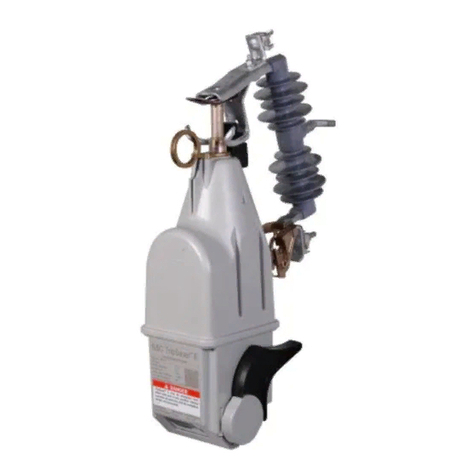
Two LED indicators are on the base of the VacuFuse interrupter. See Figures 5 and 6.
The HEALTH INDICATOR LED is white and indicates the health state of the VacuFuse
interrupter. When the interrupter is powered, the LED will flash white at a 30-second
interval to indicate a healthy condition. If the VacuFuse interrupter is in an unhealthy
state, the white LED will “fast-blink” at a one-second interval. An off LED indicates either
the MODE SELECTOR lever is in the NR (down) position or the VacuFuse interrupter
is no longer connected to line power. The HEALTH LED will only remain lit with the
vacuum interrupter open for one minute before the unit loses power.
The NR (Non-Reclose) LED is amber and will flash at a two-second interval when the
interrupter is in NR mode. When the VacuFuse interrupter is in Auto mode, the amber
LED remains off.
Position Indicators
The position indicator is located at the
base of the VacuFuse interrupter. It
is a reective red or green target that
indicates the position of the vacuum
interrupter inside the VacuFuse
interrupter. The target is green when
the vacuum interrupter is in the Open
position and red when the vacuum
interrupter is in the Closed position.
Note: Catalog number option “-F1”
reverses the colors of the position
indicator. This option is only avail-
able to some Canadian utilities that
require reversed colors on their
system.
Do not refer to the position of the
OPEN/CLOSE lever to know the posi-
tion of the vacuum interrupter. If the
transformer is manually closed into
fault current, the interrupter will trip
open in response, leaving the lever in
the Closed position and the vacuum
interrupter in the Open position.
Always observe the position indicator
to know the position of the VacuFuse
interrupter’s vacuum interrupter.
NOTICE
Information on troubleshooting
the VacuFuse Self-Resetting
Interrupter can be found in
S&C Instruction Sheet 465-500
available at sandc.com.
Closing the VacuFuse Interrupter into the Cutout Mounting
WARNING
The VacuFuse interrupter is different from other cutout-mounted devices such
as fuses. Before using a VacuFuse interrupter, installation training using both a
hotstick and extendostick must be provided so line crews know how to correctly
install the VacuFuse interrupter in the field to avoid potential serious injury or death.
Special attention should be paid to how the VacuFuse interrupter behaves when being
closed into its mounting.
When the MODE SELECTOR lever is in the Auto (up) position, the VacuFuse interrupter
will operate in Non-Reclose (NR) mode for the first 10 seconds. The active Time-Current
Characteristic (TCC) curve will be the initial trip curve (TCC0). If a fault is not present
on the line, after 10 seconds the VacuFuse interrupter will revert to Auto mode and the
active TCC curve will be the same TCC0. If a fault is present on the line, the VacuFuse
interrupter will trip open and lock open.
When closing with the MODE SELECTOR lever in the Non-Reclose (down) position, the
VacuFuse interrupter will operate in NR mode until the MODE SELECTOR lever is moved
to the Auto (up) mode position. The active TCC curve will be the instantaneous curve.
To close a VacuFuse interrupter into the cutout mounting:
STEP 1. Conrm that the VacuFuse interrupter is in the Open position by viewing its
position indicator. Stand rmly in front of and in line with the cutout mounting.
Do not operate standing directly underneath. If using an extendostick, stand
6 to 10 feet (183 to 305 cm) away from the utility pole.
STEP 2. Insert the straight prong of a Talon tool or a distribution prong into the pull-
ring.
STEP 3. Swing the VacuFuse interrupter to within approximately 45 degrees of the
Closed position. See Figure 3.
STEP 4. While rmly gripping the stick, drive the VacuFuse interrupter closed with
forward force. Maintain the
forward force until the
VacuFuse interrupter properly
closes and latches into the
cutout mounting.
STEP 5. Disengage the prong from the
pull-ring taking care to avoid
pulling the VacuFuse
interrupter open.
STEP 6. Verify the MODE SELECTOR
lever is in the proper position
for the application, either Auto
or NR mode. Then, pull the
OPEN/CLOSE lever down to
close the VacuFuse interrupter
and energize the transformer.
NOTICE
For a video about installing the
VacuFuse Self-Resetting Interrupter
visit sandc.com/vacufuse-video.
Installing and Removing a VacuFuse Interrupter from the Cutout
Mounting
To install a VacuFuse interrupter into a cutout mounting:
STEP 1. Visually inspect the cutout mounting for damage or excessive wear. If damage
is visible, replace the cutout mounting. Make any electrical connections to the
cutout mounting. If aluminum conductors are used, wire-brush them and apply
a coating of oxidation inhibitor before inserting them into the connectors.
STEP 2. Use appropriately rated insulated gloves. With the OPEN/CLOSE lever in the
Open position, insert the VacuFuse interrupter into the cutout mounting with
gloved hands, as shown in Figure 4. Guide the trunnion into the hinge of the
cutout mounting. Close as described in the “Closing the VacuFuse Interrupter
into the Cutout Mounting” section.
To open the vacuum interrupter, drop open, and remove a VacuFuse
interrupter from a cutout mounting:
WARNING
Do NOT attempt to remove a VacuFuse interrupter from its cutout mounting with
the interrupter in the Closed position. The VacuFuse interrupter is in the Closed
position when the position indicator at the base displays a red target. Removing the
VacuFuse interrupter from its cutout mounting in the Closed position may cause
arcing, equipment damage, serious injury, or death.
STEP 1. Open the vacuum interrupter inside the VacuFuse interrupter by pushing up
on the notch of the yellow OPEN/CLOSE lever. Conrm the position indicator
at the base of the VacuFuse interrupter displays a green target. See Figure 6.
STEP 1. With a Talon tool or distribution prong, pull the pull-ring of the
VacuFuse interrupter forward until the interrupter disengages from the
Closed-Into-Cutout position and drops open. A swift, rm pull will be
required.
STEP 2. Using appropriately rated insulated gloves, remove the VacuFuse interrupter
from the cutout mounting with gloved hands. See Figure 4.
Trunnion
Figure 4. Carefully lift the trunnion out of, or place the trunnion
into, the hinge-end contact.
45°
Figure 3. Angle to achieve before closing.
Open/Closed
Position
Indicator
(Closed shown)
OPEN/CLOSED lever
in Closed position
MODE SELECTOR
lever
in NR mode
Amber NR LED
Figure 5. Base of the VacuFuse interrupter showing
a red closed target and a lit amber NR LED.
Figure 6. Base of the VacuFuse interrupter showing
a green open target and a lit white HEALTH LED.
The HEALTH LED will only remain lit with the
vacuum interrupter open for one minute before the
unit loses power.
Open/Closed
Position
Indicator
(Open shown)
White HEALTH LED
OPEN/
CLOSED
lever
(Open
shown)
MODE SELECTOR lever
in Auto mode