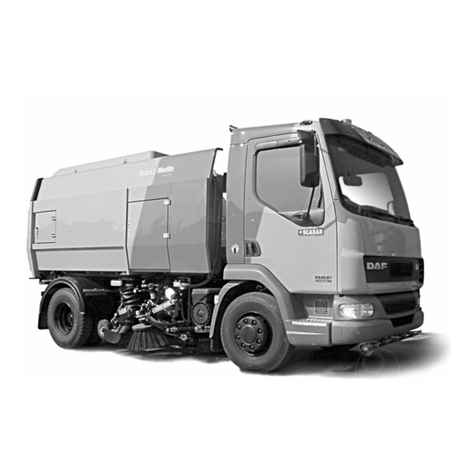
Scarab Merlin Series Operating instructions

E&OE
Merlin and Magnum Hydrostatic Sweepers - Abbreviated Operating Instructions
Sweep mode/hydrostatic drive
Engine running and air tanks full.
1. Vehicle stopped and in Neutral gear. Hand brake ON. (L1) Neutral. (L2) OFF.
2. Clutch de-pressed. Sweep Mode switch ON (Main Panel). Engine speed will change to default
rpm. The symbol will change to the on the LCD screen.
If the symbol flashes and a buzzer sound’s, press the Sweep Mode switch and release the
clutch. Drive the vehicle slightly forward and repeat steps 1 and 2.
3. Engage top gear, slowly release clutch.
4. Select required sweeping equipment (Main Panel). Fan ON. (L2) ON.
5. Select Forward (L1).
6. Handbrake OFF. Slowly press accelerator to required speed.
When required to travel faster, pressing the accelerator further will increase vehicle to
Maximum Hydrostatic drive speed.
7. To reverse, select REVERSE (L1), and press the throttle.
Vehicle movement is controlled, by means of the accelerator and brake pedal, similar to a
vehicle fitted with automatic transmission.
All sweeping gear is stopped and raised automatically when REVERSE is selected. Sweeping
equipment will re-engage, when forward is selected.
Never press the brake and accelerator pedals at the same time.
Cruise control (only in Sweep Mode)
1. With vehicle at the desired speed, select Cruise Control. Can be over-ridden by the
accelerator pedal, and is cancelled by using the foot brake or by pressing the switch.
When sweeping with a full load or up-hill, engine rpm may need to be increased.
Reverting to normal drive mode
1. Vehicle stopped, Hand brake ON. Neutral (L1), and (L2) OFF. Fan OFF.
2. Clutch de-pressed. Vehicle Neutral engaged. Press the Sweep Mode switch. The symbol
will change to the on the LCD screen.
If the symbol flashes and a buzzer sound’s, press the Sweep Mode switch and release the
clutch. Drive the vehicle slightly forward and repeat steps 1 and 2.
3. Clutch released. The vehicle can now be driven conventionally using the gearbox.
This document is designed as a quick reference guide, to allow the operator to drive the
vehicle in Normal or Hydrostatic Mode and operate the basic controls. It does not constitute
the full operating instructions.
Please refer to reverse for important health and safety advice.
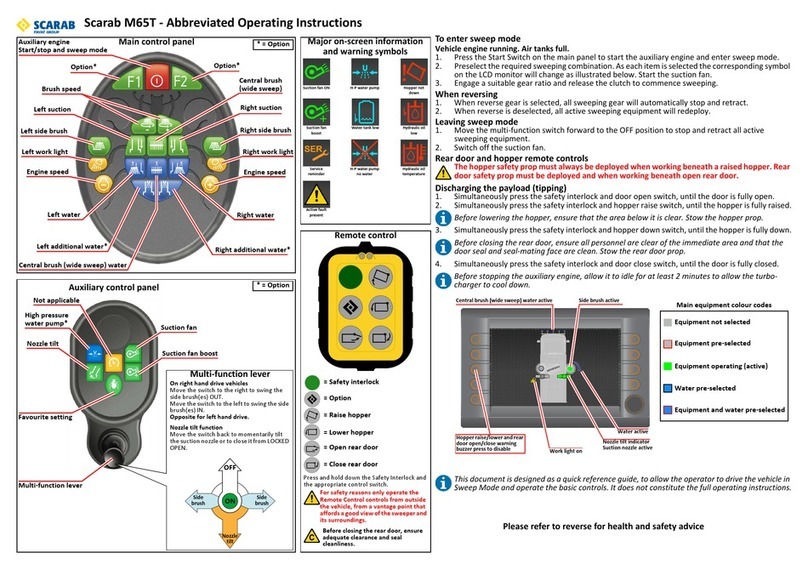
MAIN EQUIPMENT COLOUR CODES
Equipment not selected
Equipment pre-selected
Equipment operating
Equipment + water pre-selected
Water pre-selected
Central brush (wide sweep) water active Brush active
Water active
Nozzle tilt indicator
Suction nozzle active
Work light ON
Hopper raise/lower and rear
door open/close warning buzzer.
Press to disable.
Press and hold down the Safety Interlock and the
appropriate control switch.
For safety reasons, only operate the
Remote Control switches from outside the
vehicle, with a good view of the sweeper
and its surroundings.
Before closing the rear door, ensure
adequate clearance and rubber seal
cleanliness.
Hydrostatic
drive
Manual drive
Suction fan
ON
Suction fan
boost
Hopper not
down
H-P water pump
Water tank
level low
H-P water pump
no water
Hydraulic oil
level low
Hydraulic oil
high temp
Service
reminder
Active fault
present
On Right Hand Drive Vehicles
Lever Right, side brush(es) OUT.
Lever Left, side brush(es) IN.
Reversed On Left Hand Drive
On machines fitted with variable extend and
retraction, move the lever momentarily in the
desired direction to ‘nudge’ the brush(es).
Nozzle Tilt Functions
Pull lever back and hold to OPEN. Release to
CLOSE.
Variable Tilt:-Pull lever back to ‘nudge’
DOWN from the LOCKED OPEN position.
Main panel
Auxiliary panel *=Options
Forward
Neutral
Reverse Suction fan boost
Suction fan
Cruise control (Sweep Mode only)
High pressure
water pump *
Nozzle tilt
Favourite
setting
L2
Remote control
Multifunction lever
L1
Option*
Wide sweep brush
Right suction
Right
side brush
Right
work light
Engine speed +
Right water
Right
additional water*
Left
additional water*
Wide sweep
water
Right water
Engine speed -
Left
work light
Left
side brush
Left suction
Brush speed
= Safety interlock
= Option
= Raise hopper
= Lower hopper
= Open door
= Close door
Option*
*=Options
Sweep mode
Major on-screen information
and warning symbols
ON
Side
brush Side
brush
Nozzle
tilt
OFF

E&OE
Health and Safety
Hydraulic oil: HPL 32 or an equivalent.
WARNING
NEVER OPERATE A FAULTY MACHINE AS THIS MAY RESULT IN SERIOUS INJURY OR DEATH.
1 Only trained operatives should be allowed to drive or work on this machine.
2 Never work under as raised hopper or rear door without the appropriate safety prop in position.
3 Do not drive the vehicle with the hopper raised. The red warning symbol on the LCD monitor remains illuminated until the hopper is in the fully lowered
position.
4 Before working on the vehicle ensure that it is on firm, level ground, apply the hand brake, stop the engine and remove the ignition key.
5 Before raising the hopper or opening the rear door, ensure that there is sufficient clearance and it is safe to do so.
6 Before starting the engine, ensure that all controls are switched off and the vehicle’s gearbox and hydrostatic drive are in neutral.
7 Before driving the vehicle, ensure that all vehicle checks have been carried out and that all equipment is stowed and brush(es) are raised.
8 Do not overload hopper.
9 High pressure water can be dangerous, always wear suitable eye protection when operating the high pressure water pump with the lance. Do not direct the
water jet at other persons. Beware of electrical installations on public buildings and lamp posts etc. and always exercise extreme caution in public places.
10 The suction fan is an extremely heavy rotating mass. Vibrations coming from the suction fan must be investigated, the cause determined and rectified
immediately.
11 When working on the suction fan. Never attempt to slow or stop the fan by using the hands or by inserting any item into the fan chamber, even at low speeds.
Failure to comply can result in serious injury.
12 When operating the machine in any mode always be aware of objects and people in the immediate vicinity, especially at the rear of the machine when
reversing.
13 Whatever the situation, remember that the rules of traffic and road safety must be observed.
14 While operating this machine the safety and well-being of other people are the sole responsibility of the operator.
CAUTION
1 If the suction fan vibrates, it should be cleaned immediately (Refer to the Operator Handbook). Prolonged vibration will result in damage to the fan, bearings
and, in extreme cases, the hopper.
2 In the event of a hydraulic leak, stop the engine and investigate.
3 The high and low pressure water pumps must never be permitted to run dry otherwise the seals in the pump will be damaged.
4 Do not direct the high pressure jet at paintwork or electrical connections on the vehicle.
ROUTINE DAILY MAINTENANCE
1 Check the vehicle’s general condition (Including:- Tyres, lights and all fluid levels) in accordance with the chassis manufacturers recommendations.
2 Check hydraulic oil level. Note: - If the oil level is not maintained, the sweeping panel will automatically shut down until the oil level is correct.
3 Check the condition of the brushes and remove any items such as string that maybe entangled.
4 Check the ground clearance of suction rubber flaps, 20mm front, 15mm sides and rear, suction power can be lost if clearances are incorrect but it is possible to
slightly vary these to better suit specific sweeping conditions according to the operator’s experience.
5 Check water spray jets for blockages.
6 Clean the oil cooler and check that the cooling fan functions. Note: - If fitted, a red warning light and buzzer will operate when the maximum temperature is
reached.
7 Wash the vehicle, ensure that the suction fan and hopper screen are cleaned.
8 Lubricate brush links, pivot points and wide sweep bearings.
9 Remove and clean water strainer elements.
10 Always leave the vehicle with rear door slightly open to allow water to drain out.
11 In frosty weather, drain water pumps and tanks, remove water strainer elements, turn on all water sprays.
Auto ratchet hopper safety prop
Rear door safety prop
When inserting the
door prop, ensure it is
correctly positioned
in the locating slot.
Ensure the prop is
correctly positioned
within the ratchet rack.
SCAZ037971 7.0.00 English
This manual suits for next models
1
Other Scarab Blower manuals