
Sven VR-L600 User manual

www.sven.fi
OPERATION
MANUAL
Automatic Voltage Regulator
VR-l600
VR-l1000
VR-l1500

2
2
3
3
3
4
5
6
CONTENTS
1. UNPACKING .........................................................................................
2. PACKAGE CONTENTS...............................................................................
3. SAFETY PRECAUTIONS ............................................................................
4. TECHNICAL DESCRIPTION ........................................................................
5. INSTALLATION AND OPERATION GUIDE .......................................................
6. TROUBLESHOOTING .............................................................................
7. TECHNICAL SPECIFICATIONS ...................................................................
Technical support is on www.sven.fi
Congratulations on your purchase of Sven Automatic Voltage Regulator!
Please read this Operation Manual before using the unit and retain this Operation Manual in a safe
place for future reference.
COPYRIGHT
© 2016. SVEN PTE. LTD. Version 1.0 (V 1.0).
This Manual and information contained in it are copyrighted. All rights reserved.
TRADEMARKS
All trademarks are the property of their legal holders.
NOTICE OF RESPONSIBILITY RESTRICTION
Despite all the efforts to make this Manual most accurate, some discrepancies may occur.
Information in this Manual is given on «As it is» basis. Author and publisher do not bear any liability
to a person or an organization for loss or damages which have arisen from the information,
contained within the given Manual.
ENG
Automatic Voltage Regulator
1. UNPACKING
• Unpack the device carefully. Make sure there are no accessories left in the box. Check up the
device for damage; if the product was damaged during transportation, address the firm which
carried out the delivery; if the product functions incorrectly, address the dealer at once.
• Shipping and transportation equipment is permitted only in the original container.
• Does not require special conditions for realization.
• Dispose of in accordance with regulations for the disposal of household and computer
equipment.

2. PACKAGE CONTENTS
• Automatic Voltage Regulator — 1 pc
• Operation Мanual — 1 pc
• Warranty card — 1 pc
3. SAFETY PRECAUTIONS
• When the input voltage is higher than 290V, failure of the AVR is possible.
• Do not operate the AVR in the environment with temperatures other than allowed in Technical
Specifications.
• The case heats up during operation. Operate the AVR in the environment with good air con-
vection only.
• The socket for connection should be located close to the device and be easily accessible.
• In case of emergency, switch off the AVR and unplug the power cord.
• Do not open the device or make repairs by yourself.
• Do not connect household appliances with power load higher than allowed.
z Connection of electric heating devices is forbidden.
4. TECHNICAL DESCRIPTION
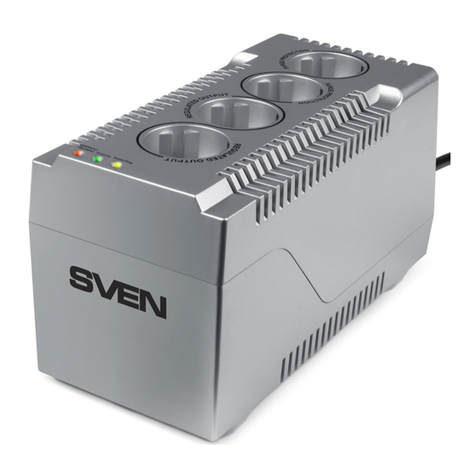
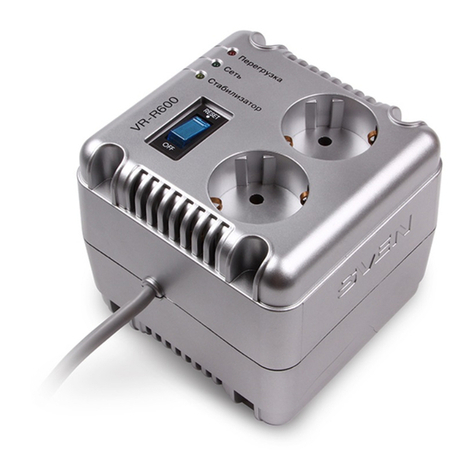
VR-L600, VR-L1000 and VR-L1500 – these are the entry level models of the range of stabilizers
(AVR) Sven, that protect any electronic equipment from high or low voltage, pulse interference and
dangerous high voltage. Maximum power capacity of VR-L600, VR-L1000 and VR-L1500 is
respectively 200 watts / 320 watts / 500 watts.
Automatic Voltage Regulators are designed for the operation of electrical appliances in regions
with unstable voltage. Modern electronic equipment capacity has the minimum required margin of
resistance to voltage instability network settings, but constant work in conditions of low or high line
voltage significantly reduces the life of any consumer electronics.
Surge VR-L600, VR-L1000 and VR-L1500 ensure the optimal mode of operation of your equipment.
Special features
• Microprocessor control
• Wide input voltage range
• Improved accuracy of the output voltage stabilization
• Consumer appliances protection against the high and low voltage
• Protection of AVR against short circuit and overload
• Thermal protection of autotransformer
• Built-in surge protector
• LED indication of operating modes
• Combined with switch automatic fuse
ENG
Operation Manual
3
Caution! High voltage inside! To avoid the risk of electric
shock do not open or touch elements inside.
VR-l600
VR-l1000
VR-l1500

5. INSTALLATION AND OPERATION GUIDE
Attention! Before connecting the regulator, make sure that all consuming devices connected
to it are off, and stabilizer switch is set to «OFF» position.
Attention! When choosing an AVR, it is necessary to consider that reduction of input
voltage increases value of input current, which means that maximum power of AVR is
reduced too! Such dependence is shown in the graph (Fig.5).
Note. Adhere strictly to such dependence. If the condition stated above is not adhered to,
warranty servicing becomes void!
• Before installing the AVR, please make sure that total power of all consumers is lower than AVR
power. Besides, take into account the starting load and power factor of consumers, it is
necessary to apply power margin factor of 1.2–1.5; it should be 1.5–2 for such equipment as air
conditioners, fridges, etc.
• Connect the necessary equipment to the power outlet (s) of the stabilizer.
• Connect the regulator to the power network of 230 V.
• Turn on the stabilizer. When the built-in LED lights up the key, and LED light up: for a short period
to test, «Стабилизатор» and «Перегрузка», constantly, «Сеть».
• When the self-test is complete LED «Перегрузка» will go out and voltage connection to the
output receptacles will happen. If the LED «Перегрузка» at the end of the test did not go out, it is
prohibited to operate the regulator to eliminate the problem.
• «Стабилизатор» LED will light when the regulator to increase or decrease in the input voltage.
• In case of overload or short circuit the thermal fuse is ready installed on the rear wall is trig-
gered. Turn on the stabilizer after removing the cause of the overload by pressing the power
button.
• When voltage input is more than 280 V or below 150 V regulator will disconnect the load.
«Перегрузка» LED will light up.
• «Перегрузка» indicator will light up in case of overheating auto-transformer, protection will work.
The load deenergises. After cooling down auto-transformer load power is restored automatically.
ENG
Automatic Voltage Regulator
4
140 150 160 17 0 180 187 200 210 220 230 240 250 260 2700
50
25
75
100
100 110 120 13 0
Output power, %
Input
voltage, V
Fig. 5.

ENG
Operation Manual
5
Problem
The stabilizer does not
turn on voltage.
Stabilizer turned on
wherein the light does not
go out «Перегрузка» and
there is no output voltage.
Voltage regulator keeps
clicking with constant
blinking of «Стабили-
затор» LED.
Stabilizer disabled load.
«Перегрузка» and
«Стабилизация»
indicators are on.
Cause
1. Switch is off.
2. There is no voltage in the mains
socket.
3. Excessive load is connected.
Triggering of protection fuse.
1. Test curcuit crash.
2. Overheating of the
autotransformer.
Input voltage is very unstable.
The input voltage is too low / high.
Solution
1. Turn on the switch.
2. Make sure there is input voltage.
3. Disconnect a part of load.
Turn on the protective fuse.
1. Switch the AVR off and on again.
If the problem is not solved,
address a service center.
2. Wait until the product cools down.
It is normal. The AVR is regulating
the output voltage.
When the input voltage reaches
150-280 V, the AVR will resume its
operation.
6. TROUBLESHOOTING
If none of the above can solve the problem, please seek professional advice at your nearest service
center. Never attempt to repair the product yourself.
VR-l600
VR-l1000
VR-l1500

ENG
Automatic Voltage Regulator
6
118 × 112 × 106 124 × 119 × 124
2 × CEE7/4
2 × CEE7/4 +
1 × ІЕС 320
200 320
3 5
Load carrying capacity, W
Fuse, А
Input voltage, V
Input frequency, Hz
Output voltage, V
Output frequency, Hz
Max. suppressed energy of
high-voltage pulses, J.
Maximum time withstand interference
current, A
Output socket, pc
Input plug, pc
Indicators
Protection
Operating environment
Dimensions, mm
~184 – 285±3%
50
~230 (-14/+10%)
50
≤320
10,000/6,500
1 × СЕЕ7/7
on-line operation, voltage overload, stabilization mode
against high/low voltage, high-voltage pulse,
short circuit and overload,
built-in thermal protection
0-40°С, 10-90% humidity, non-condensing
7. TECHNICAL SPECIFICATIONS
Model
Parameter
Notes:
• Technical specifications given in this table are supplemental information and can not
lead to legal claims.
• Technical specifications are subject to change without notice due to improvement of
SVEN products.
500
5
VR-L600 VR-L1000 VR-L1500
118 × 106× 112
2 × CEE7/4

Model: VR-L600, VR-L1000, VR-L1500
Импортер в России: ООО «РЕГАРД», 109052,
РФ, г. Москва, ул. Нижегородская, д. 86, корп. Б.
Уполномоченная организация в России: ООО «РТ-Ф»,
105082, г. Москва, ул. Фридриха Энгельса, д. 75, стр. 5.
Условия гарантийного обслуживания смотрите
в гарантийном талоне или на сайте www.sven.fi.
Гарантийный срок: 24 мес.
Срок службы: 5 лет.
Производитель: «СВЕН ПТЕ. Лимитед», 176 Джу Чиат Роуд,
№ 02-02, Сингапур, 427447. Произведено под контролем
«Свен Скандинавия Лимитед», 48310, Финляндия, Котка,
Котолахдентие, 15. Сделано в Китае.
Manufacturer: SVEN PTE. LTD., 176 Joo Chiat Road,
№ 02-02, Singapore, 427447. Produced under the control
of Oy Sven Scandinavia Ltd. 15, Kotolahdentie, Kotka,
Finland, 48310. Made in China.
® Registered Trademark of Oy SVEN
Scandinavia Ltd. Finland.
Automatic Voltage Regulator
VR-l600
VR-l1000
VR-l1500
Other manuals for VR-L600
1
This manual suits for next models
2
Table of contents
Other Sven Controllers manuals
Popular Controllers manuals by other brands

Digiplex
Digiplex DGP-848 Programming guide

YASKAWA
YASKAWA SGM series user manual

Sinope
Sinope Calypso RM3500ZB installation guide

Isimet
Isimet DLA Series Style 2 Installation, Operations, Start-up and Maintenance Instructions

LSIS
LSIS sv-ip5a user manual

Rockwell Automation
Rockwell Automation 1769-L31 installation instructions










