K14347 4/06 Rev. A
-
ADEMCO 5878
Wireless Wall Transmitter
INSTALLATION AND SETUP GUIDE
GENERAL INFORMATION
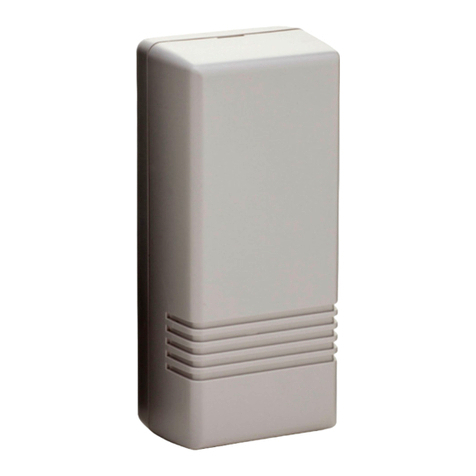
The 5878 is a compact, six-button, eight-loop wall mountable
wireless transmitter intended for use only with wireless
alarm systems that support 5800 series receivers. Individual
buttons on the transmitter may be programmed for any zone
response, but are typically used for arming/disarming and for
home automation functions. Optional function buttons are
provided with the 5878.
!
Do not use for system disarming in an area that
requires security.
This device supports both Standard and High-Security
(encrypted) modes. The latter sends rolling-code encrypted
messaging to the RF receiver.
This device must be used with a receiver or
control that supports high security mode i.e.:
5881EN, 5883, 6150RF, or 6160RF receiver or a
LYNXR Series control panel (Revision 13 or higher
if you intend to use it in high security mode).
The 5878 is powered by one replaceable lithium battery de-
signed to provide up to four years of life. For battery
installation, see Replacing the Battery.
5878-001-V1
SERIAL #1
LOOP 3
SERIAL #2
LOOP 3
SERIAL #1
LOOP 4
LED
SERIAL #1
LOOP 2
SERIAL #2
LOOP 2
SERIAL #1
LOOP 1
STAY
AWAY
12
34
5878 WALL TRANSMITTER*
* SERIAL #2 - LOOP 1 = AWAY + 4 BUTTON
LOOP 4 = 3 + 4 BUTTONS
Figure 1 - 5878 Button Designations
PROGRAMMING
The 5878 is assigned two unique serial numbers during
manufacture and each button, or button combination on the
unit also has a distinct "loop" number (refer to Figure 1) that
must be programmed into the control panel during
installation. Assign each button, or button combination, to
one of eight individual zones and designate the Input Type as
"BR" (Button Type RF).
1. When prompted, enter the serial number either by:
Pressing and releasing the button (or buttons) that you are
programming twice (wait about 5 seconds between button
activations).or Manually through the keypad.
Notes: (1) To activate the transmitter, the 5878 buttons must be
pressed and held for at least one-half second.
(2) Serial #2 is one (1) digit higher than serial #1, which is
printed on the rear of the transmitter.
Loop 4 Setup
Both of the Loop 4 buttons must be enrolled in the control,
even if they will not be used. If one or both of the loops is not
being used, program it as Zone Type 23 (No Alarm Response).
Otherwise assign it to the desired zone type.
2. Exit Programming Mode after programming is complete.
For complete details on how to program the transmitter's
serial number at the control panel, see the control unit's
installation instructions.
Assigning a 5878 to a User
On most control panels, if the wall transmitter is assigned to
arm and disarm the system, you must assign it to a user in
order for it to operate. This is accomplished through User
Code programming at the control panel. See the control
panel’s Installation and Setup Guide for specific instructions
on programming User Codes.
If you are programming arming and disarming functions on
both serial numbers, each serial number must be assigned to
a separate user.
SELECTING STANDARD OR HIGH-SECURITY MODE
For use with LYNXR Series controls earlier than
Revision 13, the Standard Mode must be selected.
To select Standard Mode, simultaneously press and hold the
STAY, 1 and 2 buttons for three seconds.
To select High-Security Mode, simultaneously press and hold
the AWAY, 1 and 2 buttons for three seconds.
The LED flashes green when transmitting in Standard Mode
and red when transmitting in High-Security Mode.
ACTIVATING HIGH-SECURITY MODE
To ensure proper functionality, the 5878 must be
synced to the security system.
1. After selecting High-Security mode, put the system in
Go/No Go Test mode.
2. To enroll the transmitter in the receiver, simultaneously
press and hold the AWAY, STAY, 1, and 2 buttons until
the panel beeps (see Figure 1). For LYNXR Series controls
proceed to step 4.
Note: The LYNXR Series panels will confirm the enrollment by
sounding two beeps.
3. To sync the device in High Security Mode, press either the
AWAY, STAY, 1, or 2 button ONCE, until the panel beeps
indicating receipt.
4. To enroll the second serial number of the wireless key in
the receiver, simultaneously press and hold the 1, 2, 3, and
4 buttons until the panel beeps.
5. To sync the device in High Security Mode, press the 3 or 4
button ONCE, and hold until the panel beeps indicating
receipt. For LYNXR Series controls proceed to step 6.
Note: If no beep is heard, exit Go/No Go mode, and repeat
Steps 1 - 5.
6. Exit Go/No Go mode by entering user code + 1 (OFF).
USING TWO RECEIVERS IN HIGH-SECURITY MODE
If the control supports two receivers and you plan to use
them in the high-security mode perform the following:
1. Enroll the transmitters into the receivers one at a time, by
disconnecting Receiver #2, and enrolling as described in
“Activating High Security Mode” (above).