Version 1 / 2021 Kurth Electronic, All Rights Reserved. Page 2
Introduction xDSL
Introduction xDSL
KE3700 KE3550
ESC
12
ABC 3
DEF
0 #
5
JKL
4
GHI 6
MNO
8
TUV
7
PQRS 9
WXYZ
F1 F2 F3 F4
SHIFT
VIEW
SPKR
VOL
HELP
ON-OFF
SEL
UnfreezeFreeze
QR-Code
ESC
12
ABC 3
DEF
0 #
5
JKL
4
GHI 6
MNO
8
TUV
7
PQRS 9
WXYZ
F1 F2 F3 F4
SHIFT
VIEW
SPKR
VOL
HELP
ON-OFF
SEL
UnfreezeFreeze
QR-Code
KE3550
ESC
12
ABC 3
DEF
0 #
5
JKL
4
GHI 6
MNO
8
TUV
7
PQRS 9
WXYZ
F1 F2 F3 F4
SHIFT
VIEW
SPKR
VOL
HELP
ON-OFF
SEL
UnfreezeFreeze
QR-Code
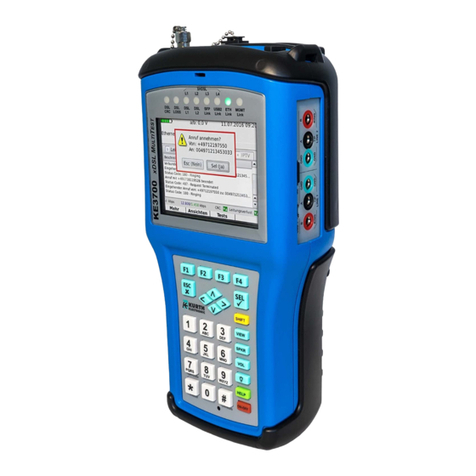
Ethernet 10/100/1000 Management,
Ethernet 10/100/1000 Test port, USB 2
ISDN analogue interface, SFP port*
xDSL test port, power supply connection
Wi-Fi antenna (optional)
Status LEDs
Speaker (Telephony)
Battery indicator
Sunlight readable TFT colour display
Connection: USB 1
Menu-sensitive function keys F1 – F4
Menu UP - DOWN / LEFT- RIGHT buttons
ON / OFF button
Microphone (Telephony)
Alphanumeric keypad
ESC (back) button
Select (enter) button
Display connection status SHDSL
Shift button: Function keys F5 – F8
View button: Back to main menu
Speaker button: Speakerphone
Vol button: Increase volume (3 levels)
button: Increase brightness (3 levels)
Help button: Open the help function