I331 GB I 08 18 31100158
2
SELECTION OF READINGS
– Pressing briefly the button it is possible to select the readings on the display, following the
sequence in the table reported below.
– Each measure is indicated by the correspondent icon in the lower part of the display.
– After one minute has elapsed after the last keystroke, the display moves automatically back to the
total active energy screen.
These measurements are shown only enabling parameter P-08
These measurements are shown only enabling parameter P-09
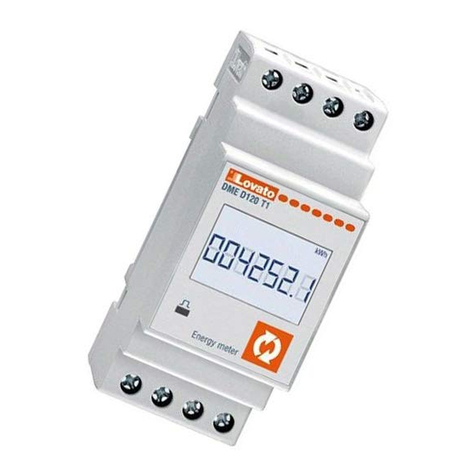
METROLOGICAL LED
– The red LED on the front emits 1000 pulses for every kWh of consumed Energy (that is, one pulse
every Wh).
– The pulsing frequency of the LED gives an immediate indication of the energy flowing in every
moment.
– The pulse duration, LED colour and intensity are compliant with the reference standards that define its
utilization in order to verify the accuracy of the energy meter.
ENERGY FLOW INDICATION
– When the device detects a flow of active energy to the load, it shows a rotating icon in the top-right
part of the display.
– When there is no active energy consumption or when the load draws less than the starting current
the rotating icon disappears.
PROGRAMMABLE INSULATED STATIC OUTPUT
– The static output on the upper terminals can be used either as a pulse output or as a measure
threshold output.
– The connection can be done in PNP or NPN mode. See schematic diagrams and technical
characteristics for details on the wiring and on the rating.
– The activation of the static output is shown on the display through the icon.
– When the output is programmed as a pulse generator, it allows connecting the energy meter to:
• An external data concentrator (like DME CD)
• A remote electromechanical counter
• A PLC or other device
– When it works as an alarm threshold, it can be used for:
• Disconnection of non-priority loads
• Alarm signalling
NOTE: During parameter setting (setup) the status of the static output is not updated.
INCORRECT WIRING INDICATION
– In case of incorrect wiring, when the device detects a reverse energy flow, the display shows the
blinking code Err 3.
– This error is caused by either reverse connection of current wires (terminals L↑and L↓) or reverse
voltage wiring (terminals N - L↑).
– In these conditions, the energy is not counted.
NAVIGATION WITH FRONT KEY
– To move through menus use the following rules:
– A short click of the front button, indicated by , changes the present selection, shown on the
display, with a new one (the following).
– Pressing the button for a long time (> 3s), that is indicated with symbol , is used to confirm the
present selection.
– Symbol indicates when the user must wait for the display to move to a new selection.
– To quit a menu, select the --ESC-- option.
1
Queste misure sono visibili solo abilitando il parametro P-08
Queste misure sono visibili solo abilitando il parametro P-09
LED METROLOGICO FRONTALE
– Il LED rosso frontale emette 1000 impulsi per ogni kWh di energia consumata (ovvero 1 impulso per
ogni Wh).
– La frequenza di lampeggio del LED dà una immediata indicazione dell’entità della potenza richiesta in
un determinato istante.
– La durata del lampeggio, il colore e l’intensità del LED sono conformi alle norme che prescrivono il
suo utilizzo ai fini di una verifica metrologica della accuratezza dell’energy meter.
INDICAZIONE FLUSSO DI ENERGIA
– Quando lo strumento sta rilevando un flusso di energia verso il carico, il display visualizza nell’angolo
in alto a destra una icona rotante.
– Quando il carico non richiede energia attiva oppure quando la corrente assorbita è inferiore alla
corrente di avviamento, l’icona rotante scompare.
USCITA STATICA ISOLATA PROGRAMMABILE
– L’uscita statica disponibile sui morsetti superiori può essere utilizzata sia come uscita ad impulsi che
abbinata ad una soglia.
– Il collegamento può essere effettuato in modo PNP o NPN. Vedere schemi di collegamento e
caratteristiche tecniche per dettagli sulla portata.
– L’attivazione dell’uscita statica è visualizzata tramite l’icona sul display.
–
Quando l’uscita statica è configurata come generatore di impulsi consente di collegare l’energy meter a:
• un concentratore dati esterno (tipo DME CD)
• un contatore elettromeccanico remoto
• un PLC o altra apparecchiatura
– Quando invece lavora abbinata ad una soglia, può essere utilizzata:
• per scollegare carichi non prioritari
• per segnalazioni di allarme
NOTA: Durante l’impostazione dei parametri (Setup) lo stato dell’uscita statica non viene aggiornato.
INDICAZIONE DI COLLEGAMENTO ERRATO
– In caso di collegamento errato, quando l’apparecchio rileva un flusso di energia di direzione contraria,
viene attivata l’indicazione lampeggiante Err 3.
–
Questo errore può essere provocato dalla inversione del collegamento della corrente (morsetti L↑e L↓)
oppure dalla inversione dei morsetti della tensione (N - L↑).
– In queste condizioni l’energia non viene conteggiata.
NAVIGAZIONE TRAMITE TASTO FRONTALE
– Per muoversi fra i menu si usano le seguenti regole:
– Una breve pressione del tasto frontale, che indicheremo con , viene utilizzata per cambiare la
selezione attualmente visualizzata con una diversa, successiva.
– Una pressione prolungata (> 3s), che indicheremo con , viene invece utilizzata per confermare la
selezione visualizzata.
– Il simbolo indica quando è necessario attendere perché il display proponga una nuova scelta.
– Per uscire da un menu, selezionare --ESC--.
1
Icon Measure Format
kWh Total active energy 000000,0
kWh + Part Partial active energy 000000,0
kvarh Total reactive energy 000000,0
kvarh + Part Partial reactive energy 000000,0
VVoltage 000,0
ACurrent 00,00
kW Active power 00,00
kvar Reactive power 00,00
PF Power factor 0,00
Hz Frequency 00,0
hHour counter (hhhhh.mm) 00000,00
h + Part Partial hour counter (hhhhh.mm) 00000,00
kW +d Average active power (15 min demand) 00,00
kW+d+ Max avg. active power (max demand) 00,00
SELEZIONE MISURE
– Premendo brevemente il pulsante è possibile selezionare le misure sul display dello strumento,
secondo la sequenza indicata nella tabella riportata sotto.
– A ciascuna selezione corrisponde un’icona nella parte bassa del display, con l’unità di misura
selezionata.
– Dopo un minuto senza premere il pulsante frontale, la misura si riposiziona sul contatore totale di
energia attiva.
Icona Misura Formato
kWh Energia attiva totale 000000,0
kWh + Part Energia attiva parziale 000000,0
kvarh Energia reattiva totale 000000,0
kvarh + Part Energia reattiva parziale 000000,0
VTensione 000,0
ACorrente 00,00
kW Potenza attiva 00,00
kvar Potenza reattiva 00,00
PF Fattore di potenza 0,00
Hz Frequenza 00,0
hContaore (hhhhh.mm) 00000,00
h + Part Contaore parziale (hhhhh.mm) 00000,00
kW +d Potenza attiva media (demand su 15 min) 00,00
kW+d+ Max potenza attiva media (max demand) 00,00