EnglishDeutsch
 logo
Brands
  1. Home
  2. •
  3. Brands
  4. •
  5. Medela
  6. •
  7. Medical Equipment
  8. •
  9. Medela Invia Liberty Series Parts list manual

Medela Invia Liberty Series Parts list manual

Other Medela Medical Equipment manuals

Medela Invia Motion User manual

Medela

Medela Invia Motion User manual

Medela Invia Foam Dressing Kit User guide

Medela

Medela Invia Foam Dressing Kit User guide

Medela Basic 30 User manual

Medela

Medela Basic 30 User manual

Medela Invia Motion 087.4000 User manual

Medela

Medela Invia Motion 087.4000 User manual

Medela SoftFeeder User manual

Medela

Medela SoftFeeder User manual

Medela Invia Liberty Series Parts list manual

Medela

Medela Invia Liberty Series Parts list manual

Medela Invia Liberty User manual

Medela

Medela Invia Liberty User manual

Medela Apgar Timer User manual

Medela

Medela Apgar Timer User manual

Medela Supplemental Nursing System User manual

Medela

Medela Supplemental Nursing System User manual

Medela Dominant 35 c/i User manual

Medela

Medela Dominant 35 c/i User manual

Medela Clario User manual

Medela

Medela Clario User manual

Medela Starter SNS User manual

Medela

Medela Starter SNS User manual

Medela Basic 30 User manual

Medela

Medela Basic 30 User manual

Medela ThopEasy+ User manual

Medela

Medela ThopEasy+ User manual

Medela BiliBed User manual

Medela

Medela BiliBed User manual

Medela Invia Liberty User manual

Medela

Medela Invia Liberty User manual

Medela Invia Ease User manual

Medela

Medela Invia Ease User manual

Medela Vario User manual

Medela

Medela Vario User manual

Medela Thopaz User manual

Medela

Medela Thopaz User manual

Medela Invia Series User manual

Medela

Medela Invia Series User manual

Medela Invia Liberty User manual

Medela

Medela Invia Liberty User manual

Medela Thopaz User manual

Medela

Medela Thopaz User manual

Medela Thopaz User manual

Medela

Medela Thopaz User manual

Medela Invia Liberty Series Parts list manual

Medela

Medela Invia Liberty Series Parts list manual

Popular Medical Equipment manuals by other brands

TekTone Tek-CARE160 Installation and operation manual

TekTone

TekTone Tek-CARE160 Installation and operation manual

NeuroMetrix Quell 2.0 user manual

NeuroMetrix

NeuroMetrix Quell 2.0 user manual

AMT XLR8 Quick reference guide

AMT

AMT XLR8 Quick reference guide

EDAN SONOTRAX Pro user manual

EDAN

EDAN SONOTRAX Pro user manual

Restorative Therapies RT300 Service guide

Restorative Therapies

Restorative Therapies RT300 Service guide

Gendex Expert DC installation manual

Gendex

Gendex Expert DC installation manual

Dexcowin ADX4000W user manual

Dexcowin

Dexcowin ADX4000W user manual

Libelium MySignals user manual

Libelium

Libelium MySignals user manual

Acelity V.A.C.ULTA 4 user manual

Acelity

Acelity V.A.C.ULTA 4 user manual

Caputron ActivaDose II tDCS quick start guide

Caputron

Caputron ActivaDose II tDCS quick start guide

Plinth 2000 93CDT Service manual

Plinth 2000

Plinth 2000 93CDT Service manual

GE SENOGRAPHE 800T Operator's manual

GE

GE SENOGRAPHE 800T Operator's manual

GE Definium 5000 Operator's manual

GE

GE Definium 5000 Operator's manual

Kanmed GE-1380 user manual

Kanmed

Kanmed GE-1380 user manual

Huntleigh FD1 Instructions for use

Huntleigh

Huntleigh FD1 Instructions for use

Stryker SPR Plus Operation manual

Stryker

Stryker SPR Plus Operation manual

Tobii Dynavox I-Series user manual

Tobii Dynavox

Tobii Dynavox I-Series user manual

S-Capepod Evac Cocoon Step-by-step guide

S-Capepod

S-Capepod Evac Cocoon Step-by-step guide

https://manuals.online logo
https://manuals.online logoBrands
  • About & Mission
  • Contact us
  • Privacy Policy
  • Terms and Conditions

Copyright 2026 Manuals.Online. All Rights Reserved.

The Invia Liberty Quick Card does not replace the Invia Liberty instructions for use (IFU).
For information concerning intended use, contraindications, warnings and cautions please
refer to the Invia Liberty Patient instructions for use Ref 201.0397 available with the Invia
Liberty pump or on the Medela website.
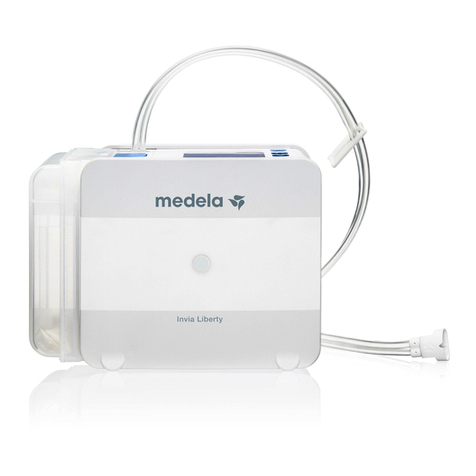
Invia®Liberty™
Quick Card – Patient
Charge battery
Connect the pump to electrical outlet port. Always charge battery
overnight. Battery is fully charged after approximately 4hours and
battery time generally exceeds 14hours.
4. Press quickly to resume
therapy.
5. Discard used canister
according to instructions
provided by your healthcare
professional.
Basic operating commands
Change canister
Turn pump OFF
Press for 3 seconds
2. Press release button on
top of the pump to remove
canister.
3. Attach new canister by
positioning feet first and
snapping canister to the
pump.
Turn pump ON
Press quickly
1. Press for 3 seconds to place
pump in standby mode.
Place pump in Standby
mode
Resume therapy from
Standby mode
Press for 3 seconds Press quickly
1
Troubleshooting
2. Follow instructions on the
display or refer to the Alarm
Table for troubleshooting. If
you cannot solve the problem
contact your healthcare pro-
fessional.
1. Press to temporarily silence
the alarm.
Medela AG
Lättichstrasse 4b
6341 Baar, Switzerland
www.medelahealthcare.com
© Medela AG/201.1174/2019-06/C
2
Invia®Liberty™Quick Card – Patient
Fault
number
Problem description
on the display
Troubleshooting
on the display
Remarks / potential cause of fault
Warning
401
Recharge the battery either by placing the Invia Liberty pump in the
docking station or plug in the charger to the electrical outlet port on the pump.
Remaining time of battery is approximately 30 minutes.
405
If the pump is in Standby mode for more than 5 minutes, an alarm will go off.
To continue therapy press
“On”
[ ].
406 Cool Invia Liberty pump down.
Alarm
301
Dressing:
– Check dressing for air leakage. Press firmly around the edges of the
dressing, around the drain tubing or on the Invia FitPad.
– May apply additional film dressing to seal the leaking area.
Connectors:
– Ensure that the tubing connected to the dressing is connected properly to the
canister tubing.
– Ensure that the canister tubing is inserted straight into the pump.
Canister:
– Ensure that the canister is properly inserted, release the canister
and reposition.
– Ensure that the orange O-ring / gasket, placed beside the canister tubing on the
pump is not missing. Additional O-ring is available via Medela representative.
302 Call your healthcare professional.
305
Recharge the battery either by placing the Invia Liberty pump in the docking
station or plug in the charger to the electrical outlet port on the pump.
Remaining time of battery is 15 minutes.
306 Change the canister, see chapter “Change canister” in the Quick Card or in the
instructions for use.
313 Change the canister, see chapter “Change canister” in the Quick Card or in the
instructions for use.
Internal fault
Restart the pump. If internal fault remains, turn off by pressing
[ > 3 seconds ] and contact your healthcare professional.
Alarm table
United Kingdom
Medela UK Ltd.
Huntsman Drive
Northbank Industrial Park
Irlam, Manchester M44 5EG
UK
Phone +44 161 776 0400
Fax +44 161 776 0444
info@medela.co.uk
www.medelahealthcare.co.uk
International Sales
Medela AG
Lättichstrasse 4b
6341 Ba ar
Switzerland
Phone +41 41 562 51 51
Fax +41 41 562 51 00
customercare@medela.com
www.medelahealthcare.com