Tones you may hear . . .
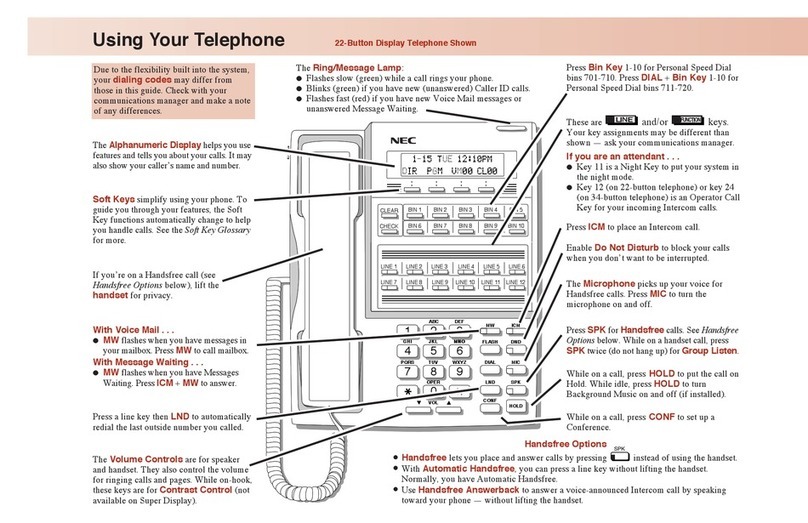
Press DND. If Level 3 programmed: Press DND once to
block outside and ICM calls; press DND twice to block
just outside calls.
The programmed level determines the types of calls
blocked:
Level 1 blocks outside calls, allows ICM calls
Level 2 blocks outside and ICM calls
Level 3 blocks outside and ICM or just outside calls
Do Not Disturb:
To activate or cancel: From extension to be monitored: Lift
handset + FTR + FLASH + Hang up + From monitoring
extension: FTR + FLASH.
Room Monitor:
Set up with three or more parties: Lift handset + ICM +
Dial page zone (308 System uses 80-85, 824 System uses
80-87) + Announce parties to press CONF + Press CONF.
To join: Lift handset + Press CONF.
OR
Set up with one or two parties: Lift handset + ICM + Page
zone + Announce parties to dial same page zone + #.
To join: Dial announced code.
Meet Me Conference:
Place outside call + FTR + 1 + Hang up + Lift handset
when call goes through.
To cancel: Lift handset.
Repeat Redial:
Quick Reference for Other Features
Seize CO line + * + Account Code + * + Telephone
number.
Account Code:
(Display Phone Only) To set: SPK + FTR + 50 + 1 or 2 +
Alarm time (24 hour clock) + * + SPK.
To stop alarm: CLEAR.
To cancel alarm: SPK+ FTR + 50 + 1 or 2 + * + SPK.
Alarm Clock:
This means an ICM call is waiting to be answered. Hang
up to receive call or send Selectable Display Message
(TRFR + message number 1, 2, or 3).
This means you made a mistake in placing a call or using a
feature. Hang up and start over.
Fast busy or warble
tone anytime:
One ring during a call:
SPK + FTR + CLEAR + 4 digits for year (e.g. 2001) + * +
2 digits for month (Jan=01, Feb=02, etc.) + 2 digits for date
(01-31) + * + 1 digit for day (Sun=0, Mon=1, etc.) + * + 4
digits for time (24-hour clock) + * + SPK.
Time/Date Setting:
1. Lift handset and press + .
•Display Phones:
To cancel all your messages without
returning them, press FTR + CLEAR.
To view your messages, press CHECK
+ * (To scroll messages, *=forward,
#=backward). Press ICM to call the
extension shown on the display.
•To listen to voice mail messages, press SPK
+ voice mail key (see One-Touch Keys).
Answering Outside Calls . . .
1. Lift handset or press .
•Press line key if not connected to call.
•Some line keys may be programmed as
a group key.
•To view Caller ID, before answering and
without lifting the handset, press the line
key (If single step access is enabled, press
FLASH before pressing the line key.).
Answering Intercom Calls . . .
1. Speak toward your phone.
•The mic in your phone picks up your voice.
You can lift the handset for privacy.
OR 1. Press the flashing key.
•The mic in your phone picks up your voice.
You can lift the handset for privacy.
Picking up calls not ringing your phone . . .
1. Lift handset.
2. Press or dial .
1. Lift handset (Do not press SPK).
2. Dial your co-worker’s extension or press
if unsure of the extension ringing.
When a call is ringing a
co-worker’s phone: