manuals.online logo
Brands
  1. Home
  2. •
  3. Brands
  4. •
  5. PDQ
  6. •
  7. Door Lock
  8. •
  9. PDQ MR User manual

PDQ MR User manual

Other PDQ Door Lock manuals

PDQ GR2 User manual

PDQ

PDQ GR2 User manual

PDQ 135 User manual

PDQ

PDQ 135 User manual

PDQ MRS User manual

PDQ

PDQ MRS User manual

PDQ KMS pdqSMART User manual

PDQ

PDQ KMS pdqSMART User manual

PDQ 5300 User manual

PDQ

PDQ 5300 User manual

PDQ 5100 Series User manual

PDQ

PDQ 5100 Series User manual

PDQ 6300 User manual

PDQ

PDQ 6300 User manual

PDQ pdqSMART SDS User manual

PDQ

PDQ pdqSMART SDS User manual

PDQ 5100 Series User manual

PDQ

PDQ 5100 Series User manual

PDQ GTS User manual

PDQ

PDQ GTS User manual

PDQ 93203 User manual

PDQ

PDQ 93203 User manual

PDQ KMS User manual

PDQ

PDQ KMS User manual

Popular Door Lock manuals by other brands

Dorma MUNDUS PREMIUM US 10 Mounting instruction

Dorma

Dorma MUNDUS PREMIUM US 10 Mounting instruction

Defiant LG600BRA4BGT Instructions for installation

Defiant

Defiant LG600BRA4BGT Instructions for installation

TRU-BOLT M1740024 manual

TRU-BOLT

TRU-BOLT M1740024 manual

Opera ARCA SLIDE installation instructions

Opera

Opera ARCA SLIDE installation instructions

tell CODELOCK CL5500 Series installation instructions

tell

tell CODELOCK CL5500 Series installation instructions

ABH LR6000 installation instructions

ABH

ABH LR6000 installation instructions

Assa Abloy effeff 827A-IP Mounting instructions

Assa Abloy

Assa Abloy effeff 827A-IP Mounting instructions

Iseo MA1A installation guide

Iseo

Iseo MA1A installation guide

ID Lock 150 user manual

ID Lock

ID Lock 150 user manual

Lockly ACCESS TOUCH PRO user manual

Lockly

Lockly ACCESS TOUCH PRO user manual

iLoq G50S user guide

iLoq

iLoq G50S user guide

SDC Z7835 installation instructions

SDC

SDC Z7835 installation instructions

ilco 452 Installation

ilco

ilco 452 Installation

Samsung shs-h705 user guide

Samsung

Samsung shs-h705 user guide

TRU-BOLT 08102017 user manual

TRU-BOLT

TRU-BOLT 08102017 user manual

CDVI 500-LADJ quick start guide

CDVI

CDVI 500-LADJ quick start guide

Igloohome Deadbolt 2S Metal Grey Installer/user guide

Igloohome

Igloohome Deadbolt 2S Metal Grey Installer/user guide

eSSL FL-300 user manual

eSSL

eSSL FL-300 user manual

manuals.online logo
manuals.online logoBrands
  • About & Mission
  • Contact us
  • Privacy Policy
  • Terms and Conditions

Copyright 2025 Manuals.Online. All Rights Reserved.

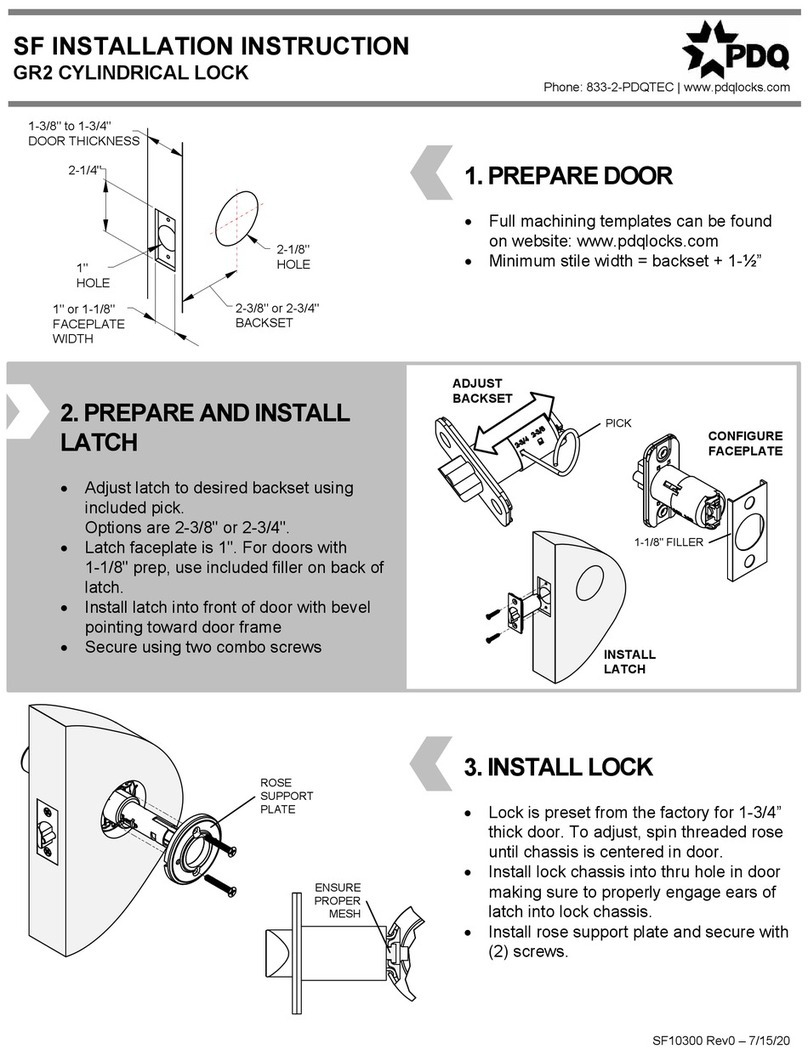
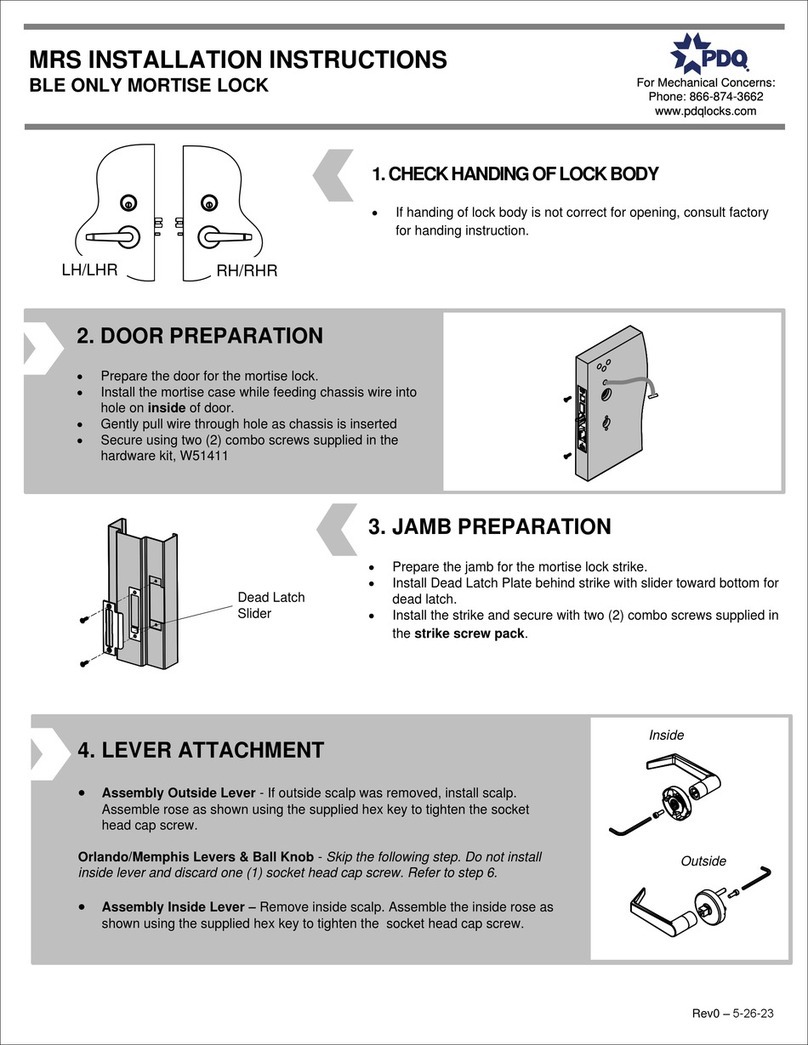
1. DOOR PREPARATION
 Prepare the door for the mortise lock.
Generic template in box, function specific
templates located at www.pdqlocks.com
 Install the mortise case and secure using two (2)
#12-24 combo screws supplied in the hardware kit,
W51440.
2. JAMB PREPARATION
 Prepare the jamb for the mortise lock strike.
 Install Dead Latch Plate behind strike with slider toward
bottom for dead latch.
 Install the strike and secure with two (2) #12-24 combo
screws supplied in the strike screw pack.
3. INSTALL CYLINDER
 Thread cylinder into lock case. Do not secure cylinder, it will be tightened in
Step #7.
6. INSTALL INSIDE TRIM / SECURE TO
DOOR
 Install inside escutcheon to door while aligning lever with drive
spindle - confirm spindle engagement.
 Secure the escutcheon with two (2) #10-24 x 2-1/2" oval head
machine screws, supplied in the Hardware Kit, W51440.
7. TIGHTEN CYLINDER /
INSTALL ARMOR PLATE
 Adjust the cylinder making it flush or slightly recessed into the
escutcheon
For I/C housings, install the slotted set screw through the I/C
bore to secure the housing.
 Secure the cylinder by tightening the cylinder set screw
through the front of the case with the supplied 2.5mm hex key.
Does not apply to I/C when using slotted set screw.
 Install and secure the armor plate with two (2) #8-32 flat head
screws.
Dead Latch
Slider
MR – MORTISE LOCK ESCUTCHEON TRIM
INSTALLATION INSTRUCTION Phone: 833-2-PDQTEC | www.pdqlocks.com
5. INSTALL SPINDLES / OUTSIDE TRIM
Drive Spindles:
 Install spindles and springs on both sides in orientation shown.
Outside Trim
 Install outside escutcheon to door while aligning lever with drive spindle.
 Confirm spindle engagement in lock by rotating the lever down and
verifying that the latch retracts.
W53032 Rev3 – 05/01/19
4. ATTACH LEVERS
 Attach levers using supplied hex key to tighten socket
head cap screws supplied in hardware kit, W51440.
 Be sure to orient each lever for correct lock handing.
Some lever styles are handed and will only work on the
correct side of the lock.
IN-CORRECT CORRECT
SPINDLE ORIENTATION
Cylinder Set
Screw –
Tighten
side(s) with
cylinder
1. DOOR PREPARATION
 Prepare the door for the mortise lock.
Generic template in box, function specific templates
located at www.pdqlocks.com
 Install the mortise case and secure using two (2) #12-24
combo screws supplied in the hardware kit, W51411.
2. JAMB PREPARATION
 Prepare the jamb for the mortise lock strike.
 Install Dead Latch Plate behind strike with slider toward bottom for
dead latch.
 Install the strike and secure with two (2) #12-24 combo screws
supplied in the strike screw pack.
Dead Latch
Slider
MR – MORTISE LOCK SECTIONAL TRIM
INSTALLATION INSTRUCTION Phone: 833-2-PDQTEC | www.pdqlocks.com
3. LEVER ATTACHMENT
 Assemble the outside rose as shown using the supplied 4mm hex key to
tighten the M5x0.8x14mm socket head cap screw. Scalp should be installed
on outside scalp before lever is attached.
Orlando/Memphis Levers & Ball Knob - Skip the following step. Do not install
inside lever and discard one (1) M5x0.8x14mm socket head cap screw. Refer to
step 5.
 Assemble the inside rose as shown using the supplied 4mm hex key to
tighten the M5x0.8x14mm socket head cap screw. Inside rose scalp should
not be installed at this point.
4. INSTALL SPINDLES / OUTSIDE TRIM
Drive Spindles:
 Install spindles and springs on both sides in orientation shown.
Outside Trim
 Install outside escutcheon to door while aligning lever with drive spindle.
 Confirm spindle engagement in lock by rotating the lever down and
verifying that the latch retracts.
IN-CORRECT CORRECT
SPINDLE ORIENTATION
5. INSTALL INSIDE TRIM / ROSE
 Install the inside rose assembly to the inside of the door. Align
the spindle with the lever.
 Secure inside rose assembly with #10-24x1-1/2" flat head
machine screws, supplied in the hardware kit, W51411 -
Confirm the spindle engagement.
 Install the rose scalp by aligning the dimples with the slots in
the rose plate. Secure by rotating clockwise until tight.
FOR ORLANDO/MEMPHIS LEVERS & BALL KNOB
 Slide lever onto spindle. Install M5x0.8 set screw in bottom of
lever. Tighten from underside with supplied 2.5mm hex key.
6. CYLINDER & TURNPIECE
INSTALLATION
 Thread the cylinder into the lock body until the cylinder is flush or
slightly recessed in the cylinder trim collar.
 Secure the cylinder by tightening set screw through front of case,
on the side of cylinder, with the 2.5mm hex key provided in the
hardware kit, W51411.
For I/C housings, install the slotted set screw through the I/C bore
to secure the housing.
 Install the thumb turn and secure with two (2) stainless steel
#6x1/2" truss head sheet metal screws, supplied in the thumb turn
screw pack.
Other Levers Orl, Mem, Bk
7. INSTALL ARMOR PLATE
 Install the armor plate with two (2) stainless steel #8-32 x 1/4"
flat head machine screws.
W53032 Rev3 – 05/01/19