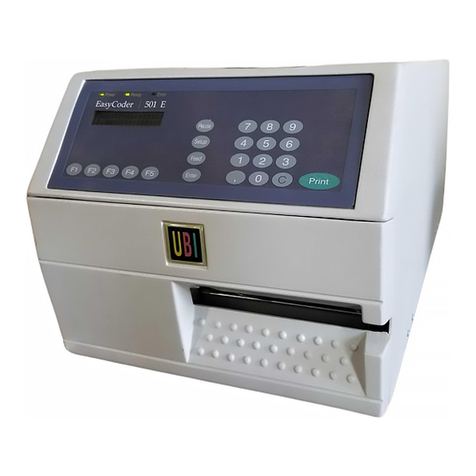
UBI EasyCoder 501 SA User manual

UBI EasyCoder 501 – User's Manual
1
CONTENTS
Introduction Presentation of the EasyCoder 501 ............................................................. 3
Get to Know Your Printer Front View ................................................................................................. 4
Rear View .................................................................................................. 4
Paper Stock Compartment .......................................................................... 5
Paper Load Tear-Off ..................................................................................................... 6
Cut-Off ....................................................................................................... 9
Peel-Off.................................................................................................... 12
Rewind ..................................................................................................... 15
External Supply ........................................................................................ 19
Ribbon Load Loading without using a Ribbon Cassette ................................................. 20
Loading using a Ribbon Cassette .............................................................. 22
Maintenance Printhead Cleaning ................................................................................... 24
External Cleaning ..................................................................................... 26
Printhead Replacement ............................................................................. 27
Troubleshooting ....................................................................................... 28
UBI EasyCoder 501
User's Manual
Edition 6, September 1996
Article No. 1-960326-05

UBI EasyCoder 501 – User's Manual
2
Information in this manual is subject to change without prior notice and does not represent a
commitment on the part of UBI Printer AB.
© Copyright UBI Printer AB, 1996. All rights reserved. Published in Sweden.
EasyCoder and LabelShop are trademarks of United Barcode Industries (UBI).
Apple and Macintosh are registered trademarks of Apple Computer Inc.
Microsoft is a registered trademark of Microsoft Corporation.
Speedo is a trademark of Bitstream, Inc.
TrueType is a trademark of Apple Computer Inc.
Windows is a trademark of Microsoft Corporation.
FCC Notice
United States of America
WARNING:
This equipment generates, uses, and can radiate radio frequency energy and if not installed and used in accordance
with the instructions manual, may cause interference to radio communications. It has been tested and found to
comply with the limits for a Class A computing device pursuant to Subpart J of Part 15 of FCC Rules, which are
designed to provide reasonable protection against such interference when operated in a commercial environment.
Operation of this equipment in a residential area is likely to cause interference in which case the user at his own
expense will be required to take whatever measures may be required to correct the interference.
DOC Notice
Canada
Canadian Dept. of Communication
REGULATIONS COMPLIANCE
(DOC-A)
This digital apparatus does not exceed the class A limits for radio noise emissions from a digital apparatus as set out
in the radio interference regulations of the Canadian Department of Communication.
✳ ✳ ✳
Ministère des Communications du Canada
CONFORMITE DE REGLEMENTS
(DOC-A)
Leprésentappareilnumériquen´émetpas de bruitsradio-électriquesdépassant les limitesapplicablesaux appareils
numériques de classe A prescrites dans le règlement sur brouillage radioélectrique édicté par le Ministère des
Communications du Canada.
VDE Notice
Germany
ALLGEMEINE VORSCHRIFT:
Reparaturen oder sonstige Eingriffe, die sich nicht auf normale Bedienung der Maschine beziehen, dürfen
ausschließlich nur von einem ausgebildeten, zuständigen Fachmann vorgenommen werden.

UBI EasyCoder 501 – User's Manual
3
INTRODUCTION
The UBI EasyCoder 501 is a series of modular
multipurpose thermal transfer/direct thermal printers.
Theycomeinthreemainmodelsintendedfordifferent
types of applications:
•EasyCoder 501is mainly intended to be controlled
by a host computer using standard or custom-made
application software, e.g. theUBI LabelShop label-
design program for Microsoft Windows. Being a
low-cost alternative, it has a somewhat lower print
speed and fewer options than the other members of
thisprinterfamily.EasyCoder501canbefittedwith
an optional scalable fonts kit that allows the use of
outlinefontsinSpeedoandTrueType format.Exter-
nally, the EasyCoder 501 is distinguished by the
single Print key on its front panel.
•EasyCoder 501 E (Enhanced) offers higher print
speed and a larger keyboard than EasyCoder 501.
The large number options in regard of media hand-
ling and computer connection makes this printer a
highly flexible alternative. It is recommended for
installations, where you want to switch between
different application programs, or create your own
programs in the built-in UBI Fingerprint program-
minglanguage.EasyCoder501E can,as anoption,
be fitted with a scalable fonts kit that allows the use
ofoutlinefontsinSpeedoandTrueTypeformat.This
printermodelcaneasilyberecognizedbyits22-key
membrane keyboard.
•EasyCoder501SAisjustasquickandflexibleasthe
EasyCoder 501 Emodel, but is fitted with a special
“Stand-Alone”software,whichallowstheprinterto
be operated independently, without any computer
connection. This printer model is fitted with a large
built-in alphanumeric keyboard. The EasyCoder
501SAcaneasilybe“docked”toapersonalcompu-
terandloadedwithlabeltextsandformatscreatedin
the UBI LabelShop label-editing program running
under Microsoft Windows.
Informationonthedifferentmodelsandoptionscanbe
found in the Technical Manual, which also describes
installation and computer connection.
The following manuals may be of interest to the
operator or programmer:
• UBI EasyCoder 501, Operator's Guide
• UBI Shell Standard, Startup Manual
• UBI Shell Enhanced, Startup Manual
• UBI Stand-Alone Concept, Operating Instructions
• UBI EasyCoder 501, Technical Manual
• UBI Fingerprint Direct, Programmer's Guide
• UBI Fingerprint, Programmer's Guide
• UBI Fingerprint, Reference Manual
• UBI LabelShop, various manuals
• UBI Windows Driver, Installation Instructions
• UBI Macintosh Driver, Installation Instructions
F1 F2 F3 F4 F5
Pause
Setup
Feed
Enter
7 8 9
4 5 6
1 2 3
. 0 C
Print
Power Ready Error
EasyCoder 501 E
Print
Power Ready Error
EasyCoder 501
Caps Ins Del
Power Ready Error
EasyCoder 501 SA
Shift
ZXCVBNM,.
ASDFGHJKL+
QWERTYUIO
Alt Pause Save Feed
456
Space
Clear
0
Enter
P123
Esc
789
<>[]^;:ÖÄØ
§@~£'_*?–ÅÆ
|"#$%&/()=ÜßÙ
ÉÈÀ
Çѵ
Print
UBI EasyCoder 501 SA
UBI EasyCoder 501 E
UBI EasyCoder 501

UBI EasyCoder 501 – User's Manual
4
UBI PRINTER AB • SWEDEN
Type
Art. No.
Ser. No.
115/230 V 2.6/1.3 A 50–60 Hz
GET TO KNOW YOUR PRINTER
Keyboard
Label Taken Sensor
(option)
Display Window
LED Indicator Lamps
Cutter Interface Connector
Memory Card Adapter
(option)
Front Door
The front door can be swung open and removed
from the hinges. It can also be replaced by an
optional paper cutter unit.
Continued!
Voltage Switch
Provision for Optional Interface Connectors
Display Contrast Adjustment
Main Switch
Mains Receptacle
Machine Sign
Lower External Paper Intake
Upper External Paper Intake
Serial Interface Connector "uart1:"

UBI EasyCoder 501 – User's Manual
5
Backing Paper
Take-Up
IMPORTANT PRINTHEAD AND RIBBON INFORMATION
The use of any thermal transfer ribbons, other than those supplied by UBI, will invalidate
the printhead warranty. UBI thermal transfer ribbons are engineered specifically for this printhead.
The quality of thermal and thermal transfer media supplies in this printer is also of great importance
for the quality of printing bar codes and a long life of the printhead. UBI has carefully matched the
paper we recommend/provide to the needs of this printer. We therefore strongly advise of using
only UBI recommended/provided supplies to ensure a high quality printing.
TEAR-OFF
Load
Print
+
-
The paper stock compartment becomes accessible when the
right-handandfrontdoorsareswungopen.Althoughtheprinter
is operable when the doors are left opened or completely
removed, you are strongly recommended to keep them closed
duringnormaloperation,soastopreventtheprintermechanism
from being exposed to dust.
The adapter for 76 mm (3") paper roll cores is included in the
delivery and can be fitted on the paper supply spool.
Lock the adapter by means of the screw, making sure that the
screwhitstheevenlyroundedplasticsurface,ratherthantheleaf
spring or the cam.
GET TO KNOW YOUR PRINTER, cont'd.
Clip
Guide
Shaft
Paper Supply Spool
Transfer Ribbon Supply
Transfer Ribbon Take-Up
Slack Absorber
Printhead Lift Knob
Thermal
Printhead
Guide Ring
Dispenser Edge
F5
F4
F3
F2
F1 C
0
.
Enter
3
2
1
Feed
6
5
4
SetUp
9
8
7
Pause
Print
Power Ready Error
External Guides
(option)
3" Adapter
Label Roll
Retainer
(option)
Rewind
Guide

UBI EasyCoder 501 – User's Manual
6
PAPER LOAD – TEAR OFF
Open the front and right-hand doors. Turn the printhead lift knob to “Load” position.
Remove the empty paper core, if any.
In case of paper roll with a 76.2 mm (3 inches) core, first
fit the adapter on the paper supply spool.
Fit a new paper roll on the paper supply spool and push
the roll inwards as far as it will go.
1
3
4b 5a
4a
2
F5
F4
F3
F2
F1 C
0
.
Enter
3
2
1
Feed
6
5
4
SetUp
9
8
7
Pause
Print
Power Ready Error
Load
Print
38-40 mm
(1.5")
76 mm
(3")
In case of an EasyCoder 501, thread the paper under-
neath the guide shaft behind the print mechanism.

UBI EasyCoder 501 – User's Manual
7
PAPER LOAD – TEAR OFF, cont'd.
5b
6
8 9a
7
In case of an EasyCoder 501 E or 501 SA, rotate the label slack absorber 180˚ clockwise to open position (snap-lock).
Then thread the paper underneath the slack absorber and under the guide plate of the label stop sensor.
Push the paper inwards as far as it will go.This diagram shows the path of the paper web.
Turn the printhead lift knob to “Print” position.
Load
Print
In case of an EasyCoder 501, adjust the green guide ring
so the paper is guided with a minimum of play.

UBI EasyCoder 501 – User's Manual
8
PAPER LOAD – TEAR OFF, cont'd.
Close the front and side doors.
9b
11 12
10
To tear off the paper, pull it downwards.
Feed out two blank copies by pressing
the <Print> key twice.
In case of an EasyCoder 501 E or 501 SA, release the
slack absorber (1). Adjust the green guide ring so the
paper is guided with a minimum of play (2).
2.
1.
F5
F4
F3
F2
F1 C
0
.
Enter
3
2
1
Feed
6
5
4
SetUp
9
8
7
Pause
Print
Power Ready Error
F5
F4
F3
F2
F1 C
0
.
Enter
3
2
1
Feed
6
5
4
Setup
9
8
7
Pause
Print
Power Ready Error
EasyCoder 501 E
2x
# 1
# 2
F5
F4
F3
F2
F1 C
0
.
Enter
3
2
1
Feed
6
5
4
Setup
9
8
7
Pause
Print
Power Ready Error

UBI EasyCoder 501 – User's Manual
9
PAPER LOAD – CUT OFF
Open the optional cutter unit and the right-hand door.
Turn the printhead lift knob to “Load” position.
1
3
5a 5b
4
2
Remove the empty paper core, if any.
Turn off the power using the switch on the rear plate.
Fit a new paper roll on the paper supply spool and push
the roll inwards as far as it will go.
Load
Print
38-40 mm
(1.5")
76 mm
(3")
In case of paper roll with a 76.2 mm (3 inches) core, first
fit the adapter on the paper supply spool.

UBI EasyCoder 501 – User's Manual
10
PAPER LOAD – CUT OFF, cont'd.
This diagram shows the path of the paper web.
7b
8 9
Turn the printhead lift knob to “Print” position.Push the paper inwards as far as it will go.
Load
Print
6
In case of an EasyCoder 501 E or 501 SA, rotate the label slack absorber 180˚ clockwise to open position (snap-lock).
Then thread the paper underneath the slack absorber and under the guide plate of the label stop sensor.
7a
In case of an EasyCoder 501, thread the paper under-
neath the guide shaft behind the print mechanism.
Other manuals for EasyCoder 501 SA
4
Table of contents
Other UBI Printer manuals
UBI
UBI EasyCoder 601 User manual
UBI
UBI EasyCoder 301 User manual
UBI
UBI EasyPak 501 User manual
UBI
UBI EasyCoder 101 User manual
UBI
UBI EasyCoder 71 User manual
UBI
UBI EasyCoder 91 User manual
UBI
UBI EasyCoder 501 User manual
UBI
UBI EasyCoder 501E User manual
UBI
UBI EasyCoder 101 User manual
UBI
UBI EasyCoder 101 User manual
UBI
UBI EasyCoder 101 Manual
UBI
UBI EasyCoder 401 User manual
UBI
UBI EasyCoder 71 User manual
UBI
UBI EasyCoder 601 XP User manual
UBI
UBI EasyCoder 91 User manual
UBI
UBI EasyPak 201 IIE User manual
UBI
UBI EasyCoder 201 II User manual
UBI
UBI EasyCoder 401 Linerless User manual
UBI
UBI EasyCoder 401 User manual
UBI
UBI EasyPak 501 SA User manual