©Vantage, 41551 / IS-0542-A / InFusion Equinox 73 LCD Touchscreen – MODEL: EQ73TB-TI page 1 of 3
INSTALLATION
VANTAGECONTROLS.COM VANTAGE INSTALL GUIDES
1061 South 800 East • Orem, Utah 84097 • Telephone 801 229 2800 • Fax 801 224 0355 Equinox 73 LCD Touchscreen – MODEL: EQ73TB-TI
Overview
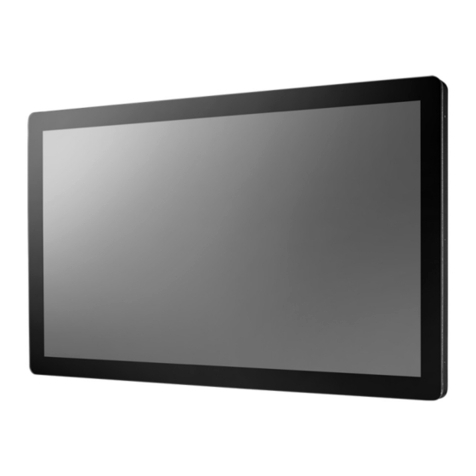
Vantage's Equinox 73 active matrix LCD touchscreen
continues the Vantage commitment to LCD in-wall control
centers. The Equinox 73 LCD Interface is a dedicated system
portal to whole home control. The 7" touchscreen displays
media rich widgets in a dashboard layout. Each widget’s
content has been carefully designed to provide the ultimate
user experience. Vantage's Equinox 73 system uses self
discovering technology, eliminating countless hours of tedious
programming. Navigate and control, with real-time feedback,
lighting, audio, video, climate, weather, security, cameras,
energy monitoring scenarios, and more through a single layer
navigation experience. For additional customization and
control, select individual widgets directly right on the
touchscreen.
Equinox 73 Features/Operations
Wide screen orientation only.
Equinox platform provides built-in widgets using Vantage
proprietary auto discovery widgets for fast automatic
screen design.
Equinox 73 fully incorporates Vantage’s consistent user
experience interface, eliminating learning curves normally
associated with switching interface devices.
Powered over PoE*/PoE+ Ethernet, or 12VDC transformer,
o*PoE optional Ethernet 4 Port PoE Injector part
number EQ-DA2400-POE.
o12VDC adaptor part number VFA-0005.
Communicates over Vantage Ethernet bus (InFusion
controller and Equinox should be connected to the same
local network).
o– or – Connect to a WiFi*Ethernet port.
*Optional WiFi Dongle, part # EQ-WIFI-01.
Firmware upgradable from Design Center over Ethernet.
Built-in ambient light sensor for “active,” AUTO mode
screen brightness and off when dark option when
“inactive”.
Inactive mode dims or turns screen off in 1 minute if no
activity.
Built-in proximity activation, 6” maximum, sets screen to
Active brightness when approached.
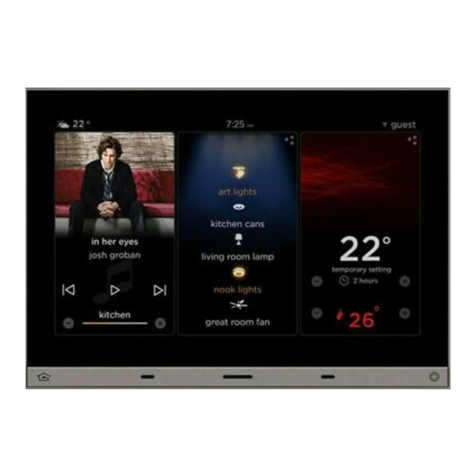
Displays three widgets at a time.
Mechanical buttons, bottom left and right;
oleft navigates to home screen position---
oright may be assigned to a programmed task---
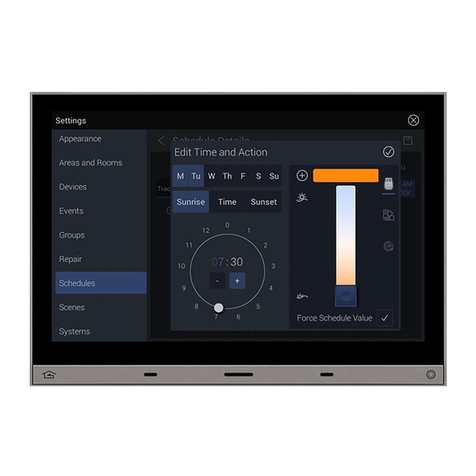
Profiles; customize dashboard level and hardware settings:
oSelect dashboard, to arrange order of widgets to
display.
oSelect options to select language, 12/24 hour clock,
and fahrenheit/celsius temperature display.
oSelect device, to view and set hardware settings,
system information, network settings, reset user
settings, and view additional information settings.
oSelect profiles, to create, delete, or rename profiles.
Equinox 73 uses the same widgets as Android tablets and
phones, and iPads, iPhones, and iPods.
Top of screen displays:
o(left) icon for current weather conditions and
temperature, via Vantage weather service,
o(center) time of day, and
o(right) selected profile.
Middle to bottom of screen displays widgets (the order
may be changed within each profile).
oWidgets (some widgets require specific Vantage
drivers in the Design Center project file):
Scene,
Audio,
Video,
Climate,
Weather
Lighting,
Security,
Cameras,
Energy and more (coming soon)
Raise/Lower dimmable loads and volume control via minus
/ plus (-/+) graphical buttons.
Graphical icons and text color track load status.
Press and release the upper right section on each widget
for additional control and/or customization.
Manual Reboot of Equinox 73 – press and hold both
mechanical buttons until screen goes dark (about 3
seconds), then release.
oNote, if buttons are held in too long the screen will
boot to service mode, and will not load the
application code. Repeat manual reboot – without
holding buttons to long – to clear this mode.
Specifications
Description Specification
Dimensions, HWD
(at wall surface)
4.9” x 6.9” x 0.37”
124mm x 175mm x 9mm
Dimensions, HWD
(overall)
4.9” x 6.9” x 2.1”
124mm x 175mm x 53mm
Weight 1.6 lb or 725.75g
Display Active Matrix Color LCD
Display Size 7” diagonal
Display Resolution 800 x 480 pixels
Power 12VDC via PoE, PoE+, or 12VDC adaptor
Surge Suppression Yes
Mounting See Installation section below
Sound Option Adjustable volume level - touch interaction
Wiring Connections Communication: Ethernet RJ45 or WiFi dongle
Power: PoE/PoE+ or 12VAC adaptor
Addressing self addressing through software
Finishes TRIM - Titanium
TOUCHSCREEN – Black Glass
Glass Surface Chemically Strengthened
Ambient Operating
Temperature 32-95°F -or- 0-35°C
Ambient Operating
Humidity 5-95% non-condensing
CE & FCC Yes
System Requirements
Equinox 73 is compatible with InFusion Design Center version
3.2 software or higher. For new projects it is recommended
that firmware and software be kept to the most current
release.
Installation
Installation of Vantage products should be performed or
supervised by a Certified Vantage Installer. Installation kits for
Equinox 73 touchscreens are compatible with global electrical
and installation standards. For new construction or retrofit
installations. Please see the additional installation sheets*
referenced below for Equinox 73 installation preparation.
*Installation Instructions
oStandard
Equinox 73 LCD Standard_EQ73ST-INSTALL_install.pdf
oRetrofit or TPT650 Replacement
Equinox 73 LCD Retrofit_EQ73RT-INSTALL_install.pdf
1. Connect Equinox 73 to Ethernet PoE and/or other wiring
connection options used in the installation.
2. Insert the Equinox 73 into the mounting ring from the
standard or retrofit kit.
3. Make sure the Equinox 73’s four Spring Clips lock into the
standard or retrofit mounting ring (click on Standard or
Retrofit install sheets above to open).