6
DORO CARE FOR TECHNICAL HELP SEE PAGE 10
ALARM FUNCTION
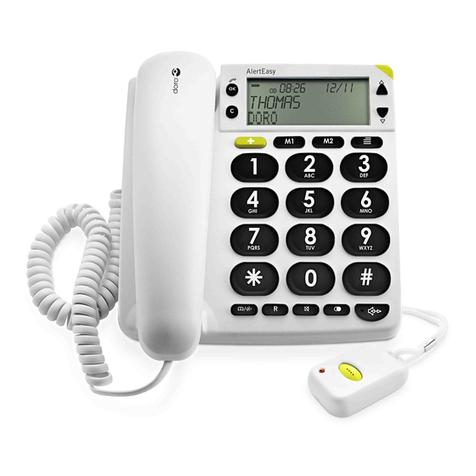
#The alarm activates by the pressing and holding the alarm button for
2 seconds, on either the telephone, or remote alarm.
#If the alarm function is accidently triggered, press and hold the STOP
button, until the telephone alarm button illuminates Green.
#A corded alarm button may also be installed, please refer to page 8 for
further details.
#All telephone numbers will be dialled (M1 - M4) until someone answers, at
which point your recorded message will be played.
#If the person called then presses the #button, this will activate the DORO
CARE hands free function. (REFER TO ‘WARNING’ ON PAGE 4).
#If there is no response the DORO CARE will wait for 60 seconds before
dialing the next memory number.
#The memories will be dialled for up to 14 times.
#Several of these functions can be adjusted, please refer to the advanced
alarm settings on page 8.
REMOTE ALARM BUTTON
A remote alarm button is supplied and can be carried by
#A Belt clip.
#A Neck-strap.
#An Arm-strap.
You must install a quality Alkaline battery (1 x 12v type 23A) for the remote button
to function.
ALARM RESPONSE OPTIONS
There are three alternative options available to the person being called.
#Press # - To connect to the speaker phone and terminate the voice message. After
approximately 3 minutes you will hear a warning tone, press #again to continue
the call for 3 minutes. Press the *button to terminate the call.
#Press *- To turn off the alarm and terminate memory dialing.
#Press nothing - After 60 seconds the telephone will dial the next memory number.
VOICE MESSAGE
If the alarm function is triggered a Voice message (30 seconds maximum) will be
played.
Example messages:
#-"This is Simon Smith at 10 Bridge street in London. I need help. Press # to
connect this call to speakerphone operation".
#-"This alarm is from the store at 10 Bridge street in London. We are in trouble
and need help immediately. Press *to confirm you have received this message to
stop this telephone dialling other people".