____________________________________________________________________________________
____________________________________________________________________________________
NTU-2V, NTU-RG Optical Network Terminals 3
TABLE OF CONTENTS
1 INTRODUCTION.........................................................................................................................................................................5
2 DEVICE DESCRIPTION ................................................................................................................................................................6
2.1 Application ........................................................................................................................................................................6
2.2 Models ..............................................................................................................................................................................6
2.3 Device Specification ..........................................................................................................................................................6
2.4 Key Specifications..............................................................................................................................................................9
2.5 Design..............................................................................................................................................................................11
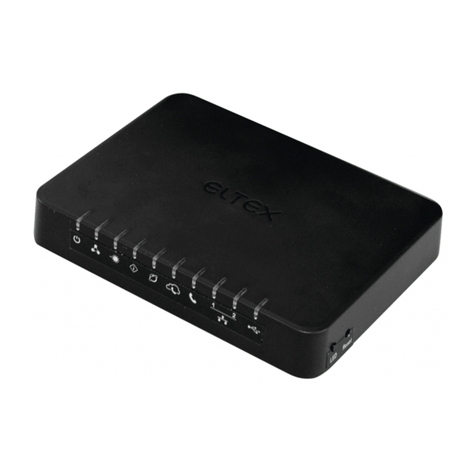
2.5.1 NTU-2V.........................................................................................................................................................................11
2.5.1.1 NTU-RG......................................................................................................................................................................12
2.6 Light Indication................................................................................................................................................................14
2.6.1 NTU-2V.........................................................................................................................................................................14
2.6.2 NTU-RG.........................................................................................................................................................................14
2.6.3 LAN Interface Indication...............................................................................................................................................15
2.7 Reboot and Reset to Factory Settings.......................................................................................................................15
2.8 Delivery Package .......................................................................................................................................................15
3 NTU-RG-1402G-W ARCHITECTURE .................................................................................................................................16
4 NTU-RG-1402G-W CONFIGURATION THROUGH WEB INTERFACE. USER ACCESS..........................................................17
4.1 The Device Info Menu. Device Information ..............................................................................................................18
4.1.1 The Summary Submenu. Device General Information ........................................................................................18
4.1.2 The WAN Submenu. The Status of Services ........................................................................................................18
4.1.2.1 The Detail Submenu. Detailed Information.........................................................................................................19
4.1.3 The LAN Submenu. Monitoring of LAN Ports. Monitoring of Wi-Fi Interface Status ..........................................19
4.1.4 The Statistics Submenu. Traffic Flow Information for Ports of the Device .........................................................19
4.1.5 The Route Submenu. The Routing Table .............................................................................................................21
4.1.6 The ARP Submenu. Display of the ARP Protocol Cache.......................................................................................21
4.1.7 The DHCP Submenu. Active DHCP Leases ...........................................................................................................22
4.1.8 The Wireless Stations Submenu. Connected Wireless Devices...........................................................................22
4.1.9 The Voice Submenu. Monitoring of Telephone Ports ........................................................................................23
4.2 The PPPoE Menu. PPP Settings .................................................................................................................................24
4.3 The Advanced Setup Menu. Advanced Configuration ..............................................................................................24
4.3.1 The LAN Submenu. Configuration of Main Parameters ......................................................................................24
4.3.2 The Port Mapping Submenu. Distribution Configuration for Ports and Services................................................25
4.3.3 The NAT Submenu. NAT Settings ........................................................................................................................25
4.3.3.1 The Virtual Servers Submenu. Settings of Virtual Servers...................................................................................25
4.3.3.2 The Port Triggering Submenu. Port Triggering Configuration .............................................................................27
4.3.3.3 The DMZ Host Submenu. DMZ Settings ..............................................................................................................28
4.3.4 The Security Submenu. Security Settings ............................................................................................................28
4.3.4.1 The IP Filtering Submenu. Filtering Settings for Addresses.................................................................................28
Filtration Settings for Outgoing Traffic .................................................................................................................................28
Filtration Settings for Incoming Traffic .................................................................................................................................29
4.3.4.2 The MAC Filtering Submenu. Filtering Settings for MAC Addresses ...................................................................31
4.3.5 The Parental Control Submenu. Parental Control: Restrictions Configuration ...................................................32
4.3.5.1 The Time Restriction Submenu. Configuration of Session Time Restriction .......................................................32
4.3.5.2 The Url Filter Submenu. Internet Access Restriction Settings.............................................................................33
4.3.6 The Dynamic DNS Menu. Settings of Dynamic Domain Name System ...............................................................33
4.3.7 The UPnP Menu. Automatic Setup of Network Devices .....................................................................................35
4.4 The Voice Menu. SIP Telephony Settings..................................................................................................................36
4.4.1 The SIP Basic Setting Submenu. SIP General Settings .........................................................................................36
4.4.2 The SIP Advanced Setting Submenu. SIP Advanced Settings ..............................................................................37
4.5 The Wi-Fi Menu. Wi-Fi Network Setup .....................................................................................................................38
4.5.1 The Basic Submenu. General...............................................................................................................................38
4.5.2 The Security Submenu. Security Settings ............................................................................................................39
4.5.3 The MAC Filter Submenu. Filtering Settings of MAC Addresses .........................................................................42
4.5.4 The Wireless Bridge Submenu. Configuration of Wireless Connection in the Bridge Mode ..............................43
4.5.5 The Advanced Submenu. Advanced Settings ......................................................................................................44
4.6 The Storage Service Menu. File Storage Services .....................................................................................................45
4.6.1 The Storage Device Info Submenu. Information on Connected Devices ............................................................45