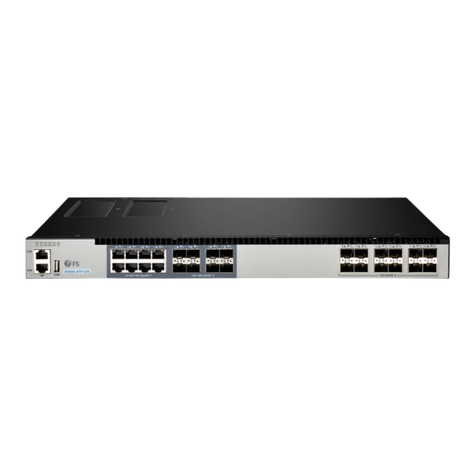
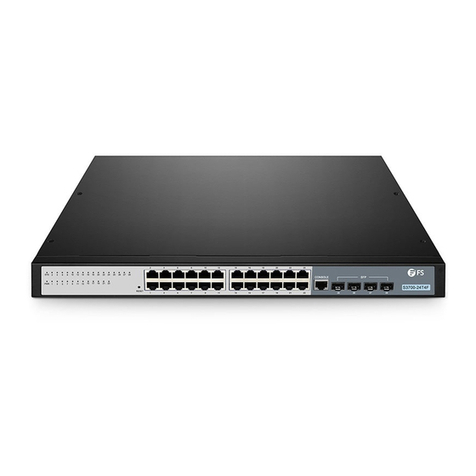
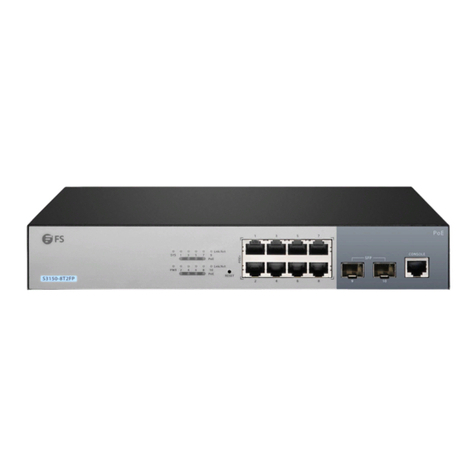
FS S1900-8T User manual

Introduction
S1900-8T
Thank you for choosing S1900-8T switch. This guide is designed to
familiarize you with the layout of the switch and describes how to
deploy the switch in your network.
Accessories
Grounding Cable x1
Expansion Tube x2
(Inner diameter: 2.5mm,
length: 25mm)
Power Adapter x1
Rubber Pad x4
Grounding Screw x1
M3 Screw x2
(M3*25mm)
1PWR 2 4 5 6 7 8
3
S1900-8T
1EN
V2.1
Quick Start Guide
Quick-Start Anleitung
Guide de Démarrage Rapide
ETHERNET UNMANAGED SWITCH
SWTCH ETHERNET NON GÉRÉ
ETHERNET UNMANAGED SWITCH
S1900-8T
1PWR 2 4 5 6 7 8
3
S1900-8T

Introduction
S1900-8T
Thank you for choosing S1900-8T switch. This guide is designed to
familiarize you with the layout of the switch and describes how to
deploy the switch in your network.
Accessories
Grounding Cable x1
Expansion Tube x2
(Inner diameter: 2.5mm,
length: 25mm)
Power Adapter x1
Rubber Pad x4
Grounding Screw x1
M3 Screw x2
(M3*25mm)
1PWR 2 4 5 6 7 8
3
S1900-8T
1EN
1PWR 2 4 5 6 7 8
3
S1900-8T
Front Panel
Back Panel Ports
Hardware Overview
PWR RJ45
Ports Description
RJ45 10/100/1000BASE-T ports for Ethernet connection
LEDs Status Description
PWR
RJ45
Green Switch is powered on.
Power supply is absent or abnormal.
10/100/1000BASE-T port is linked.
The RJ45 port is transmitting or receiving packets
at 10/100/1000Mbps.
O
Green
O Port is not linked.
Blinking Green
RJ45
54321
678
2 EN

1PWR 2 4 5 6 7 8
3
S1900-8T
Front Panel
Back Panel Ports
Hardware Overview
PWR RJ45
Ports Description
RJ45 10/100/1000BASE-T ports for Ethernet connection
LEDs Status Description
PWR
RJ45
Green Switch is powered on.
Power supply is absent or abnormal.
10/100/1000BASE-T port is linked.
The RJ45 port is transmitting or receiving packets
at 10/100/1000Mbps.
O
Green
O Port is not linked.
Blinking Green
RJ45
54321
678
2 EN

1. Attach four rubber pads to the bottom.
2. Place the chassis on a desk.
1. Drill two suitable holes, press two expansion tubes into the two
holes respectively.
Mounting the Switch
Desk Mounting
Wall Mounting
1PWR 2 4 5 6 7 8
3
S1900-8T
4 EN
Back Panel
Site Environment:
Do notoperate itin an areathat exceeds an ambient
temperature of 40°C.
The installationsite must be free fromleaking or dripping
water, heavy dew, and humidity.
Ensure walland working platforms are well earthed.
The installation site must be well ventilated. Ensure that there is
Be sure that the switch is level and stable to avoid any
hazardous conditions.
Do notinstall the equipmentina dusty environment.
Installation Requirements
Before you begin the installation, make sure that you
have the following:
Desktop mounting: ESD bracelet (or ESD gloves)
Wall mounting: ESD bracelet(or ESD gloves), ladder, marker,
hammer drill, rubber hammer, screwdriver
54321
678
Power Supply
3EN

1. Attach four rubber pads to the bottom.
2. Place the chassis on a desk.
1. Drill two suitable holes, press two expansion tubes into the two
holes respectively.
Mounting the Switch
Desk Mounting
Wall Mounting
1PWR 2 4 5 6 7 8
3
S1900-8T
4 EN
2. Insert the screw into the expansion tube respectively.
3. Hang the switch on the two screws.
5EN

2. Insert the screw into the expansion tube respectively.
3. Hang the switch on the two screws.
5EN
4. Installation is completed.
1. Connect one end of the grounding cable to a proper earth ground,
such as the wall in which the switch is mounted.
2. Secure the grounding lug to the grounding point on the left side of
the switch with the washer and screws.
Grounding the Switch
CAUTION: The earth connection must not be removed unless all supply
connections have been disconnected.
6 EN

4. Installation is completed.
1. Connect one end of the grounding cable to a proper earth ground,
such as the wall in which the switch is mounted.
2. Secure the grounding lug to the grounding point on the left side of
the switch with the washer and screws.
Grounding the Switch
CAUTION: The earth connection must not be removed unless all supply
connections have been disconnected.
6 EN
54321
6
7
8
1. Plug the DC power cord into the power port on the back of the
switch.
2. Connect the other end of the power adapter to an DC power source.
Connecting the Power
WARNING: Do not install power adapter while the power is on.
7EN

54321
6
7
8
1. Plug the DC power cord into the power port on the back of the
switch.
2. Connect the other end of the power adapter to an DC power source.
Connecting the Power
WARNING: Do not install power adapter while the power is on.
7EN
54321
6
7
8
Connecting the RJ45 Ports
1. Connect an Ethernet cable to the RJ45 port of a computer, printer,
network storage, or other network devices.
2. Connect the other end of the Ethernet cable to the RJ45 port of the
switch.
8 EN

54321
6
7
8
Connecting the RJ45 Ports
1. Connect an Ethernet cable to the RJ45 port of a computer, printer,
network storage, or other network devices.
2. Connect the other end of the Ethernet cable to the RJ45 port of the
switch.
8 EN

Einführung
S1900-8T
Vielen Dank, dass Sie sich für einen S1900-8T Switch entschieden
haben. Diese Anleitung soll Sie mit dem Aufbau des Switches vertraut
machen und beschreibt, wie Sie den Switch in Ihrem Netzwerk
einsetzen.
Zubehör
Erdungskabel x1
Expansionsrohr x2
(Innendurchmesser:
2,5 mm, Länge: 25 mm)
Netzadapter x1
Gummipad x4
Erdungsschraube x1
M3-Schraube x2
(M3*25mm)
1PWR 2 4 5 6 7 8
3
S1900-8T
10 DE
Support and Other Resources
Download https://www.fs.com/products_support.html
Help Center https://www.fs.com/service/fs_support.html
Contact Us https://www.fs.com/contact_us.html
Product Warranty
FS ensures our customers that any damage or faulty items due to our
you receive your goods. This excludes any custom made items or
tailored solutions.
Warranty: S1900-8T Switch enjoys 2 years limited warranty
against defect in materials or workmanship. For more details
about warranty, please check at
https://www.fs.com/policies/warranty.html
2
Return: If you want to return item(s), information on how to
return can be found at
https://www.fs.com/policies/day_return_policy.html
9EN
Table of contents
Languages:
Other FS Switch manuals

FS
FS S5800-48F4S User manual
FS
FS S5500-48T8SP User manual
FS
FS S3700-24T4F Instruction Manual
FS
FS NC8200 Series User manual
FS
FS S1150-8T2F User manual
FS
FS S2805S Series User manual
FS
FS S3700-24T4F Instruction Manual
FS
FS S5500-48T8SP Operating instructions
FS
FS S3700-24T4F Instruction Manual

FS
FS Fiberstore S8050-20Q4C User manual