manuals.online logo
Brands
  1. Home
  2. •
  3. Brands
  4. •
  5. Lilin
  6. •
  7. IP Camera
  8. •
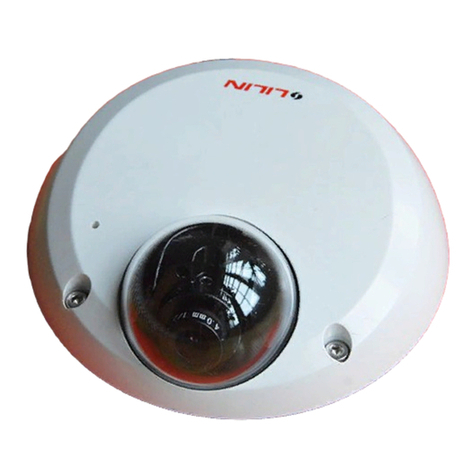
  9. Lilin IRS1204 User manual

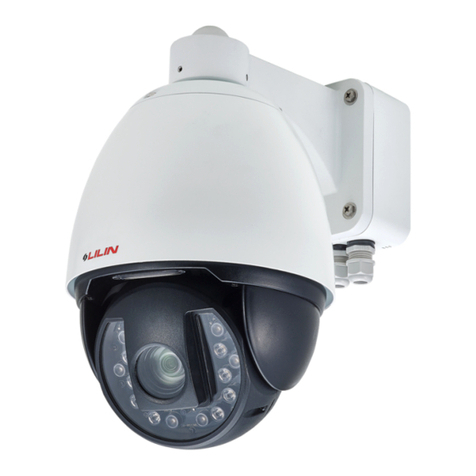
Lilin IRS1204 User manual

This manual suits for next models

3

Other Lilin IP Camera manuals

Lilin AHD7324AX10 User manual

Lilin

Lilin AHD7324AX10 User manual

Lilin 6122 Manual

Lilin

Lilin 6122 Manual

Lilin IPD2122S4.3 User manual

Lilin

Lilin IPD2122S4.3 User manual

Lilin UHG1182E User manual

Lilin

Lilin UHG1182E User manual

Lilin IPG1022ELS User manual

Lilin

Lilin IPG1022ELS User manual

Lilin IPS622M User manual

Lilin

Lilin IPS622M User manual

Lilin IPD6220ES3.6 User manual

Lilin

Lilin IPD6220ES3.6 User manual

Lilin ipg1022esx User manual

Lilin

Lilin ipg1022esx User manual

Lilin IPR414/418ESX3 User manual

Lilin

Lilin IPR414/418ESX3 User manual

Lilin FD2452E User manual

Lilin

Lilin FD2452E User manual

Lilin UFG1122 Guide

Lilin

Lilin UFG1122 Guide

Lilin AHD701A3.6 User manual

Lilin

Lilin AHD701A3.6 User manual

Lilin PZD6422CSE-2 User manual

Lilin

Lilin PZD6422CSE-2 User manual

Lilin IPR732ES User manual

Lilin

Lilin IPR732ES User manual

Lilin PIH-0364X WN IP User manual

Lilin

Lilin PIH-0364X WN IP User manual

Lilin AHD7424AX4.2 User manual

Lilin

Lilin AHD7424AX4.2 User manual

Lilin iMEGAPRO IPD2122ES User manual

Lilin

Lilin iMEGAPRO IPD2122ES User manual

Lilin AHD612AX4.2 User manual

Lilin

Lilin AHD612AX4.2 User manual

Lilin PIH-0364X WN IP User manual

Lilin

Lilin PIH-0364X WN IP User manual

Lilin PZD6422X3 User manual

Lilin

Lilin PZD6422X3 User manual

Lilin IPR7424 User manual

Lilin

Lilin IPR7424 User manual

Lilin AHD DOME User manual

Lilin

Lilin AHD DOME User manual

Lilin IPR614ES4.3 User manual

Lilin

Lilin IPR614ES4.3 User manual

Lilin IPR414/418ESX3 User manual

Lilin

Lilin IPR414/418ESX3 User manual

Popular IP Camera manuals by other brands

Challenger Smart Force ASFCAM2 quick start guide

Challenger

Challenger Smart Force ASFCAM2 quick start guide

Foscam FI8903W user manual

Foscam

Foscam FI8903W user manual

BenQ DVY22 user manual

BenQ

BenQ DVY22 user manual

Avigilon H4A-BO1-IR installation guide

Avigilon

Avigilon H4A-BO1-IR installation guide

Digital Watchdog DWCA-C128-64 manual

Digital Watchdog

Digital Watchdog DWCA-C128-64 manual

Ganz ZN8 Series user manual

Ganz

Ganz ZN8 Series user manual

ShareTech AV1 user manual

ShareTech

ShareTech AV1 user manual

HOME8 V33040US quick start guide

HOME8

HOME8 V33040US quick start guide

Ezviz C6C quick start guide

Ezviz

Ezviz C6C quick start guide

Melchioni UCAM 2015 manual

Melchioni

Melchioni UCAM 2015 manual

Zxtech Tropox user manual

Zxtech

Zxtech Tropox user manual

Arecont Vision MegaBall AV3146DN-3310-D-LG installation manual

Arecont Vision

Arecont Vision MegaBall AV3146DN-3310-D-LG installation manual

Mitel 6800i Series Administrator's guide

Mitel

Mitel 6800i Series Administrator's guide

Vitek VTC-IR403-212NP quick start guide

Vitek

Vitek VTC-IR403-212NP quick start guide

THOMSON DSC - 323W user guide

THOMSON

THOMSON DSC - 323W user guide

ACTi TCM-5311 Hardware user manual

ACTi

ACTi TCM-5311 Hardware user manual

Eneo MCB-64A0003M0A Quick installation guide

Eneo

Eneo MCB-64A0003M0A Quick installation guide

deView electronics CBDNI36F instruction manual

deView electronics

deView electronics CBDNI36F instruction manual

manuals.online logo
manuals.online logoBrands
  • About & Mission
  • Contact us
  • Privacy Policy
  • Terms and Conditions

Copyright 2025 Manuals.Online. All Rights Reserved.

66-IRS130CSE
MERIT LILIN ENT. CO., LTD
http://www.meritlilin.com
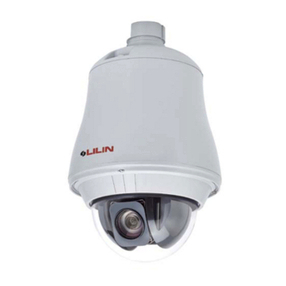
D/N 2MP HD PTZ Dome IR IP Camera
IRS1204/1208, IRS1304/1308
Instruction Manual
IMPORTANT SAFEGUARDS
SYMBOL DEFINITION
The lightning within a triangle is intended to alert the user to the
presence of uninsulated "dangerous voltage" within the product's
enclosure that may be of sufficient magnitude to
constitute a risk of electric shock.
The exclamation point within a triangle is intended
to alert the user to the presence of important operating and
maintenance instructions in this guide.
CAUTION
RISK OF ELECTRIC SHOCK
DO NOT OPEN
CAUTION
TO REDUCE THE RISK OF ELECTRIC SHOCK,
DO NOT REMOVE FRONT OR BACK COVER.
NO USER SERVICEABLE PARTS INSIDE.
FOR MAINTENANCE, CONTACT QUALIFIED
SERVICE PERSONNEL.
CAUTION
RISK OF EXPLOSION IF BATTERY IS REPLACED
WITH AN INCORRECT TYPE.
DISPOSE OF USED BATTERIES ACCORDING
TO THE INSTRUCTIONS
IRS 1204/1208 and IRS 1304/1308 with HD/Full HD resolution offer enhanced
and refined video and brings you the most innovative surveillance solutions.
These industry-leading cameras features 20X/30X optical zoom, digital zoom, wide dynamic range,
digital noise reduction, back light compensation, and electronic image stabilization.
designed with compactness in mind, and is capable of
making 360 degrees continuous rotation with an adjustable speed of 0.15 to 120 degrees per second
to ensure direct and accurate target positioning. When required the dome can quickly complete a
180° rotation, an important feature when something passes directly under the camera.
The cameras supports up to 128 preset positions can be programmed and recalled with an accuracy
of 0.183 degree, and can be set to auto-sequence mode to automatically monitor preset points.
Each PTZ Dome has 6 alarm inputs that can drive the dome to any position in seconds.
The built-in coding high-quality video
p efficient ontrol
-delivers
The d supports
both M formats to ideo streaming
uality optimization
The cameras provide f user-friendly sets of the
function.
IRS 1204/1208 and IRS 1304/1308 are
H.264 AVC (Advanced Video Coding) video engine provides ,
1080 resolution, bandwidth c , and real-time streaming.
The cutting edge H.264 AVC encoding technology better compression
rate and superior video quality at 56 Kbps to 3 Mbps bit rate. ual streaming design
JPEG and H.264 AVC allow v at low bandwidth (Internet) and high
bandwidth (LAN) for q .
our PTZ web interfaces including lens absolute
positioning
Introduction
- 1 -
FEATURES
Auto Focus Lens
Built-in 20X optical zoom lens with focal length 4.7 - 94mm [20X Model]
Built-in 30X optical zoom lens with focal length 4.4 - 132mm [30X Model]
Day & Night (with switchable IR-cut filter)
Day : Color
Night : Monochrome
Auto : Automatic switch from Color to Monochrome when light drops below 10 Lux.
12X Digital Zoom
HD 2.38MP Exmor CMOS sensor [20X Model] / HD 2.12MP CMOS sensor [30X Model]
Minimum Illumination
Color : 0.4Lux [F1.6/1.4, 1/30(1/25)sec, 50% AGC On]
Mono : 0.03Lux [F1.6/1.4, 1/30(1/25)sec, 50% AGC On]
IR On : 0Lux
Highly efficient IR LED: Radiant distance 150M
Beam width of IR LED: Automatically adjusted depending on the zoom ratio
H.264 AVC/MPEG-4 part 10 real-time video coding
H.264 and Motion JPEG multi-profile video streaming
Llive monitoring: 1080p(1920x1080), 720p(1280x720), D1(720x480), CIF(352x240)
Wide Dynamic Range
Digital Noise Reduction
Slow Shutter (Sens-Up) Function
Defog & Enhanced Intensity & Electronic Image Stabilization [30X Model]
Privacy Mask
360° continuous panning
Up to 128 programmable preset positions
2-way audio support
iPhone and Android Support
Onvif Support
Weatherproof IP66
Power supply options: AC24V or AC100 - 240V
- 2 -
Please read the manual before attempting installation or operation
1. Do not use any chemical detergent to clean the machine surface; use a damp cotton cloth
only. Regularly clean the dome cover to ensure focusing accuracy.
2. Install the Fast Dome in a dry area. Water and high humidity may damage
internal parts. External housing should be used for outdoor installation.
3. Use parts supplied by the manufacturer only; use of unqualified part will void the warranty.
4. Avoid installing the equipment on an unstable surface. Make sure the installation location is
solid and stable. Falling equipment may injure personnel and damage the equipment.
5. Do not install the equipment near any flammable gas. Violation may cause fire or injury.
6. Avoid running video and signal cables through or passing interference sources such
as electromagnetic wave, broadcast station, power generator, elevator motor, or high
voltage are, etc. Interference may cause the equipment not to function properly.
7. Make sure the power cable is properly connected. Loosened power cables may cause
serious short circuit or fire.
8. Make sure all cables are properly connected. Do not place any object on the cables.
Replace the cable if damaged. Violation may cause short circuit, fire, and injury.
9. Make sure all wires and cables are properly grounded to avoid damage caused by lightning.
10. Do not put any foreign objects inside the equipment and do not spray any liquid on the
equipment to avoid short circuit and subsequent damage.
11. Do not touch power connection with wet hands to avoid short circuit or electric shock.
12. Do not apply external force on the equipment. Violation may cause damage.
13. Do not expose the equipment directly to sunlight. Violation may cause color fading or damage.
14. Do not install the equipment in high or low temperature environment to
avoid damage. The operating temperature is between -40°C - +50°C.
15. The Fast Dome consists of highly sensitive electronic parts inside.
16. Turn off the power immediately and contact the technician when the following occurs:
A. Damage on power cable or plug.
B. Water leak into the equipment.
C. Fast Dome does not function normally.
D. Equipment falling on the ground or damage on external casing.
Do not try to repair the
equipment. Only a qualified technician may disassemble and repair the equipment. Shut off
the power before disassembling the equipment and do not power it on unless the casing is
completely closed.
WARNINGS & CAUTIONS
- 3 -

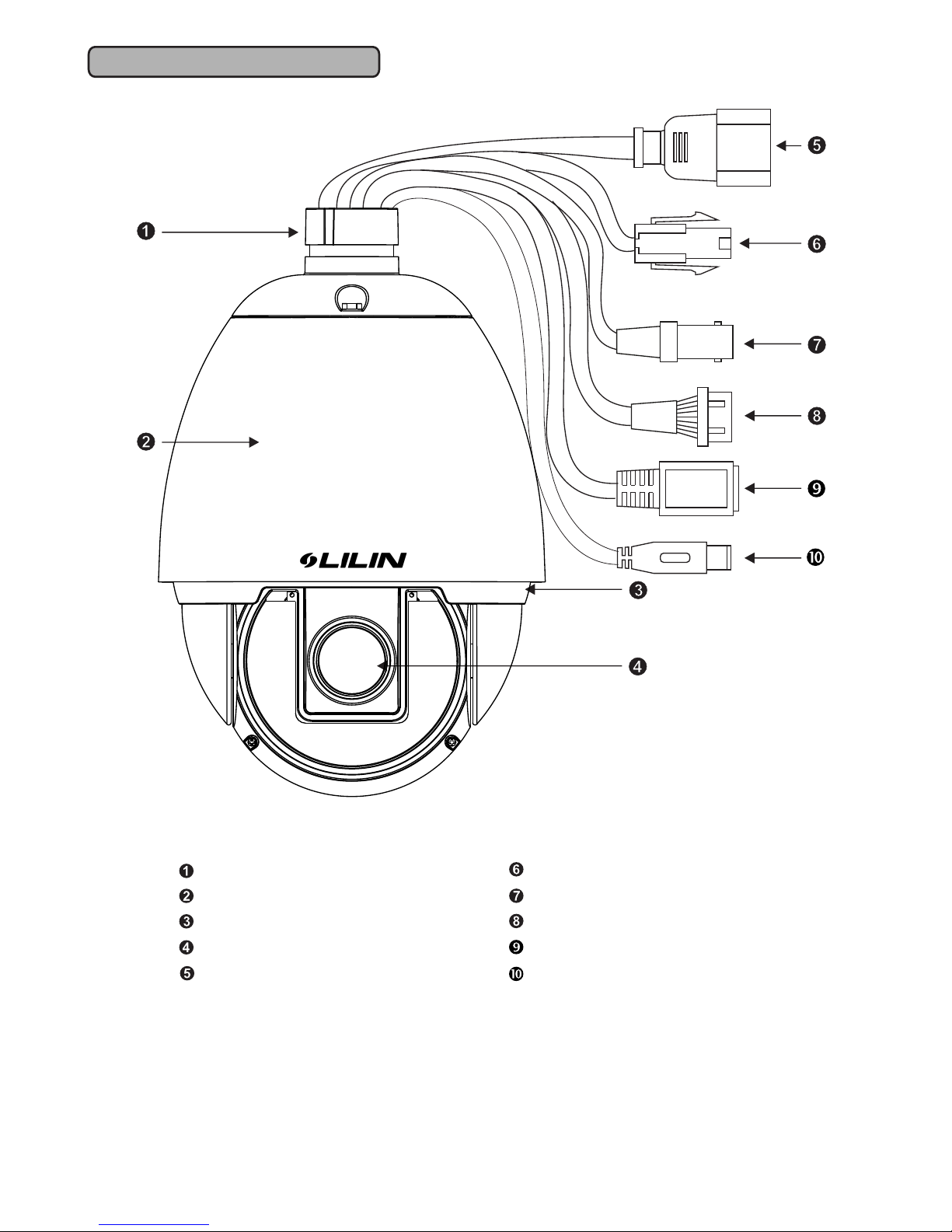
PHYSICAL DETAILS
Top Cover
Outer Cover
Bottom Cover
Lens
Power-In Jack (AC100~240V)
Video-Out Jack
Alarm In/Out connector
RJ45 Network Connector
Audio In/Out Jack
Power-In Jack (AC24V ±10%)
- 4 -


1. AC100 - 240V Power Cable
2. AC24V Power Cable
 Recommended Cable:
PTZ Dome Connector and Cable Requirement
Accessory Connector Information
PIN
1
2
3
4
Power
AC24V Live (Black)
AC24V Neutral (White)
Earth (Green)
NA
12
34
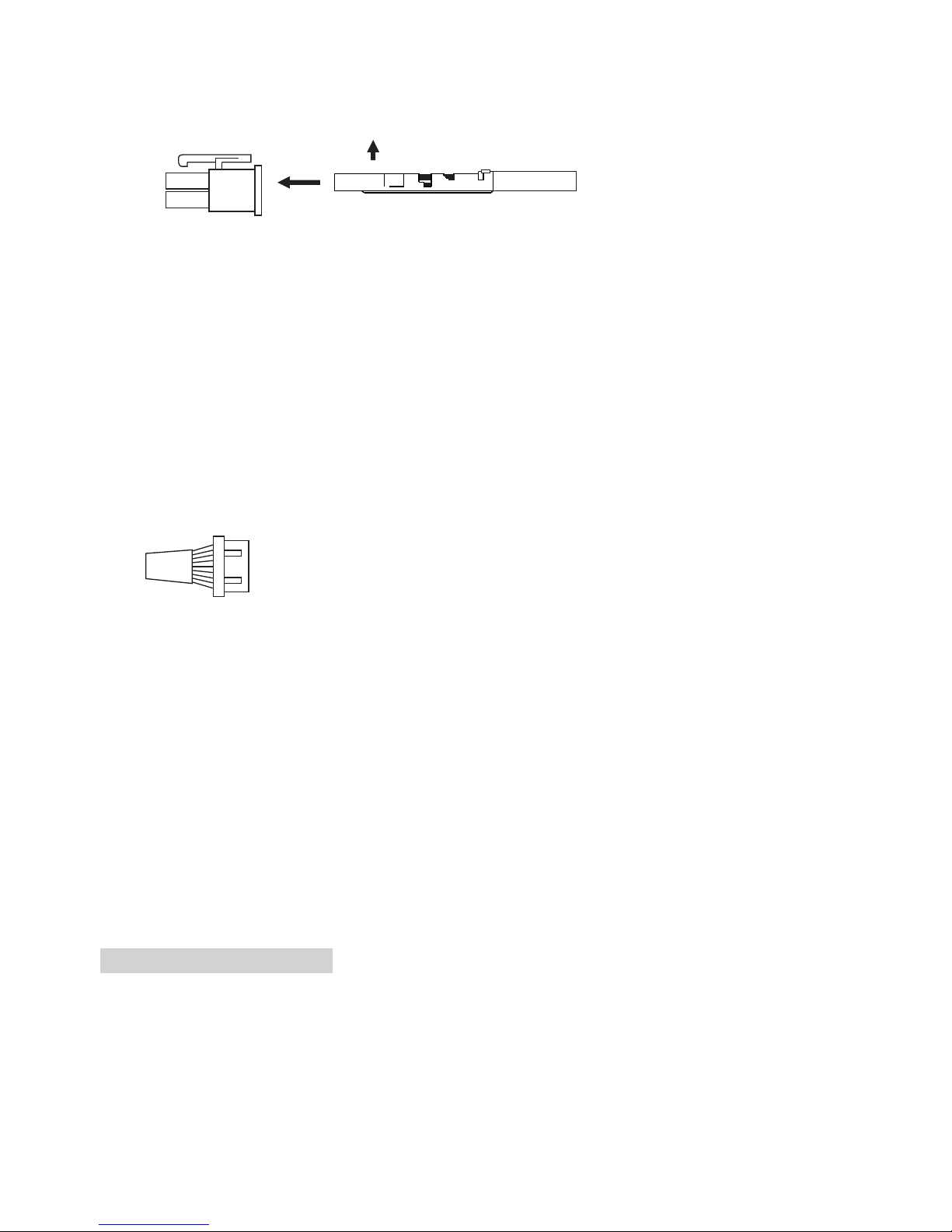
Assemble the Cable with the Accessory Connector
a. Strip back the cable jacket approx. 3mm and separate the individual conductors.
3mm
Insert
Contact
UP Electrical Wire
AC 100 - 240V Power Cable
AC24V Power Cable
Video Signal Cable
Alarm In/Out Cable
To Monitor
To PIR
CAT5 Network Cable
Audio Signal Cable
Copper Wire (AWG)
Length of Cable
(approx.)
(m)
(ft)
22AWG2
(0.32mm )
20
65
20AWG2
(0.51mm )
30
100
18AWG2
(0.81mm )
45
150
16AWG2
(1.31mm )
75
250
- 5 -
b. Prepare the individual conductors for clamping. After clamping the contacts, push them
  into the proper holes in the accessory connector of this camera until they snap in place.
CAUTIONS: CONNECT THIS TO A 24V AC CLASS 2 POWER SUPPLY ONLY.
Contact
UP
3. Video-Out BNC Jack
 Video Signal Output: CVBS 1.0Vp-p 75 BNC
Recommended Cable: 5C2V
4. Alarm In/Out Connector
Each fast dome consists of 6 alarm inputs and 1 alarm output.
Alarm Input Voltage: 5.6V max.
Alarm Output: 0.5A AC120V, 1A AC24V
Recommended Cable: UL26 AWG 80°C 300V
                      UL24 AWG 80°C 300V
5. Network Connector RJ45
LAN: 10/100Mbps
Recommended Cable: CAT5
6. Audio In/Out RCA Jack
 Audio:1.4Vp-p (1 Vrms)
 Recommend Cable: Shielded signal wire
Ω


Reset
NC
NO
COM.
GND
IN6
IN5
IN4
IN3
IN2
IN1
Alarm Out:
Alarm In:
(Pink)
(Brown)
(Gray)
(White)
(Black)
(Red)
(Green)
(Orange)
(Blue)
(Yellow)
(Violet)
Low Temperature Power-Up
Camera may perform abnormally at low temperature. Hence, follow the below procedure
when the camera is off due to power outage or other issues and needs to be restarted under
-40°C to -5°C.
Low temperature power-up procedure
Power up and wait for the heater to warm up for 15 minutes before you operate the camera.
- 6 -
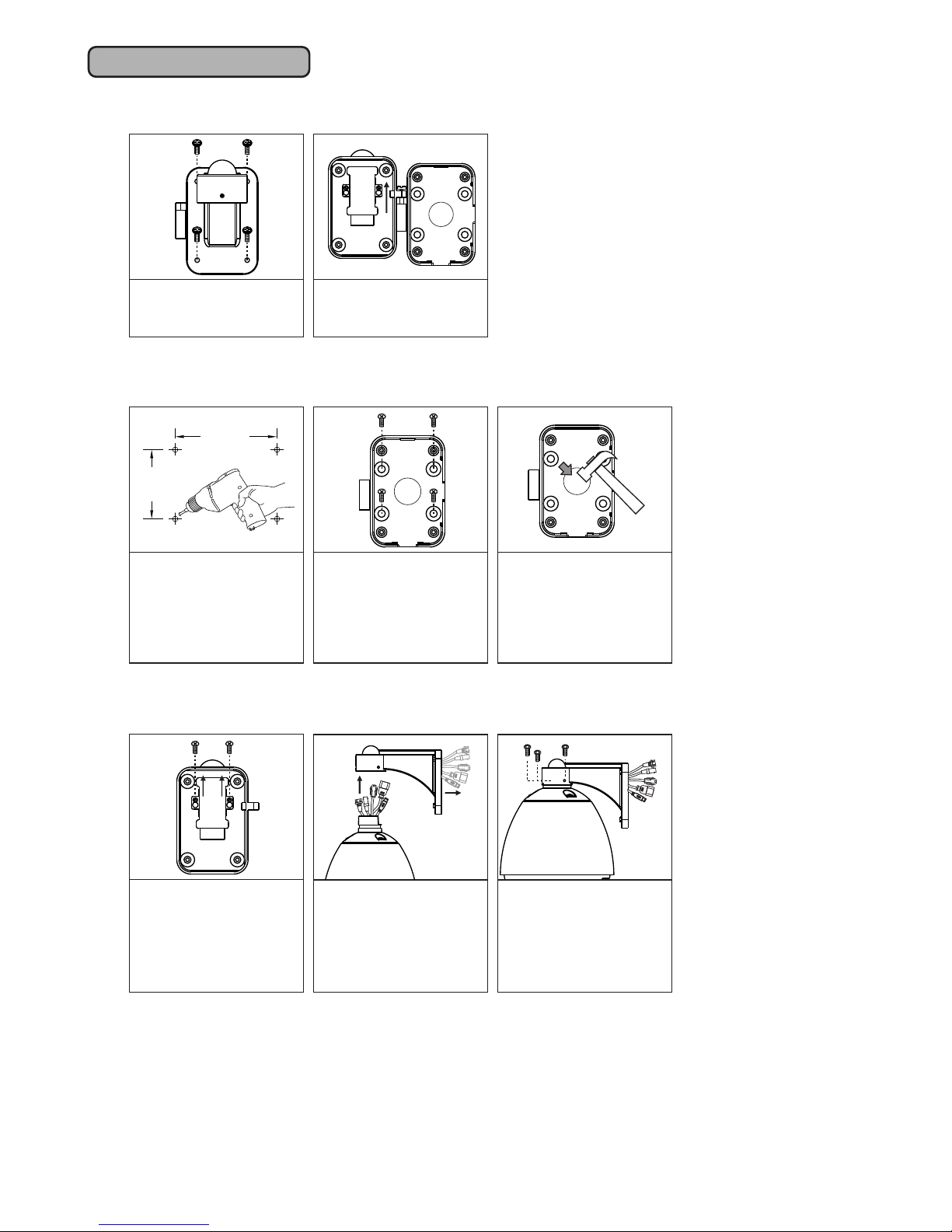
Step 1 Separate bracket from the baset
60mm
70mm
Loosen the four screws
from bracket.
Separate the bracket
and base of bracket
from the bolt.
Drill holes at the
desired location.
Tighten the four screws
to secure the base
(These four screws are
not included. User must
prepare their own
screws)
Step 2 Fix base of bracket on the wall
If you have use for this
hole, use the included
hammer to break the
seal.
Loosen the two screws
from iron pieces of the
fixed cable in the
bracket and remove
the iron pieces.
Attach the camera to
the bracket, and
tighten the three
screws.
Pull the output cables
of the camera in
sequence through the
bracket tube
(AC cable is preferred)
Step 3 Attach camera to bracket
INSTALLATION
- 7 -
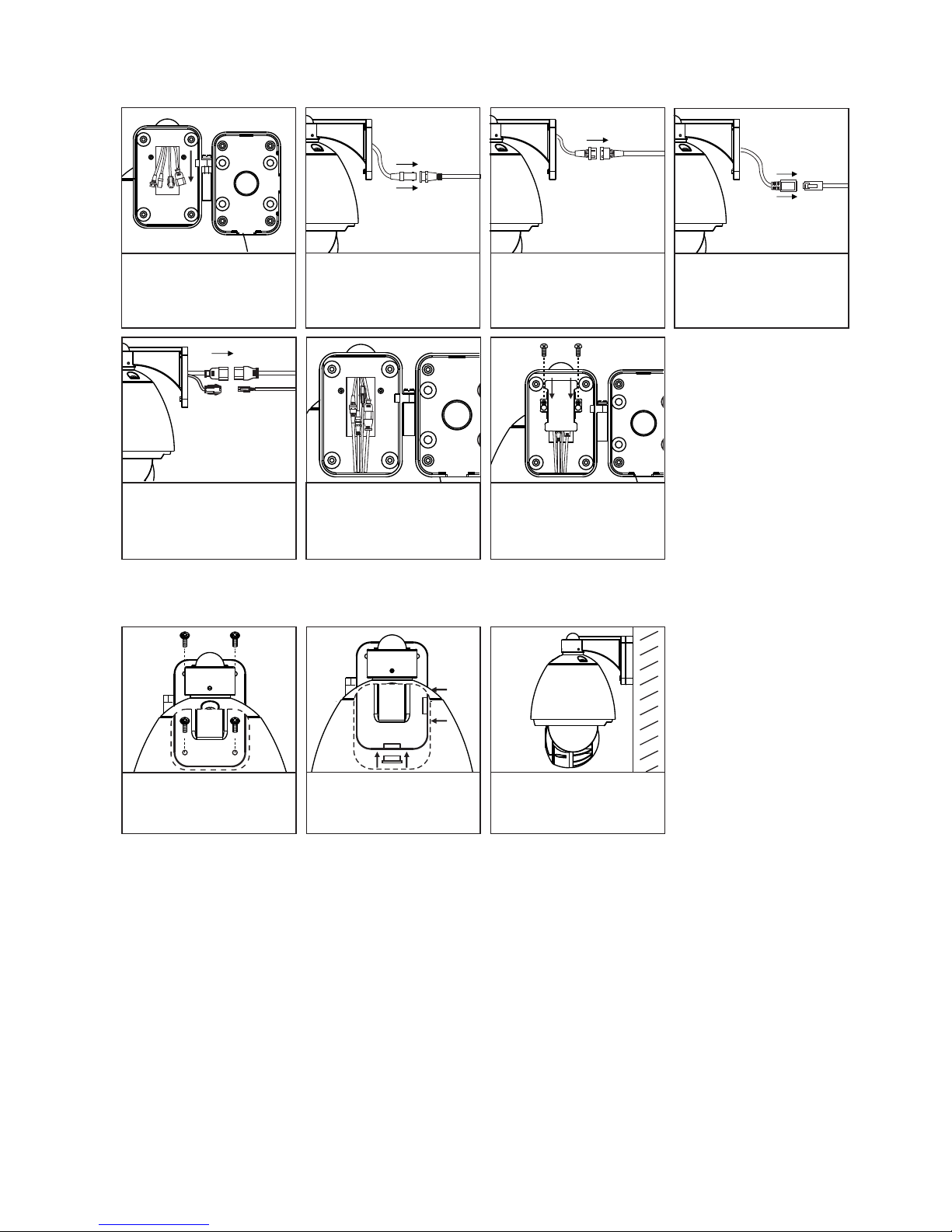
LAN
Connect the network
cable.
VIDEO OUT
Reset
NO
NC
COM.
GND
IN6
IN5
IN4
IN3
IN2
IN1
Alarm Out:
Alarm In:
(Pink)
(Brown)
(Gray)
(White)
(Black)
(Red)
(Green)
(Orange)
(Blue)
(Yellow)
(Violet)
AC24V
AC100~240V
Step 4 Connect Jack
Attach the camera and
bracket to the base
Connect the video
cable.
Connect the
alarm in/out cable.
After connecting all the
cables, put the cables
and connectors in the
bracket tube.
Attach the iron piece of
cables to the bracket,
and tighten the screws
to secure the cables.
Connect the AC24V or
AC100-240V power
cable.
Tighten the four screws
to the bracket
Complete PTZ dome
dome IR IP camera
installation.
Use the rubber cover to
shroud the outlet of
unused cables.
Step 5 Fix bracket and PTZ dome IR IP camera with base
- 8 -