manuals.online logo
Brands
  1. Home
  2. •
  3. Brands
  4. •
  5. LogicMark
  6. •
  7. Emergency Phone
  8. •
  9. LogicMark CaretakerSentry 40914 User manual

LogicMark CaretakerSentry 40914 User manual

Other LogicMark Emergency Phone manuals

LogicMark CaretakerSentry User manual

LogicMark

LogicMark CaretakerSentry User manual

LogicMark Freedom Alert 35911 Installation instructions

LogicMark

LogicMark Freedom Alert 35911 Installation instructions

LogicMark CaretakerSentry 40911 Installation manual

LogicMark

LogicMark CaretakerSentry 40911 Installation manual

LogicMark GUARDIAN 911 ALERT PLUS User manual

LogicMark

LogicMark GUARDIAN 911 ALERT PLUS User manual

LogicMark CaretakeSentry 40914 User manual

LogicMark

LogicMark CaretakeSentry 40914 User manual

LogicMark 37911 Operating instructions

LogicMark

LogicMark 37911 Operating instructions

LogicMark 30911 User manual

LogicMark

LogicMark 30911 User manual

LogicMark Freedom Alert 35911 Installation instructions

LogicMark

LogicMark Freedom Alert 35911 Installation instructions

LogicMark GUARDIAN ALERT 911 User manual

LogicMark

LogicMark GUARDIAN ALERT 911 User manual

LogicMark FreedomAlert 35911 Installation instructions

LogicMark

LogicMark FreedomAlert 35911 Installation instructions

LogicMark FreedomAlert 35911 Installation instructions

LogicMark

LogicMark FreedomAlert 35911 Installation instructions

LogicMark 37911 Instructions for use

LogicMark

LogicMark 37911 Instructions for use

Popular Emergency Phone manuals by other brands

Future Call LLC. Emergency 911 user manual

Future Call LLC.

Future Call LLC. Emergency 911 user manual

Rath 2100-TLL Landline 12v Tower Installation & operation manual

Rath

Rath 2100-TLL Landline 12v Tower Installation & operation manual

DEXAPLAN BA 611 operating instructions

DEXAPLAN

DEXAPLAN BA 611 operating instructions

GAI-Tronics PHP400 Installation and user guide

GAI-Tronics

GAI-Tronics PHP400 Installation and user guide

switel POWERTEL TF 51 operating instructions

switel

switel POWERTEL TF 51 operating instructions

CareTech Gina user guide

CareTech

CareTech Gina user guide

Safeline SL1 manual

Safeline

Safeline SL1 manual

Smartlink OEM WIRELESS DIALLER user manual

Smartlink

Smartlink OEM WIRELESS DIALLER user manual

Merak MMk-656 instruction manual

Merak

Merak MMk-656 instruction manual

Talkaphone ETP-MT/R Series installation instructions

Talkaphone

Talkaphone ETP-MT/R Series installation instructions

indePendant DA1432 Get started

indePendant

indePendant DA1432 Get started

ANEP BOX-C manual

ANEP

ANEP BOX-C manual

Linear PERS-2400A Installation and operation instructions

Linear

Linear PERS-2400A Installation and operation instructions

Safeline MX3+ manual

Safeline

Safeline MX3+ manual

ADT WSB GEN1.0 user guide

ADT

ADT WSB GEN1.0 user guide

TeleAlarm TA72 user manual

TeleAlarm

TeleAlarm TA72 user manual

Dosch&Amand DA1450 quick start guide

Dosch&Amand

Dosch&Amand DA1450 quick start guide

Viking E-1600A series Application note

Viking

Viking E-1600A series Application note

manuals.online logo
manuals.online logoBrands
  • About & Mission
  • Contact us
  • Privacy Policy
  • Terms and Conditions

Copyright 2025 Manuals.Online. All Rights Reserved.

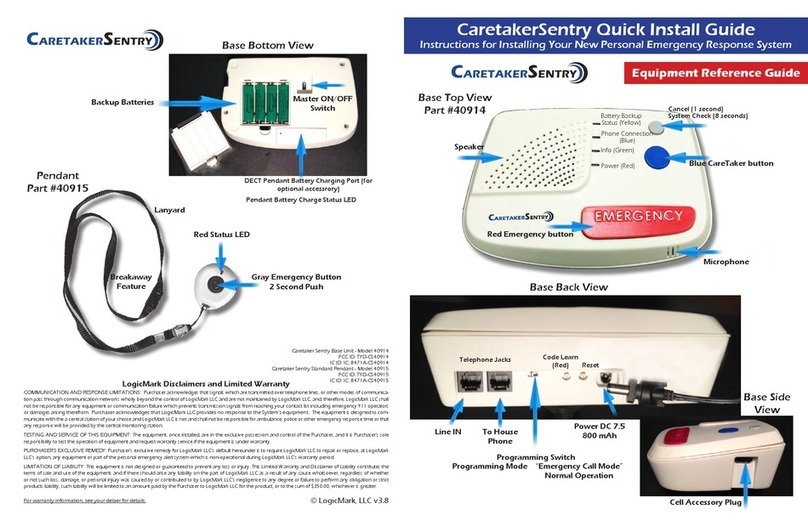
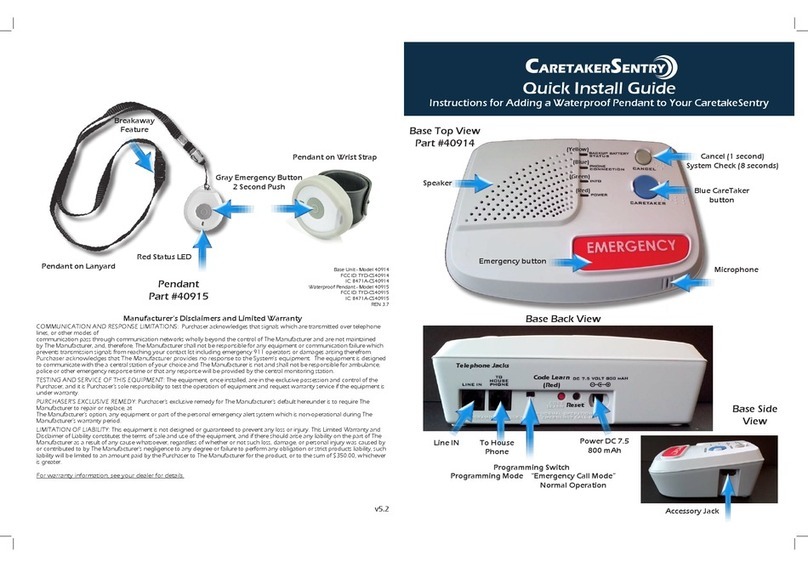
CaretakerSentry with two-way voice pendant
Quick Install Guide
Instructions for Installing Your New Personal Emergency Response System
LogicMark Disclaimers and Limited Warranty
COMMUNICATION AND RESPONSE LIMITATIONS: Purchaser acknowledges that signals which are transmitted over telephone lines, or other modes of
communication pass through communication networks wholly beyond the control of LogicMark LLC and are not maintained by LogicMark LLC, and, therefore, LogicMark LLC
shall not be responsible for any equipment or communication failure which prevents transmission signals from reaching your contact list including emergency 911 operators or
damages arising therefrom. Purchaser acknowledges that LogicMark LLC provides no response to the System’s equipment. The equipment is designed to communicate
with the a central station of your choice and LogicMark LLC is not and shall not be responsible for ambulance, police or other emergency response time or that any response
will be provided by the central monitoring station.
TESTING AND SERVICE OF THIS EQUIPMENT: The equipment, once installed, are in the exclusive possession and control of the Purchaser, and it is Purchaser’s sole responsi-
bility to test the operation of equipment and request warranty service if the equipment is under warranty.
PURCHASER’S EXCLUSIVE REMEDY: Purchaser’s exclusive remedy for LogicMark LLC’s default hereunder is to require LogicMark LLC to repair or replace, at
LogicMark LLC’s option, any equipment or part of the personal emergency alert system which is non-operational during LogicMark LLC’s warranty period.
LIMITATION OF LIABILITY: This equipment is not designed or guaranteed to prevent any loss or injury. This Limited Warranty and Disclaimer of Liability constitutes the terms
of sale and use of the equipment, and if there should arise any liability on the part of LogicMark LLC as a result of any cause whatsoever, regardless of whether or not such loss,
damage, or personal injury was caused by or contributed to by LogicMark LLC’s negligence to any degree or failure to perform any obligation or strict products liability, such
liability will be limited to an amount paid by the Purchaser to LogicMark LLC for the product, or to the sum of $350.00, whichever is greater.
For warranty information, see your dealer for details.
CaretakerSentry Base Unit - Model 40914
FCC ID: TYD-CS40914
IC: 8471A-CS40914
CaretakerSentry Two-Way Pendant - Model 41915
FCC ID: TYD-CS41915
IC: 8471A-CS41915
REN 3.7
Base Back View
Telephone Jacks
Line IN
To House
Phone Programming Switch
Programming Mode “Emergency Call Mode”
Normal Operation
Reset
Power DC 7.5
800 mAh
Code Learn
(Red)
Cellular Accessory Jack
Base Side
View
CARETAKERSENTRY
© LogicMark, LLC v4.1
Pendant
Part #41915
Gray System Check/
Battery test button
Red Status LED
Microphone
Base Top View
Part #40914
Red Emergency
button
(Blue)
I(Green)
(Red) Blue CareTaker
button
Microphone
(Yellow)
Speaker
Cancel (1 second)
Blue Emergency
call button
Pendant battery
cover latch
Pendant battery
compartment
Speaker
Backup Batteries
* Note Orientation
of batteries
Base Bottom View
Master
ON/OFF
Switch
Two-way Voice Pendant Battery
Charging Port (for optional Two-way
voice pendant accessory)
* Note Orientation of battery
Plug Telephone Line and
Power Cord into Wall Jacks
3
CaretakerSentrStep-by-Step Installation
Place the Green AA Rechargeable Batteries in
the compartment on the bottom of the base
unit. Make sure to turn ON/OFF switch
to ON. You will hear the announcement
“Running on Battery Power.” Unit will do
so until the AC Adapter power supply is
plugged in.
Place Batteries in Unit
2
Confirm Accessories in Kit
1
Plug the AC Adapter
power cord into the
power jack and twist 1/4
turn clockwise to lock.
4 Rechargeable AA
Batteries
Telephone Cord
AC Adapter
Lanyard
Test the Unit
4
Place call to Emergency Operator:
a. Push BLUE EMERGENCY button for 2 seconds on Pendant (RED LED
on the pendant should turn ON)
b. You should hear a dial tone, dialing and then communication tones
between the CaretakerSentry and central station. Several seconds later
the operator should answer the call
c. Talk normally into the pendant– just like speaker phone
d. At the end of the conversation, the CaretakerAlert should automatically
hang-up – if not, push the CANCEL button for 1 second (either on
back of pendant or on base unit.)
Performing a System Test
a. Push GRAY EMERGENCY button on back of pendant for 4 seconds
b. Listen for voice prompt from base unit:
i. “All Systems are OK – Battery is OK” is heard if the system is correctly installed
ii. If any other voice prompt is heard, the unit will describe the problem
c. We recommend that you perform this System Test weekly
Model #41911
(OPTIONAL) Plug
the telephone
into the “To
House Phone”
jack.
Install 2nd pendant battery
into Two-way Voice Pendant Battery Charging port
RED LED = Charging
GREEN LED = Battery Charged
No LED = defective battery or no battery installed
**Battery should standby in the pendant for
4-6 months (depending on use). We recommend
to exchange/charge the batteries monthly.
Install 1st pendant battery in
pendant.
(When battery is properly
installed, pendant will
automatically perform a battery
check - listen for these voice
prompts everytime a battery is
installed.)
2 Lithium Ion
Pendant batteries
*Beltclip*Wriststrap
*The holster is the same for both Wriststrap
and Beltclip. Simply unscrew the strap and
replace with the clip or vice-versa
CARETAKERSENTRY