manuals.online logo
Brands
  1. Home
  2. •
  3. Brands
  4. •
  5. Siemens
  6. •
  7. Control Unit
  8. •
  9. Siemens RC-30U User manual

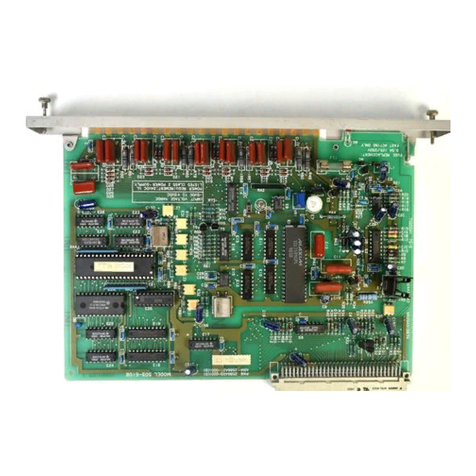
Siemens RC-30U User manual

Other Siemens Control Unit manuals

Siemens VVG44.15-0.4S Owner's manual

Siemens

Siemens VVG44.15-0.4S Owner's manual

Siemens SINUMERIK 840Di sl User manual

Siemens

Siemens SINUMERIK 840Di sl User manual

Siemens XDACT-ASSY User manual

Siemens

Siemens XDACT-ASSY User manual

Siemens SIMATIC IM 153-2 User manual

Siemens

Siemens SIMATIC IM 153-2 User manual

Siemens CP 5611 User manual

Siemens

Siemens CP 5611 User manual

Siemens SINAMICS V60 User manual

Siemens

Siemens SINAMICS V60 User manual

Siemens SIMADYN D T400 Parts list manual

Siemens

Siemens SIMADYN D T400 Parts list manual

Siemens S120 PM240-2 User manual

Siemens

Siemens S120 PM240-2 User manual

Siemens SIRIUS 3RW44 User manual

Siemens

Siemens SIRIUS 3RW44 User manual

Siemens SINAMICS G130 User manual

Siemens

Siemens SINAMICS G130 User manual

Siemens SIRIUS 3RT1.4 User manual

Siemens

Siemens SIRIUS 3RT1.4 User manual

Siemens XLD-1 User manual

Siemens

Siemens XLD-1 User manual

Siemens Simatic ET200pro User manual

Siemens

Siemens Simatic ET200pro User manual

Siemens ZS-30 User manual

Siemens

Siemens ZS-30 User manual

Siemens OMM-2 User manual

Siemens

Siemens OMM-2 User manual

Siemens 3RA2816-0EW20 User manual

Siemens

Siemens 3RA2816-0EW20 User manual

Siemens VAI60.15-15 User manual

Siemens

Siemens VAI60.15-15 User manual

Siemens SINUMERIK 808D Parts list manual

Siemens

Siemens SINUMERIK 808D Parts list manual

Siemens S-60 User manual

Siemens

Siemens S-60 User manual

Siemens SIMATIC ET 200SP User manual

Siemens

Siemens SIMATIC ET 200SP User manual

Siemens SINAMICS G120P Assembly instructions

Siemens

Siemens SINAMICS G120P Assembly instructions

Siemens SINUMERIK 802D sl User manual

Siemens

Siemens SINUMERIK 802D sl User manual

Siemens SINUMERIK 840D sl User manual

Siemens

Siemens SINUMERIK 840D sl User manual

Siemens S5-155U User guide

Siemens

Siemens S5-155U User guide

Popular Control Unit manuals by other brands

Festo Compact Performance CP-FB6-E Brief description

Festo

Festo Compact Performance CP-FB6-E Brief description

Elo TouchSystems DMS-SA19P-EXTME Quick installation guide

Elo TouchSystems

Elo TouchSystems DMS-SA19P-EXTME Quick installation guide

JS Automation MPC3034A user manual

JS Automation

JS Automation MPC3034A user manual

JAUDT SW GII 6406 Series Translation of the original operating instructions

JAUDT

JAUDT SW GII 6406 Series Translation of the original operating instructions

Spektrum Air Module System manual

Spektrum

Spektrum Air Module System manual

BOC Edwards Q Series instruction manual

BOC Edwards

BOC Edwards Q Series instruction manual

KHADAS BT Magic quick start

KHADAS

KHADAS BT Magic quick start

Etherma eNEXHO-IL Assembly and operating instructions

Etherma

Etherma eNEXHO-IL Assembly and operating instructions

PMFoundations Attenuverter Assembly guide

PMFoundations

PMFoundations Attenuverter Assembly guide

GEA VARIVENT Operating	 instruction

GEA

GEA VARIVENT Operating instruction

Walther Systemtechnik VMS-05 Assembly instructions

Walther Systemtechnik

Walther Systemtechnik VMS-05 Assembly instructions

Altronix LINQ8PD Installation and programming manual

Altronix

Altronix LINQ8PD Installation and programming manual

Eaton Powerware Series user guide

Eaton

Eaton Powerware Series user guide

WAGO 750-407/040-000 manual

WAGO

WAGO 750-407/040-000 manual

Sony CCU-590 Operation manual

Sony

Sony CCU-590 Operation manual

Graco 25D614 instructions

Graco

Graco 25D614 instructions

Task Force Tips YE-RF-900 Instructions for installation, safe operation and maintenance

Task Force Tips

Task Force Tips YE-RF-900 Instructions for installation, safe operation and maintenance

Shini SPV-U Series manual

Shini

Shini SPV-U Series manual

manuals.online logo
manuals.online logoBrands
  • About & Mission
  • Contact us
  • Privacy Policy
  • Terms and Conditions

Copyright 2025 Manuals.Online. All Rights Reserved.

P/N 315-085462-7
Installation Instructions
Model RC-30U
Confirmation Module (Alarm Verification)
Siemens Industry, Inc.
Building Technologies Division
Florham Park, NJ
Siemens Building Technologies, Ltd.
Fire Safety & Security Products
2 Kenview Boulevard
Brampton, Ontario
L6T 5E4 Canada
Description
The Confirmation Module, Model RC-30U is designed to
assure against unwanted system alarm operation which
might result, as an example, from the presence of occa-
sional, momentary but harmless products of combustion.
The RC-30U will interrupt the transmission of an alarm
signal to the system control panel for a factory set period
of 20 seconds, however, it is adjustable from 1 to 60 sec-
onds. Immediately following the interruption period, a
confirmation period is in effect during which time a subse-
quent alarm signal, if present, will be sent immediately to
the control panel. This confirmation period as factory set
is approximately 1 minute, however, it is dependent upon
the interrupt setting.
During the confirmation period should an alarm signal be
present, it will put the system into alarm condition.
The Confirmation Module is placement sensitive as follows:
• Modules connected between the Confirmation
Module receptacle P2 and the control panel are not
affected by its operation.
• Modules connected subsequent to receptacle P1 of
the Confirmation Module may be affected. This is
determined by which plug (system or zone) is used.
The system plug (orange wire) is for basic applications
where a single alarm interrupt/confirmation cycle is suffi-
cient. See Typical Connection #1. In this application, a
special Plug/Harness Assembly is used between recep-
tacles P4 and P5 and any alarm signal from a module
connected to receptacle P1 will be interrupted for a se-
lected period of time from 1 to 30 seconds (20 seconds is
the standard setting). During this period power to the
modules on receptacle P1 is removed, a yellow LED is il-
luminated, and a system trouble signal is initiated. In addi-
tion, a high-going signal (20mA) is present on a terminal
for use as a pre-signal or for connection to a recording
device. Immediately following the interruption period, the
circuit power is restored, the yellow LED is extinguished,
and the system trouble signal is canceled. This also starts
the confirmation period - a period during which time if any
alarm signal is present, it will be passed through uninter-
rupted to the control panel, and the system will go into
alarm condition. This confirmation period is variable to the
extent that it is a multiple of the duration of the interruption
cycle (one minute is standard). If no alarm signal is
present during the confirmation period, the RC-30U resets
automatically and the system is normal.
The zone plug (white wire) is used for applications requir-
ing various alarm interruption/confirmation cycles - two or
more RC-30Us will be needed. See Typical Connection
#2. In this application only alarm signals from modules
connected to receptacles P1 will not be interrupted/con-
firmed. The interruption and confirmation cycle described
above apply in a zone mode. A yellow trouble LED is pro-
vided on the RC-30U to annunciate a specific trouble
within the RC-30U.
The Model RC-30U which occupies two standard module
positions, is placement supervised, providing a system
trouble signal upon removal from the system. In addition,
removal of the system/zone plug and/or the special Plug/
Harness. Assembly provides a system trouble signal.
Electrical Information
Current Requirements:
Normal - 5mA
Duration of interruption period - 100mA @ 24VDC max
Duration of confirmation period - 62mA @ 24VDC max
Alarm - 40mA max
Installation
1. Mount the module to the horizontal mounting
brackets in the control enclosure.
2.Install the Model JA-5 (5 in long) bus connector cable
assembly between receptacle P2 of the module and
receptacle P1 of the module or control panel
immediately preceding it in the bus.

Notes:
1. Note the specific color of the zone plug and the system plug.
The system plug (orange) confirms all zones as a function of a
system alarm, whereas the zone plug (white) may confirm some
zones and not others. Refer to the plug arrangement and the

modules controlled in the above examples.

2. P2 is the incoming bus plug and must be connected to the
control panel.
3. Operation - The RC-30U interrupts the transmission of an alarm
signal to the system control panel for a factory-set period of 15
seconds. Immediately following the interruption period, a
confirmation period is in effect, during which time a subsequent
alarm signal, if present, is sent immediately to the control panel.
This confirmation period is factory-set at 1 minute.
4. The RC-30U cannot be used to confirm shorting zones.
5. Terminals 1 and 2 are provided in case a trouble output delay is
desired. If it is, remove jumper terminals 1 and 2, and connect
terminal 1 of RC-30U to terminals 1 and 2 of the TL-30U and
terminal 2 of RC-30U to terminal 3 of the TL-30U. The TL-30U
delay must not exceed 200 seconds.
6. When the RC-30U module is installed, apply the WARNING
label (P/N 575-287974) enclosed to the inside of the control unit
door where it is plainly visible.
7. Minimum wire size: 18 AWG
Maximum wire size: 12 AWG
8. Refer to P/N 315-093680 for power limited connections.
9. All terminals are non-power limited on the RC-30U.
Note: If the preceding module is on another row in
the enclosure, a JA-24 (24 in long) bus connector
cable assembly will be required.
3. Modules are to be bus-connected from right to left.
For two-row enclosures, the modules in the lower row
are to be connected from left to right. Succeeding rows
are to be alternately connected, right to left, left to
right, etc.
4. If a module is the last module in the system, install
either a JS-30 (30 in long) or JS-64 (64 in long) bus
connector assembly from the unused receptacle of
the last module to terminal 41 of the CP-35 control
panel. This completes the module supervision circuit.
5. Wire the circuit(s) as described in the CP-35 Control
Panel Instruction Manual (P/N 315-085063) Installation
and Wiring. Refer to the Wiring illustration.
Note: If a zone is not used, the EOL device should
be connected to the alarm initiating circuit terminals 2
and 3 (Zone 1) or 4 and 5 (Zone 2) of the module.
6. If a supplementary relay module, annunciator, or
other output module is used, then the alarm outputs,
terminals 1 (Zone 1) and 6 (Zone 2), should be
connected to these units.
Wiring Test
Refer to the CP-35 Control Panel Instruction Manual, In-
stallation and Wiring.
P/N 315-085462-7