7
Copyright © 2014 - 2017 Somfy SAS. All rights reserved. Images not contractually binding
EN
11) 2)
3) 4)
5)
2.4.2. Readjusting the end limits
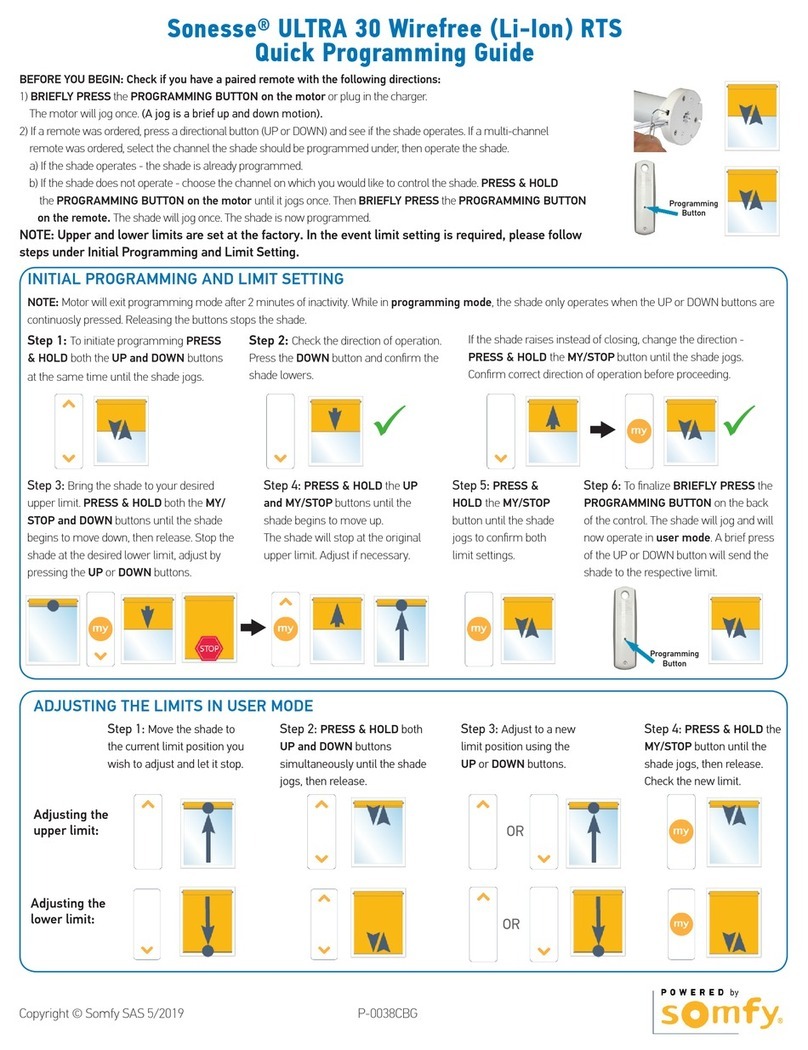
Readjusting the upper end limit
1) Press the ȁ button to bring the motorised
product to the end limit to be readjusted.
2) Press the ȁ and V buttons at the same time
until the motorised productPRYHVXSDQGGRZQ
3) Press the ȁ or V EXWWRQWRPRYHWKHmotorised
product to the new desired position.
7RFRQ¿UPWKHQHZHQGOLPLWSUHVVWKHmy
button until the motorised productPRYHVXSDQG
down.
Readjusting the lower end limit
1) Press the V button to bring the motorised
product to the end limit to be readjusted.
2) Press the ȁ and V buttons at the same time
until the motorised productPRYHVXSDQGGRZQ
3) Press the ȁ or V EXWWRQWRPRYHWKHmotorised
product to the new desired position.
7RFRQ¿UPWKHQHZHQGOLPLWSUHVVWKHmy
button until the motorised productPRYHVXSDQG
down.
2.4.3. Replacing a lost or broken Somfy control point
2QO\ VZLWFK RII WKH SRZHU WR WKH DSSOLFDWLRQ WR
be reset.
This reset deletes all the local control points,
KRZHYHU WKH VHQVRUV HQG OLPLW VHWWLQJV DQG
IDYRXULWHSRVLWLRQDUHUHWDLQHG
1) Position the motorised product at the mid-height
position.
2) 6ZLWFKRIIWKHSRZHUVXSSO\IRUVHFRQGV
3) 6ZLWFK WKH SRZHU VXSSO\ EDFN RQ IRU WR
seconds.
4) 6ZLWFKRIIWKHSRZHUVXSSO\IRUVHFRQGV
5) 6ZLWFK WKH SRZHU VXSSO\ EDFN RQ WKH motorised
productPRYHVIRUDIHZVHFRQGV,IWKHDSSOLFDWLRQ
is in the upper or lower limit position, it will make a
EULHIXSDQGGRZQPRYHPHQW
Press the PROG button on the new control point
until the motorised productPRYHVXSDQGGRZQ
the new control point is programmed and all the
other control points are deleted.
1) 2)
3) 4)
1) 2)
3) 4)