PCS-G70/G70P 1
Table of Contents
1. Installation
1-1. Caution on Installation ................................................................................1-1
1-1-1. Videoconferencing Room Layout ..............................................1-1
1-1-2. Operating Environment ..............................................................1-3
1-2. Flowchart of Installation .............................................................................1-4
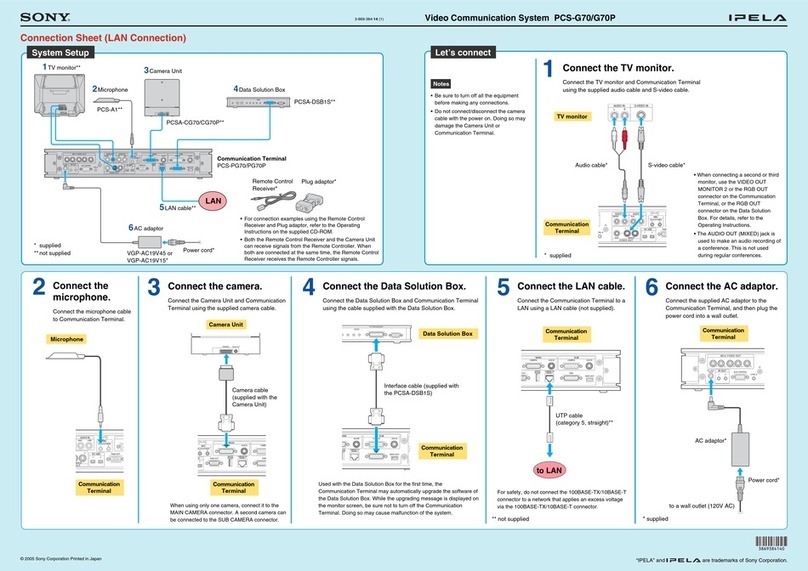
1-3. System Connections ....................................................................................1-5
1-3-1. When Used in LAN (100BASE-TX/10BASE-T) ......................1-5
(with one Camera and one Monitor) ..........................................1-5
1-3-2. When Used in ISDN (with one Camera and one Monitor) ........1-6
1-4. Initialization ................................................................................................1-7
1-4-1. Inserting Batteries into the Remote Commander .......................1-7
1-4-2. Turning On/Off the TV Monitor Together with the
Communication Terminal ..........................................................1-8
1-4-3. When the Power is First Turned On after Installation ...............1-9
1-4-4. Adjust the Volume of TV Monitor...........................................1-14
1-5. System Setting...........................................................................................1-15
1-5-1. Menu Configuration .................................................................1-15
1-5-2. System Setting Table................................................................1-16
1-6. Flowchart of Opening Test........................................................................1-23
1-6-1. Dialing Procedure of ISDN ......................................................1-24
1-6-2. Answering Procedure of ISDN ................................................1-25
1-6-3. Dialing Procedure of LAN .......................................................1-26
1-6-4. Answering Procedure of LAN .................................................1-27
1-7. Conducting a Videoconference Using the Dual Video Function..............1-28
1-7-1. System Configuration Using 2 Cameras and 3 Monitors.........1-28
1-7-2. Activating the Dual Video Function ........................................1-29
1-8. Connecting Four Camera Units.................................................................1-30
2. Maintenance
2-1. Confirmation Procedure of Local Terminal Operation Using Self-Loop ...2-1
2-2. LAN Communication Test Using Ping .......................................................2-1
2-3. Failure Analysis ..........................................................................................2-2
2-4. How to Take Log ........................................................................................2-4
2-5. Updating of Software ................................................................................2-14
2-5-1. Updating Using Memory Stick ................................................2-14
2-6. Service Mode ............................................................................................2-15