manuals.online logo
Brands
  1. Home
  2. •
  3. Brands
  4. •
  5. Sony
  6. •
  7. Tuner
  8. •
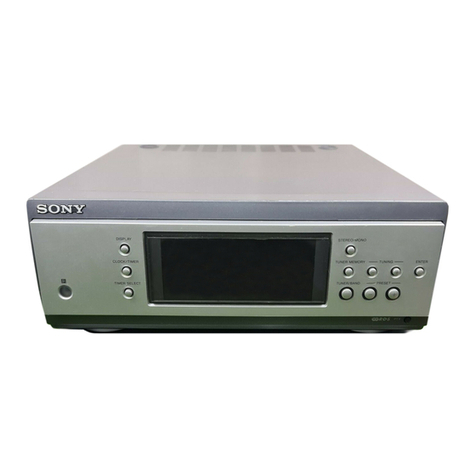
  9. Sony ST-S3000ES User manual

Sony ST-S3000ES User manual

Other manuals for ST-S3000ES

1

Other Sony Tuner manuals

Sony MB-806A User manual

Sony

Sony MB-806A User manual

Sony WRR-805A User manual

Sony

Sony WRR-805A User manual

Sony ST-S3 User manual

Sony

Sony ST-S3 User manual

Sony WRR-861A User manual

Sony

Sony WRR-861A User manual

Sony SVR-2000 User manual

Sony

Sony SVR-2000 User manual

Sony XDRF1HD - HD Radio Tuner User manual

Sony

Sony XDRF1HD - HD Radio Tuner User manual

Sony URX-P03D/25 User manual

Sony

Sony URX-P03D/25 User manual

Sony MBX6 User manual

Sony

Sony MBX6 User manual

Sony WRR-800A User manual

Sony

Sony WRR-800A User manual

Sony ST-D50L User manual

Sony

Sony ST-D50L User manual

Sony ST-S800ES User manual

Sony

Sony ST-S800ES User manual

Sony Dream Machine ICF-C743 User manual

Sony

Sony Dream Machine ICF-C743 User manual

Sony ST-S320 User manual

Sony

Sony ST-S320 User manual

Sony XT-V70 User manual

Sony

Sony XT-V70 User manual

Sony URX-M2 User manual

Sony

Sony URX-M2 User manual

Sony WRR-810A User manual

Sony

Sony WRR-810A User manual

Sony URX-S03D User manual

Sony

Sony URX-S03D User manual

Sony ST-SA50ES - Am/fm Tuner User manual

Sony

Sony ST-SA50ES - Am/fm Tuner User manual

Sony hmd-m11 User manual

Sony

Sony hmd-m11 User manual

Sony ST-JX661 User manual

Sony

Sony ST-JX661 User manual

Sony ST-S590ES User manual

Sony

Sony ST-S590ES User manual

Sony WRR-800A User manual

Sony

Sony WRR-800A User manual

Sony WRR-801A User manual

Sony

Sony WRR-801A User manual

Sony WRR-810A User manual

Sony

Sony WRR-810A User manual

Popular Tuner manuals by other brands

Technics ST-HD55 Service manual

Technics

Technics ST-HD55 Service manual

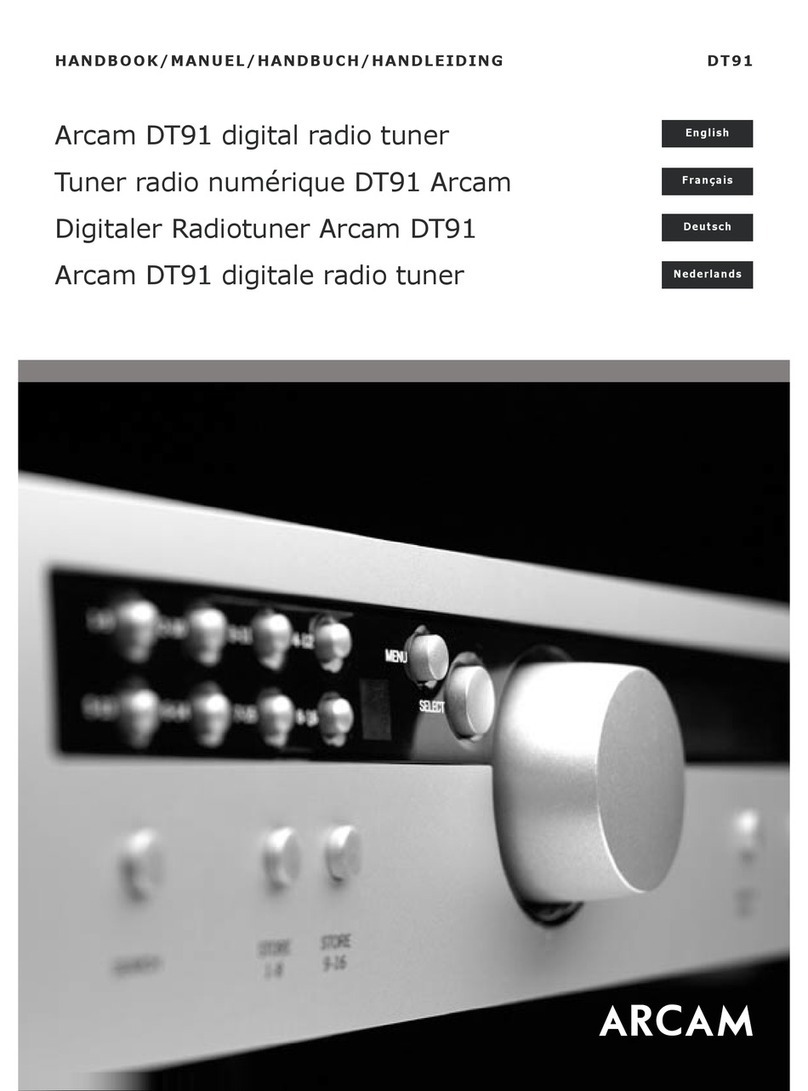
Arcam DT91 Handbook

Arcam

Arcam DT91 Handbook

HDHomeRun 20121008 installation instructions

HDHomeRun

HDHomeRun 20121008 installation instructions

Eico HFT-92 instruction manual

Eico

Eico HFT-92 instruction manual

MFJ MFJ-928 instruction manual

MFJ

MFJ MFJ-928 instruction manual

Teac T-1D Service manual

Teac

Teac T-1D Service manual

NAD C 445 owner's manual

NAD

NAD C 445 owner's manual

Pioneer GEX-P700DAB Operation manual

Pioneer

Pioneer GEX-P700DAB Operation manual

Sirius Satellite Radio SC-FM1 user guide

Sirius Satellite Radio

Sirius Satellite Radio SC-FM1 user guide

Antique Automobile Radio 283501B Installation and operating instructions

Antique Automobile Radio

Antique Automobile Radio 283501B Installation and operating instructions

Sanyo FMT M15L Service manual

Sanyo

Sanyo FMT M15L Service manual

Monacor PA-1200R instruction manual

Monacor

Monacor PA-1200R instruction manual

Technics ST-X301L Service manual

Technics

Technics ST-X301L Service manual

Manhattan 176156 user manual

Manhattan

Manhattan 176156 user manual

Marantz ST-15S1 user guide

Marantz

Marantz ST-15S1 user guide

Korg HA-40 owner's manual

Korg

Korg HA-40 owner's manual

Pioneer XC-IS21T Service manual

Pioneer

Pioneer XC-IS21T Service manual

Harman Kardon TU915 Technical manual

Harman Kardon

Harman Kardon TU915 Technical manual

manuals.online logo
manuals.online logoBrands
  • About & Mission
  • Contact us
  • Privacy Policy
  • Terms and Conditions

Copyright 2025 Manuals.Online. All Rights Reserved.

— 1 —
AEP Model
SPECIFICATIONS
MICROFILM
FM STEREO FM-AM TUNER
ST-S3000ES
SERVICE MANUAL
— 2 —
SECTION 1
GENERAL
TABLE OF CONTENTS
1. GENERAL ...................................................................2
2.TEST MODE ................................................................3
3. ELECTRICAL ADJUSTMENT ..................................... 4
4. DIAGRAMS
4-1. Waveforms.......................................................................... 7
4-2. IC Block Diagrams ............................................................. 8
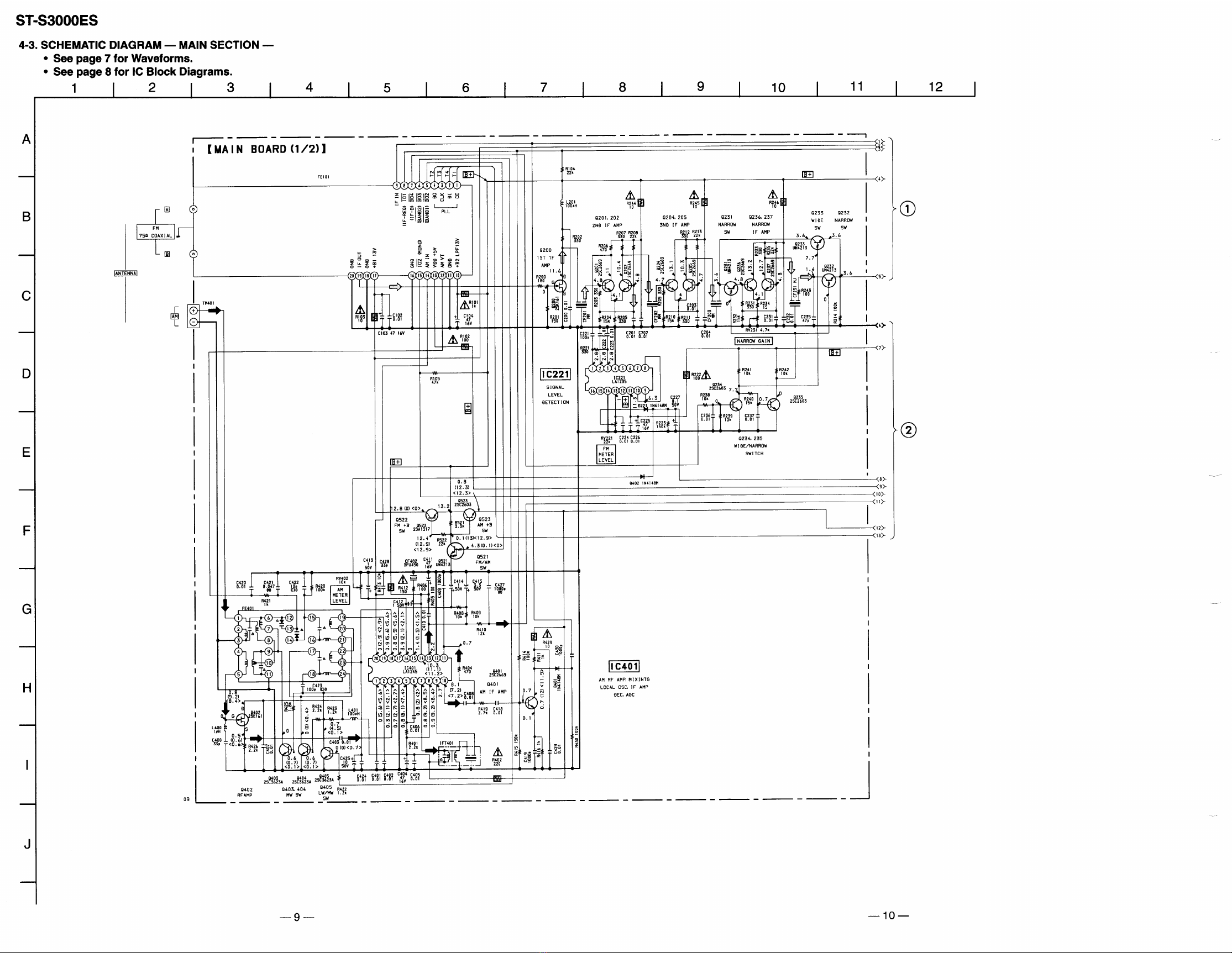
4-3. Schematic Diagram — Main Section — ............................ 9
4-4. Printed Wiring Board — Main Section — ....................... 13
4-5. Printed Wiring Board — Power Board Section —........... 15
4-6. Schematic Diagram — Power Board Section — ............. 16
4-7. Printed Wiring Board — Display Section — ................... 17
4-8. Schematic Diagram — Display Section — ...................... 19
4-9. IC Pin Function
• IC701 System Control (µPD780205GF) ....................... 21
5. EXPLODED VIEW ....................................................23
6. ELECTRICAL PARTS LIST ....................................24
SAFETY-RELATED COMPONENT WARNING !!
COMPONENTS IDENTIFIED BY MARK !OR DOTTED LINE
WITH MARK !ON THE SCHEMATIC DIAGRAMS AND IN
THE PARTS LIST ARE CRITICAL TO SAFE OPERATION.
REPLACE THESE COMPONENTS WITH SONY PARTS
WHOSE PART NUMBERS APPEAR AS SHOWN IN THIS
MANUAL OR IN SUPPLEMENTS PUBLISHED BY SONY.
Location of Parts and Controls
4567
810911
12 13
13
2
1 POWER button
2 TUNING/SELECT– button
3 TUNING/SELECT+ button
4 DISPLAY button
5 CHARACTER button
6 ANTENNA button
7 BAND button
8 MEMORY button
9 MENU ENTRY MENU button
10 MENU ENTRY RETURN button
11 MENU ENTRY ENTER button
12 TUNE MODE button
13 SHIFT button
— 3 —
1. Circuit Check Mode
Set to the reception frequency that the circuit can STEREO RDS stations. (Set the input level to above 70 dB.)
This enables circuit check to be performed in any of the reception modes-FM, AM (MW, LW). Set to a desired band before setting the test
mode.
1. Turn OFF the power.
2. While pressing ENTER and BAND together, turn ON the power.
• The items in the following table will be checked automatically in order every 2 seconds.
SECTION 2
TEST MODE
Tuned
IF Frq
Sig Level
Stereo
RDS Signal
AST signal =LOW
IF COUNT OK
SI LEVELh70dB
ST signal=LOW
RDS DATA OK
OK or NG
OK or NG
OK or NG
OK or NG
OK or NG
OK or NG
OK or NG
IC251 NG, RV251 adjustments
FE101, IC251 NG, or IF count buffer amp (Q251, Q401) NG
IC221 NG, RV221 adjustments
IC301 NG, RV301 adjustments
IC801 NG
NG
Display Items FM RDS AM (MW, LW)
DISPLAY
NOTE : The preset data will be erased when this test mode is used. Therefore, take down the data before setting this mode and preset the data
again after completing operations in this mode.
2. FLUORESCENT INDICATORTUBE Check and KEY Check mode
1. Turn OFF the power.
2. While pressing ENTER and RETURN together, turn ON the power.
3. While continuously pressing ENTER and RETURN together, check the following.
Indication test pattern
* The indication test patterns from 2to 5are indicated on only even grids.
The display changes every 1 sec.
17F
ppppp
ppppp
ppppp
ppppp
ppppp
ppppp
ppppp
260
πpπpπ
πpπpπ
πpπpπ
πpπpπ
πpπpπ
πpπpπ
πpπpπ
37E
ppppp
πππππ
πππππ
πππππ
πππππ
πππππ
πππππ
43D
πππππ
πππππ
ppppp
πππππ
ppppp
πππππ
πππππ
55F
πππππ
πππππ
πππππ
πππππ
πππππ
πππππ
ppppp
Microcomputer version indication (1 sec) nAll light up “7F” nDot area only “60” nDot area only “7E”
Dot area only “5F” NDot area only “3D”
N
N
— 4 —
4. Release ENTER and RETURN . The KEY CHECK mode will be set.
5. All key numbers will be displayed.
Key Number : 12
6. Each time the key is pressed, the key number will be counted down.
Each key will be counted only once, at the first time.
7. When all keys have been pressed, the process will end.
NOTE : As contents of the Factory Preset will be written into memory after completing this check mode, delete contents of memory
according to 4. Forced RESET.
3. Entering the Factory Preset (In case perform just to write memory of the Factory Preset.)
1. Turn OFF the power.
2. While pressing ENTER and MEMORY together, turn ON the power.
4. Forced RESET (Used to delete the contents of Factory Preset when it is written into the preset memory.)
Clears all the RAMs and sets the initial state
1. Turn OFF the power.
2. While pressing ENTER and ANTENNA together, turn ON the power.
3. When “All clear” is indicated on the display tube.
SECTION 3
ELECTRICAL ADJUSTMENTS
Precautions in Repairing
If the front end unit fails, it is difficult to repair the inner circuits, so
replace the entire front end unit.
Set “IF : WIDE” after the all adjustments.
FM SECTION 0dB = 1µV
• Standard Setting of FM Stereo RF Signal Generator.
STEREO STANDARD SIGNAL MONAURAL
STANDARD SIGNAL
Carrier frequency : 98MHz
Modulation : Audio 1kHz
Main channel (L+R) :33.75kHz
deviation
Sub channel (L–R) :33.75kHz
deviation
Pilot :7.5kHz
deviation
Carrier frequency : 98MHz
Modulation : Audio 1kHz
75kHz deviation
FM RF SSG 1 kHz
highpass
filter distortion meter
FM ANTENNA (75
Ω
)LINE OUT
set
How to switch IF BAND : WIDE/NARROW and ANT ATT :
ON/OFF
Method:
1. Press the power button to turn the power on and set to FM.
2. Press the MENU button and press the TUNING/SELECT –, +
button to indicate “Reception” on the fluorescent display tube,
then press the ENTER button.
3. Press the TUNING/SELECT –, + button to indicate “ATT/IF
Band”, and press the ENTER button.
4. “ANT ATT: OFF” is indicated on the fluorescent display tube
and press the TUNING/SELECT –, + button to indicate “ON”
or “OFF”, then press the ENTER button.
When theANTATT is set, “ANTATT” is indicated on the fluo-
rescent display tube.
5. “IF:Wide” is indicated on the fluorescent display tube, and press
the TUNING/SELECT –, + button to indicate “Wide” or “Nar-
row”, then press the ENTER button.
When the “IF: Narrow” is set, “NARROW” is indicated on the
fluorescent display tube.
6. Set WIDE after the operation.

— 5 —
FM Discriminator ADJUSTMENT
(NULL and MONO Distortion Adjustment)
Setting :
IF BAND : WIDE
ANT ATT : OFF
FM RF SSG 1 kHz
highpass
filter distortion meter
FM ANTENNA (75
Ω
)LINE OUT
Modulation: Monaural Standard signal
Output level: 6mV (76dB) (at 75
Ω
open)
Procedure :
1. Tune the set to 98 MHz.
2. Adjust IFT252 for 0V reading on the digital voltmeter.
.................. NULL
3. Adjust IFT253 for a minimum reading on the distortion meter.
.................. MONO Distortion (THD)
4. Repeat the adjustments of 2 and 3 several times.
Note : When replacing the ceramic filter, perform this alignment.
TP251
NULL terminal
DigitalVoltmeter
(DC range)
set
Stereo Level Adjustment
Setting :
IF BAND : WIDE
ANT ATT : OFF
FM RF SSG
set
FM ANTENNA (75
Ω
)
Modulation: Stereo Standard signal
Output level: 18µV (25dB) (at 75
Ω
open)
Procedure :
1. Tune the set to 98 MHz.
2. Adjust RV251 to the point (moment) when the “STEREO”
indicator will change from going off to going on.
FM RF SSG
set
FM ANTENNA (75
Ω
)
Modulation: Stereo Standard signal
Output level: 18µV (25dB) (at 75
Ω
open)
Narrow Gain Adjustment
Setting :
IF BAND : NARROW
ANT ATT : OFF
Procedure :
1. Tune the set to 98 MHz.
2. Set “IF BAND: NARROW”accordingto the procedure of“How
to switch IF BAND WIDE/NARROW” on page 6.
3. Adjust RV231 to the point (moment) when the “STEREO” indi-
cator will change from going off to going on.
FM Meter Level Adjustment
Setting :
IF BAND : WIDE
ANT ATT : OFF
FM RF SSG
FM ANTENNA (75
Ω
)
Modulation: Stereo Standard signal
Output level: 3mV (76dB) (at 75
Ω
open)
Procedure :
1. Tune the set to 98 MHz.
2. Press DISPLAY button to display the digital signal, then adjust
RV221 to be displayed as “SIG 70dB”.
Stereo Separation Adjustment
Setting :
IF BAND : WIDE
set
FM RF SSG
FM ANTENNA (75
Ω
)
set
LINE OUT
level meter
Modulation: Stereo Standard signal
Output level: 6mV (76dB) (at 75
Ω
open)
Procedure :
1. Refer to “How to switch IF BAND WIDE/NARROW” on page
6.
FM stereo
Signal generator
Output channel
Level meter
connection Level meter
reading (dB)
L-CH L-CH A
B
Adjust RV301 for minimum
reading on Level meter
R-CH L-CH
R-CH R-CH C
D
Adjust RV301 for minimum
reading on Level meter
L-CH R-CH
L-CH Stereo separation : A- B
R-CH Stereo separation : C- D
The separations of both channels should be equal.
— 6 —
AM SECTION
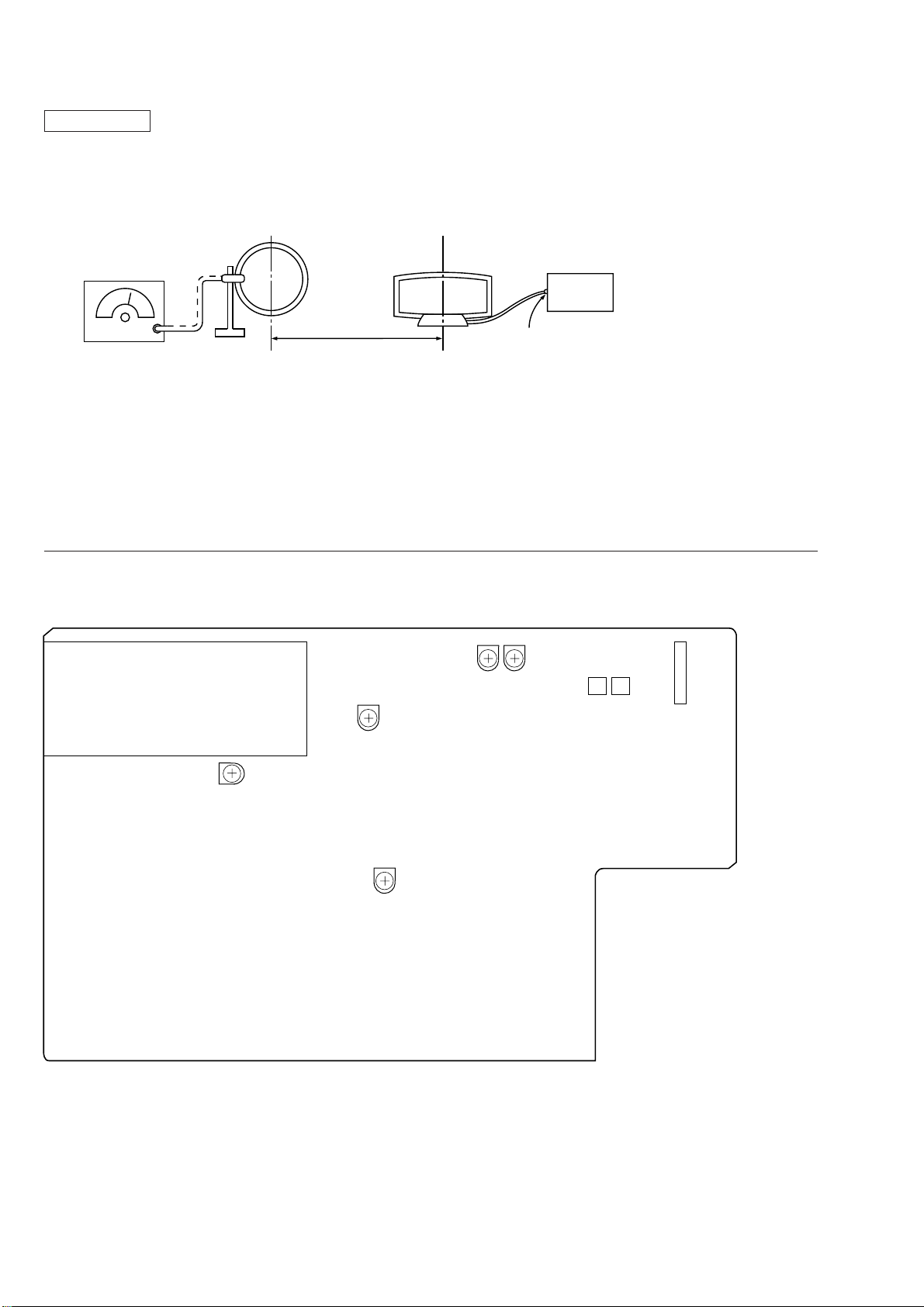
AM Meter Level Adjustment
Setting :
BAND : LW
loop antenna
AM RF SSG
AM antenna
terminal (TM1)
loop antenna
(Supplied accessories)
Field strength dB (µV/m) = SSG output level dB (µV/m) –26dB.
30% amplitude
modulation by
400Hz signal
Carrier frequency: 216kHz
Modulation: AUDIO 400Hz, 30% modulation
Procedure :
1. Set AM RF signal generator so that the AM antenna input level
becomes 74dBµ/m.
2. Adjust RV402 so that 1 to 10 indication bars light up on the signal
meter.
Adjustment Location
[MAIN BOARD] — Component Side —
60cm
set
FE101
RV402
AM Meter Level
RV301
Stereo
Separation
RV231
Narrow
Gain RV251
Stereo
Level
IFT253
(THD)
IFT252
(NULL) CNP701
IFT252, 253
FM Discriminator
RV221
FM Meter Level
— 7 — — 8 —
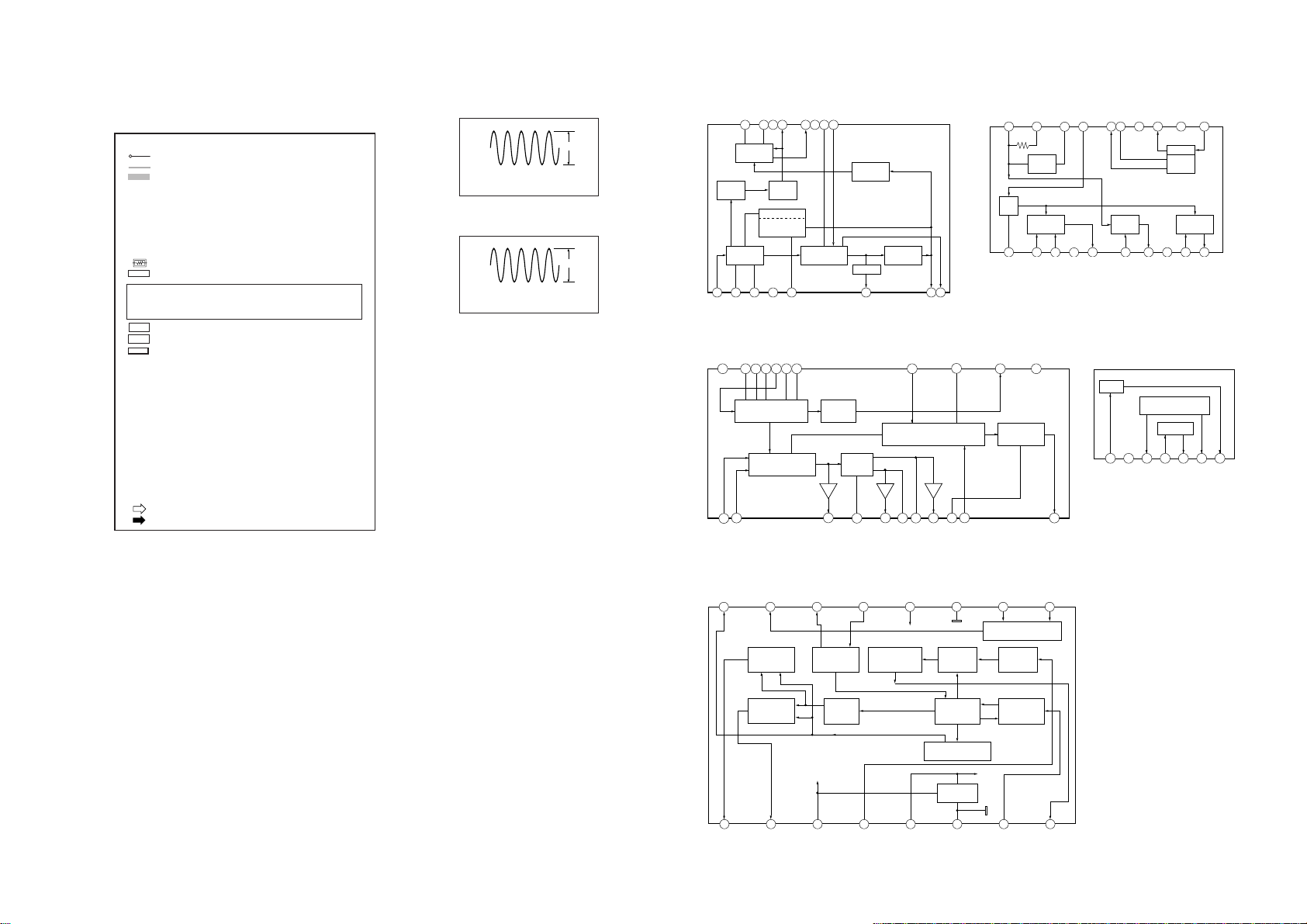
4-1.WAVEFORMS 4-2. IC BLOCK DIAGRAMS
THIS NOTE IS COMMON FOR PRINTEDWIRING BOARDS
AND SCHEMATIC DIAGRAMS.
(In addition to this, the necessary note is printed in each
block.)
NOTE
• : parts extracted from the component side.
• : parts extracted from the conductor side.
• : Pattern from the side which enable seeing.
NOTE
• All capacitors are in µF unless otherwise noted. pF : µµF 50WV
or less are not indicated except for electrolytics and tantalums.
• All resistors are in Ωand 1/4W or less unless otherwise speci-
fied.
•¢: Internal component.
• : nonflammable resistor.
• : panel designation.
3 6
11
2 5 81 4
1415 12 91016 13
7
FM IF AMP
LIMITER AF/NULL
METER
QUADRATURE
DET AF AMP
IF OFF
NULL METER
SHORTING
LEVEL
DET METER
DRIVE
MUTING
CIRCUIT DETUNE
DET
GND
B+
IC401 LA1245
36 92 5 81 47 10
18 15 1219 16 1320 17 14 11
AM RF AMP AM IF AMP
AM
MIXING
AGC
AM
OSC
GND B+
(RF)
AM DET
METER
DRIVE
B+
(IF)
1
FM/AM SELECT
MUTING
FM/AM SELECT CONTROL
LOGIC / MUTE ON/OFF MUTING
OUT
LAMP
DRIVE
PLL
VCC GND
MPX
22 21 20 19 18 17 16 15 14 13 12
2 3 4 5 6 7 8 9 10 11
IC301 LA3401
IC221, 251 LA1235
1234
REG
GND
CONTROL
REG
567
IC901 LA5667
TEST LOGIC AND OUTPUT
SELECTOR SWITCH
QUALITY BIT
GENERATOR OSCILLATOR
AND
DIVIDER
RECONSTRUCTION
FILTER
57KHz
BANDPASS
(8th ORDER)
ANTI-
ALIASING
FILTER
COSTAS LOOP
VARIABLE AND
FIXED DIVIDER
CLOCKED
COMPARATOR
CLOCK REGENERATION
AND SYNC
16 15 14 13 12 11 10 9
1 2 3 4 5 6 7 8
REFERENCE
VOLTAGE
DIFFERENTIAL
DECODER
BIPHASE
SYMBOL
DECODER
Vp1
QUAL
RDDA
VREF
MUX
VDDA
VSSA
CIN
SCOUT
RDCL
T57
OSCO
OSCI
VDDD
VSSD
TEST
TSTLD
IC801 SAA6579
SECTION 4
DIAGRAMS
IC801 !£
4.332MHz
MAIN SECTION
1
3.2Vp-p
IC701 !¡ X2
4.2MHz
DISPLAY SECTION
1
5.2Vp-p
•B+ : B+ Line
•B– : B– Line
• : adjustment for repalf
• Voltage and waveforms are dc with respect to ground under no-
signal conditions.
no mark : FM
MW : ( )
LW : < >
*: Can not be measu
• Voltages are taken with aVOM (Input impedance 10MΩ).
Voltage variations maybenotedduetonormal production toler-
ances.
• Waveforms are taken with a oscilloscope.
Voltage variations maybenotedduetonormal production toler-
ances.
• Circled numbers refer to waveforms.
• Signal path.
: FM
: AM
Note: The components identified by mark !or dotted
line with mark !are critical for safety.
Replace only with part number specified.