6
English
Select video source
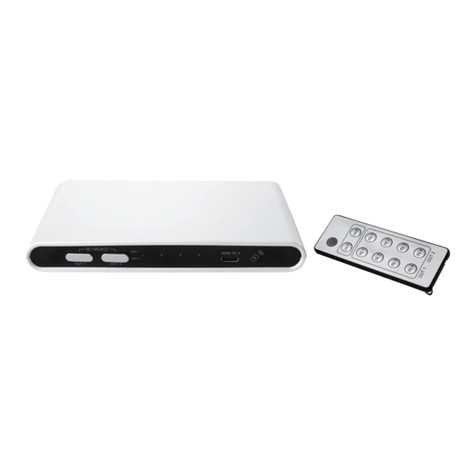
1. Press [ON/OFF] (22, 21) to turn output Aand output B on/off, respectively. TheLED
indicators (5, 6) show which inputs are selected.
2. Repeatedly press [OUTPUT A] (7) on theHDMI switch or one of thebuttons [A1–4] (19)
on theremote control to select thevideo source to display on output A.
3. Similarly, repeatedly press [ OUTPUT B ] (8) on theHDMI switch or one of thebuttons
[B 1–4] (20) on theremote control to select thevideo source to display on output B.
Turnoff
• Press [ ] (16) on theremote control to put theHDMI switch in standbymode. Pressit
again to turn it backon.
• Press [POWER] (1) on theHDMI switch to completely cut thepower.
Audio
Theaudio that is sent to HDMI output Ais also sent to theaudio outputs. Iftheaudio source
supports surround sound, you can switch between 2-channel stereo and 5.1-channel
surroundsound.
• Press [2CH] (18) to select 2-channel stereosound. LED (4) turns off and all three audio
outputs AUDIO (12), COAX (13) and SPDIF (14) are active.
• Press [5.1CH] (17) to select 5.1 surroundsound. LED (4) turns on and only audio outputs
COAX (13) and SPDIF (14) are active.
• Press [MUTE] (23) to turn off thesound completely.
Care and maintenance
Clean theproduct using adampcloth. Useonly mild cleaning agents, never solvents or
corrosive chemicals.
Troubleshootingguide
TheHDMI switch will not
turnon. NoLED indicators
light up on theproduct.
• Make sure that themains lead is undamaged and is
securely connected to both theelectrical outlet and
theHDMI switch.
TheHDMI switch does
not react to theremote
control’s signals.
• Make sure that thedistance to theHDMI switch is not too
far and that nothing is blocking thesignal.
• Thebattery in theremote might bedead. Replace if necessary.
No picture is displayed
and no audio isheard.
• Check that theHDMI cables are intact and properly
connected to theHDMI switch and to your video sources,
displaysetc.
Thepicture is seen but no
audio isheard.
• Only use HDMI cables that are version 1.1 orlater.
• Try another HDMI source.
If theproduct is operating
abnormally in some
otherway.
• Try cutting thepower to theHDMI switch: Unplug
themains adaptor from theelectrical outlet, wait for afew
seconds and then plug theadaptor backin.