IQ
IQAir
Air®
®
Cer
Certificate of P
tificate of Per
erfor
formance
mance
IQAir Model:
Serial No.:
Shell No.:
I. Air Delivery Rate
Speed 1:
Speed 2:
Speed 3:
Speed 4:
Speed 5:
cfm
cfm
cfm
cfm
cfm
This certifies that the aforementioned air cleaning device has been tested prior to packaging
at the IQAir production facility in Switzerland.This particular device has been found to be
in compliance with the model’spublished specifications for air delivery and particle filtra-
tion efficiency.This particular device has passed the particle leakage test. All test have been
carried out with a set of reference cartridges of the type P260 AC/4.
Speed 1:
Speed 2:
Speed 3:
Speed 4:
Speed 5:
cfm
cfm
cfm
cfm
cfm
Published Air Delivery ActualAir Delivery
170
Speed 6: cfm
260 Speed 6: cfm
Dental Series
TestVoltage/Frequency:
120V / 60 Hz
Page1 of 2
cfm = cubic feet per minute
The aforementioned device
has been tested for its air
delivery at all fan speed set-
tings. Due to component
tolerances, a divergence of
5% + 10 cfm is deemed
acceptable.
Note:
Theair delivery rate refers to
the unit’sinitial air delivery,
which will decrease as filters
load up with dust particles.
Measuring instrument: Alnor LoFloBalometer.
Instrument accuracy: ± (3% + 5 cfm).
Signed: _________________
Testing& QC Dept.
Testingcarried out by:
140
110
70
35
1D0UA00
00
1D0UA0000/040713/105600007
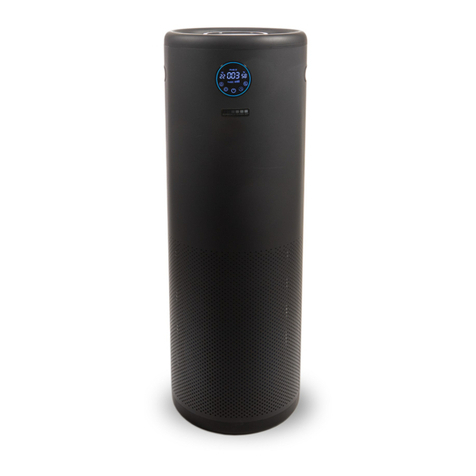
Getting Started with YourIQAir® Dental System
Thankyou for choosing an IQAir advanced air cleaning system. This2-page instruc tion sheet will assist you in getting
started with your IQAir in a matter of minutes.Simply follow the instructions below. To access some of the more
advancedfeatures of your IQAir Dental system, such as the timer,please refer to the detailed instructions in the IQAir
UserManual.
YourIQAir Dental system is supplied with the following items:
•Individually Numbered Certificate of Performance
•User Manual with Warranty Registration Certificate
•Power Connection Cord
•Remote Control & Batteries
•Set of 4 Casters (including installation instructions)
•Dental Cartridge Tool
•Set of 4 Dental Cartridges (delivered in a separate box)
•Set of 4 Dental Post-Filter Sleeves (inside the air cleaner in the F2 chamber)
1
2
SettingUp Your IQAir Dental System
A) Unpacking
Tounpack your Dental system, open the top of the box and remove the user manual,certificate of performance
andthe styrofoam pad. Lay the box on its side and pull the Dental system out by its top handle.Place the device
inits upright position and remove all packaging materials. Dental cartridges are supplied in a separate box.
B) Installingthe casters
Installingthe optional casters is not necessary, however,it may facilitate moving the air cleaner more easily from
roomto room. Please refer to the leaflet supplied with the casters for installation instructions.
C) Choosinga suitable location
TheDental system should be positioned as centrally as possible in the room where clean air is desired and at least
onefoot away from the nearest vertical surface.
D) Install your Dental Cartridges
YourDental cartridges have come in a separate box – to avoid shipping damage.Therefore, you’llneed to install
your Dental cartridges. Open the Dental system to gain access to filter 2 (Dental cartridges). For further
explanation,please see page 20 (Opening and Closing the Housing) and page 21 (Replacing the Gas Phase Filter
Cartridges(Filter 2) in the User Manual. Unpack and remove plastic from the four (4) Dental cartridges located in
aseparate shipping box.Then lock in the four (4) Dental cartridges with the D ental cartridge tool provided.Cover
eachof the Dental cartridges with the post-filter sleeves provided.
E) Connectingthe Dental system to the power supply
Plugthe connector-end of the power cable into the base of the Dental system. Locate a suitable wall socket and
connectthe power cable. The Dental system is now in standby mode readyto be switched on.
Usingthe Electronic Control Panel
A) Switchingthe Dental system on/off
Toswitch the Dental system on or off,simply press the POWER button, located on the far left of the control panel.
B) Regulatingthe fan speed
Toselect the desired fan speed, simply press the ARROW button on the control panel.When the top speed has
beenreached, the display will start again at the lowest fan speed with the next push of the“arrow” button.
C) Settingthe clock
Settingthe time and weekday is not essential for the Dental system to keep track of filter life.However,the setting
ofthe clock is required to program the Dental system’s daily and weekly timer.For detailed instructions, please
referto the Dental Series user manual.
(over)