manuals.online logo
Brands
  1. Home
  2. •
  3. Brands
  4. •
  5. Omron
  6. •
  7. Accessories
  8. •
  9. Omron E3Z-LT User manual

Omron E3Z-LT User manual

This manual suits for next models

18

Other Omron Accessories manuals

Omron E32-L25T User manual

Omron

Omron E32-L25T User manual

Omron FZ3 Series User manual

Omron

Omron FZ3 Series User manual

Omron E3MC - User manual

Omron

Omron E3MC - User manual

Omron ZN-A Series User guide

Omron

Omron ZN-A Series User guide

Omron ZS-HL-N Series Installation manual

Omron

Omron ZS-HL-N Series Installation manual

Omron ZFV-LTF01 User manual

Omron

Omron ZFV-LTF01 User manual

Omron E3C-LDA-N Series User manual

Omron

Omron E3C-LDA-N Series User manual

Omron E8F2 - User manual

Omron

Omron E8F2 - User manual

Omron ZS User manual

Omron

Omron ZS User manual

Omron ZFV-SC50 Series User manual

Omron

Omron ZFV-SC50 Series User manual

Omron E3MC - User manual

Omron

Omron E3MC - User manual

Omron fh series Instructions for use

Omron

Omron fh series Instructions for use

Omron LASER ZX - User manual

Omron

Omron LASER ZX - User manual

Omron MX2 COMPONET OPTION BOARD User manual

Omron

Omron MX2 COMPONET OPTION BOARD User manual

Omron ZW-C1*T User manual

Omron

Omron ZW-C1*T User manual

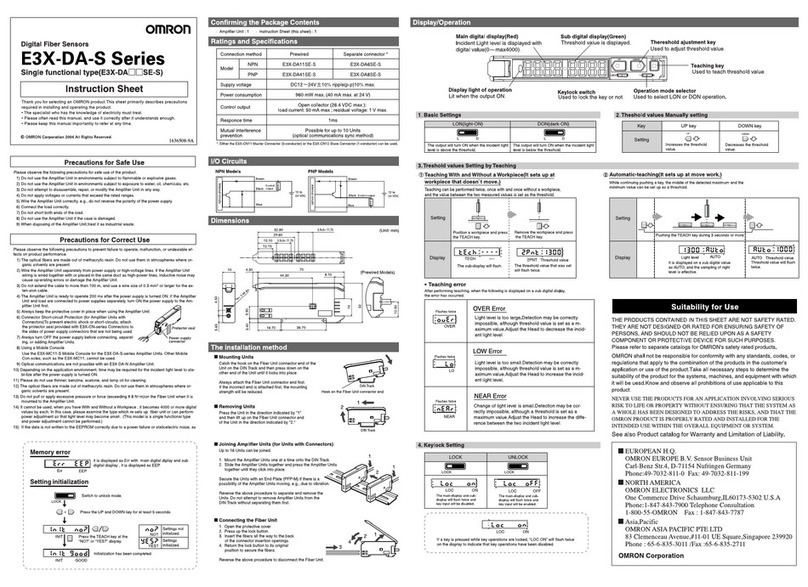
Omron E3X-DA-S Series User manual

Omron

Omron E3X-DA-S Series User manual

Omron ZS-L - User manual

Omron

Omron ZS-L - User manual

Omron ZFX-C User manual

Omron

Omron ZFX-C User manual

Omron E3S-LS10XE4 2M User manual

Omron

Omron E3S-LS10XE4 2M User manual

Omron E3Z series User manual

Omron

Omron E3Z series User manual

Omron TL User manual

Omron

Omron TL User manual

Omron FZ2 Series User manual

Omron

Omron FZ2 Series User manual

Omron F210 User manual

Omron

Omron F210 User manual

Omron E2F-X1R5Y1 User manual

Omron

Omron E2F-X1R5Y1 User manual

Popular Accessories manuals by other brands

Quincy lab 140AE-1 operating manual

Quincy lab

Quincy lab 140AE-1 operating manual

HomePro ZIR000 user manual

HomePro

HomePro ZIR000 user manual

DOL 20SCR Technical user guide

DOL

DOL 20SCR Technical user guide

RAB Smart Task installation manual

RAB

RAB Smart Task installation manual

Kemppi KMS 300 quick guide

Kemppi

Kemppi KMS 300 quick guide

Stearns 57,500 Series Installation and service instructions

Stearns

Stearns 57,500 Series Installation and service instructions

iGuzzini TWILIGHT COPENAGHEN manual

iGuzzini

iGuzzini TWILIGHT COPENAGHEN manual

Adelaide Annexe & Canvas Avan Deluxe installation guide

Adelaide Annexe & Canvas

Adelaide Annexe & Canvas Avan Deluxe installation guide

OHAUS 5000 instruction manual

OHAUS

OHAUS 5000 instruction manual

HOME8 WLS1300 quick start guide

HOME8

HOME8 WLS1300 quick start guide

MAXBOTIX MaxSonar quick start guide

MAXBOTIX

MAXBOTIX MaxSonar quick start guide

ioSmart iSmart56 Installation and user guide

ioSmart

ioSmart iSmart56 Installation and user guide

Focusrite Scarlett 18i8 user guide

Focusrite

Focusrite Scarlett 18i8 user guide

Velleman ED38105 user manual

Velleman

Velleman ED38105 user manual

JumpSport SkyBounce user manual

JumpSport

JumpSport SkyBounce user manual

Prima-Temp PRIYA Instructions for use

Prima-Temp

Prima-Temp PRIYA Instructions for use

Tefcold BC85I-BC85I W user manual

Tefcold

Tefcold BC85I-BC85I W user manual

Vaisala WMS302 user guide

Vaisala

Vaisala WMS302 user guide

manuals.online logo
manuals.online logoBrands
  • About & Mission
  • Contact us
  • Privacy Policy
  • Terms and Conditions

Copyright 2025 Manuals.Online. All Rights Reserved.

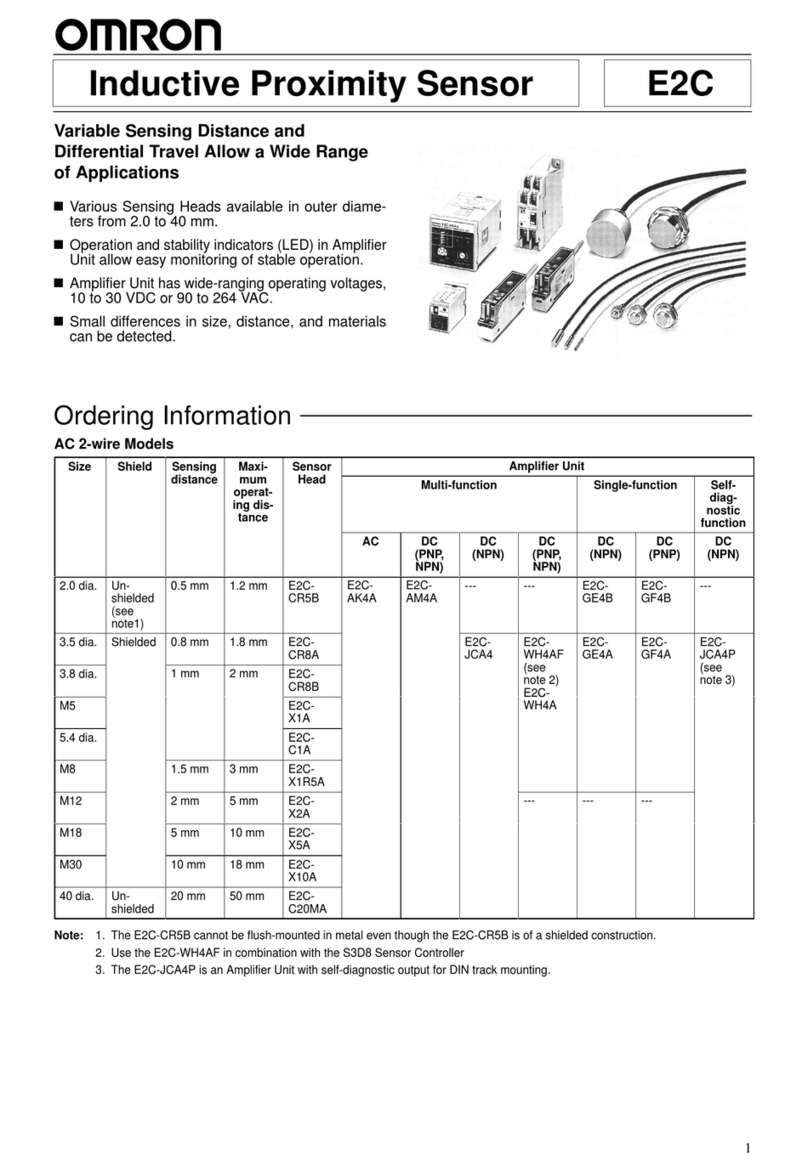
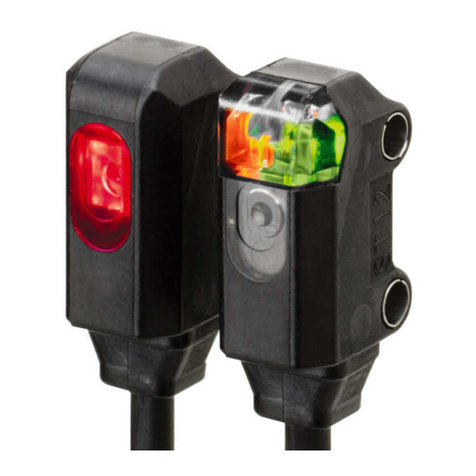
Laser Photoelectric Sensor with Built-in Amplifier
E3Z-LT/LR/LL
Applications
Optical Customization for E3Z Lasers
That Fit the Application!
The E3Z laser system has an original modular structure. Spot diameters can be customized, as shown in the examples below.
For example, when a through-beam model is used at far range, the optical axis can be easily adjusted by widening the spot, and minute objects
can be easily detected by minimizing the spot at close range. These applications improve product value.
Greatly Enhanced Beam Visibility
for Easier Optical Axis Adjustment of Sensors
Detect the sides of large tiles.
Detect chip components on tape.
Long-distance Sensing
at 300 mm (White Paper)
Reliable Detection of
Small Objects and
Narrow Gaps with the Small Spot
Count bottles.
Detect protruding straws.
A Low Black/White Error for
Applications with Mixed Colors
Laser beam directional deviation can be suppressed and
spot diameters can be freely customized.
This is achieved through high-precision alignment technology based on LD
and emitter lens modularization.
The lens position can be adjusted inline.
Advanced Optical Technology of the E3Z Laser
(
P
a
t
e
n
t
p
e
nd
i
ng
.
)
Laser Modular Conceptual Diagram Holder
LD (semiconductor laser)
Emitter lens
Laser beam
By precisely adjusting the emitter lens in the vertical, horizontal, and depth directions,
alignment can be achieved with minimal directional deviation (to ±1 degree).
The Most Compact Laser Sensor
The Most Reliable E3Z
■Excellent quality of E3Z such as the maximum ambient operating
temperate of 55°C, IP67 degree of protection is inherited.
■Safe and reliable class 1 (JIS/IEC) laser used
■Excellent detection performance supporting long distance and
low hysteresis
■Complete Compliance with RoHS
■
Spot diameters can be customized.
Increasing the spot diameter makes optical axis adjustment easier.
Be sure to read Safety Precautions on
page 9.
http://www.ia.omron.com/ 1
(c)Copyright OMRON Corporation 2007 All Rights Reserved.
E3Z-LT/LR/LL
Ordering Information
Sensors
*1. The Reflector is sold separately. Select the Reflector model most suited to the application.
*2. Values in parentheses indicate the minimum required distance between the Sensor and Reflector.
*3. Pre-wired Models with a 0.5-m cable are also available for these products. When ordering, specify the cable length by adding “0.5M” to the end of the model number
(e.g., E3Z-LT61 0.5M).
M12 Pre-wired Connector Models are also available. When ordering, add “-M1J” to the end of the model number (e.g., E3Z-LT61-M1J). The cable is 0.3 m long.
The following connection forms are also available. Ask your OMRON representative for details.
• Pre-wired Models with 1-m or 5-m cables
• Pre-wired Connector Models with M8 4-pin connectors, M8 3-pin connectors, or e-CON connectors.
*4. Consult with your OMRON representative if a distance of more than 10 m is required. Models with large custom-size spots can be produced. These make optical
axis adjustment easier and allow the beam to be received more stably by the Receiver even if vibration is present.
Accessories
Slits (for E3Z-LT@@)
Reflectors (for E3Z-LR@@)
Sensing method Appearance Connection method Response
time Sensing distance Model
NPN output PNP output
Through-beam
Pre-wired (2 m)*3
1 ms
E3Z-LT61 E3Z-LT81
Connector (M8, 4 pins) E3Z-LT66 E3Z-LT86
Retro-reflective with
MSR function
Pre-wired (2 m)*3E3Z-LR61 E3Z-LR81
Connector (M8, 4 pins) E3Z-LR66 E3Z-LR86
Distance-settable
(BGS Models)
Pre-wired (2 m)*3E3Z-LL61 E3Z-LL81
Connector (M8, 4 pins) E3Z-LL66 E3Z-LL86
Pre-wired (2 m)*3
0.5 ms
E3Z-LL63 E3Z-LL83
Connector (M8, 4 pins) E3Z-LL68 E3Z-LL88
Slit width Sensing distance Minimum detectable object
(typical) Model Contents
0.5 mm dia. 3 m 0.1 mm dia. E39-S65A
One set
(contains Slits for both the
Emitter and Receiver)
Name Sensing distance (typical) Model Remarks
Reflector
15 m (300 mm) E39-R1 • Retro-reflective models are not provided with Reflectors.
• Separate the Sensor and the Reflector by at least the
distance given in parentheses.
• The MSR function is enabled.
7 m (200 mm) E39-R12
7 m (200 mm) E39-R6
Red light
*4
60 m
*1(Using E39-R12)
(Using E39-R1)
7 m
(200 mm)
(Using E39-R6)
15 m
(300 mm)
7 m
(200 mm)
*2
20 to 40 mm
(Min. distance set)
20 to 300 mm
(Max. distance set)
25 to 40 mm
(Min. distance set)
25 to 300 mm
(Max. distance set)
http://www.ia.omron.com/ 2
(c)Copyright OMRON Corporation 2007 All Rights Reserved.
E3Z-LT/LR/LL
Mounting Brackets
Note: When using Through-beam models, order one bracket for the Receiver and one for the Emitter.
* Cannot be used for Standard Connector models.
Sensor I/O Connectors
Appear-
ance Model Quantity Remarks Appear-
ance Model Quantity Remarks
E39-L153 1
Mounting Brackets
E39-L98 1 Metal Protective Cover Bracket *
E39-L104 1E39-L150 1 set
(Sensor adjuster)
Easily mounted to the aluminum
frame rails of conveyors and
easily adjusted.
For left to right adjustment
E39-L43 1 Horizontal Mounting Bracket *
E39-L151 1 set
E39-L142 1Horizontal Protective Cover
Bracket *
E39-L44 1 Rear Mounting Bracket E39-L144 1Compact Protective Cover
Bracket (For E3Z only) *
Size Cable Appearance Cable type Model
M8
Standard
2 m
4-wire
XS3F-M421-402-A
5 m XS3F-M421-405-A
2 m XS3F-M422-402-A
5 m XS3F-M422-405-A
M12
(For -M1J
models)
2 m
3-wire
XS2F-D421-DC0-A
5 m XS2F-D421-GC0-A
2 m XS2F-D422-DC0-A
5 m XS2F-D422-GC0-A
e-CON
2 m
4-wire
E39-ECON2M
5 m E39-ECON5M
0.5 to 1 m E39-ECONW@M
1.1 to 1.5 m Replace the box (@) in the model number
by the cable length in increments of 0.1 m.
1.6 to 2 m
Straight
L-shaped
Straight
L-shaped
1234
Connector on One End
1234
4
3
12
Connectors of Both Ends
http://www.ia.omron.com/ 3
(c)Copyright OMRON Corporation 2007 All Rights Reserved.
E3Z-LT/LR/LL
Ratings and Specifications
Note: An emission stop function can be added to Through-beam Models as a custom function. Ask your OMRON representative for details.
* Consult with your OMRON representative if a distance of more than 10 m is required. Models with large custom-size spots can be produced. These make optical axis
adjustment easier and allow the beam to be received more stably by the Receiver even if vibration is present.
Sensing
method Through-beam Retro-reflective with MSR
function Distance-settable (BGS models)
Response Standard response High-speed response
Model
NPN
output E3Z-LT61/-LT66 E3Z-LR61/-LR66 E3Z-LL61/-LL66 E3Z-LL63/-LL68
Item PNP
output E3Z-LT81/-LT86 E3Z-LR81/-LR86 E3Z-LL81/-LL86 E3Z-LL83/-LL88
Sensing distance 60 m *
0.3
to
15 m
(when using E39-R1)
0.2
to
7 m
(when using E39-R12)
0.2
to
7 m
(when using E39-R6)
White paper (100 100 mm):
20 to 300 mm
Black paper (100 100 mm):
20 to 160 mm
White paper (100 100 mm):
25 to 300 mm
Black paper (100 100 mm):
25 to 100 mm
Set distance range ---
White paper (100 100 mm):
40 to 300 mm
Black paper (100 100 mm):
40 to 160 mm
White paper (100 100 mm):
40 to 300 mm
Black paper (100 100 mm):
40 to 100 mm
Spot diameter (typical) 5-mm dia. at 3 m 0.5-mm dia. at 300 mm
Standard sensing object Opaque: 12-mm dia. min. Opaque: 75-mm dia. min. ---
Minimum detectable
object (typical) 6-mm-dia. opaque object at 3 m 0.2-mm-dia. stainless-steel pin gauge at 300 mm
Differential travel --- 5% max. of set distance
Black/white error --- 5% at 160 mm 5% at 100 mm
Directional angle Receiver: 3 to 15---
Light source (wavelength) Red LD (655 nm), JIS CLass 1, IEC Class 1, FDA Class II
Power supply voltage 12 to 24 VDC10%, ripple (p-p): 10% max.
Current consumption 35 mA (Emitter 15 mA,
Receiver 20 mA) 30 mA max.
Control output Load power supply voltage: 26.4 VDC max., Load current: 100 mA max., Open collector output
Residual output voltage Load current of less than 10 mA: 1 V max.
Load current of 10 to 100 mA: 2 V max.
Output mode switching Switch to change between light-ON and dark-ON
Protection circuits
Reversed power supply
polarity protection, Output
short-circuit protection, and
Reversed output polarity
protection
Reversed power supply polarity protection, Output short-circuit protection, Mutual interference pre-
vention, and Reversed output polarity protection
Response time Operate or reset: 1 ms max. Operate or reset: 0.5 ms max.
Sensitivity adjustment One-turn adjuster Five-turn endless adjuster
Ambient illumination
(Receiver side)
Incandescent lamp: 3,000 lx max.
Sunlight: 10,000 lx max.
Ambient temperature range Operating: 10 to 55C, Storage: 25 to 70C (with no icing or condensation)
Ambient humidity range Operating: 35% to 85%, Storage: 35% to 95% (with no icing or condensation)
Insulation resistance 20 M:min. at 500 VDC
Dielectric strength 1,000 VAC, 50/60 Hz for 1 min
Vibration resistance Destruction: 10 to 55 Hz, 1.5-mm double amplitude for 2 hours each in X, Y, and Z directions
Shock resistance Destruction: 500 m/s23 times each in X, Y, and Z directions
Degree of protection IP67 (IEC 60529)
Connection method Pre-wired cable (standard length: 2 m): E3Z-L@@1/-L@@3
Standard M8 Connector: E3Z-L@@6/-L@@8
Indicator
Operation indicator (orange)
Stability indicator (green)
Emitter for Through-bream Models has power indicator (orange) only.
Weight
(packed
state)
Pre-wired cable
(2 m) Approx. 120 g Approx. 65 g
Standard
Connector Approx. 30 g Approx. 20 g
Material Case PBT (polybutylene terephthalate)
Lens Modified polyarylate resin Methacrylic resin Modified polyarylate resin
Accessories Instruction manual (Neither Reflectors nor Mounting Brackets are provided with any of the above models.)
http://www.ia.omron.com/ 4
(c)Copyright OMRON Corporation 2007 All Rights Reserved.
E3Z-LT/LR/LL
Engineering Data (Typical)
Parallel Operating Range
Through-beam Models Through-beam Models Retro-reflective Models
E3Z-LT@@ E3Z-LT@@ + E39-65A E3Z-LR@@
Operating Range at a Set Distance
of 300 mm
Operating Range at a Set Distance
of 40 mm
BGS Models BGS Models
E3Z-LL@@ E3Z-LL@@
Excess Gain vs. Set Distance
Through-beam Models Retro-reflective Models
E3Z-LT@@ E3Z-LR@@
Close Range Characteristics
BGS Models
E3Z-LL@1/-LL@6E3Z-LL@3/-LL@8
80604020
150
−150
100
−100
50
−50
0
Y
X
Distance X (m)
Distance Y (mm)
20
−20
15
−15
−10
10
5
−5
0810462
Distance (mm)
Distance (m)
3020 2510 155
60
−60
40
−40
20
−20
0
Y
X
E39-R12
E39-R1
E39-R6
Distance X (m)
Distance Y (mm)
350
300
200
250
500 100 150
−
2.50
2.50
−
2.00
2.00
−
1.00
1.00
−
0.50
−
1.50
1.50
0.50
0.00
Y
X
Sensing object:
100 ×100 mm
white paper
Distance X (mm)
Operating range Y (mm)
605030 4010 20
3
−3
2
−2
1
−1
0
Y
X
Sensing object:
100 ×100 mm
white paper
Distance X (mm)
Operating range Y (mm)
02010 30 40 50 7060 80
10000
100
1000
Distance (m)
Excess gain ratio (multiple)
100
10
1
0.1
3010 200
E39-R6
E39-R12
E39-R1
Distance (m)
Excess gain ratio (multiple)
300 mm
160 mm
40 mm
10 mm 12 mm 0 mm
9 mm
40 mm
350
100
50
300
150
200
250
0
White
paper
Setting:
300 mm
Black
paper
White
paper
Black
paper
Sensing distance (mm)
Setting:
40 mm
Setting:
40 mm
Setting:
160 mm
350
100
50
300
150
200
250
0
White
paper
Black
paper
White
paper
Black
paper
Sensing distance (mm)
300 mm
100 mm
40 mm
10 mm 21 mm 0 mm
9 mm
40 mm
Setting:
300 mm
Setting:
40 mm
Setting:
40 mm
Setting:
100 mm
http://www.ia.omron.com/ 5
(c)Copyright OMRON Corporation 2007 All Rights Reserved.
E3Z-LT/LR/LL
Sensing Distance vs. Sensing Object Material
BGS Models
E3Z-LL
@
1/-LL
@
6
White Paper with a Set Distance of 40 mm
E3Z-LL
@
3/-LL
@
8
White Paper with a Set Distance of 40 mm
E3Z-LL
@
1/-LL
@
6
White Paper with a Set Distance of 300 mm
Emission Spot Diameter vs. Distance
Through-beam and Retro-reflective
Models (Same for All Models)
BGS Models (Same for All Models)
E3Z-LL
@
3/-LL
@
8
White Paper with a Set Distance of 100 mm
E3Z-LT@@, E3Z-LR@@ E3Z-LL@@
Hysteresis vs. Distance
BGS Models
E3Z-LL@1 (LL@6)E3Z-LL@3 (LL@8)
Inclination Characteristics (Vertical) Inclination Characteristics (Horizontal)
BGS Models BGS Models
E3Z-LL@@ E3Z-LL@@
50
40
10
20
30
0
White
paper
Veneer Card-
board
Black
paper
Black
rubber
SUS Mirror
surface
Material
Sensing distance (mm)
50
40
10
20
30
0
White
paper
Veneer Card-
board
Black
paper
Black
rubber
SUS Mirror
surface
Material
Sensing distance (mm)
350
300
50
150
100
250
200
0
White
paper
Veneer Card-
board
Black
paper
Black
rubber
SUS Mirror
surface
Material
Sensing distance (mm)
120
100
20
60
40
80
0
White
paper
Veneer Card-
board
Black
paper
Black
rubber
SUS Mirror
surface
Material
Sensing distance (mm)
6030 40 5020100
100
50
10
20
30
40
90
60
70
80
0
Spot shape
a
b
Spot diameter (mm)
Dimension a
Dimension b
Set distance (m)
600300 400 5002001000
1.4
0.2
0.4
0.6
0.8
1.0
1.2
0
Spot shape
a
b
Dimension a
Dimension b
Spot diameter (mm)
Set distance (mm)
4003002001000
2.50
0.50
1.00
1.50
2.00
0.00
Black
paper
White
paper
Set distance (mm)
Hysteresis (%)
4003002001000
2.50
0.50
1.00
1.50
2.00
0.00
Black
paper
White
paper
Set distance (mm)
Hysteresis (%)
20
15
10
5
0
−5
−10
−15
−20
−40 −30 −20 −10 0 10203040
Sensing distance variation (%)
Distance setting: 300 mm
Sensing object: White paper
100 ×100 mm
− θ
+ θ
Inclination angle θ (°)
(Upwards
and
Downwards)
Inclination
angle
Center
line
Sensing
object
− θ
+ θ
Inclination
angle
20
15
10
5
0
−5
−10
−15
−20
−40 −30 −20 −10 0 10203040
Distance setting: 300 mm
Sensing object: White paper
100 ×100 mm
Sensing distance variation (%)
Inclination angle θ(°)
(Left and
Right)
Sensing
object
Center
line
http://www.ia.omron.com/ 6
(c)Copyright OMRON Corporation 2007 All Rights Reserved.
E3Z-LT/LR/LL
I/O Circuit Diagrams
NPN Output
PNP Output
Model Operation
mode Timing charts Operation
selector Output circuit
E3Z-LT61
E3Z-LT66
E3Z-LR61
E3Z-LR66
Light-ON L side
(LIGHT ON)
Dark-ON D side
(DARK ON)
E3Z-LL61
E3Z-LL66
E3Z-LL63
E3Z-LL68
Light-ON L side
(LIGHT ON)
Dark-ON D side
(DARK ON)
Light incident
Light interrupted
ON
OFF
ON
OFF
Operate
Reset
Operation indicator
(orange)
(Between brown and black leads)
Output transistor
Load
(e.g., relay)
4
3
1
100 mA
max.
0 V
Z
D
1
2
3
4
3
1
241
24
3
12 to 24 VDC
Through-beam Receivers, Retro-reflective Models
e-CON Connector
Pin Arrangement
Pin 2 is not used.
Press fit
Brown
Black
(Control
output)
Blue
Operation
indicator
Stability
indicator
(Green)
(Orange)
Load
(Relay)
Photo-
electric
Sensor
Main
Circuit
M12 Connector
Pin Arrangement
M8 4-pin Connector
Pin Arrangement
4
13
M8 3-pin Connector
Pin Arrangement
Light incident
Light interrupted
ON
OFF
ON
OFF
Operate
Reset
Operation indicator
(orange)
(Between brown and black leads)
Output transistor
Load
(e.g., relay)
3
1
1
2
3
4
3
1
241
24
3
12 to 24 VDC
Through-beam Emitter
Power
indicator
(orange)
e-CON Connector
Pin Arrangement
Press fit
Pins 2 and 4
are not used.
Brown
Blue
Photo-elec-
tric Sensor
Main
Circuit
M12 Connector
Pin Arrangement
M8 4-pin Connector
Pin Arrangement
4
13
M8 3-pin Connector
Pin Arrangement
ON
OFF
ON
OFF
Operate
Reset
NEAR FAR
Operation
indicator
(orange)
Output
transistor
Load
(e.g., relay)
(Between brown and black leads)
4
3
1
1
2
3
4
3
1
241
24
3
100 mA
max.
0 V
Z
D
12 to 24 VDC
e-CON Connector
Pin Arrangement
Pin 2 is not used.
Press fit
Brown
Black
(Control
output)
Blue
Operation
indicator
Stability
indicator
(Green)
(Orange)
Load
(Relay)
Photo-
electric
Sensor
Main
Circuit
M12 Connector
Pin Arrangement
M8 4-pin Connector
Pin Arrangement
4
13
M8 3-pin Connector
Pin Arrangement
ON
OFF
ON
OFF
Operate
Reset
NEAR FAR
Operation
indicator
(orange)
Output
transistor
Load
(e.g., relay)
(Between brown and black leads)
Model Operation
mode Timing charts Operation
selector Output circuit
E3Z-LT81
E3Z-LT86
E3Z-LR81
E3Z-LR86
Light-ON L side
(LIGHT ON)
Dark-ON D side
(DARK ON)
E3Z-LL81
E3Z-LL86
E3Z-LL83
E3Z-LL88
Light-ON L side
(LIGHT ON)
Dark-ON D side
(DARK ON)
Light incident
Light interrupted
ON
OFF
ON
OFF
Operate
Reset
Operation indicator
(orange)
(Between blue and black leads)
Output transistor
Load
(e.g., relay)
4
1
3
1
2
3
4
4
13
3
1
241
24
3
Through-beam Receivers, Retro-reflective Models
100 mA
max.
0 V
Z
D
12 to 24 VDC
e-CON Connector
Pin Arrangement
Pin 2 is not used.
Press fit
Brown
Black
(Control
output)
Blue
Operation
indicator
Stability
indicator
(Green)
(Orange)
Load
(Relay)
Photo-
electric
Sensor
Main
Circuit
M12 Connector
Pin Arrangement
M8 4-pin Connector
Pin Arrangement
M8 3-pin Connector
Pin Arrangement
Light incident
Light interrupted
ON
OFF
ON
OFF
Operate
Reset
Operation indicator
(orange)
(Between blue and black leads)
Output transistor
Load
(e.g., relay)
3
1
1
2
3
4
4
13
3
1
241
24
3
12 to 24 VDC
Through-beam Emitter
Power
indicator
(orange)
Pins 2 and 4 are not used.
Brown
Blue
e-CON Connector
Pin Arrangement
Press fit
Photo-elec-
tric Sensor
Main
Circuit
M12 Connector
Pin Arrangement
M8 4-pin Connector
Pin Arrangement
M8 3-pin Connector
Pin Arrangement
ON
OFF
ON
OFF
Operate
Reset
NEAR FAR
Operation
indicator
(orange)
Output
transistor
Load
(e.g., relay)
(Between blue and black leads)
1
2
3
4
4
13
3
1
241
24
3
4
1
3
100 mA
max.
0 V
ZD
12 to 24 VDC
e-CON Connector
Pin Arrangement
Pin 2 is not used.
Press fit
Brown
Black
(Control
output)
Operation
indicator
Stability
indicator
(Green)
(Orange)
Load
(Relay)
Photo-
electric
Sensor
Main
Circuit
M12 Connector
Pin Arrangement M8 4-pin Connector
Pin Arrangement
M8 3-pin Connector
Pin Arrangement
Blue
ON
OFF
ON
OFF
Operate
Reset
NEAR FAR
Operation
indicator
(orange)
Output
transistor
Load
(e.g., relay)
(Between blue and black leads)
http://www.ia.omron.com/ 7
(c)Copyright OMRON Corporation 2007 All Rights Reserved.
E3Z-LT/LR/LL
Plugs (Sensor I/O Connectors)
Nomenclature
2
4
13
1
2
3
4
Pin No.
XS2F-D421-DC0-A
XS2F-D421-GC0-A XS2F-D422-DC0-A
XS2F-D422-GC0-A
Brow
n
Blue
Black
Wire colo
r
1234
1234
4
3
12
E39-ECON@M
E39-ECONW@M
M
8 4-pin Connectors e-CON Connector
2
4
1
3
1
2
3
4
XS3F-M421-402-A
XS3F-M421-405-A XS3F-M422-402-A
XS3F-M422-405-A
Brown
White
Blue
Black
Wire color
M
12 Connectors
Å@
Note: 1. Pin 2 is not used.
2. The above M8 and M12 Connectors made by OMRON are IP67.
Classification Wire color Connector pin No. Application
DC
Brown 1 Power supply (+V)
White 2 ---
Blue 3 Power supply (0 V)
Black 4 Output
Distance adjuster
(5-turn endless)
Stability indicator
(green)
Operation selector
Operation indicator
(orange)
Sensitivity adjuster Stability indicator
(green)
Operation indicato
r
(orange)
Mode selector
switch
Sensors with Sensitivity Adjustment and
Mode Selector Switch
Through-beam Models
E3Z-LT@@ (Receiver)
Retro-reflective Models
E3Z-LR@@
Distance-settable Sensor
BGS Models
E3Z-LL@@
http://www.ia.omron.com/ 8
(c)Copyright OMRON Corporation 2007 All Rights Reserved.
E3Z-LT/LR/LL
Safety Precautions
Refer to Warranty and Limitations of Liability.
This product is not designed or rated for ensuring
safety of persons. Do not use it for such purpose.
To ensure safe use of laser products, do not allow the
laser beam to enter your eye. Direct exposure may
adversely affect your eyesight.
Do not connect an AC power supply to the Sensor.
If AC power (100 VAC or more) is supplied to the
Sensor, it may explode or burn.
Be sure to abide by the following precautions for the safe operation of
the Sensor.
●Operating Environment
Do not use the Sensor in locations with explosive or flammable gas.
●Wiring
Power Supply Voltage and Output Load Power Supply
Voltage
Make sure that the power supply to the Sensor is within the rated
voltage range. If a voltage exceeding the rated voltage range is
supplied to the Sensor, it may explode or burn.
Power Supply Voltage
The maximum power supply voltage is 26.4 VDC. Applying a voltage
exceeding the rated range may damage the Sensor or cause burning.
Load
Do not use a load that exceeds the rated load.
Load Short-circuiting
Do not short-circuit the load, otherwise the Sensor may be damaged
or it may burn.
Connection without Load
Do not connect the power supply to the Sensor with no load
connected, otherwise the internal elements may explode or burn.
Always connect a load when wiring.
Do not use the product in atmospheres or environments that exceed
product ratings.
●Laser Warning Labels
Be sure that the correct laser warning label (enclosed) is attached for
the country of intended use of the equipment containing the
Photoelectric Sensor. Refer to the user's manual for details.
●Usage Environment
Water Resistance
The Sensor is rated IP67. Do not use it in water, in the rain, or
outdoors.
Ambient Environment
Do not install the product in the following locations. Doing so may
result in product failure or malfunction.
Locations subject to excess dust and dirt
Locations subject to direct sunlight
Locations subject to corrosive gas
Locations subject to organic solvents
Locations subject to shock or vibration
Locations subject to exposure to water, oil, or chemicals
Locations subject to high humidity or condensation
●Designing
Power Reset Time
The Sensor is ready to operate 100 ms after the Sensor is turned ON.
If the load and Sensor are connected to independent power supplies
respectively, be sure to turn ON the Sensor before supplying power
to the load.
●Wiring
Avoiding Malfunctions
If using the Sensor with an inverter or servomotor, always ground the
FG (frame ground) and G (ground) terminals, otherwise the Sensor
may malfunction.
●Mounting
Mounting the Sensor
If Sensors are mounted face-to-face, make sure that the optical
axes are not in opposition to each other. Otherwise, mutual
interference may result.
Always install the Sensor carefully so that the aperture angle range
of the Sensor will not cause it to be directly exposed to intensive
light, such as sunlight, fluorescent light, or incandescent light.
Do not strike the Photoelectric Sensor with a hammer or any other
tool during the installation of the Sensor, or the Sensor will lose its
water-resistive properties.
Use M3 screws to mount the Sensor.
When mounting the case, make sure that the tightening torque
applied to each screw does not exceed 0.54 N·m.
Metal Connectors
Always turn OFF the power supply to the Sensor before connecting
or disconnecting the metal connector.
Hold the connector cover to connect or disconnect it.
If the XS3F is used, always tighten the connector cover by hand. Do
not use pliers.
If the tightening is insufficient, the degree of protection will not be
maintained and the Sensor may become loose due to vibration.
The appropriate tightening torque is 0.3 to 0.4 N·m.
If other commercially available connectors are used, follow the
recommended connector application conditions and recommended
tightening torque specifications.
WARNING
CAUTION
Precautions for Safe Use
Precautions for Correct Use
http://www.ia.omron.com/ 9
(c)Copyright OMRON Corporation 2007 All Rights Reserved.

E3Z-LT/LR/LL
Mounting Direction for Distance-settable Models
Make sure that the sensing side of
the Sensor is parallel with the
surface of the sensing objects.

Normally, do not incline the
Sensor towards the sensing
object.
If the sensing object has a glossy
surface, however, incline the Sensor
by 5to 10as shown in the
illustration, provided that the Sensor
is not influenced by background
objects.
If there is a mirror-like object below the Sensor, the Sensor may not
operate stably. Therefore, incline the Sensor or separate the
Sensor from the mirror-like object as shown below.
Do not install the Sensor in the wrong direction. Refer to the
following illustration.
Install the Sensor as shown in the following illustration if each sensing
object greatly differs in color or material.
The stability indicator may turn off in reaction to reflection from
background objects. In such cases, incline the Sensor by 10as
shown in the illustration for more stable detection.
●Adjusting Distance-settable Models
Indicator Operation
Note:If the stability indicator is lit, the detection/no detection status is
stable within the rated ambient operating temperature (10 to
55C).
●Inspection and Maintenance
Cleaning
Never use paint thinners or other organic solvents to clean the surface
of the product.
Sensing side
Surface of sensing
object
Glossy object
Sensing
object
Mirror-like object
Sensing
object
Moving direction
Moving direction
Moving
direction
Sensing
object
Sensing
object
Correct Incorrect
Correct
Moving direction
Moving direction
Correct Incorrect
Background object,
conveyor, etc.
Reflection Approx. 10˚
ON
OFF
ON
OFF
ON
OFF
ON
OFF
Stability
(green)
Operation
(orange)
Stability
(green)
Operation
(orange)
L/ON
D/ON
BGS
NEAR region
Stable NEAR Stable FAR
FAR region
Unstable NEAR Unstable FAR
Distance threshold
(settable)
http://www.ia.omron.com/ 10
(c)Copyright OMRON Corporation 2007 All Rights Reserved.