14
SL-PM800I-R / PM800I-RL Chapter 2 Software Setup
2-2.5 To Install USB 2. Driver
VIA USB V2.0 is already integrated on board. Its 480Mb/s transfer rate
supports operating systems Windo s 98SE/ME/2000/XP. USB2.0
Driver is typically for Windo s 98SE/ME. For Windo s 2000/XP, users
can install their latest Service Pack instead of the USB2.0 driver to gain
the USB2.0 support. For the Windo s system hich is not installed
ith its latest Service Pack, users must install the USB2.0 driver to
activate the USB2.0 support:
(3) SATA-RAID Driver is incorporated in Support CD/Floppy Disk for
user’s installation. The Driver Floppy Disk is needed for SATA RAID
installation on Windo s 2K/XP. If you cannot find this Driver Floppy
Disk in the mainboard package, you can make one by copying the
driver from the Driver CD into a Floppy Disk.
(2) To set up RAID system and RAID driver, first enter CMOS BIOS
Setup. Then choose “Integrated Peripheral” and “VIA OnChip IDE
Device”. As soon as you click on the “VIA OnChip IDE Device”, a list
of events appears for you to configure their values. Choose “Enabled”
for the “OnChip SATA RAID” so as to enable the SATA RAID interface.
VIA OnChip IDE Device:
To press< Enter > on VIA OnChip IDE Device ill reveal the follo ing
item(s).
OnChip SATA RAID To enable/disable the on-chip SATA interface.
2-2.6 To Install RAID System and Driver
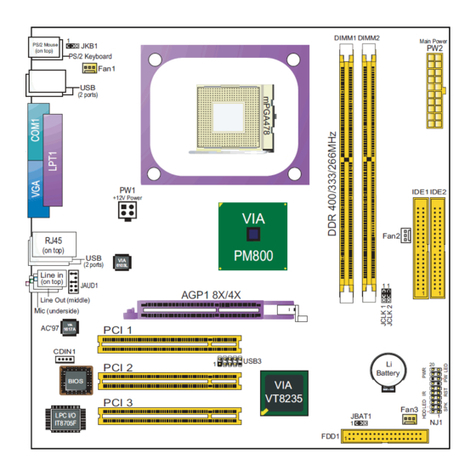
(1) First set up SATA Hard Disks to SATA connectors.
VIA
PM800
PCI 1
BIOS
IDE2IDE1
VIA
1617A
AC'97
Li
Battery
DIMM1 DIMM2
DDR 400/333/266MHz
¤
mPGA478
¤
1
JKB1
Main Po er
JAUD1
PS/2 Mouse
(on top)
NJ1
HDD IR PWR
1
20
SPK RST
+ -
+-
PW LED
LED
PCI 2
Fan3
1
JCLK 1
JBAT1
PS/2 Keyboard
AGP1 8X/4X
VT8237
VIA
¤
RJ45
(on top)
Line in
(on top)
Line Out
(middle)
Mic
PCI 3
1
1
1
JCLK 2
VIA
6103L
(2 ports)
1
FDD1
LPT1
COM1
VGA
USB
PW2
+12V Po er
PW1
LPC I/O
IT8705F
Fan1
(underside)
(2 ports)
USB
USB3
11
CDIN1
Fan2
ATA1
1
USB4
ATA1 (supporting 2 SATA HDD)
SATA
Connector
SATA Power
Connector
(SATA Hard Disk)