i
Contents
1. Introduction ............................................1
1.1 Product Introduction ...............................................................................1
1.2 Compliances ............................................................................................1
2. Operations Overview .....................................3
2.1 Unpacking and Inspection ......................................................................3
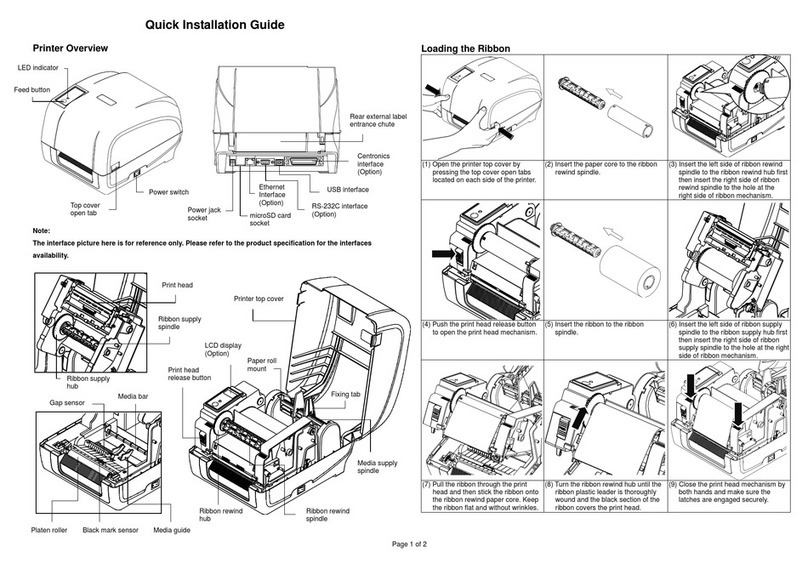
2.2 Printer Overview ......................................................................................4
2.2.1 Front View ......................................................................................4
2.2.2 Interior view....................................................................................5
2.2.3 Rear View........................................................................................6
2.3 Operator Controls....................................................................................7
2.3.1 Front Panel Display .......................................................................7
2.3.2 LED Indicators ...............................................................................7
2.3.3 Front Panel Keys ...........................................................................8
2.4 Setting Up the Printer..............................................................................8
2.5 Installation of Ribbon ..............................................................................9
2.5.1 Loading Ribbon .............................................................................9
2.5.2 Remove Used Ribbon..................................................................12
2.6 Installation of Media ..............................................................................13
2.6.1 Loading Roll Labels.....................................................................13
2.6.2 Loading Fan-fold Labels .............................................................16
2.6.3 Loading Media for Peel-off Mode (Option).................................18
2.6.4 Remove Liner (Option)................................................................20
2.7 Adjustment Knob...................................................................................21
2.7.1 Print head Pressure Adjustment Knob ......................................21
2.7.2 Print Head Burn Line Adjustment Knob.....................................21
3. Menu Function .........................................23
3.1 Setup Menu Overview............................................................................24
3.1.1 Printer Setup ................................................................................25
3.1.2 Sensor...........................................................................................32
3.1.3 Serial Comm.................................................................................36
3.1.4 Ethernet........................................................................................38
3.2 File Manager...........................................................................................41
3.2.1 File List.........................................................................................41
3.2.2 Avail. Memory...............................................................................41
3.2.3 Del. All Files..................................................................................41