manuals.online logo
Brands
  1. Home
  2. •
  3. Brands
  4. •
  5. Volvo
  6. •
  7. Automobile Accessories
  8. •
  9. Volvo Handsfree User manual

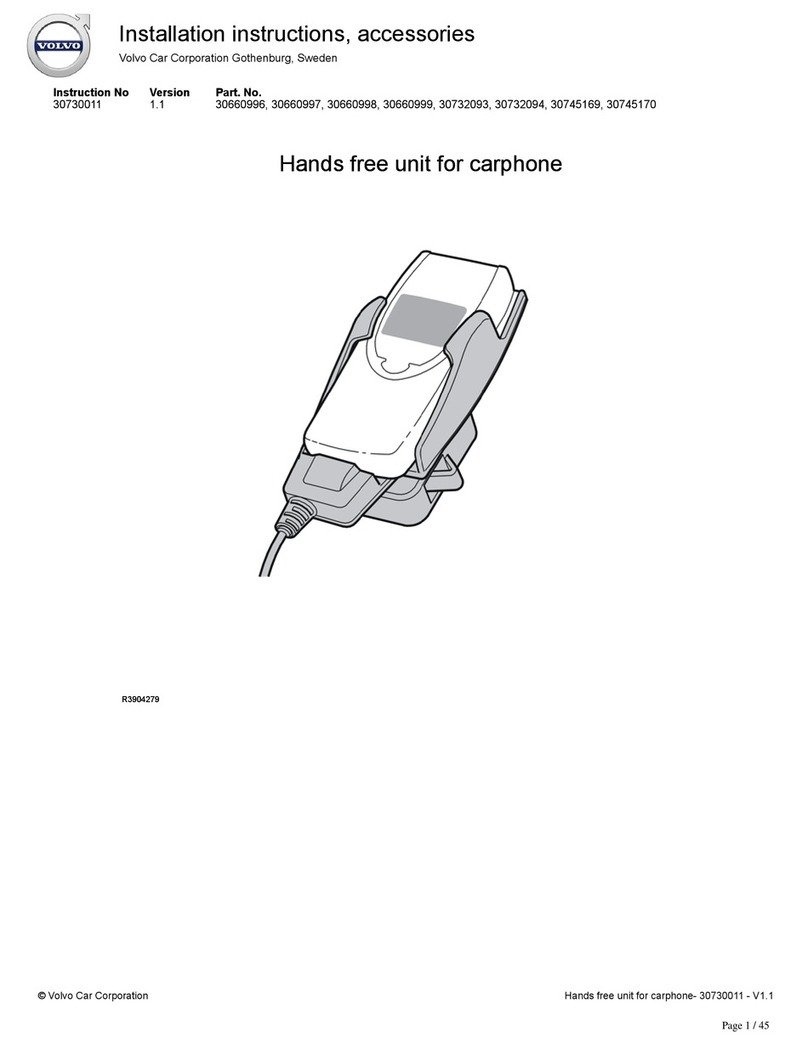
Volvo Handsfree User manual

This manual suits for next models

8

Other Volvo Automobile Accessories manuals

Volvo 30664381 User manual

Volvo

Volvo 30664381 User manual

Volvo 31210148 User manual

Volvo

Volvo 31210148 User manual

Volvo Mode 2 User manual

Volvo

Volvo Mode 2 User manual

Volvo 8641547 User manual

Volvo

Volvo 8641547 User manual

Volvo SKI HOLDER User manual

Volvo

Volvo SKI HOLDER User manual

Volvo 1324 User manual

Volvo

Volvo 1324 User manual

Volvo 32296522 User manual

Volvo

Volvo 32296522 User manual

Volvo SENSUS User manual

Volvo

Volvo SENSUS User manual

Volvo Ski box User manual

Volvo

Volvo Ski box User manual

Volvo Stereo MDL User manual

Volvo

Volvo Stereo MDL User manual

Volvo 700 - ACCESSORY PANEL User manual

Volvo

Volvo 700 - ACCESSORY PANEL User manual

Volvo 31316789 User manual

Volvo

Volvo 31316789 User manual

Volvo 30758234 User manual

Volvo

Volvo 30758234 User manual

Volvo TRAVEL ACTIVE 500 User manual

Volvo

Volvo TRAVEL ACTIVE 500 User manual

Volvo C30 2007 User manual

Volvo

Volvo C30 2007 User manual

Volvo 31359433 User manual

Volvo

Volvo 31359433 User manual

Volvo Alcoguard 30758207 User manual

Volvo

Volvo Alcoguard 30758207 User manual

Volvo 30775790 User manual

Volvo

Volvo 30775790 User manual

Volvo VIDA User manual

Volvo

Volvo VIDA User manual

Volvo 31346058 User manual

Volvo

Volvo 31346058 User manual

Volvo TRAVEL ACTIVE 500 User manual

Volvo

Volvo TRAVEL ACTIVE 500 User manual

Volvo 31285547 User manual

Volvo

Volvo 31285547 User manual

Volvo TRAVEL ACTIVE 500 User manual

Volvo

Volvo TRAVEL ACTIVE 500 User manual

Volvo 912-D User manual

Volvo

Volvo 912-D User manual

Popular Automobile Accessories manuals by other brands

Magneti Marelli AC161 Installation instruction

Magneti Marelli

Magneti Marelli AC161 Installation instruction

FDI uEZ GUI Start here

FDI

FDI uEZ GUI Start here

JCROffroad JT Install instructions

JCROffroad

JCROffroad JT Install instructions

Rostra VOXXElectronics 250-1930 owner's guide

Rostra

Rostra VOXXElectronics 250-1930 owner's guide

TOP VEHICLE TECH GR3FORD5 installation manual

TOP VEHICLE TECH

TOP VEHICLE TECH GR3FORD5 installation manual

Safe Fleet PRIME DESIGN AR-2000-BLK manual

Safe Fleet

Safe Fleet PRIME DESIGN AR-2000-BLK manual

Skoda Fabia Combi 5J Fitting instructions

Skoda

Skoda Fabia Combi 5J Fitting instructions

Camcar 40077 Al Mounting instructions

Camcar

Camcar 40077 Al Mounting instructions

Camcar 40089 AL Mounting instructions

Camcar

Camcar 40089 AL Mounting instructions

Impac Tradesman 2000 installation manual

Impac

Impac Tradesman 2000 installation manual

DVB OFFROAD BRSB-01 installation manual

DVB

DVB OFFROAD BRSB-01 installation manual

Safari Snorkel SS385HF installation guide

Safari Snorkel

Safari Snorkel SS385HF installation guide

ULTIMATE SPEED 279746 Assembly and Safety Advice

ULTIMATE SPEED

ULTIMATE SPEED 279746 Assembly and Safety Advice

SSV Works DF-F65 manual

SSV Works

SSV Works DF-F65 manual

ULTIMATE SPEED CARBON Assembly and Safety Advice

ULTIMATE SPEED

ULTIMATE SPEED CARBON Assembly and Safety Advice

Witter F174 Fitting instructions

Witter

Witter F174 Fitting instructions

WeatherTech No-Drill installation instructions

WeatherTech

WeatherTech No-Drill installation instructions

TAUBENREUTHER 1-336050 Installation instruction

TAUBENREUTHER

TAUBENREUTHER 1-336050 Installation instruction

manuals.online logo
manuals.online logoBrands
  • About & Mission
  • Contact us
  • Privacy Policy
  • Terms and Conditions

Copyright 2025 Manuals.Online. All Rights Reserved.

XC90
Section
Group
Weight(Kg/Pounds)
Year
Month
3
394
1/2.2
2007
11
XC90 2003, XC90 2004, XC90 2005, XC90 2006, XC90 2007, XC90 2007, XC90 2008, XC90 2008, XC90 2009, XC90 2010
Replaces issue: 2006 05
XC90
Section
Group
Weight(Kg/Pounds)
Year
Month
3
394
1/2.2
2007
11
XC90 2003, XC90 2004, XC90 2005, XC90 2006, XC90 2007, XC90 2007, XC90 2008, XC90 2008, XC90 2009, XC90 2010
Replaces issue: 2006 05
Installation instructions, accessories
-
Handsfree, Volvo Handsfree System
with Bluetooth
Installation instructions, accessories
-
Handsfree, Volvo Handsfree System
with Bluetooth
©
VolvoCar Corporation, 2007 Printed in Sweden
31210028
©
VolvoCar Corporation, 2007 Printed in Sweden
31210028
Page 1 of 17
Required tools
A0000162
IMG
-239667
M0000232
IMG
-273606
IMG
-250224
Installation instructions, accessories
-
Handsfree, Volvo Handsfree System
with Bluetooth
Installation instructions, accessories
-
Handsfree, Volvo Handsfree System
with Bluetooth
©
VolvoCar Corporation, 2007 Printed in Sweden
31210028
©
VolvoCar Corporation, 2007 Printed in Sweden
31210028
Page 2 of 17
IMG
-213320
Installation instructions, accessories
-
Handsfree, Volvo Handsfree System
with Bluetooth
Installation instructions, accessories
-
Handsfree, Volvo Handsfree System
with Bluetooth
©
VolvoCar Corporation, 2007 Printed in Sweden
31210028
©
VolvoCar Corporation, 2007 Printed in Sweden
31210028
Page 3 of 17
INTRODUCTION
●NOTE! Read through the whole installation instruction
before starting the work.
●The front page gives the date of this edition and the edition it
replaces
●The second page shows the tools needed for the installation and
the contents of the installation kit
●The illustrations display the procedure in order of operation. The
order of operation is repeated in the text section
●Cut out the text page in order to follow the illustrations and text at
the same time.
Handsfree, Volvo Handsfree System with Bluetooth
Note!
These installation instructions apply to left-hand drive vehicles. When
installing in a right
-hand drive vehicle, the procedure is carried out on
the opposite side and/or mirrored. Where the operations differ, right-
hand versions are also displayed with text and images.
There may be components in the accessories kit that are not used for
this installation.
Note!
When installing Velcro fasteners/tape the underlying surface must be
kept at a temperature of at least +20
°
C (68
°
F).
Wiring A is for vehicles with an internal amplifier that is located in the
media player.
Wiring B and C is for vehicles with an external amplifier that is located
under the right-hand front seat.
Vehicles from and including model year 07-with audio system
Performance Sound have an internal amplifier.
Vehicles up to and including model year -06 with audio system
Performance Sound have an external amplifier.
Cars with the High Performance and Premium Sound audio systems
have external amplifier.
Place the manual for this accessory in a suitable place in the vehicle.
Installation instructions, accessories
-
Handsfree, Volvo Handsfree System
with Bluetooth
Installation instructions, accessories
-
Handsfree, Volvo Handsfree System
with Bluetooth
©
VolvoCar Corporation, 2007 Printed in Sweden
31210028
©
VolvoCar Corporation, 2007 Printed in Sweden
31210028
Page 4 of 17

1
A8800136
Preparations
●
Slide the right
-hand front seat fully backwards and then fully upwards at the
front edge (also applies to right-hand drive vehicles).
●Turn the ignition switch to position 0.
●Disconnect the battery negative lead.
Note!
Wait at least three minutes before unplugging the connectors or removing other
electrical equipment.
2
R8504113
Preparations
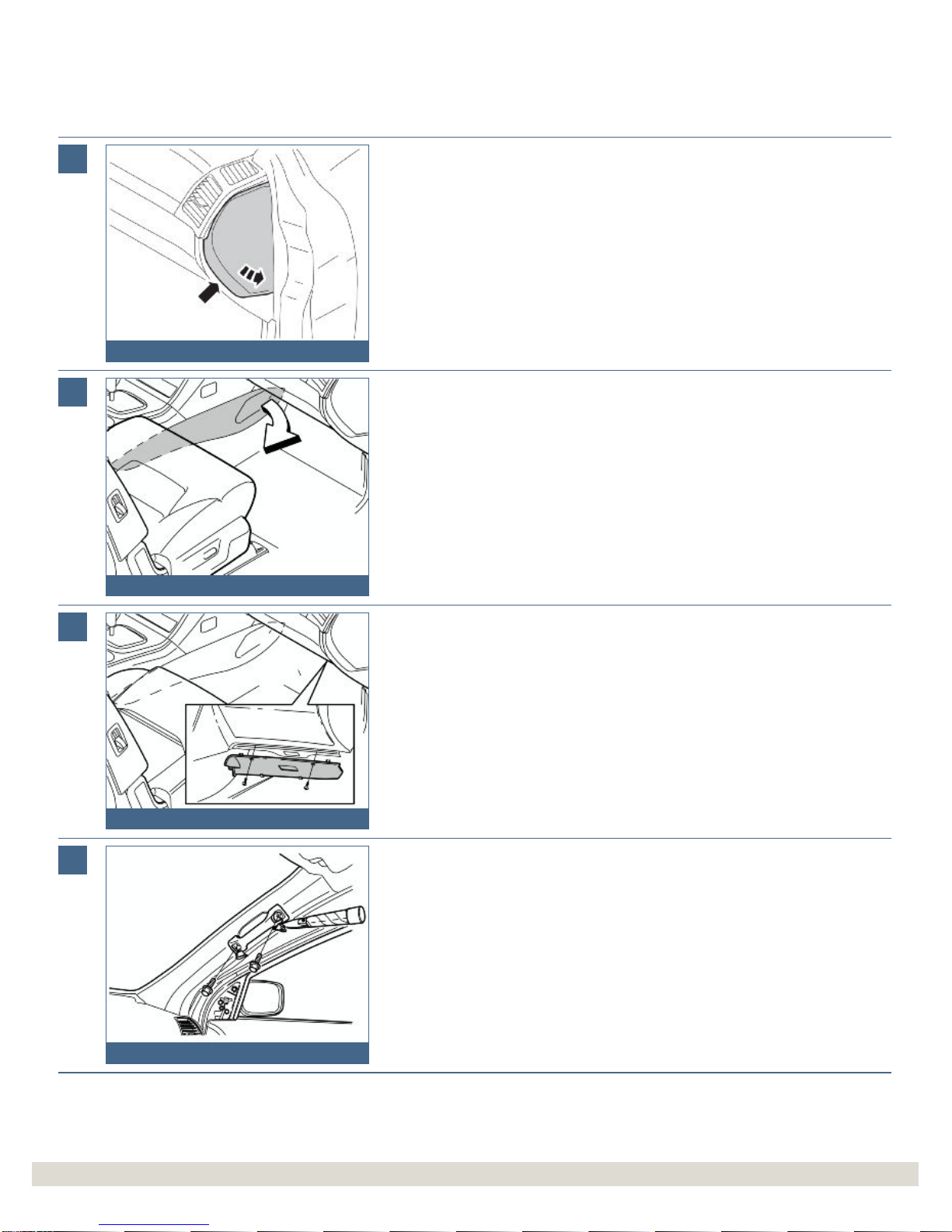
Applies to cars with automatic gearbox
●
Turn the ignition key to position II.
Applies to all models
●Move the gear selector lever to its rearmost position.
●Use a weatherstrip and pry off the gear selector panel at the rear edge.
3
IMG
-239204
Preparations
●Press in the catches and remove the panel.
4
R8504051
Preparations
●Remove the two screws.
●Remove the bracket with the A/C panel and radio from the center console. Pull
from the lower edge and then downwards until it releases from the mounting at
the upper edge.
●Remove the connectors.
Note!
Do not damage the removed components or the surrounding panels.
Installation instructions, accessories
-
Handsfree, Volvo Handsfree System
with Bluetooth
Installation instructions, accessories
-
Handsfree, Volvo Handsfree System
with Bluetooth
©
VolvoCar Corporation, 2007 Printed in Sweden
31210028
©
VolvoCar Corporation, 2007 Printed in Sweden
31210028
Page 5 of 17

5
IMG
-241300
Preparations
●Remove the end face panel from the dashboard.
6
R8504225
Preparations
●Remove the center console's right-hand side panel by pulling it away starting at
the front edge and then backwards until all the clips have released.
7
R8504419
Preparations
●Remove the screws and soundproofing panel.
8
R8504175
Preparations
●Remove the covers and screws for the grab handle on the A-
pillar.
Installation instructions, accessories
-
Handsfree, Volvo Handsfree System
with Bluetooth
Installation instructions, accessories
-
Handsfree, Volvo Handsfree System
with Bluetooth
©
VolvoCar Corporation, 2007 Printed in Sweden
31210028
©
VolvoCar Corporation, 2007 Printed in Sweden
31210028
Page 6 of 17

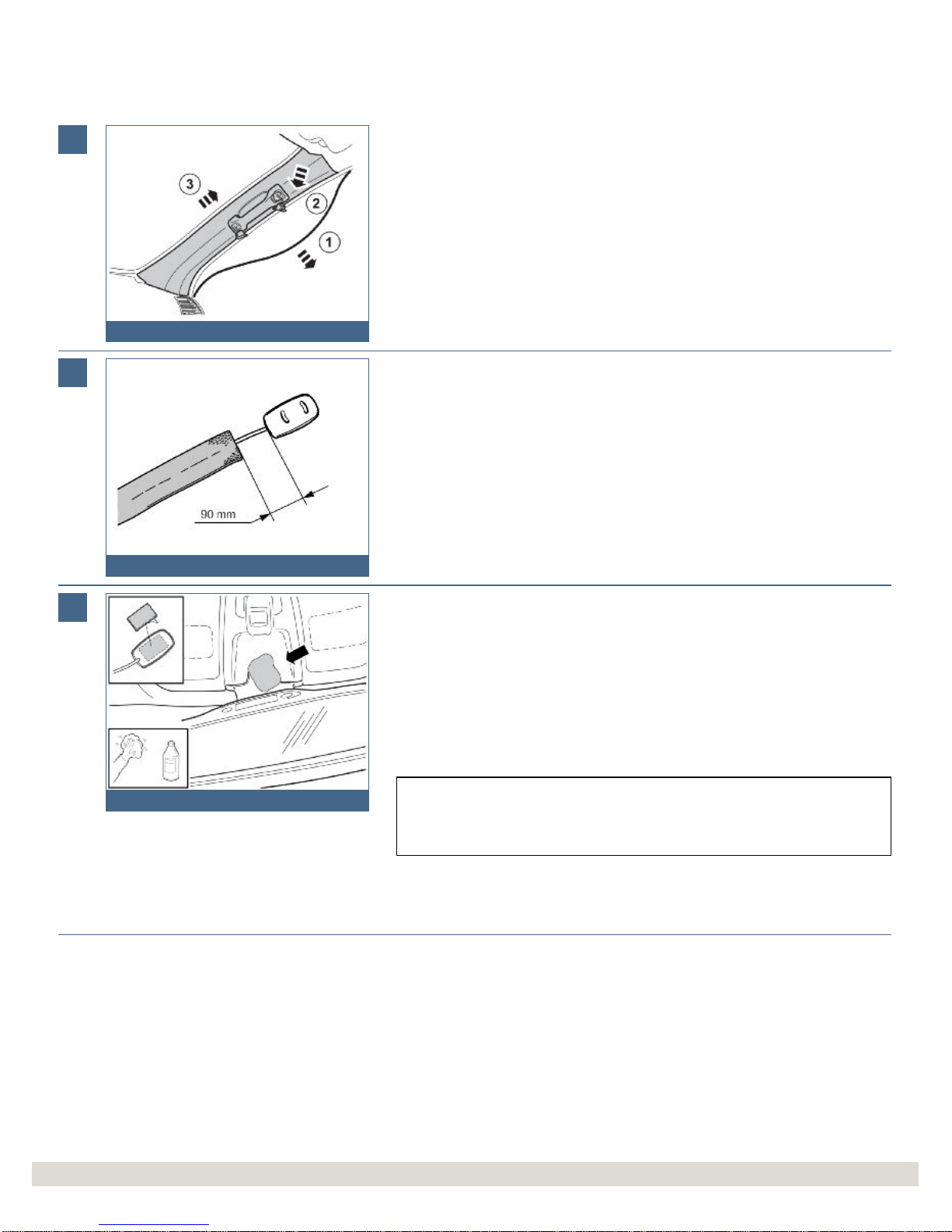
9
IMG
-241301
Preparations
●Pull of the weatherstrip (1) for the door at the A-
pillar.
●Pull off the A-pillar panel at the upper edge and then straight upwards to remove
it.
10
IMG
-250288
Installing the microphone
●
Tape a 700 mm length piece of foam tape on the microphone cable starting 90
mm from the microphone.
11
IMG
-284125
Installing the microphone
●Clean the area on the microphone and headlining panel as illustrated, which
corresponds to the size of the double-sided adhesive tape. Use a solution of
25% isopropanol and 75% water, as well as a lint free cloth.
Dry with care, do not rub.
●Allow to dry.
●Remove the backing tape from one side of the Velcro strip and press it onto the
microphone.
Note!
In cases where the area is heavily soiled or treated with cockpit shine. First clean using
a washing up detergent (FAIRY or similar).
Installation instructions, accessories
-
Handsfree, Volvo Handsfree System
with Bluetooth
Installation instructions, accessories
-
Handsfree, Volvo Handsfree System
with Bluetooth
©
VolvoCar Corporation, 2007 Printed in Sweden
31210028
©
VolvoCar Corporation, 2007 Printed in Sweden
31210028
Page 7 of 17

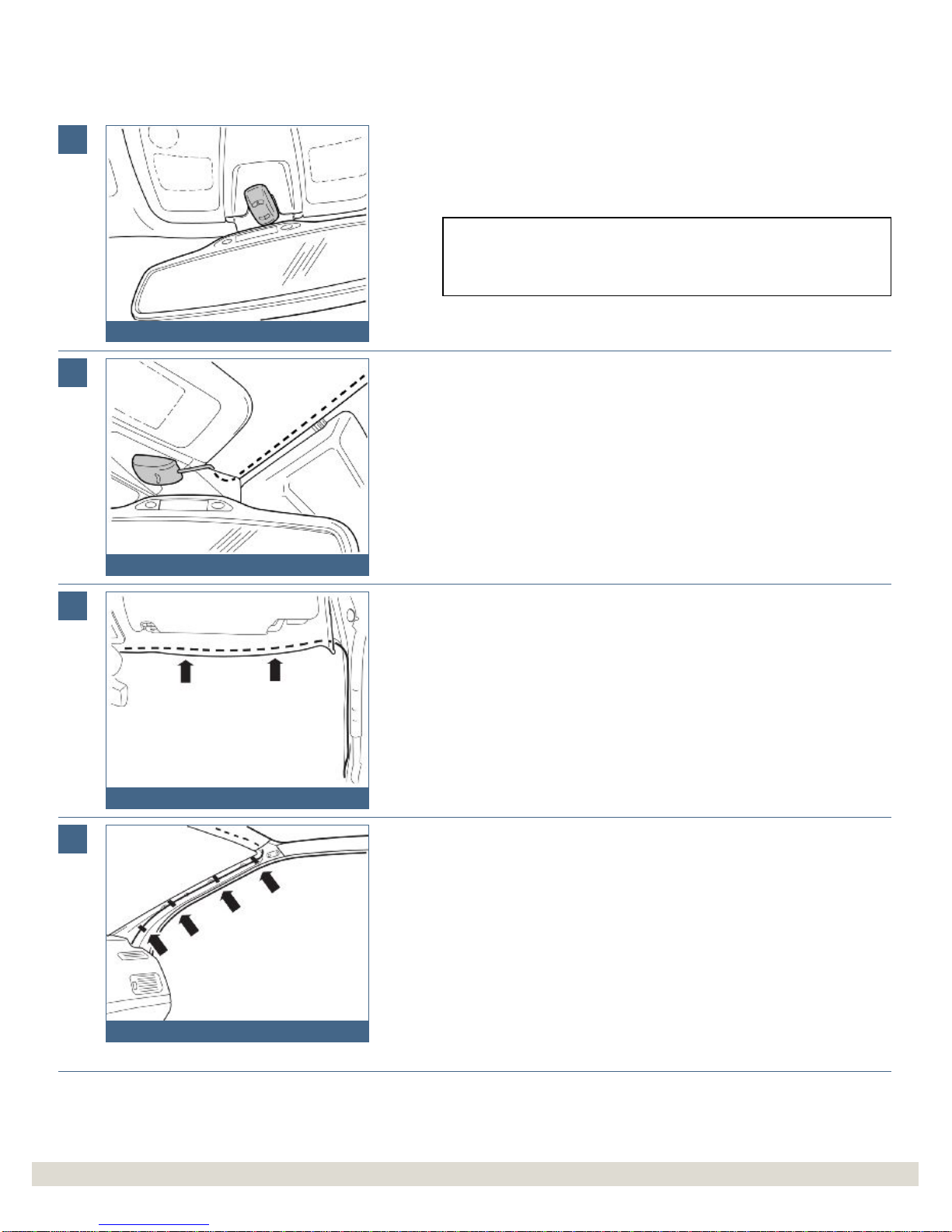
12
IMG
-250289
Installing the microphone
●Remove the remaining protective film from the Velcro strip. Press the microphone
securely into place.
Note!
The microphone must be pointing towards the driver. Make sure that it does not
obstruct adjustment of the rear view mirror.
13
IMG
-250290
Installing the microphone
●Route the microphone cable under the rear view mirror's mounting and inside the
headlining. Insert the cable using a weatherstrip tool.
14
IMG
-240989
Installing the microphone
●Carefully pull down the headlining and route the cable above it, to the A-
pillar.
15
IMG
-240992
Installing the microphone
●Pull the cable down along the A-pillar to the dashboard.
●Cut off two 100x50mm pieces of foam tape in the middle.
●Secure the cable to the A-
pillar using foam tape.
Caution!
The inflatable curtain (IC) is located inside the A-
pillar panel, it is important that
the cable is not positioned on it.
Installation instructions, accessories
-
Handsfree, Volvo Handsfree System
with Bluetooth
Installation instructions, accessories
-
Handsfree, Volvo Handsfree System
with Bluetooth
©
VolvoCar Corporation, 2007 Printed in Sweden
31210028
©
VolvoCar Corporation, 2007 Printed in Sweden
31210028
Page 8 of 17
16
IMG
-250291
Installing the microphone
●
Cut off one 100x50mm strip of foam tape in the middle.
●Secure the cable on the heater unit using the pieces of tape.
●Route the cable further in towards the center console.
17
R8504165
Connecting the external amplifier
Steps 17-28 apply to cars with external amplifier.
●Remove the center console's left-hand side panel by pulling it away starting at
the front edge and then backwards until all the clips have released.
18
R8504495
Connecting the external amplifier
●Remove the sound proofing panel by first removing the two screws and then
prying off the sound proofing panel at the top edge.
19
IMG
-241303
Connecting the external amplifier
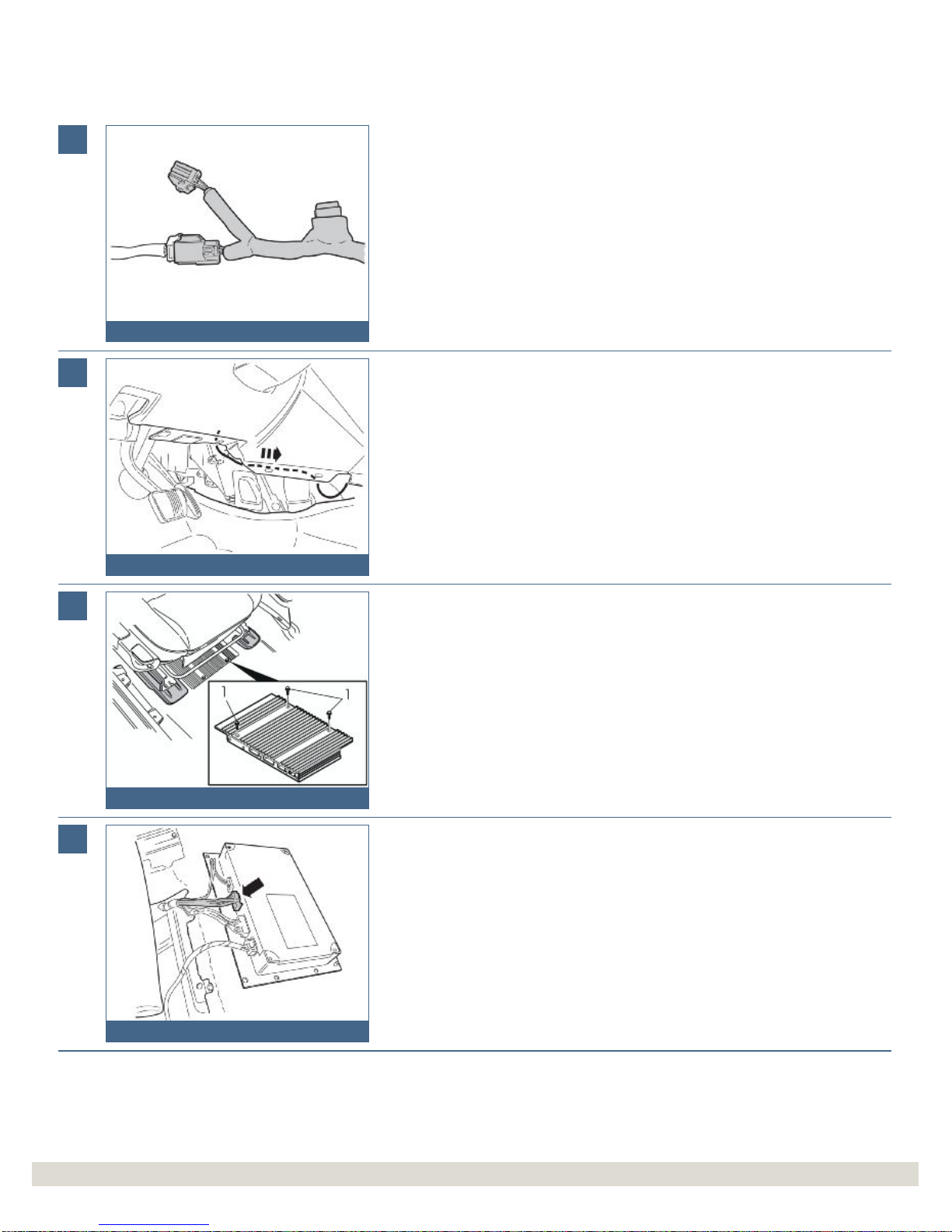
●Locate the 4 pin, gray, pre-routed connector for the power supply. It comes from
the thick cable harness under the dashboard on the right-hand side of the
steering wheel
Installation instructions, accessories
-
Handsfree, Volvo Handsfree System
with Bluetooth
Installation instructions, accessories
-
Handsfree, Volvo Handsfree System
with Bluetooth
©
VolvoCar Corporation, 2007 Printed in Sweden

31210028
©
VolvoCar Corporation, 2007 Printed in Sweden
31210028
Page 9 of 17
20
IMG
-241304
Connecting the external amplifier
●Take cable harness C from the kit. Connect it to the existing connector.
The pre
-routed connector is already connected on certain versions. Disconnect
the connector and connect both connectors from the new cable harness.
●
Cut a 700 mm piece of foam tape into three pieces of the same length. Tape one
piece around the connectors on the car's existing cable harness.
21
IMG
-241305
Connecting the external amplifier
Only applies to left-hand drive vehicles.
●Route the cable harness backwards and across through the center console.
22
R3904521
Connecting the external amplifier
Applies to both left and right-hand drive vehicles
●Slacken off the amplifier screws (1) under the right-hand front seat.
23
IMG
-241306
Connecting the external amplifier
●Lift out the amplifier. Use a weatherstrip to raise it from its recessed position.
●Place it upside down as illustrated.
●Disconnect the connector.
Installation instructions, accessories
-
Handsfree, Volvo Handsfree System
with Bluetooth
Installation instructions, accessories
-
Handsfree, Volvo Handsfree System
with Bluetooth
©
VolvoCar Corporation, 2007 Printed in Sweden
31210028
©
VolvoCar Corporation, 2007 Printed in Sweden
31210028
Page 10 of 17