Cree FLEX Series User manual

FLEX Series with Cree SmartCast®Technology
Commercial Specification Troffers with Emergency Driver
Includes: FLX14™, FLX22™ and FLX24™
INSTALLATION INSTRUCTIONS
1 of 4 LPN00611X0001A1_C
FLX14™
FLX22™
FLX24™
• The FLEX Series of specification troffers is for non-insulated
ceiling applications using T-Bar ceiling grid, drywall grid adaptors,
and suspended mount.
• Designed for use in 120-277V 50-60 Hz or 347V 60Hz protected
circuit (fuse box, circuit breaker). Supply wire sized as per NEC or
governing code(s), 90C rated.
• Make sure to cap off all unused leads.
• Lens and removable end cap may shift during installation. To seat
lens press end caps and squeeze lens to engage with back panel.
IMPORTANT SAFEGUARDS
When using electrical equipment, basic safety precautions should
always be followed including the following:
READ AND FOLLOW ALL SAFETY
INSTRUCTIONS
1. DANGER- Risk of shock- Disconnect power before installation.
DANGER - RISQUE DE CHOC - COUPER L’ALIMENTATION
AVANT L’INSTALLATION
2. CAUTION – Installation and servicing should be performed by
qualied personnel only. De-energize before opening.
ATTENTION – L’installation et l’entretien doivent être effectués
par du personnel qualié seulement. Mettre hors tension avant
l’ouverture
3. To reduce the risk of electric shock, disconnect both standard
and emergency power supplies and converter connector of the
emergency driver before servicing.
Pour réduire le risque de décharge électrique, vous devez
déconnecter à la fois le disjoncteur divisionnaire ou les fusibles et
les alimentations d’urgence avant l’entretien.
4. Do not use outdoors.
Ne pas utiliser à l’extérieur.
5. Do not let power supply cords touch hot surfaces.
Ne laissez pas les cordons d’alimentation toucher les surfaces
chaudes.
6. Do not mount near gas or electric heaters.
Ne montez PAS près des appareils de chauffage de gaz ou
électriques.
7. DO NOT use this equipment for other than its intended use.
NE PAS utiliser cet équipement à d’autres ns que celle qui est
prévue.
8. Equipment should be mounted in locations and heights where it will not readily be subjected to tampering by unauthorized
personnel.
L’équipement doit être monté dans des endroits et à des hauteurs où il ne sera pas soumis à des altérations par des personnes
non autorisées.
9. The use of accessory equipment not recommended by the manufacturer may cause an unsafe condition.
L’utilisation d’accessoires non recommandés par le fabricant peut causer une situation dangereuse.
10. Suitable for suspended ceilings.
11. Max. mounting height: 15 ft.
Hauteur de montage max.: 15 pieds.
12. Access above ceiling required. Do not install insulation within 3” (76mm) of any part of the luminaire.
Accès requis au-dessus du plafond. Ne pas mettre l’isolant à moins de 3 po (76 mm) de toute partie du luminaire
13. Suitable for suspended ceilings.
Convient aux plafonds suspendus.
SAVE THESE INSTRUCTIONS FOR FUTURE REFERENCE

2 of 4 LPN00611X0001A1_C
3Power Supply
Junction Box Cover
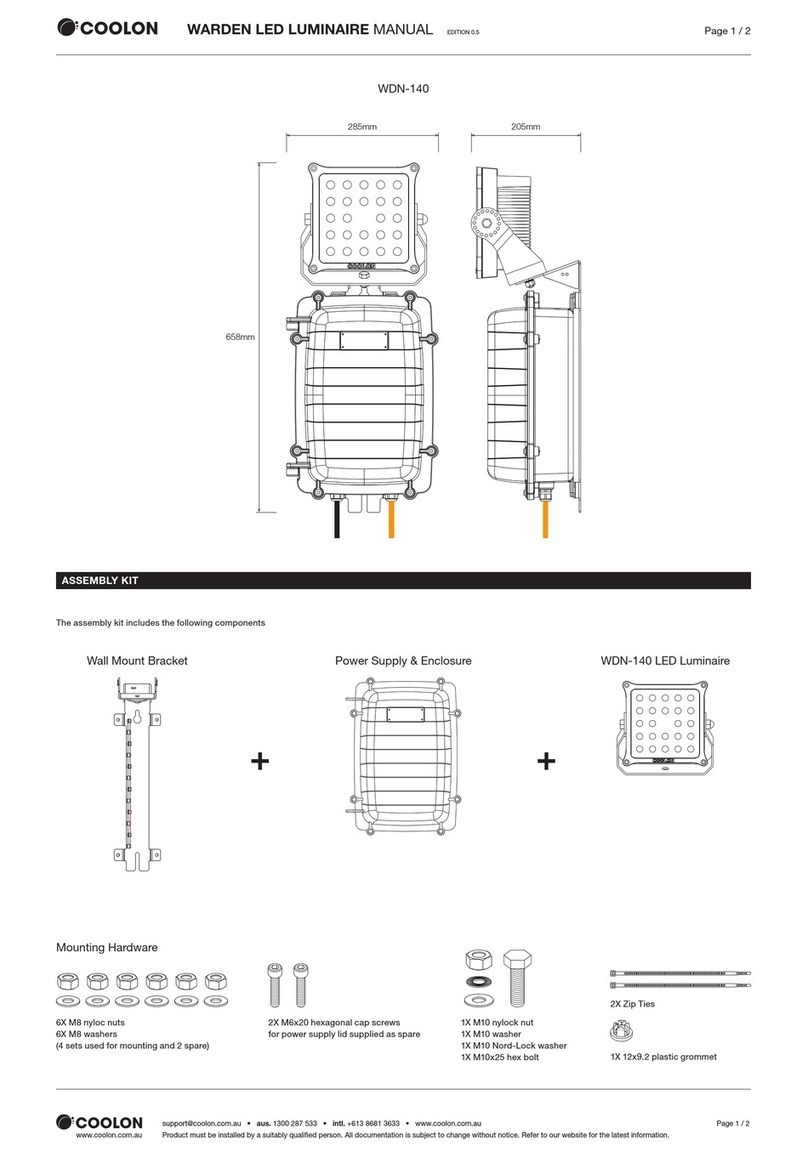
TO INSTALL:
T- BAR CEILING MOUNTING
STEP 1:
Bring the FLEX troffer up into
the T-Bar grid.
STEP 2:
Locate the luminaire hooks and
bend them out 90 degrees for
installation. See Figure 1.
NOTE: The luminaire hooks ship
bent in and need to be bent out
for installation.
STEP 3:
Then bend the luminaire hooks
against the T-Bar to secure the
luminaire. See Figure 1.
SUSPENDED MOUNTING
STEP 1:
Attach customer supplied
cables to the (2) cable slots on
each side of the housing. See
Figure 2.
STEP 2:
Attach customer supplied
cables to mounting surface
using customer supplied
hardware. Ensuring that
mounting surface can support
the luminaire.
STEP 3:
Attach the RF Module to the
luminaire by clicking it into
place as Shown in Figure 3.
2
Cable Slots
RF Module
1
Luminaire Hooks
T-bar
1st:
90° Bend
2nd: Bend
Against T-bar
T-bar

3 of 4 LPN00611X0001A1_C
4
Test Switch
Large Trim Ring
Small Trim Ring
Ceiling
5
RF Module
Access Hole, Reset
Button Inside
Blue LED
Placement
RESET RF MODULE
NOTE: The Blue LED is located behind the CREE logo on the RF
Module. The CREE logo with illuminate blue when the Blue LED
is active.
STEP 1:
Actuate RESET button through the access hole. Push and hold
until LED on RF module begins blinking rapidly (approximately
6-7 seconds). See Figure 5.
STEP 2:
Release for 1 sec.
STEP 3:
Press/Hold RESET button for 0.5 sec. Light will turn off for a
few seconds then go to full bright and the Blue LED on the RF
Module should begin a 2 blink sequence. Figure 4.
INSTALLING TEST SWITCH
STEP 1:
Install test switch assembly into ceiling by drilling a 1” hole into
the ceiling.
STEP 2:
Unscrew the small trim ring and place test switch assembly
through the ceiling. See Figure 5.
STEP 3:
Secure the test switch assembly by screwing the small trim ring
removed in Step 5 back onto the test switch assembly. Tighten
the larger trim ring above the ceiling until it is snugged tight
against the ceiling. See
Figure 5.
CLEANING LENS
STEP 1:
Remove lens and end cap assembly by pulling straight
downward gently. See Figure 6.
STEP 3:
After cleaning is complete insert lens and end cap assembly
back into the luminaire housing. Check end caps for any visible
gap between the end cap and end panel. If necessary push end
cap against the end panel to eliminate gaps. Check lens for any
visible gap between the lens and luminaire.
TROUBLESHOOTING:
Out of the box, if the light does not turn on when power is
applied:
• Check Wiring with power off
• If wired correctly, check to see if Blue LED blinking on
the RF Module.
• If Blue LED is blinking, then perform a RESET
(See RESET RF MODULE section).
• If Blue LED is on solid or off, call Cree Customer Service.
• If you have done a RESET, and the light is still off, call
Cree Customer Service.
If light is unresponsive, use Cree Configuration Tool to verify
configuration.
6
Lens

4 of 4 LPN00611X0001A1_C
lighting.cree.com
© 2018 Cree, Inc. All rights reserved. For informational purposes only. Content is subject to change.
See http://lighting.cree.com/warranty for warranty and specifications. Cree®and the Cree Logo are registered trademarks, and
FLX14™, FLX22™ and FLX24™ are trademarks of Cree, Inc. Armstrong®is a registered trademark of AWI Licensing LLC.
ELECTRICAL CONNECTIONS
NOTE: The emergency driver must be fed from
the same branch as the AC Driver.
STEP 1:
Remove the cover of the junction box and bring in appropriate
power supply to the junction box using one of the knock-outs.
See Figure 3.
STEP 2:
Using customer supplied 90°C minimum rated wire
connectors, make the following electrical connections:
a. Connect the black luminaire lead to the
unswitched voltage supply lead.
b. Connect the white luminaire lead
to the neutral supply lead.
c. Connect ground wire lead to the supply ground lead.
STEP 3:
Locate the two red leads in the junction box and connect them.
STEP 4:
Push all leads into the junction box. Reattach junction box
cover that was removed in Step 1 , make sure no wires are
pinched.
NEUTRAL
SUPPLY WIRING
LUMINAIRE
GROUND
UNSWITCHED HOT
BLACK
** NOTE: DO NOT mate leads until installation
is complete and AC power is supplied
**RED
**RED
EMERGENCY DRIVER CHECK
NOTE: For short-term testing of the
emergency function, the battery must be
charged for at least one hour. The emergency
driver must be charged for at least 24 hours
before conducting a long-term test.
STEP 1:
When AC power is applied, the charging
indicator light is illuminated, indicating the
battery is being charged. When power fails,
the emergency driver automatically switches
to emergency power, operating the LED array.
When AC power is restored, the emergency
driver returns to the charging mode.
STEP 2:
Although no routine maintenance is required
to keep the emergency driver functional, it
should be checked periodically to ensure
that it is working. The following schedule is
recommended:
• Visually inspect the charging indicator
light monthly. It should be illuminated.
• Test the emergency operation of
the fixture at 30-day intervals for a
minimum of 30 seconds. When the test
switch is depressed, the LED array
should operate.
• Conduct a 90-minute discharge test
once a year. The LED array should
operate for at least 90 minutes.
If the luminaire fails any of these checks,
consult service personnel.
REFER ANY SERVICING INDICATED BY
THESE CHECKS TO QUALIFIED PERSONNEL
EMERGENCY DRIVER AND AC DRIVER MUST
BE FED FROM THE SAME BRANCH CIRCUIT.
FCC NOTICE
CAUTION: Changes or modifications not
expressly approved could void your authority
to use this equipment.
This device complies with part 15 of the FCC
Rules. Operation is subject to the following
two conditions: (1) This device may not cause
harmful interference, and (2) this device must
accept any interference received, including
interference that may cause undesired
operation.
This equipment has been tested and found
to comply with the limits for a Class A
digital device, pursuant to part 15 of the FCC
Rules. These limits are designed to provide
reasonable protection against harmful
interference when the equipment is operated
in a commercial environment. This equipment
generates, uses, and can radiate radio
frequency energy and, if not installed and used
in accordance with the instruction manual,
may cause harmful interference to radio
communications. Operation of this equipment
in a residential area is likely to cause harmful
interference in which case the user will be
required to correct the interference at his own
expense.
CAN ICES-005 (A)/NMB-005 (A)
Le présent appareil est conforme aux CNR
d’Industrie Canada applicables aux appareils
radio exempts de licence. L’exploitation est
autorisée aux deux conditions suivantes : (1)
l’appareil ne doit pas produire de brouillage, et
(2) l’utilisateur de l’appareil doit accepter tout
brouillage radioélectrique subi, même si le
brouillage est susceptible d’en compromettre
le fonctionnement.
This manual suits for next models
3
Table of contents
Other Cree Lantern manuals
Cree
Cree RUL Series User manual
Cree
Cree C-Lite C-TR-A-FP User manual
Cree
Cree Edge User manual
Cree
Cree CS14 User manual
Cree
Cree DPT Series User manual
Cree
Cree THE EDGE Series User manual
Cree
Cree XSP Series User manual

Cree
Cree XRAAF Series User manual

Cree
Cree 228 Series User manual
Cree
Cree WS Series User manual
Cree
Cree ZR Series User manual
Cree
Cree IG Series User manual
Cree
Cree CR Series User manual
Cree
Cree RUL Series User manual
Cree
Cree LS8 User manual
Cree
Cree Essentia FP Series User manual
Cree
Cree XAK Series User manual
Cree
Cree CPY250 User manual
Cree
Cree 228 Series User manual

Cree
Cree KBL Series Installation instructions