11
6.9 Auto-Low Resistance Detect.
While in insulation test mode, if the L. C. D. Module shows “LOW MW”,
stops the test immediately. This could mean that the insulation has a
breakdown, thus, you are now trying to inject very high voltage on a short
circuit. Trying to inject high voltage on a short circuit could reset the
instrument (specially if flashing occurs).
6.10 Timer.
The duration of the test is shown on the top right of the L. C. D. This is
particularly useful to verify that insulation does not break down within a
certain time or to make comparison. See Special Features (Pg.No.13)
for more Timer Functions.
6.11 Stop test.
To stop the test in progress, press the TEST button (3). The test will
immediately stop, discharge and the instrument will re-enable the Ener-
TM
Save mode automatically.
6.2 Auto-Stop.
Should the operator leaves the Instrument in the test mode with the
TM
Ener-Save disabled, the instrument will automatically stop the test
after a duration of 99.9 Seconds. (Auto-off still applies).
6.13 Auto Live / Voltage Warning.
Should the leads be placed onto a live system before starting the test, a
warning beeper will be automatically activated and your instrument will
display “Live Warning ... Circuit Live .. “ message. Let the instrument
discharge the circuit (in the case of capacitive system) or make sure that
the circuit under testing is not live.
6.14 Auto-Discharge.
At auto-stop or test completion, the instrument automatically discharges
the system under insulation test so that the dangerous high voltage is
discharged. The auto-discharge can be observed on the L. C. D.’s bar
graph so that the operator only removes the leads when the discharge is
complete. During discharge, a beep occurs so that the user does wait for
the complete discharge of the system under test. This is indicated
10
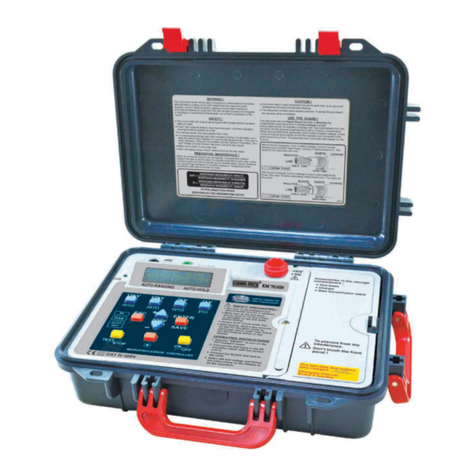
6. FUNCTIONS (see FRONT PANEL LAYOUT).
6.1 Power-On
To switch your instrument on, press the “ON” button (!). The L.C.D. Will
display the model number. Follow interactive instructions on L.C.D.
6.2 Insulation Resistance Measurement @ 10KVdc.
To Select 10KVdc test voltage, press 10KV button (2).
6.3 Insulation Resistance Measurement @ 5KVdc.
To Select 5KVdc test voltage, press 5KV button (4).
6.4 Insulation Resistance Measurement @ 2.5KVdc.
To Select 2.5 Kvdc test voltage, press 2.5KV button (5).
6.5 Insulation Resistance Measurement @ 1KVdc.
To Select 1KVdc test voltage, press 1KV button (6).
6.6 Insulation Resistance Measurement @ Multiple of 500Vdc adjustment
To add 500Vdc to the selected test voltage,
Press +500V button (7).
To subtract 500Vdc to the selected test voltage, press -500V
Button (8).
TM
6.7 Ener-Save mode.
TM
The Ener-Save mode saves battery life by automatically turning the
instrument to low consumption (reducing the test duration).
TM
The Ener-Save mode is the default mode of the instrument.
TM
The Ener-Save mode is enabled when pressing the TEST button (3) for
less than 3 seconds.
TM
The Ener-Save mode is disabled when pressing the TEST button (3)
for more than 3 seconds.
TM
When Ener-Save mode is disabled, the instrument operates in
continuous mode (up to 99.9s).
6.8 Voltage Output Bar-Graph. The bar-graph shows the voltage present on
the leads. It also shows the voltage charging a cable or capacitive system
under test and shows the decay during the automatic capacitive
discharge of the system under test.