Snom 320 Original operating instructions

snom 320
VoIP Business Phone
Quick Installation
Kurzanleitung
© 2005 snom technology AG
All rights reserved.
Version 1.00

snom technology AG
Charlottenstr. 68-71
10117 Berlin, Germany
Note to the reader
This is a quick guide to the installation and operation of the snom 320.
The full manual is available on our web page, www.snom.com.
© 2005 snom technology Aktiengesellschaft.
All Rights Reserved. This document is supplied by snom technology AG. No
part of this document may be reproduced, republished or retransmitted
in any form or by any means whatsoever, whether electronically or
mechanically, including, but not limited to, by way of photocopying,
recording, information recording or through retrieval systems, without
the express written permission of snom technology AG.
snom technology AG reserves the right to revise this document and make
changes at any time and without the obligation to notify any person and/
or entity of such revisions and/or changes.
Product specications contained in this document are subject to change
without notice.

snom technology AG • 3
Table of Contents
Note to the reader ......................................................................2
Installation ................................................................5
Delivery Content ........................................................................5
Safety Information......................................................................5
Power supply..............................................................................5
Setting up the Phone...................................................................6
Wall Mounting ...........................................................................6
Cleaning.................................................................................. 10
Connecting the phone ..............................................11
Keypad.....................................................................13
Initialization.............................................................17
Booting ................................................................................... 17
Selecting the language ............................................................. 17
DHCP Conguration................................................................... 17
Setting the IP Address............................................................... 18
Setting the Netmask ................................................................. 18
Setting the IP Gateway.............................................................. 18
Setting the DNS Server ............................................................. 19
Selecting the Tone Scheme ........................................................ 19
Selecting the Timezone.............................................................. 19
Logging on the rst account ....................................................... 20
Index .......................................................................23
English

4 •
English

snom technology AG • 5
1
English
Installation
Delivery Content
Please check whether the delivery contains the following parts:
•The base unit with display and keypad
• The handset
• The handset cable
• The power supply (optional)
Safety Information
Please read the following safety notices before installing or using
your snom phone. They are crucial for the safe and reliable operation
of the device.
Power supply
You have two options for providing the snom 320 with power:
• An external power supply (5 V)
• Power feeding over the network cable (IEEE 802.3af
compatible)
If you want to use an external power supply, use the one that is
included in the package. Other power supplies may cause damage
to the phone, affect its behavior or induce noise.

6 • Installation
[ s n o m 320 Qu i c k in s t a l l a t i o n V1.00 ]
1
English
Setting up the Phone
Your snom 320 is delivered with the footstand attached to the
phone’s bottom shell (shaded gray in Fig. 1). Place the snom 320
on an even, horizontal surface that gives the rubber pads a secure
grip. Do not place it on carpets or other materials containing bers
that could block the air vents and cause overheating.
After connecting the phone (see chapter Connecting the Phone,
below), clip the cords into the appropriate slots on the footstand or,
in the case of the handset cord, on the bottom shell of the phone
(Fig. 2).
Fig. 1 Fig. 2
Wall Mounting
It is also possible to mount the snom 320 on the wall. In order to
do this, you detach the footstand from the bottom shell and attach
it in the appropriate position for wall mounting, as described in
steps 1 through 6, below.

snom technology AG • 7
[ s n o m 320 Qu i c k in s t a l l a t i o n V1.00 ]
1
English
1Turn the phone upside down (Fig. 3). Please, ensure that
you do not damage the display and/or its hinge and that
you do not drop the receiver. You may want to hold the
phone in your lap or have a second person hold it.
Fig. 3 Fig. 4
2Lightly press the snap-ts of the footstand inwards
(Fig. 3) and, at the same time, tilt the footstand
backwards and lift it from its anchorage in the mounting
holes (Fig. 4).
3Rotate the footstand 180° around its vertical axis.
4Make sure that the handset cord has been clipped
correctly into the groove on the bottom shell of the
phone, as shown in Figs. 4 and 6. Failure to clip the
cord into the groove will result in damage to the cord
when the footstand is attached in the position for wall
mounting.

8 • Installation
[ s n o m 320 Qu i c k in s t a l l a t i o n V1.00 ]
1
English
5Insert the outside, rear snap-ts into the mounting
holes on the bottom shell (Fig. 5, arrow no. 1). Tilt
the footstand forward and downward until the snap-ts
snap into place in the mounting holes. Please, make
sure that the four snap-ts have securely snapped
into the holes before mounting the phone on the
wall.
Fig. 5 Fig. 6
6The slots on the footstand for the various cords can
also be used when the phone is mounted on a wall.
After connecting the phone (see chapter Setting up the
Phone, above), form the cords into loops and gently
press the long ends into the slots on the footstand. The
loops should not be too big, so that they will not hamper
the secure mounting of the phone on the wall, and not
too small, so that the cords will not be bent or broken
(Fig. 6).
The delivery includes a template to be used for marking the position
of the holes to be drilled in the wall.
(Use wall plugs, if necessary, and screws with half-round head
proles (diameters of screws dmax= 4.5 mm (0.1755”), diameters
of heads dmax=8.5 mm (0.3315”).

snom technology AG • 9
[ s n o m 320 Qu i c k in s t a l l a t i o n V1.00 ]
1
English
The screws must protrude approx. 0.5 cm (0.195”) from the wall
for easy wall mounting of the phone.
Adjusting the Handset Rest
The speaker of the handset has a small, rectangular indentation
that ts over the rounded end of the plastic tab inserted into a slot
on the top shell of the phone. When the phone is mounted on the
wall, the handset must be placed on this rounded end to ensure
that it will not fall off.
Slide the tab out of the slot, as shown in Fig. 7, rotate it 180°, and
slide it back into the slot, as shown in Fig. 8.
Fig. 7 Fig. 8
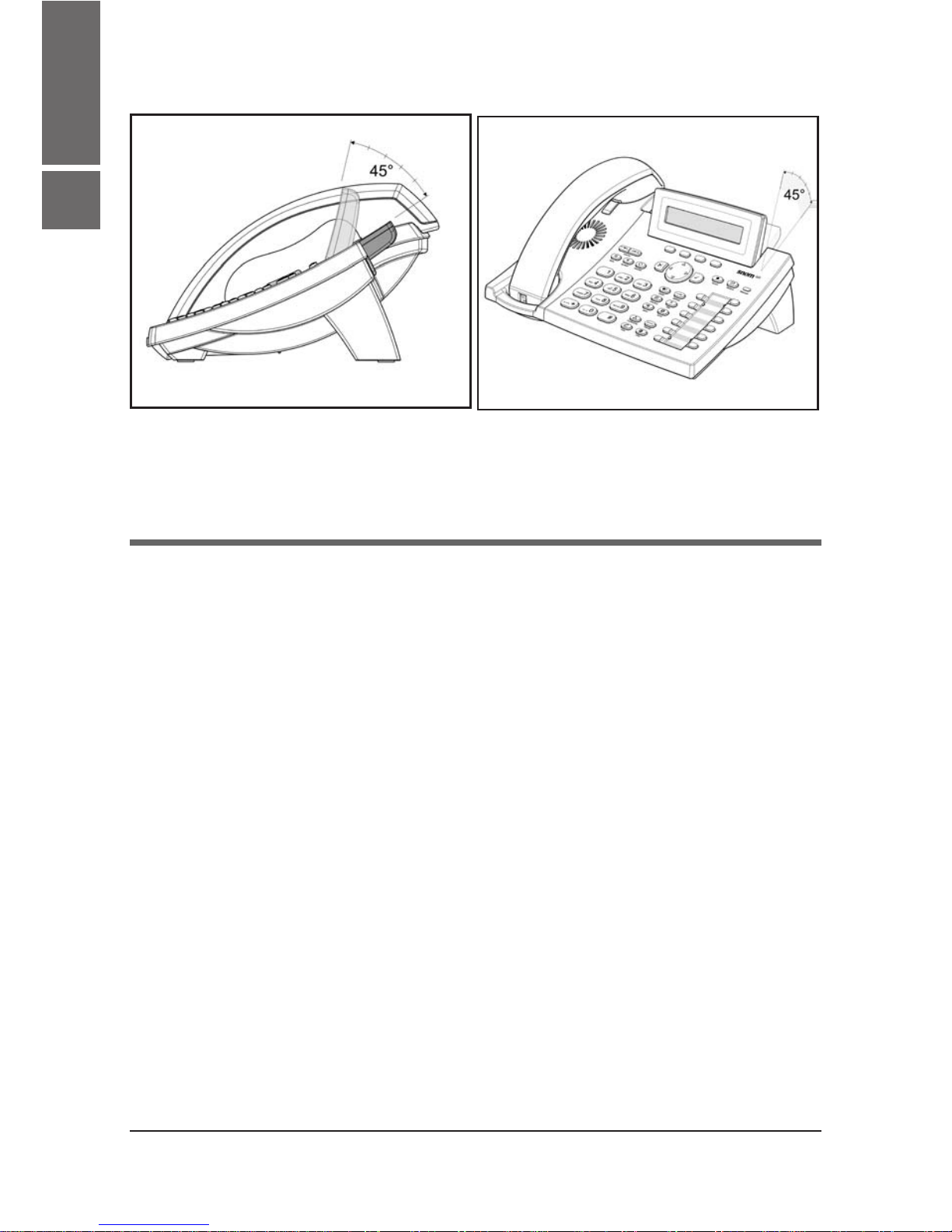
Adjusting the Position of the Display
The position of the snom 320’s display is adjustable up to an angle
of 45° (Figs. 9 and 10).
Hold down the phone with one hand and adjust the display with
your other hand. Do not use too much force and do not pull,
wrench, or twist the display as this might damage or break the
hinges.
10 • Installation
[ s n o m 320 Qu i c k in s t a l l a t i o n V1.00 ]
1
English
Fig. 9 Fig. 10
Cleaning
To clean the snom 320, use an anti-static cloth. Please avoid
cleaning liquids as they might damage the surface or the internal
electronics of the phone.
Other manuals for 320
19
Table of contents
Other Snom IP Phone manuals