manuals.online logo
Brands
  1. Home
  2. •
  3. Brands
  4. •
  5. Crux
  6. •
  7. Automobile Accessories
  8. •
  9. Crux Sightline RVCHN-76D User manual

Crux Sightline RVCHN-76D User manual

Other Crux Automobile Accessories manuals

Crux SWRHN-62L User manual

Crux

Crux SWRHN-62L User manual

Crux RVCCH-75 User manual

Crux

Crux RVCCH-75 User manual

Crux BEECR-35P User manual

Crux

Crux BEECR-35P User manual

Crux TDR-RVM32 User manual

Crux

Crux TDR-RVM32 User manual

Crux ACPBM-77Z User manual

Crux

Crux ACPBM-77Z User manual

Crux Sightline VIMFD-95F User manual

Crux

Crux Sightline VIMFD-95F User manual

Crux Sightline RVCAD-81B Instruction Manual

Crux

Crux Sightline RVCAD-81B Instruction Manual

Crux DKGM-51 User manual

Crux

Crux DKGM-51 User manual

Crux BEECR-35C User manual

Crux

Crux BEECR-35C User manual

Crux Sightline VIMPR-90P User manual

Crux

Crux Sightline VIMPR-90P User manual

Crux ACPBM-77X User manual

Crux

Crux ACPBM-77X User manual

Crux RVCCH-75 User manual

Crux

Crux RVCCH-75 User manual

Crux SOOGM-16V User manual

Crux

Crux SOOGM-16V User manual

Crux RVCCH-75E User manual

Crux

Crux RVCCH-75E User manual

Crux Sightline VIMCF-93C User manual

Crux

Crux Sightline VIMCF-93C User manual

Crux RVCCH-75W User manual

Crux

Crux RVCCH-75W User manual

Crux RVCCH-75 User manual

Crux

Crux RVCCH-75 User manual

Crux MRVFD-79Q User manual

Crux

Crux MRVFD-79Q User manual

Crux RVCMZ-72D User manual

Crux

Crux RVCMZ-72D User manual

Crux Sightline RVCAD-81 User manual

Crux

Crux Sightline RVCAD-81 User manual

Crux DKGM-51 User manual

Crux

Crux DKGM-51 User manual

Crux BEEBG-25 User manual

Crux

Crux BEEBG-25 User manual

Crux RVCCH-75WM User manual

Crux

Crux RVCCH-75WM User manual

Crux SWRGM-49 User manual

Crux

Crux SWRGM-49 User manual

Popular Automobile Accessories manuals by other brands

James Baroud Odyssey user guide

James Baroud

James Baroud Odyssey user guide

Motorola i50sx owner's manual

Motorola

Motorola i50sx owner's manual

Yakima 9MM STANDARD BIKE MOUNT instructions

Yakima

Yakima 9MM STANDARD BIKE MOUNT instructions

Feniex T3 instruction manual

Feniex

Feniex T3 instruction manual

Kia E8300-4D000 manual

Kia

Kia E8300-4D000 manual

Brink 756843 installation instructions

Brink

Brink 756843 installation instructions

Whispbar K085W Fitting instructions

Whispbar

Whispbar K085W Fitting instructions

v.link CI-VL2-PC-HSD manual

v.link

v.link CI-VL2-PC-HSD manual

Viking Stack-Rack Assembly and use instructions

Viking

Viking Stack-Rack Assembly and use instructions

Aries 203015 installation manual

Aries

Aries 203015 installation manual

Choetech AT0005 user manual

Choetech

Choetech AT0005 user manual

ZZ2 ZZAIR-PRO instruction manual

ZZ2

ZZ2 ZZAIR-PRO instruction manual

Holman 4A80L installation guide

Holman

Holman 4A80L installation guide

Thule 2075 parts manual

Thule

Thule 2075 parts manual

Motorola T325 quick start guide

Motorola

Motorola T325 quick start guide

TAUBENREUTHER 16-3950 FITTING INSTRUCTION

TAUBENREUTHER

TAUBENREUTHER 16-3950 FITTING INSTRUCTION

DV8 FBJL-02 Product installation manual

DV8

DV8 FBJL-02 Product installation manual

Prorack K1163 manual

Prorack

Prorack K1163 manual

manuals.online logo
manuals.online logoBrands
  • About & Mission
  • Contact us
  • Privacy Policy
  • Terms and Conditions

Copyright 2025 Manuals.Online. All Rights Reserved.

32-PIN
(male plug)
VIDEO
CONNECTION
15 ft
(extention)
GREEN
(Parking Grid)
CONNECT TO ACTIVATE
WHITE
(Reverse Image)
CONNECT TO REVERSE
32-PIN
(female plug)
TO FACTORY
HARNESS
COMPATIBLE RADIO
BROWN/SILVER DOTS
REVERSE TRIGGER
RED/ 12V TRIGGER
BLACK/ GROUND
GREEN CONNECTOR
(at fuse panel/ driver’s left kick panel)
TAP TO ACTIVATE TRIGGER
PIN 4
(Reverse Trigger)
CONNECT FOR 12V TRIGGER
SEPERATE SCREEN
To trigger the camera when on REVERSE:
1. Tap the CAMERA POWER wire to the BROWN/SILVER wire (Pin-4)
at the driver’s side fuse panel for REVERSE power.
(See overview) TEST REVERSE BEFORE CONNECTING!
THE RADIO WILL AUTOMATICALLY DETECT THE REVERSE
GEAR WHEN ACTIVATED.
HONDA:
2011 - 2013 Odyssey EX
Note: Compatible ONLY with Odyssey Ex
vehicles with 8” Screen
RVCHN-76D CAMERA CONNECTIONS OVERVIEW
TROUBLE SHOOTING
1. No video display while in reverse.
- Make sure the trunk is closed, as this will dis-engage the camera while in reverse.
The parking lines are there to assist you while reversing.
What the lines mean:
Yellow Line: CLEAR
Purple Line: GETTING CLOSE
Red Line: WARNING - VERY CLOSE
To remove the parking lines simply cut the GREEN wire located near
the 4 pin tail connector in the truck.
RED
PURPLE
YELLOW
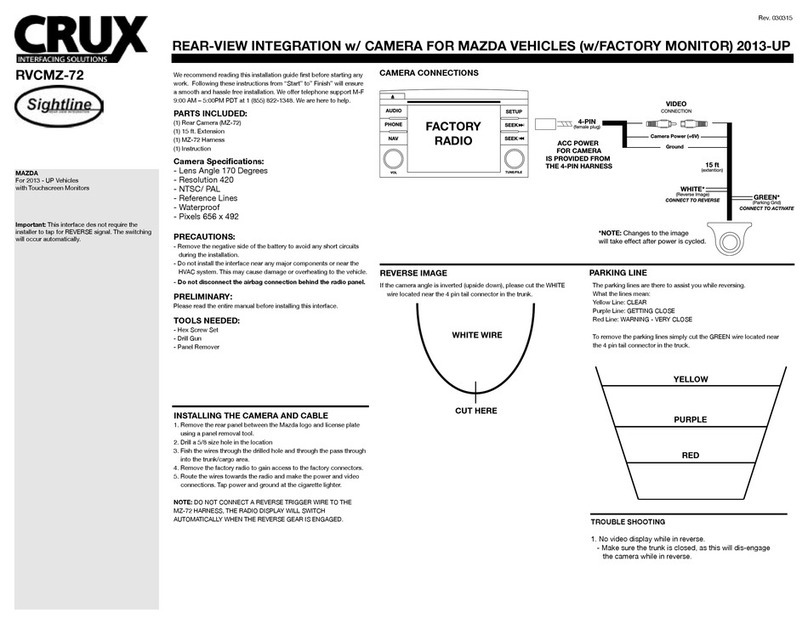
We recommend reading this installation guide rst before starting any
work. Following these instructions from “Start” to” Finish” will ensure
a smooth and hassle free installation. We oer telephone support M-F
9:00 AM – 5:00 PM PDT at 1 (855) 822-1348. We are here to help.
PARTS INCLUDED:
(1) Rear Camera (HN-76D)
(1) 15 ft. Extension
(1) HN-76D Harness
(1) Instruction
Camera Specications:
- Lens Angle 170 Degrees
- Resolution 420 TV Lines
- Min. Illumination 0.2Lux
- Voltage 12v
- Operating Temp. -22˚F - 176˚F
- NTSC
- Reference Lines
- Shutter Speed 1/60s - 20us
- Waterproof
- Pixels 656 x 492
PRECAUTIONS:
- Remove the negative side of the battery to avoid any short circuits
during the installation.
- Do not install the interface near any major components or near the
HVAC system. This may cause damage or overheating to the vehicle.
- Do not disconnect the airbag connection behind the radio panel.
PRELIMINARY:
Please read the entire manual before installing this interface.
TOOLS NEEDED:
- Drill Gun
- Panel Remover
INSTALLING THE CAMERA AND CABLE
1. Remove the rear panel with Honda emblem. Trunk lip.
2. Drill 5/8 hole in the proper location. recommend driver side of panel.
3. Insert and secure the camera using the included bolt.
4. Fish the wires through a drilled hole and through the pass through
into the trunk/cargo area.
5. Route cables to the front of the vehicle towards the factory radio.
6. Remove the factory radio to gain access to the factory display.
7. Route the wires towards the display and make the video
connection. For powering up the camera, you will need to TAP
at the fuse panel. See Overview)
8. Secure all connections and make sure to test the REVERSE gear
to power the CAMERA.
REAR-VIEW INTEGRATION CAMERA FOR HONDA ODYSSEY EX 2011-2013
PARKING LINE
CONNECTING THE REVERSE INPUT
REVERSE IMAGE
If the camera angle is inverted (upside down), please cut the WHITE
wire located near the pin tail connector in the trunk.
Rev. 112114
8” SCREEN

HONDA:
2011 - 2013 Odyssey EX
Note: Compatible ONLY with Odyssey Ex
vehicles with 8” Screen
RVCHN-76D
REAR-VIEW INTEGRATION CAMERA FOR HONDA ODYSSEY EX 2011-2013

To connect the reverse camera input you must have access to the back of the factory display, above the radio.
1. Tap the power wire from the CAMERA to the BROWN/SILVER wire at the driver’s side fuse panel for the Reverse Trigger wire.
CONNECTING THE REVERSE INPUT
Rev. 112114