ENGLISH FRANÇAIS DEUTSCH ITALIANO ESPAÑOL PORTUGUÊS
EN-9
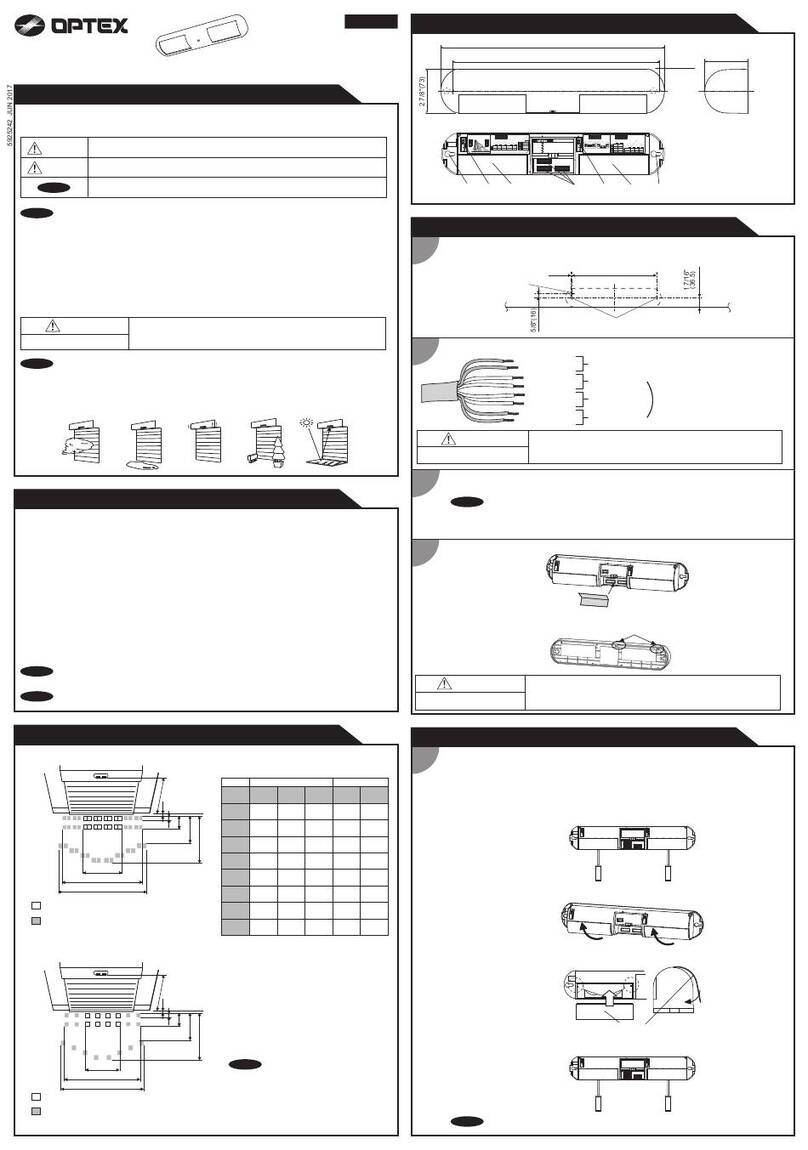
To have the right performance, set the vertical angle parallel to a ground.
Decide the detection length at first. If you choose 9.0 m/5.5 m/4.0 m, mask the unwanted lens with masking seals.
NO
TAMPER
COM NC
TROUBLE
OUT (T.O.) SP NO
ALARM
COM NC
POWER OUT
--
++
POWER IN
NO
TAMPER
COMNC
TROUBLE
NC NO SPNO
ALARM
COMNC
POWEROUT
--
++
POWERIN
SPARE (Non short)
ALARM OUTPUT (N.O.)
ALARM OUTPUT (COM)
ALARM OUTPUT (N.C.)
POWER OUTPUT (–) (3 to 7.2 VDC)
POWER OUTPUT (+) (3 to 7.2 VDC)
POWER INPUT (–) (3 to 7.2 VDC)
POWER INPUT (+) (3 to 7.2 VDC)
TAMPER OUTPUT (N.O.) *1
TAMPER OUTPUT (COM) *1
TAMPER OUTPUT (N.C.) *1
TROUBLE OUTPUT
TROUBLE OUTPUT
0° is the right setting for
3.0 m (10 ft.) height installation.
10° (4 clicks)
5° (2 clicks)
0°
Adjust 1 click (2.5° upward) for
2.5 m (8.2 ft.) height installation
to maintain the 12 m (40 ft.)
detection range.
* This is the case to have 12 m detection length.
Carry out the walk test to check if the
vertical angle is perpendicular or not.
Caution>>
If the base of the unit is already parallel
to the ground,
• Do not change the detection distance
by tilting the unit up or down. Detection
area and length should be adjusted
with masking tapes. Refer to 1-3 for
the details.
• Walk test the unit to ensure that the
desired detection distance is achieved.
If you see the detection only
inside the designated distance,
change the vertical angle
upward.
If you see the detection at the designated
distance, no adjustment is needed.
If you see the detection outside
the designated distance, change
the vertical angle downward.
12 m (40 ft.)
3.0 m (10 ft.)
NO
TAMPER
COM NC
TROUBLE
OUT (T.O.) SP NO
ALARM
COM NC
POWER OUT
--
++
POWER IN
HX-40RAM Main unit
Transmitter HX-40RAM Battery box
POWER
INPUT
POWER
OUTPUT
ALARM
Dummy
battery
-Battery Sharing
3-4
ADJUSTING THE VERTICAL ANGLE
3-5
WIRING
*1: TAMPER terminals to be connected to a 24 hour supervisory loop.
NO
TAMPER
COM NC
TROUBLE
OUT (T.O.) SP NO
ALARM
COM NC
POWER OUT
--
++
POWER IN
HX-40RAM Main unit
Transmitter HX-40RAM Battery box
TROUBLE
OUTPUT
Not
used
POWER
INPUT
POWER
OUTPUT
ALARM
-Non Battery Sharing
ANTI-MASKING
SENSITIVITY
Do not touch
TEST
NORM.
PIR SENSITIVITY
-WALK TEST MODE
POSITION FUNCTION
TEST
(Factory default)
• LED will lights at the time of detection regardless DIP-SW 6.
(Lights up irrespective of the LED ON/OFF (DIPSW 6, see
p10) setting)
• Alarm will be generated at the time of detection regardless
DIP-SW 2.
NORM. • Normal operation. (Battery saving mode.)
• LED is off. (When LED ON/OFF is OFF.)
DIP switch 1
Caution>>
After completing a walk test,
always set the unit to NORM
position for operation.
Using the unit in TEST mode
will shorten the battery life.
5-1
FUNCTION
Dip SW
1. WALK TEST MODE
2. BATTERY SAVING TIMER
3. IMMUNITY
4. TROUBLE OUTPUT TYPE
5. LOW BATTERY OUTPUT
6. LED ON/OFF
• Use a transmitter with 2 inputs or low battery
terminal and connect to TROUBLE OUTPUT.
• Use 2 small transmitter units and connect one
unit to the alarm wiring and the other to the
trouble wiring (the size of such transmitters
should be small enough to be accommodated
in the HX-40RAM internal case 1) / 2)).
• To output LOW BATTERY SIGNAL to
TROUBLE OUTPUT terminal, set DIP-SW 5
(see p10) “OFF” to “ON”.
1Set the DIP switch 1 to “ON”
(default). 3
2
Detected Not detected
Note>>
• For the walk test, move more than 1.0 m
(3.3 ft.) away from the detector.
• Conduct a walk test at least once a year.
Check if detector reacts in intended
detection area. Successful installation
shows, LED light for two seconds after
a person walks into detection area.
Set the DIP switch 1 to
“NORM” and switch 6 to
“OFF”.
4WALK TEST
5SETTING