manuals.online logo
Brands
  1. Home
  2. •
  3. Brands
  4. •
  5. Phonocar
  6. •
  7. Automobile Accessories
  8. •
  9. Phonocar VM321E User manual

Phonocar VM321E User manual

This manual suits for next models

1

Other Phonocar Automobile Accessories manuals

Phonocar VM342 User manual

Phonocar

Phonocar VM342 User manual

Phonocar 05152 User manual

Phonocar

Phonocar 05152 User manual

Phonocar 03585 User manual

Phonocar

Phonocar 03585 User manual

Phonocar VM549 User manual

Phonocar

Phonocar VM549 User manual

Phonocar VM268 User manual

Phonocar

Phonocar VM268 User manual

Phonocar 05931 User manual

Phonocar

Phonocar 05931 User manual

Phonocar 7/285 User manual

Phonocar

Phonocar 7/285 User manual

Phonocar VM 031 User manual

Phonocar

Phonocar VM 031 User manual

Phonocar VM334 User manual

Phonocar

Phonocar VM334 User manual

Phonocar 3/706 User manual

Phonocar

Phonocar 3/706 User manual

Phonocar DREAM PH2000 User manual

Phonocar

Phonocar DREAM PH2000 User manual

Phonocar 05730 User manual

Phonocar

Phonocar 05730 User manual

Phonocar 06855 User manual

Phonocar

Phonocar 06855 User manual

Phonocar 06856 User manual

Phonocar

Phonocar 06856 User manual

Phonocar 4/130 User manual

Phonocar

Phonocar 4/130 User manual

Phonocar 06891 User manual

Phonocar

Phonocar 06891 User manual

Phonocar 4/926 User manual

Phonocar

Phonocar 4/926 User manual

Phonocar 5/988 User manual

Phonocar

Phonocar 5/988 User manual

Phonocar VM341 User manual

Phonocar

Phonocar VM341 User manual

Phonocar VM390 User manual

Phonocar

Phonocar VM390 User manual

Phonocar 06940 User manual

Phonocar

Phonocar 06940 User manual

Phonocar 04048 User manual

Phonocar

Phonocar 04048 User manual

Phonocar VM338 User manual

Phonocar

Phonocar VM338 User manual

Phonocar 6/851 User manual

Phonocar

Phonocar 6/851 User manual

Popular Automobile Accessories manuals by other brands

Magneti Marelli AC161 Installation instruction

Magneti Marelli

Magneti Marelli AC161 Installation instruction

FDI uEZ GUI Start here

FDI

FDI uEZ GUI Start here

JCROffroad JT Install instructions

JCROffroad

JCROffroad JT Install instructions

Rostra VOXXElectronics 250-1930 owner's guide

Rostra

Rostra VOXXElectronics 250-1930 owner's guide

TOP VEHICLE TECH GR3FORD5 installation manual

TOP VEHICLE TECH

TOP VEHICLE TECH GR3FORD5 installation manual

Safe Fleet PRIME DESIGN AR-2000-BLK manual

Safe Fleet

Safe Fleet PRIME DESIGN AR-2000-BLK manual

Skoda Fabia Combi 5J Fitting instructions

Skoda

Skoda Fabia Combi 5J Fitting instructions

Camcar 40077 Al Mounting instructions

Camcar

Camcar 40077 Al Mounting instructions

Camcar 40089 AL Mounting instructions

Camcar

Camcar 40089 AL Mounting instructions

Impac Tradesman 2000 installation manual

Impac

Impac Tradesman 2000 installation manual

DVB OFFROAD BRSB-01 installation manual

DVB

DVB OFFROAD BRSB-01 installation manual

Safari Snorkel SS385HF installation guide

Safari Snorkel

Safari Snorkel SS385HF installation guide

ULTIMATE SPEED 279746 Assembly and Safety Advice

ULTIMATE SPEED

ULTIMATE SPEED 279746 Assembly and Safety Advice

SSV Works DF-F65 manual

SSV Works

SSV Works DF-F65 manual

ULTIMATE SPEED CARBON Assembly and Safety Advice

ULTIMATE SPEED

ULTIMATE SPEED CARBON Assembly and Safety Advice

Witter F174 Fitting instructions

Witter

Witter F174 Fitting instructions

WeatherTech No-Drill installation instructions

WeatherTech

WeatherTech No-Drill installation instructions

TAUBENREUTHER 1-336050 Installation instruction

TAUBENREUTHER

TAUBENREUTHER 1-336050 Installation instruction

manuals.online logo
manuals.online logoBrands
  • About & Mission
  • Contact us
  • Privacy Policy
  • Terms and Conditions

Copyright 2025 Manuals.Online. All Rights Reserved.

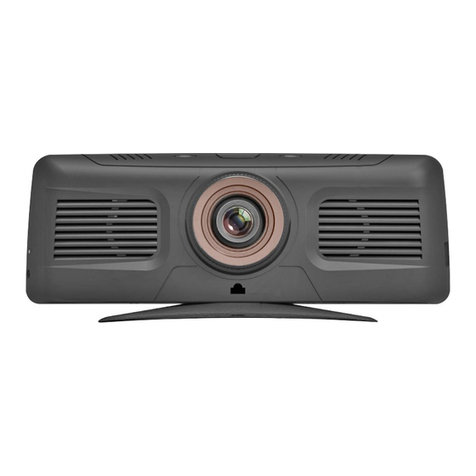
VM321
SISTEMA PER GUIDA
INTELLIGENTE
SMART DRIVING
AUXILIARY SYSTEM
ANDROID 5.0
MANUALE ISTRUZIONI • INSTRUCTIONS MANUAL
NOTICE DE MONTAGE ET D’EMPLOI • GEBRAUCHSANWEISUNGEN
MANUAL DE INSTRUCCIONES
02/2018
FR
DE
GB
IT
ES
2
Avvertenze • Warning • Avertissements • Warnungen • Advertencias
ES
-
No instalar el dispositivo en un lugar que pueda obstacular el campo de visión del conductor. • No tentar de
reparar personalmente la unidad. El montaje o la las reparaciones tienen que ser efectuada exclusivamente por
profesionales. ATENCIÓN la versión ANDROID 5.0 no se puede actualizar. Contactar con la Asistencia técnica.
DE
-
Installieren Sie das Gerät nicht, wo das Sichtfeld des Fahrers eingeschränkt werden kann. • Versuchen Sie
nicht, die Einheit selbst zu reparieren. Montage oder Reparaturarbeiten dürfen nur von Fachleuten durchgeführt
werden. Bitte beachten Sie, dass die ANDROID 5.0 Version nicht upgradefähig ist.
Wenden Sie sich an den Technischen Support.
FR
-
Ne pas installer l’unité où le champ de visibilité du conducteur peut être limité. • Ne pas essayer de réparer
l’appareil vous-même. L’assemblage ou la réparation doit être effectuée uniquement par des experts.
ATTENTION: la version ANDROID 5.0 ne peut être mise à jour. Contacter le support technique.
GB -
Do not install the unit where it can limit the field of vision of the driver. • Do not attempt to repair the unit
yourself. Assembly and repair must be performed by qualified technicians. PLEASE NOTE that the ANDROID 5.0
version is not upgradeable. Get in touch with the Technical Support.
IT -
Non installare l’unità dove possa limitare il campo di visibilità del conducente. • Non tentare di riparare l’unità a
utonomamente. Il montaggio o le riparazione devono essere effettuate solo da esperti. ATTENZIONE la versione
android 5.0 non è aggiornabile. Rivolgersi all’assistenza.
3
Utilizzo • Use • Utilisation • Nutzung • Utilizo
ES - El VM321 es un dispositivo multifunción con ANDROID 5.0, que ha sido estudiado para ser utilizado en
innumerables funciones:
• DVR Grabador del recorrido con cámara delantera y trasera optional (VM262).
• FRONT COLLISION Para mantener la distancia apropiada de los demás vehículos.
• G-SENSOR en caso de colisión memoriza el último archivo grabado incluso si el automóvil está estacionado y
apagado.
• NAVEGACIÓN 2 Soluciones de navegación, ON-LINE u OFF-LINE.
• MULTIMEDIA visualización de los videos presentes en la Micro SD, el audio se transmite al equipo original del
coche mediante el modulador de frecuencia del VM32.
• BLUETOOTH Con protocolo AVRCP.
DE - VM321 ist ein multifunktionelles Gerät mit ANDROID 5.0, das die Durchführung unterschiedlicher Funktionen
dient:
• DVR Streckenaufzeichnung (auch kontinuierlich) durch Front-und Rückfahrkamera optional (VM262) mit
Visualisierung auf dem Monitor.
• FRONT COLLISION um den ausreichenden Abstand zu anderen Fahrzeugen zu behalten.
• G-SENSOR im Falle eines Zusammenstoßes wird die letzte aufgenommene Datei gespeichert, auch wenn das
Auto geparkt oder ausgeschaltet ist.
• NAVIGATION 2 Navigationslösungen, ON-LINE oder OFF-LINE.
• MULTIMEDIA Anzeige von auf der Micro SD vorhandenen Filmen , Audio durch das Originalsystem mit
Frequenzmodulator.
• BLUETOOTH mit Protokolle AVRCP.
FR - Le VM321 est un appareil multifonction avec ANDROID 5.0 disposant de :
• DVR Enregistrement, même continu, du parcours à travers la caméra avant et de recul optional (VM262) avec
visualisation sur écran.
• FRONT COLLISION pour garder la distance appropriée des autres véhicules.
• G SENSOR en cas de collision le dernier fichier est mémorisé même si l’auto est garée ou éteinte.
• NAVIGATION 2 Solutions de navigation, EN-LIGNE ou HORS LIGNE.
• MULTIMEDIA visualisation des films sur la micro SD, audio via le système d’origine avec modulateur de fréquence.
• BLUETOOTH avec protocole AVRCP.
GB - VM321 is a multifunctional device with ANDROID 5.0 which can be used for a huge number of functions:
• DVR for path recording (continuous if necessary) of the front and rear camera optional (VM262) with viewing on
the monitor.
• FRONT COLLISION for keeping the proper distance from other vehicles.
• G-SENSOR for storing the last recorded file in case of collision, even if the car is parked and off.
• NAVIGATION 2 Navigation solutions, ON-LINE or OFF-LINE.
• MULTIMEDIA display of movies on the Micro SD, audio through original system with frequency modulator.
• BLUETOOTH with protocol AVRCP.
IT - Il VM321 è un dispositivo multifunzione con ANDROID 5.0 che permette di essere utilizzato per le seguenti
funzioni:
• DVR registrazione del percorso anche in continuo con telecamera anteriore e posteriore opzionale (VM262),
con visualizzazione sul monitor.
• FRONT COLLISION per mantenere la distanza appropriata dagli altri veicoli.
• G-SENSOR in caso di collisione salva l’ultimo le registrato anche se l’auto è parcheggiata e spenta.
• NAVIGAZIONE 2 Soluzioni di navigazione, ON-LINE o OFF-LINE.
• MULTIMEDIA visualizzazione di filmati, audio tramite impianto originale con modulatore di frequenza, presenti
su Micro SD.
• BLUETOOTH con protocollo AVRCP.

4
7
123456
Funzioni • Functions • Fonctions • Funktionen • Funciones
8
NOTA BENE. Premendo brevemente

il tasto ON/O (8) si passa alla modalità standby.
NOTE : briefly pressing the ON/Off key (8) the device
switches to standby mode.
REMARQUE: en appuyant brièvement sur la touche ON/
OFF (8) on passe en mode veille.
TENER EN CUENTA. Presionando brevemente
la tecla ON/O (8) se pasa al modo standby.
HINWEIS: Mit kurzem Drücken auf die ON/O-Taste (8)
wechselt das Gerät in den Standby-Modus.
1Camera
2GPS antenna input
3Data SIM input
4Micro SD Card / DVR slot
5Rear camera input (optional VM262)
6Power connector input
7Microphone
8On / O (Long press)
1Telecamera
2Ingresso antenna GPS
3Ingresso SIM dati
4Slot Micro SD Card/DVR
5Ingresso telecamera posteriore (optional VM262)
6Ingresso connettore alimentazione
7Microfono
8On/O (Premere a lungo)
1Camera
2Entrée antenne GPS
3Entrée SIM de données
4Slot Micro SD Card/DVR
5Entrée caméra arrière (en option VM262)
6Entrée du connecteur d’alimentation
7Microphone
8On / O (appui long)
1Camara
2Entrada antena GPS
3Entrada tarjeta SIM para datos
4Ranura Micro SD Card/DVR
5Entrada retro-camara posterior (opcional VM262)
6Entrada conector alimentación
7Micrófono
8On/O (Presionar hasta encender/apagar el dispositivo)
1Kamera
2GPS-Antenneneingang
3Daten SIM-Eingang
4Steckplatz für Micro SD-Karte / DVR
5Hinterer Kameraeingang (optional VM262)
6Stromanschluss Eingang
7Mikrofon
8An / Aus (lange drücken)
IT GB
FR
ES
DE
5
Collegamenti • Connections • Branchements • Verbindungen • Conexiones
GPS
NERO / BLACK / NOIR / SCHWARZ / NEGRO
Massa / Ground / Masse / Masa
ROSSO / RED / ROUGE / ROT / ROCHO
ALIMENTAZIONE LED - LED POWER - ALIMENTATION LED
LED STROMVERSORGUNG - ALIMENTACIÓN LED
+12V
+12V
ALIMENTAZIONE
POWER
ALIMENTATION
STROMVERSORGUNG
ALIMENTACIÓN
4 LED
MIRROR
NORMAL
VM262 OPTIONAL
LUCI DI RETROMARCIA
REVERSE-GEAR-LIGHTS
FEUX DE RECUL
RÜCKFAHRSCHEINWERFER
LUCES DE MARCHA ATRÁS
+12V
6
MENU PRINCIPALE •MAIN MENU • MENU PRINCIPAL • HAUPTMENÜ • MENÚ PRINCIPAL
Funzioni • Functions • Fonctions • Funktionen • Funciones
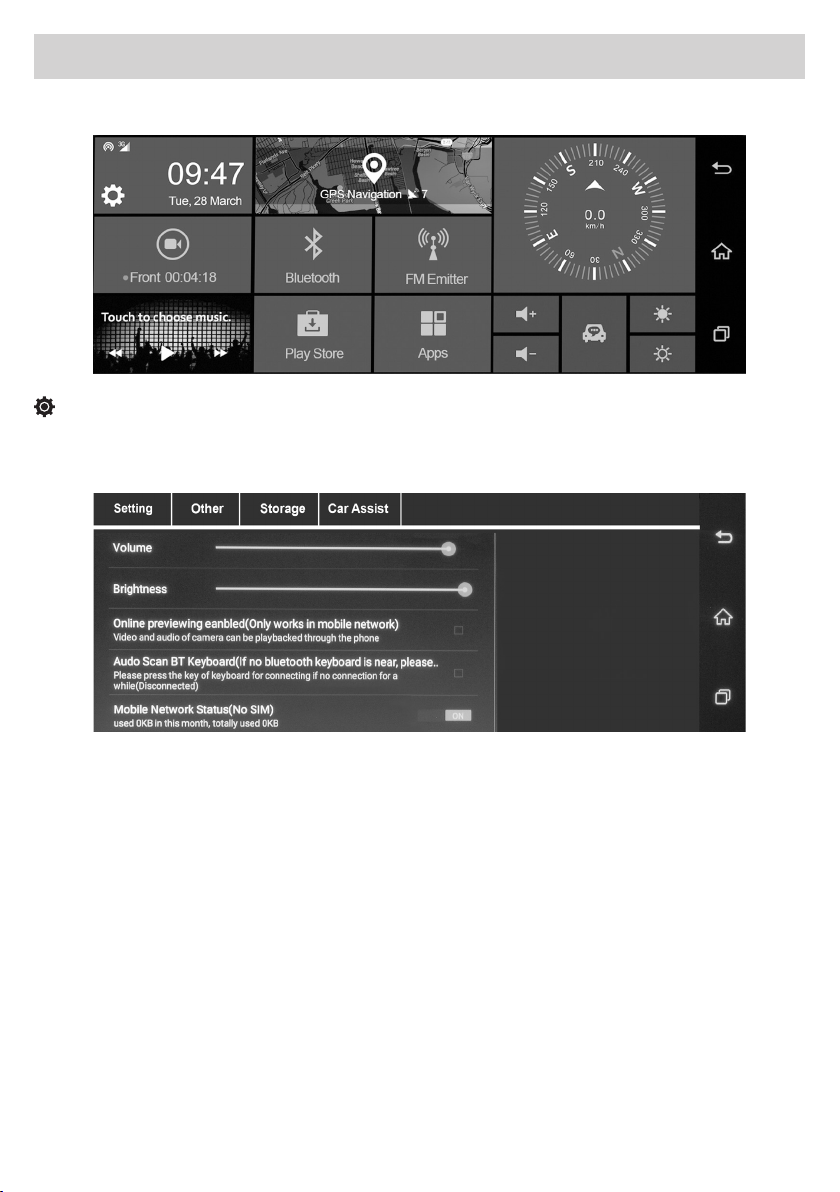
SETUP
IMPOSTAZIONI DI SISTEMA • SYSTEM SETTINGS • PARAMETRES DU SYSTEME
SYSTEM-EINSTELLUNGEN • AJUSTES DEL SISTEMA
GB - Setting Adjustments and settings: Volume / Brightness / Online viewing (working on mobile network only)
ON-OFF / Bluetooth audio keyboard ON-OFF / Mobile network status information ON-OFF / SoftAP ON-OFF /
WLAN ON-OFF / DVR Setting.
Other Adjustments and Settings: Auto Sleep / Acoustic signal in case of collision danger ENABLES-DISABLES
Protected Videos ENABLES-DISABLES / FRONT COLLISION Sensitivity / Factory RESET
ANDROID settings / System update / Software version information.
Storage Adjustments and Settings: MICRO SD Card Information / DVR Information
Internal memory information / Memory management / Format the MICRO SD Card.
IT - Setting Regolazioni e impostazioni: Volume / Luminosità / Visione online (funziona solo su rete mobile)
ON-OFF / Tastiera audio Bluetooth ON-OFF / Stato della rete mobile ON-OFF / SoftAP ON-OFF / WLAN ON-OFF /
DVR Setting.
Other Regolazioni e impostazioni: Auto Sleep / Segnale acustico in caso di pericolo collisione ABILITA-DISABILITA
Video protetti ABILITA-DISABILITA / Sensibilità FRONT COLLISION / RESET di fabbrica
Impostazioni ANDROID / Aggiornamento di sistema / Info versione software.
Storage Regolazioni e impostazioni: Informazioni scheda MICRO SD Card / Informazioni DVR
Informazioni memoria interna / Gestione memorie / Formatta la MICRO SD Card.
7
Funzioni •
Functions
•
Fonctions
•
Funktionen
•
Funciones
ES - Ajustes: Volumen / Brillo / Visión online (funciona solo con red móvil) ON-OFF / Teclado audio Bluetooth ON-
OFF / Información del estado de la red móvil ON-OFF / SoftAP ON-OFF / WLAN ON-OFF / DVR Setting.
Other Ajustes: Auto Sleep / Señal acústico en caso de peligro de colisión HABILITA-DESHABILITA / Video
protegidos HABILITA-DESHABILITA / Sensibilidad COLISION FRONTAL / RESET de fabrica
Ajustes ANDROID / Actualización sistema / Info versión software.
Storage Ajustes: Información tarjeta MICRO SD Card / Información DVR
Información memoria interna / Gestión memorias / Formatear MICRO SD Card.
DE - Setting Anpassungen und Einstellungen: Lautstärke / Helligkeit / Online-Anzeige (nur im Mobilfunknetz
verfügbar) ON-OFF / Bluetooth-Audio-Tastatur ON-OFF / Statusinformationen zum Mobilfunknetz ON-OFF / Sof-
tAP ON-OFF / WLAN ON-OFF / DVR-Einstellung.
Sonstiges : Anpassungen und Einstellungen: Auto Sleep / Akustisches Signal bei Kollisionsgefahr AKTIVIEREN-
DEAKTIVIEREN
Geschützte Videos AKTIVIEREN-DEAKTIVIEREN / FRONT KOLLISION Empfindlichkeit / Rücksetzen auf Werkseinstel-
lung ANDROID-Einstellungen / System-Update / Informationen zur Software-Version.
Speicherung : Anpassungen und Einstellungen: MICRO SD-Karteninformationen / DVR-Informationen
Interne Speicherinformationen / Speicherverwaltung / Formatierung der MICRO SD Card.
FR - Setting Réglages et paramétrages: Volume / Luminosité / Visualisation en ligne (disponible uniquement sur
le réseau mobile) ON-OFF/ Clavier audio Bluetooth ON-OFF / Informations sur l’état du réseau mobile ON-OFF /
SoftAP ON-OFF / WLAN ON-OFF / Réglages DVR.
Autre réglages et paramétrages: Veille automatique / Signal sonore en cas de danger de collision
ACTIVE-DESACTIVE / Protection Vidéos ACTIVE-DESACTIVE / Sensibilité COLLISION AVANT / Restauration réglages
d’origine
Paramétrages ANDROID / Mise à jour du système / Informations sur la version du logiciel.
Storage: Réglages et paramétrages : Informations sur la carte micro SD / Informations DVR
Informations mémoire interne / Gestion de la mémoire / Formatage de la MICRO carte SD.
8
Funzioni •
Functions
•
Fonctions
•
Funktionen
•
Funciones
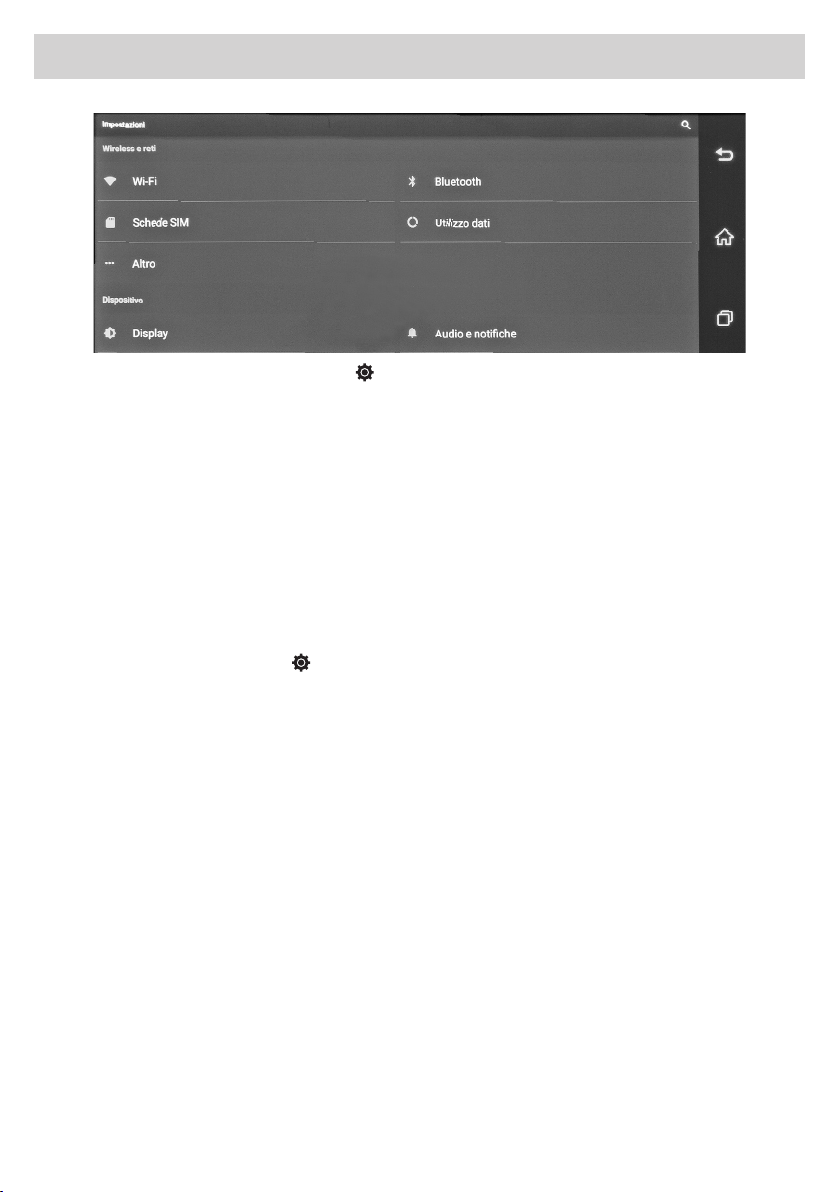
IT IMPOSTAZIONI ANDROID (percorso Menu SetupOtherImpostazioni)
Regola impostazioni: Wi-Fi / Bluetooth / Audio / Display / Screenshot.
Utilizzo dati: Mostra il graco della memoria utilizzata da ogni applicazione in KB.
Altro: Imposta Modalità aereo / Tethering / Hotspot / VPN / Ethernet / Reti mobili.
Memoria: Visualizza la memoria disponibile.
Sicurezza: Imposta blocco schermo - password.
Lingua e emissione: Regola impostazioni lingua - scrittura tastiera.
Backup e ripristino: Esegue backup e ripristino dati di fabbrica.
Aggiungi account: Congura nuovi account Google.
Data e Ora: Regolazione, automatica o manuale e fuso orario.
Accessibilità: Impostazione di utilizzo del dispositivo.
Opzioni sviluppatore: Regola impostazioni.
About device: Aggiorna sistema. Informazioni Android, Kernel, Build ed esegue factory mode.
GB ANDROID SETTINGS (Path Menu SetupOtherSettings )
Adjust settings: Wi-Fi / Bluetooth / Audio / Display / Screenshot.
Data Use: Shows the memory graph used by each application in KB.
Other: Sets Airplane mode / Tethering / Hotspot / VPN / Ethernet / Mobile networks.
Memory: Displays the available memory.
Security: Sets screen lock - password.
Language and output: Adjusts language settings - keypad writing.
Backup and restore: Backs up and restores factory data.
Add account: Configures new Google accounts.
Date and Time: Automatic or manual adjustment and time zone.
Accessibility: Setting device usage.
Developer Options: Adjust Settings.
About device: Updates the system. Information Android, Kernel, Build and performs factory mode.
9
FR RÉGLAGES ANDROID (Parcours SetupOtherSettings )
Régle les paramètres: Wi-Fi / Bluetooth / Audio / Écran / Capture d’écran.
Utilisation des données: Montre graphiquement la mémoire utilisée par chaque application en KB.
Autre: Règle le mode Avion / Tethering / Hotspot / VPN / Ethernet / Réseaux mobiles.
Mémoire: visualise la mémoire disponible.
Sécurité: Règle blocage écran - mot de passe.
Langue et écriture: règle les paramètres de la langue, écriture clavier
Backup et réinitialisation: effectue le backup et restaure les données d’origine
Nouveau compte : configure les nouveaux comptes GOOGLE
Date et Heure: réglage automatique ou manuel et fuseau horaire
Accessibilité: réglage d’utilisation de l’appareil.
Options développeur: règle les paramètres
Informations sur le produit: mise à jour du système. Informations Android, Kernel, Build et active le mode usine
DE ANDROID EINSTELLUNGEN (Pfad Menü SetupSonstigesEinstellungen) 
Einstellungen-Anpassung: Wi-Fi / Bluetooth / Audio / Bildschirm / Screenshot.
Datenverwendung: Schaubild-Anzeige der von jeder Anwendung verwendeten Speicher in KB
Sonstiges: Flugmodus einstellen / Tethering / Hotspot / VPN /Ethernet / Mobile Netzwerke.
Speicher: Zeigt den verfügbaren Speicher an.
Sicherheit: Legt die Bildschirmsperre fest - Passwort.
Sprache und Ausgabe: Passt die Spracheinstellungen an - Tastaturbeschriftung.
Sicherung (Backup) und Wiederherstellung: Sichert und stellt die Werkseinstellungen wieder her.
Konto hinzufügen: Konfiguriert neue Google-Konten.
Datum und Uhrzeit: Automatische oder manuelle Einstellung und Zeitzone.
Zugänglichkeit: Einstellung der Geräteverwendung.
Entwickler-Optionen: Passt die Einstellungen an. 
Über das Gerät: Aktualisiert das System. Android-, Kernel-, Build-Informationen und Ausführung der
Werkseinstellungen.
ES AJUSTES ANDROID (Ruta Menú SetupOtherAjustes)
Ajustar: Wi-Fi / Bluetooth / Audio / Display / Screenshot. en KB
Utilización de los datos: Muestra el gráco de la memoria utilizada en cada aplicación.
Otro: Ajusta Modo aéreo / Tethering / Hotspot / VPN / Ethernet / Redes móviles.
Memoria: Muestra la memoria disponible.
Seguridad: Congura el bloqueo de la pantalla - password.
Idioma y emisión: Ajustar idioma - escritura teclado.
Backup y puesta en funcionamiento: Ejecuta backup y vuelve a los datos de fábrica.
Añadir account: Congura nuevas cuentas de Google.
Fecha y Hora: Ajuste automatico o manual del huso horario.
Accesibilidad: Ajuste de utilización del dispositivo.
Opciones desarrollador: Congurar ajustes.
Acerca de: Actualizar sistema. Información Android, Kernel, Build y ejecuta el modo fabrica.
Funzioni •
Functions
•
Fonctions
•
Funktionen
•
Funciones
10
IT GPS
Il sistema multimediale è provvisto di due soluzioni per la navigazione GPS.
1) Navigazione on-line: è possibile utilizzare, grazie al sistema Android, l’applicazione MAPPE che permette di
navigare tramite la cartograa di Google.
Per l’utilizzo di questa modalità il sistema deve essere connesso ad uno smartphone o tablet tramite Hotspot e la
navigazione GPS sfrutterà la connessione dati con costi di utilizzo in base al proprio prolo tariario.
L’app uciale di Android ore navigazione GPS in tempo reale, informazioni su traco, trasporto pubblico e
dettagli su milioni di luoghi, come recensioni e orari di punta.
È possibile utilizzare mappe complete e precise di 220 paesi digitalizzate TOMTOM, con informazioni dettagliate
su oltre 100 milioni di attività commerciali.
Tutte le funzionalità sono disponibili con connessione dati 3G/4G, il sistema multimediale deve essere collegato
ad uno smartphone/tablet in Hotspot.
2) Navigazione o-line: la nuova cartograa iGo Nextgen di Nav&Go con mappe TomTom è invece la soluzione
professionale che completa il sistema multimediale rendendolo un accessorio indispensabile per l’attività
giornaliera.
Se avete acquistato la versione con cartograa inclusa sarà possibile utilizzare tutte le funzionalità del nuovo
software Nextgen: semplice ed essenziale, solo le funzioni che realmente servono alla guida.
Le mappe sempre disponibili per una navigazione sicura ed eciente.
Metà dello spazio di memoria di altri sistemi di navigazione, permettendo di risparmiare memoria per le altre
necessità nei viaggi, come musica e video.
Opzioni di calcolo percorsi veloci e variegate per trovare sempre il miglior itinerario possibile. Disponibilità
oine per essere sempre sulla strada giusta, in una aollatissima città come in una zona remota senza bisogno di
connessione dati.
Funzioni •
Functions
•
Fonctions
•
Funktionen
•
Funciones