3
Phase One
Blockout Installation Procedure
(during earth or masonry work)
1) Ensure a suitable recess is provided to accommo-
date installation blockout/mounting ring assembly
B/M.
2) Select appropriate installation blockout holes S
(at the corners of installation blockout B). Peel-off
the sticker(s) and feed mains supply cable(s) O
through installation blockout holes S.
3) Set installation blockout/mounting ring assembly B/
Min position and make sure that:
a) Arrow Ron mounting ring Mis pointed towards
the object to be illuminated (wall, tree, column).
b) Mounting ring Mis flu sh with surface F. If the fl
oor will be tiled or paved afterwards, leave an ap-
propriate gap.
c) Mains supply cable(s) Ois of suffic ient length to
connect sealable junction box Jwith terminal cable
Efrom luminaire housing A. (250mm out of
blockout)
4) During ongoing earth and/or masonry works, do not
remove screws Xfrom mounting ring M. Ensure
that installation blockout/mounting ring assembly
B/Mis not damaged and has maintained its original
shape. If necessary use a cover plate.
Phase Two
Luminaire Installation, Electrical Connection, and
Aiming Procedure
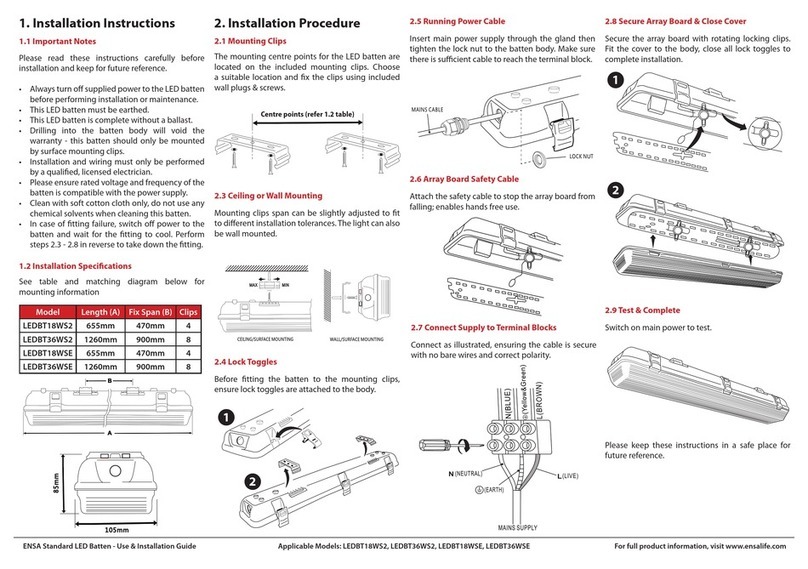
5) Switch off mains electrical supply.
6) Check that rating shown on luminaire label con-
forms with mains electrical supply.
7) Remove screws Xfrom mounting ring M.
8) Terminate cable E(from luminaire housing A) and
mains supply cable Oin sealable junction box J
(or: two mains supply cables O, if through wiring is
required). For termination details, refer to separate
instruction sheet as provided with junction box.
9) Remove cover Pand lens/gasket assembly Qby
loosening screws C.
10) Set cables and sealable junction box Jinside
installation blockout B.
11) Place luminaire housing Ainto installation block-
out/mounting ring assembly B/M. Secure luminaire
with mounting ring Mby tightening screws X.
Warning: When luminaire housing Ais placed in-
side installation blockout B, ensure there is no
stress on sealable junction box Jor electric cables
(Fig. III).
Aiming of gimbal
12) Read attached page regarding Desiccant Sachet
13)Insert screw driver into a slot on locking wheel W.
Rotate locking wheel Win the 'OPEN' direction
until gimbal can be moved (Fig. IV).
To horizontally aim the gimbal
(Rotation 360°)
Hold fins I to rotate the gimbal.
To vertically aim the gimbal
(Tilt 0-20°)
a) Insert screw driver into hole T.
b) Adjust gimbal to desired angle (Refer to protrac-
tor scale U).
Note: Angle can be adjusted in 2° increments.