
Chuango B11 User manual

User Manual
Printed in China
OI: B11-UM-EN-V1.1
2014 Chuango Security. All Rights Reserved.
C
PSTN/GSM
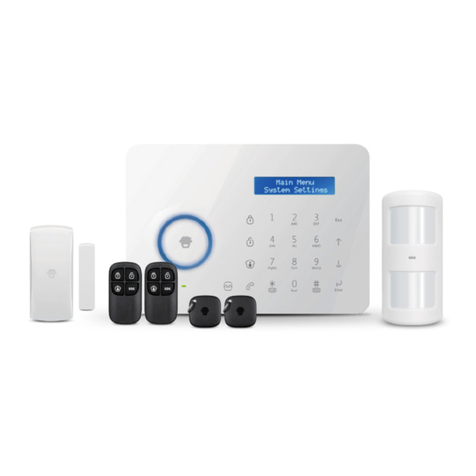
B11 Dual Networks
Alarm System

Package List ---------------------------------------------------------------------
Control Panel Layout ------------------------------------------------------------
Preparation before Use ---------------------------------------------------------
Power on --------------------------------------------------------------------------
Connect PSTN Land Line ---------------------------------------------------------
Insert a SIM Card -------------------------------------------------------------------
Control Panel Operation ---------------------------------------------------------
Alarm Control ----------------------------------------------------------------------
Access Control System ------------------------------------------------------------
Make Phone Calls ------------------------------------------------------------------
Voice Memo -----------------------------------------------------------------------
Function Setting---------------------------------------------------------------------
Security Alarm Function ----------------------------------------------------------
Test Accessories ---------------------------------------------------------------------
Remote Control --------------------------------------------------------------------
Door/Window Contact -------------------------------------------------------------
Pet-Immune PIR Motion Detector --------------------------------------------------
LCD Display Contents ------------------------------------------------------------
LCD Display Menu ---------------------------------------------------------------
Settings --------------------------------------------------------------------------
Alarm Phone Number Setup ------------------------------------------------------
Add/Delete/Edit Accessories ------------------------------------------------------
System Settings -------------------------------------------------------------------
Check Event Logs ------------------------------------------------------------------
Connect to Electronic Lock -----------------------------------------------------------
Connect to CMS ----------------------------------------------------------------
Add CMS Phone Number ---------------------------------------------------------
Delete CMS Phone Number ------------------------------------------------------
User ID ---------------------------------------------------------------------------
Upload Arm/ Disarm Report to CMS Center --------------------------------------
Table of Contents
01~02
03~04
05~06
05
05
06
07~10
07
09
09
10
10
11~22
11
11
14
16
23~24
25~27
28~39
28
29
31
39
39
40~41
40
40
40
41
Remote Control Instruction ------------------------------------------------------
Answering Alarm Phone Call to Start Remote Control -----------------------------
Remote Control by Calling Fixed Phone Number-----------------------------------
Remote Control by Calling SIM Card Number -------------------------------------
SMS Operation-------------------------------------------------------------------
Disarm -----------------------------------------------------------------------------
Arm (Away Arm) ------------------------------------------------------------------
Home Mode (Part Arm) -----------------------------------------------------------
Monitor ---------------------------------------------------------------------------
Recording Voice Memo ------------------------------------------------------------
App Operation -------------------------------------------------------------------
Download and Install APP ----------------------------------------------------------
Control through SMS---------------------------------------------------------------
Control through GPRS Data -------------------------------------------------------
Maintenance --------------------------------------------------------------------------
FAQ ----------------------------------------------------------------------------------
Specifications --------------------------------------------------------------------
Disclaimer-----------------------------------------------------------------------------
41~42
41
42
42
43~44
43
43
44
44
44
45~51
45
46
48
52
53
54~55
56

Features
100% wireless configuration, D.I.Y. installation
Stylish design with touch keypad
LCD with guide menu, easy for programming
Built-in 1,000,000 RF codes combination maintains high reliability
Support 10 remote controls, 50 wireless sensors, and 50 RFID tags
Store 6 alarm phone numbers
10 seconds voice memo and alarm voice message recordable
Disarm by RFID tags and unlock the electronic door lock
Support maximum 150 alarm event logs
Make phone calls directly
Duress code enables sending out alarm notification mutely
One group of timing arm and disarm
Support exit & entry delay
Rename all zones and RFID tags
Easy operation with phone remote control function
Arming, disarming and recording voice memo via App through SMS or GPRS
Please read this user manual carefully.
Please kindly keep this user manual for your reference when necessary.

Package List
The control panel is known as the “heart
and brain” for alarm system, which is used
for receiving and processing signals from
wireless sensors and remote controls. Users
can make settings freely with the keypad
and LCD display. In case of emergency, the
panel hoots on site and dials the pre-stored
alarm phone numbers automatically. When
Pet-Immune PIR Motion Detector is an intelligent passive
infrared motion sensor, designed to detect human movements
within an approximate range of 0 to 8 meters from the detector.
The detector includes fuzzy logic to minimize false alarms from
unwanted heat sources. With power saving feature, the detector
will enter sleeping mode after the second activation within 3
minutes to save power.
CG-B11 Control Panel x1
PIR-910 Pet-Immune PIR Motion Detector x 1
The remote control is compact and
portable; it is convenient to carry it to
arm, disarm, part arm the alarm system
and also make an emergency call.
The Door/window contact can be installed on
doors, windows and any other objects that open
and close. The sensor transmits signals to the
control panel when a magnet mounted near the
sensor is moved away.
The RFID tag is for disarming the
system and unlocking the
electronic door lock (if connected).
Supply power to the control panel. In
case of power failure, two built-in
backup batteries in the panel will
support 5-hour standby.
Connect PSTN land line to the
control panel. In case of
emergency, the panel will
hoot on site and call the pre-
stored alarm phone number
to notify users.
Brackets (Wall-Mounted and
Desktop) for Control Panel x 2
Bracket for PIR Motion
Detector x 1
Double-Sided Tape for
Door/Window Contact x 2
Screws and Wall
Plugs x 4
User Manual x 1
DWC-102 Wireless Door/Window Contact x 1 RC-80 Wireless Remote Control x 2
Tag-26 RFID Tag x 2
AC Adapter x 1
Telephone Cable x 1
01 02
users pick up the phone, they are able to hear alarm voice message and choose to
monitor on site or disarm the system, etc.
As a PSTN/GSM dual networks alarm system, B11 panel will switch to GSM network
automatically to call the user for alert when the PSTN network is cut off.

RFID Tag Reader /
Play Voice Memo
Home Mode (Part Arm)
Disarm
Arm
Voice Memo Button
LED Indicator
Rear Side
LCD Display
Esc
Up/Down
Enter
SOS
Clear
Call
Front Side
Control Panel Layout
Tamper Switch Speaker
Backup Batteries
Power
ON/OFF
Landline Jack
MIC
SIM Card Slot
GSM Network LED
NC Input for
Wired Sensor
(Normal Zone)
Output Wired Siren
(≤500mA)
Output for
Electronic Lock
AC Adapter
Jack
Terminals for
Wired Sensors
03 04

2
1
Preparation before Use
Plug the output connector of AC adapter into the adapter Jack of control panel.
Plug the AC adapter into a wall outlet.
Power on
B11 is a PSTN & GSM dual networks alarm system, If there is an alarm, it will auto dial
pre-stored phone numbers though landline, or dial through GSM network when
landline is unavailable.
Connect the smaller connector of provided telephone cable to the
PSTN land line interface at the back side of the panel.
Connect the other end of the telephone cable to the signal output
provided by PSTN land line operator.
1
2
Connect PSTN Land Line
Note:In daily use, it is
recommended to use
external power supply.
The built-in rechargeable
battery should be used
only in the case of AC
power failure.
Note: A GSM SIM card with normal functions (calling, answering, SMS and caller display) is
required. If use App to control the alarm system through GPRS network, it is recommended
to activate a GPRS plan to save expense.
Insert the SIM card only after the control panel is switched off. Then, switch on the control
panel so as to search signals.
If no SIM card is inserted, the control panel can only send alarm notification by calls through
land line and users cannot remote control the control panel through App. However, other
functions are not affected.
Insert a SIM Card
Insert a SIM card into the card slot according to the mark and lock it.
This step can be ignored if GSM function is not applied.
1.
2.
1.
2.
05 06

Control Panel Operation
Alarm Control
Arm (Away Arm)
Press the button on the [Arm ]
control panel, the system enters Arm
state when one beep is heard and the
arm LED Indicator lights on.
Emergency Call
When the LCD display is activated,
Hold the button for 3 seconds [ ]
the system goes into emergent
alarming state with siren hooting,
meanwhile the panel will auto dial
pre-stored alarm phone numbers.
Home Mode (Part Arm)
Press the button on [Home Mode ]
the control panel, the system enters
home mode when one beep is heard
and the home mode LED Indicator
lights on. All the normal sensors are
armed except the home mode sensors
which are disarmed, so that users can
move freely at home.
Disarm
Input user code (Default: 1234) or
admin code (Default: 123456) first,
then press the button, [Disarm ]
the system enters disarm state when
one beep is heard and the disarm
LED Indicator lights on.
Note: If Entry/Exit Delay is activated, all
zones except the 24-hour zone will enter
arm state after the set delay time.
07 08

The control panel has a RFID reader for
unlocking the electronic door lock by disarming
the system. Just place the RFID tag close to the
RFID reader, the blue LED indicator flashes
once.
The system is disarmed and the electronic door
lock is opened (If connected).
Access Control System
Make Phone Calls
When the control panel is in disarm or home mode state, press button, input [Call ]
the phone number and press button again, the line will get through. [Call ]
The control panel has a built-in communication module. If the PSTN land line is
connected or SIM card is connected properly, and the credit is enough, you can use
the panel to make calls.
(System will auto dial through land line first, or dial through GSM network when land
line is unavailable ).
If you input wrong numbers, press button and input again. Press button to [Esc] [Esc]
cancel dialing or press button to end a conversation.[Call ]
Voice Memo
1
3
2
4
Function Setting
Input the admin code (Default: 123456), and then press to enter setting menu. [Enter]
Up
Down
Enter Confirm
Back to last step Esc
Press the button for 3 seconds to record 10 seconds voice [Record Voice Memo ]
message. The Play Voice Memo circle will be flashing to remind you. Users can touch
the center of circle to listen to the voice memo. The LED indicator blacks out when the
voice memo has been played. Replay by touching it again.The latest voice memo will
cover the former message.
Note: If control panel is connected with extension line, 0# or 9# need to be added in front of
the phone number when making phone calls. if the land line is unavailable, system will switch
to GSM network, user can make phone calls by inputting phone number directly without 0# or
9#.
09 10

Security Alarm Function
Test Accessories
Our accessories can work only with our control panels, can not work with other brands.
Remote Control
RC-80 remote control is dainty and delicate, easy to carry. It can be attached to your
key ring, or just put into your pockets or purses.When you are about to exit or entry
the house, you can use it to arm or disarm the system. In case of emergency, just press
the button, the alarm will be activated immediately.[SOS]
Arm
Disarm
Stay
Panic
LED Status Indicator
Appearance
Arm
Disarm
Press the button, the system enters [Arm ]
arm state when one beep is heard and the
arm LED on the control panel is on.
Note: If Exit Delay is activated, all zones except
the 24-hour zone will enter arm state after the
set delay time.
Press the button on the remote [Disarm ]
control, the system enters disarm state when
two beeps are heard and the disarm LED on
the control panel is on.
When alarm is activated, the siren will hoot.
Press the button, the system is [Disarm ]
disarmed . But the LED indicator of triggered
zone keeps flashing for further checking.
Press button again, the alarming [Disarm ]
zone indicator goes out.
Home Arm (Part Arm)
Press button on the remote control, [Stay ]
the system enters home mode when one beep
is heard and the home mode LED is on. All the
normal sensors are armed except the home
mode sensors which are disarmed, so that
users can move freely at home.
11 12

The door/window contact can be installed on doors, windows, and any other objects that
can open and close. The sensor transmits signals to the control panel when a magnet
mounted near the sensor is moved away. External input for wired accessory is available at
the N/C interface. The tamper protection ensures that sabotage attempts to move the
contact will result in an alarm activation.
LED Status Indicator
Transmitter Magnet
Appearance
LED Indication
LED Meaning
Blinks once
AA 1.5V LR6
Mute Operation
When arm or disarm the system, the siren will
beep accordingly.
If siren beep is not needed, please operate as
follows:
Press button on the remote control [Stay ]
for 1 second, then press or [Arm ] [Disarm
] button. The siren is armed or disarmed
in mute without disturbing other people.
SOS
Whenever you press the button on [SOS]
the remote control, the system will alarm
immediately.
Door/Window Contact
Door/Window contact is triggered
Blinks once per 3 seconds
PCB Layout
Tamper switch
Low battery indication, LCD shows:
Sensor 1-50(Sensor Name) Low Battery. Please
change the batteries immediately
Note: If wireless strobe sirens are used, they will not sound either.
13 14
Table of contents
Other Chuango Security System manuals
Chuango
Chuango A9 User manual
Chuango
Chuango G5 User manual
Chuango
Chuango OV-300 User manual

Chuango
Chuango AW1 Plus User manual
Chuango
Chuango OV6 User manual

Chuango
Chuango G5 User manual
Chuango
Chuango H4 PLUS User manual

Chuango
Chuango CG-B11 User manual
Chuango
Chuango G5 User manual
Chuango
Chuango AWV Plus User manual

Popular Security System manuals by other brands













EDM
EDM Solution 6+6 Wireless-AE installation manual

Highway Safety Group
Highway Safety Group EA401 user manual

Siren
Siren LED GSM operating manual

Detection Systems
Detection Systems 7090i Installation and programming manual

Se-Kure Controls
Se-Kure Controls MicroMini SK-4841 instructions

Siemens
Siemens FDM273 manual