m
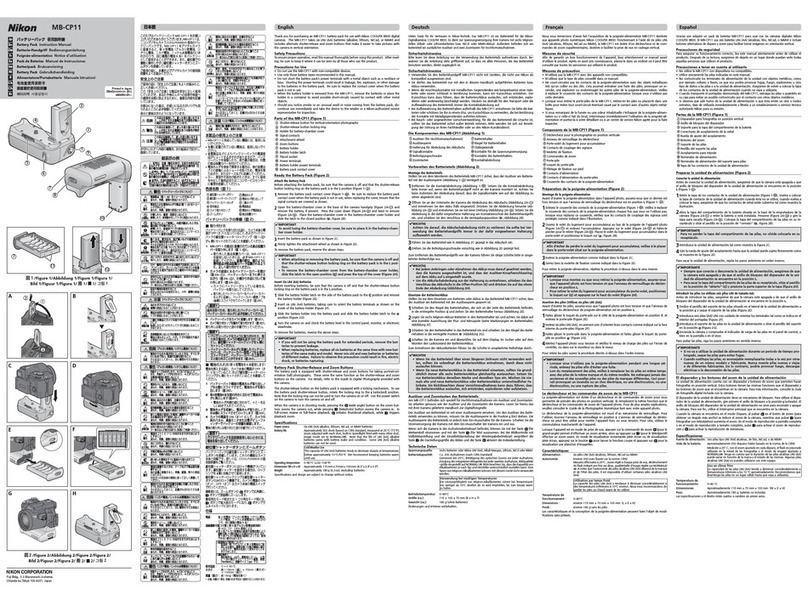
Battery
Pack
User
's
Manual
Thank
you
for
purchasing
an
MB
-
NlO
battery
pack
.
Mounted
on
aZ7
or
Z6
mirrorlesscamera,
the
MB-N
l
Oa
l
lows
the
use
of
two
EN
-
Ell
Sb
rechargeable
Li-ion
batter
i
es
An
EH
-
?P
charging
AC
adapter
(avai
l
able
sepa
r
ately)
connected
to
the
MB
-
NlO's
charging
connector
can
be
used
to
cha
r
ge
the
batter
i
es
wit
hout
remov
i
ng
them
from
the
ba
tt
ery
pac
k
Befo
re
using
this
product,
please
read
these
instructions
carefu
lly.
You
will
also
need
to
consult
the
camera
manua
l
Parts
of
tlie
Batterr
Paci<
:Names
and
Functions
See
below
for
the
names
and
functions
of
the
pa
r
ts
of
MB
-
NlO
.
©~
®
-
..
...
u
....
-.
@
Q) M
ounting
mew
(g) A
ttachment
w
heel
Use
when
mounting
theMB-NlO
on
thecamera,
I
See
m
@
Po
w
ercontacts
©
(ontact
c
ap
Jrot
ectstheMB-NlO'spowercontacts. I
See
m
®
::~:~
le
v
el
displa
y I
Press
to
view
the
battery
level
LED
display.
@
Chargingconn
ec
tor
(j)
Charging
conn
ec
tor
1
use
when
cha
r
ging
batteries
in
t
he
MB-NlO
co
v
er
See
lll
See
l!J
@
LEOs
{x
l)
Light
to
show
battery
leve
l
when
the
batte
ry
level
display
button
is
pr
essed.
The
LEDs
also
l
See
li
,m
flash
whi
le
the
battery
is
cha
r
ging
®
Batter
y
-chamber
c
ove
rs
(x2)
®
~;:;;~
:
;:~:~
(
~;
)
@
Batter
y
-chamber
cove
rho
lder
@
Tripodsocket
Holds
the
camera
battery-chamber
cover
once
it
has
been
removed
from
the
camera
@Batt
er
y
ChamberB
Each
battery
chamber
holds
one
EN-EL1Sb
@
Battery
Chamber
A
rechargea
b
le
Li-ion
battery.
®
Batter
y
lat
ch
es
!~1
_I
Latch
the
batter
i
es
in
place.
F
or
v
our
safe
~
See
l]
See
r;!
See
l]
See
l]
To
prevent
damage
to
property
or
i
njury
to
yourse
lf
or
to
others,
read
·
For
Your
Safet(
in
its
enti
r
ety
befo
re
using
th
is
product
Keep
these
safe
tyi
nstruc
t
ions
where
all
those
who
use
this
product
wil
l
read
them.
&.
DANGER
: F
ailu
re to
observe
t
he
precautiom
marke
d with this
icon
carries
a
highr
isk
ofdeath or
severe
inju
ry.
&.
WARNING:
Fai
lure
to
obse
r
ve
the
precau
t
ions
marked
with this
icon
could
resu
lt
in
d
eath
or
severe
injury.
&.
CAUTION
:
Failure
to
observe
the precautions
marked
withth
is
icon
could result
ininjury or property
da
m
age.
~
WARNING
•
Do
not disassemble ormodify thisproduct.
Do
not touch internal parts
th
at become expo
se
d asthe result of a fall or
other accident.
Failu
reto
observe
these
precautions
could
result
in
el
ect
r
ic
shock
or
other
injury.
• Should y
ou
notice
any
abnormalitiess
uch
as
the product producing smok
e,
heat, or unusual odors, immediately disconnect the batte
ri
es
or po
we
r
sourc
e.
Continued
operat
i
on
could
result
in
fire,
burns
or
othe
rinjury.
•
Keep
dry.
Do
not handle with wet hands.
Do
not
handle the plug with wet
hands.
Failu
reto
observe
these
precautions
could
result
in
fire
or
electric
shock
•
Do
not immer
se
in or washwith
wa
te
r.
Do
not
us
e
in
heavy rain.
Failu
reto
observe
these
precautions
could
result
in
fire
or
elec
t
ric
shock.
•
Do
not let
yo
ur
skin
remain
in
prolonged contact with this product while
it
is
on
or plugged in.
Failure
to
observe
this
precau
t
ion
could
resu
lt in
low
-
temperature
burns
.
•
Do
not
use
this product
in
the pres
ence
of flammable dust or
gas
such
as
propane,
ga
soline or
ae
ros
ol
s.
Failu
reto
observe
this
precau
t
ion
could
result
inexpl
os
i
on
or
fire
•
Keep
thisproduct out
of
reach
of
children.
Failu
reto
observe
this
precau
t
ion
could
result
ininjury
or
produc
t
ma
lf
unct
i
on.
In
addi
t
ion,
note
that
small
parts
constitute a
choking
hazard.
Should
a
child
swallow
any
part
of
this
pr
oduct,
seek
immediate
medica
lattention-.
---
•
Do
not
use
batteries, chargers, or
AC
adapters not specifically designated
for
use
with this product.
When
using batteri
es
, charger
s,
and ACadapters
de
signated for use with
this product, do not:
-
Damage,
modify, forcibly tug or bend the cords or
cabl
es, place them
under hea
vy
obj
ec
t
s,
ore
xpos
ethem
to
h
ea
t orflame.
- U
se
tra
ve
l
con
ve
rte
rs
oradapte
rs
d
es
igned
to
convert from
on
evoltageto
anotheror with
DC-to-AC
in
ve
rte
rs
.
Failu
reto
observe
these
precautions
could
result
in
fire
or
elect
r
ic
shoc
k.
•
Do
not handle the plug w
hen
charging theproduct orusing the
AC
adapter
during thunderstorms.
Failu
reto
observe
this
precau
t
ion
could
result
inel
ect
r
ic
shock.
6
CAUTION
• Re
mo
ve
the ba
tt
ery and dis
conn
ect the
AC
adapter
if
this product will not
beu
se
dfor
an
ex
tended period.
Failu
reto
observe
this
precaution
could
result
in
fi
re
or
pr
oduct
malfunction
~
CAUTION
,
Do
not
l
eave
th
eproduct whereitw
il
Ibe
ex
po
se
dto
ex
tr
emely
high
temp
e
ratur
es,
for
an
ex
tended pe
riod
su
chas
in
an
e
nclo
se
da
utomobil
e
or
in
dir
ec
t s
unlight.
Failure
to
observe
this
precaution
could
resul
t
in
fire
or
product
malf
u
nct
i
on
.
•
Do
nottransport
cam
e
ras
orlen
se
swithtripodsorsimilar
acc
ess
ori
es
attache
d.
Failure
to
obse
r
ve
this
precaution
could
resul
t
in
injury
or
product
malfunction
~
DANGER
(Batteries)
•
Do
notmishandle batte
ri
es
.
F
ailure
to
observe
t
he
fo
ll
owing
precaut
i
ons
could
r
esul
t
in
the
batter
i
es
leak
i
ng,
ove
r
heating,
ruptur
i
ng,
or
catching
fire
U
se
only
rechargeab
le
batte
r
ies
approved
fo
r
use
in
this
product.
-
Do
not
expose
batte
r
ies
to
flame
or
excess
i
ve
heat.
-
Do
not
disassemble.
-
Do
no
t
shor
t
-c
ir
cu
it
the
te
rmi
nals
by
touching
them
to
necklaces,
hai
r
pins,
or
other
meta
l
objects.
-
Do
not
expose
OOtteries
or
the
products
in
which
t
hey
are
i
nserted
to
powerful
physica
l
shocks.
-
Do
not
step
on
batteries,
pierce
them
with
nai
l
s,
or
strike
them
wi
th
hamme
r
s.
•
Charge
only
as
indicated.
Failure
to
observe
this
precaut
i
on
cou
ld
result
in
the
b
atteries
l
eak
in
g,
overheat
i
ng,
r
uptu
r
ing,
or
catching
fire
•
If
battery liquid
come
sinto contact with the
eye
s,
rin
se
with plenty of
clean
water and
seek
immediatemedical attention.
Delayi
ng
action
could
result
in
eye
injuries.
& WARNING
(Batteries)
•
Keep
batteries out of
reach
ofchildren.
Should
a
child
swallow
abattert
seek
immedia
te
med
i
cal
atten
t
ion.
• Ke
ep
batte
rie
sout ofr
ea
ch
ofhousehold petsand otheranimals.
The
batte
r
ies
could
leak,
overheat,
ruptu
r
e,
or
catch
fire
if bi
tten,
chewed,
or
otherwi
se
damaged
by
animals.
•
Do
not immerse batteries
in
water orex
pose
to rain.
Failure
to
obse
r
ve
this
precaut
i
on
could
result
in
fire
or
pr
oduct
malfunction.
I
mmediately
dryt
he
product
with at
owe
l
or
similar
ob
j
ect
should
it
become
wet.
•
Di
scontinue u
se
immediately should y
ou
notice any chang
es
in
the
batte
rie
s, s
uch
as
discoloration or deformation.
Cea
se
charging EN-El1
Sb
rechargeable batte
ries
if
th
ey
do not charge in
the specified period
of
time.
Failure
to
obse
r
ve
t
hese
precautions
could
result
in
the
batteries
leak
i
ng,
ove
r
heating,
ruptur
i
ng,
or
catching
fire.
•
When
batteries are
no
tonger needed, insulate the terminals with tape.
Overheat
i
ng,
rupture,
or
fire
may
result
should
metal
objects
come
i
nto
contact
with t
he
terminals.
•
If
battery liquid
comes
into contact with a person's
skin
or clothing,
immediately rinse the affected
area
with plenty of
cle
an water.
Failure
to
observe
this
precaut
i
on
could
resu
lt
in
sk
in
irrita
t
ion
INotices for Customersin
the
U.S.A.
T
his
device
comp
li
es
with
part
1S of
the
FCC
Rules.
Operation
is
subject
to
the
following two
cond
i
tions
:{l ) t
his
device
may
nor
cause
harmful
inte
r
ference,
and
{2)
this
device
mus
t
accept
any
interfe
r
ence
r
eceived,
including
interference
that
may
cause
undesired
operat
i
on
.
Federal Communications Commission
(FCC)
Radio Frequency Interference
Statement
Note:
Th
is
equipment
has
been
tested
and
found
to
comply
wi
th
the
lim
i
ts
for
a
Class
Bdigital
deviCe,
pursuant
to
part
1Sof
the
FCC
Rules.
These
limitsare
desgned
to
prov
i
de
reasonable
protection
against
harmful
interfe
r
ence
in a
residential
installa
t
ion
.
This
equipment
gene
r
ates,
uses
and
can
radia
te
rad
io
frequency
energy
and,
if
no
t
installed
and
used
in
accordance
wi
th
the
i
nstructio
n
s,
may
cause
harmful
i
nterference
to
radio
commun
i
ca
t
ions.
However,
t
here
is
no
guarantee
th
at
i
nterference
will
not
occu
r
in
a
particular
installation.
If
this
equ
i
pment
does
cause
harmful
interference
to
rad
io
or
television
r
eception,
wh
i
ch
can
be
dete
r
mined
bytuming
the
equipment
off
and
on,
t
he
user
is
encouraged
to
t
ry
to
cor
r
ect
the
interference
by
one
or
more
ofthe
following
measures
:
•
Reorient
or
r
elocate
the
r
eceiving
antenna
•
Increase
the
separat
i
on
between
the
equipment
and
receive
r.
•
Connect
the
equ
i
pment
into
an
outlet
on
acircuit different
from
that
to
which
the
receiver
is
connected
•
Consul
t
the
dea
ler
or
an
exper
i
enced
radio/TV
techn
i
cian
for
help
CAUTIONS
M
odifications
T
he
FCC
requ
i
res
the
user
to
be
notified
that
any
changes
or
modifications
made
to
this
device
that
are
not
expressly
approved
by
Nikon
Corporation
may
void
the
user's
author
ityto
operate
the
equipment.
Nikon
Inc.,
1
300Wal
t
Whi
t
man
Road,
Melv
i
lle,
New
York
11747
-
3064,
U.S.A.
Tel
.
,631
-
547
-
4200
INoticefor Customers
in
Canada
CAN
ICES-
3B/
NMB-
3B
rJAttaching
the
MB-NlO
Turn
the
camera
off
before
attaching
t
he
MB-NlO
1
Remov
ethecontact capfrom the
MB-N
l O{
Figure
A-IT]
).
Store
the
cap
in
a
safe
place
to
prevent
loss
.
2
Remove
the battery-chamber
co
ver from the bottom
of
the
camera
(
Figure
A
-00
) and place
it
in the
MB
-
N1
O'
s ba
tter
y-
ch
amber
co
ve
r holder
(
Figur
eA-
11]
).
Remove
the
battery
fr
om
the
camera
.
3 Mount the MB-N10on the
camera
(figure A-
[!]
.
Rotate
the
attachment
wheel
in
t
he
di
rection
shown
by
the
LOCK
►
arrow
to
fix
the
battery
pack
in
place
['!i
RemovingtheMB
-
NlO
To
remove
the
MB-NlO,
turn
the
camera
off
and
rotate
the
attachment
wheel
in
the
di
rection
oppos
it
e 10
that
shown
by
the
LOCK
►
arrow
After
removing
the
MB-NlO,
take
the
battery
-
chamber
cover
from
the
battery
-
chamber
cover
holde
r
and
replace
it
on
the
camera
•
Be
sure
to
replace
the
contact
cap
when
the
battery
pack
is
not
in
use.
IJInserting Batteries
The
MB-NlO
tak
es
up
to two
EN
-
EL
15b
rechargeable
Li-ion
ba
tt
eries.
Turn
the
camera
off
before
insert
i
ng
batter
i
es
.
1 Keeping the battery-chamber
co
ver latch
pressed
, slide the battery-
chamber
co
v
er
open (
Figure
B-
[I]
.
2 Insertthe batteries
as
sho
wnbythelabels
in
the
battery
chamber
s(
Figure
B
-[II
).
Using
the
battery
to
keep
the
battery
latch
pressed
to
one
si
de,
slide
eac
h
battery
into
the
chamber
until
the
la
t
ch
locks
it
in
place.
3
Pr
ess
theba
tt
ery-chamber
cov
er downand slideit clo
se
d (
Figure
B-
11]
).
When
two
batteries
are
inserted:
•
The
camera
draws
power
first
from
the
battery
in
Chamber
A.
When
t
he
batte
ry
in
Chambe
rAis
empty,
the
camera
sw
i
tches
to
the
batte
ry
in
Chambe
rB
•
Batter
i
es
can
be
removed
and
rei
nserted
one
at
a
time
while
the
camera
is
on
without
in
terrupting
shoot
i
ng,
wh
i
ch
helps
during
t
ime
-
lapse
movie
recording
and
on
other
occasions
when
the
camera
will
be
used
cont
i
nuously
for
long
periOOs
l"!iCamera
W
arningDisplay
J
The
came
ra
may
display
the
following
warnings
when
a
battery
pack
is
connected
•If
the
camera
disp
l
ays
the
message,
[Shutter relea
se
disabled.
Recharge
ba
tt
ery
].
be
sure
to
turn
the
came
raoff
and
replace
the
battery
.
•If t
he
camera
displays
the
message,
[
Error.
Pr
ess
shutter-rel
ea
se button
to
reset
].
press
the
shutter-release
button.
If
t
he
message
appears
frequently
or
does
not
clear
from
t
he
display
after
you
press
the
shutter
-r
el
ease
button,
contact
a
Nikon-authorized
service
representative
l3I
The
Battery
Level Display
The
LEDs
will
show
battery
level
for
alx.iut
10
seconds
afte
r
the
battery
leve
ldi
sp
l
ay
button
is
pressed
(
Figure
().
0 {
on
)0 {
on
)0 {
on
) J
Battery
f
ully
charged
.
•
(o
ff)0
(on
)6
(on
) lBa«
ery
partially
discharged
.
e 1
off
Je l
off
JO i
on
J
e 1
off
Je l
off
Je l
off
J
Low
ba
tt
ery.
Ready
fully-
charged
spare
battery
or
prepare
to
charge
battery
.
Battery
exhausted.
Replace
or
r
echarge
battery.
The
battery
level
fo
r
the
battery
cu
r
re
nt
ly
in
use
is
al
so
shown
on
the
camera
l]J Charging Batteries
in
the
MB-Nl
0
Batteries
can
be
cha
r
ged
wh
ile
inserted
in
the
MB
-
NlO
as
described
below
.
1 Connect the
EH-7P
charging
AC
adapter (available separately) to the
charging connector (
Figure
D-0
).
,
Only
EN-
EL
l
Sb
batteries
can
be
charged
using
the
EH
-
7P:
• If
the
MB-NlO
is
connected
to
the
came
ra,
turn
the
camera
off
to
charge
the
batter
i
es
.
The
batter
i
es
wi
ll
not
charge
wh
il
e
the
camera
is
on
,
An
EH
-
7P
is
supp
li
ed
with
the
Z7
mirror
l
ess
camera.
•
The
shape
of
the
EH-7P
var
i
es
wi
th
the
country
or
reg
i
on
of
sa
l
e.
2
Plug
the
EH
-
7P
intoa power outlet.
•
The
three
LEDs
for
the
current battery
flash
simultaneously during
charging
(
Figure
D-9 )
and
turn off
when
charg
i
ng
is
comp
l
ete
.
To
check
the
cur
r
ent
battery
level,
pr
ess
the
batte
ry
level
display
button.
, Iftwo
batteries
are
inse
r
ted,
the
battery
in
Chamber
B
will
cha
r
ge
first.
Note
the
following
when
charging
batteries
using
the
EH-
7P
•
The
batteries
will
not
charge
if
the
EH-7P
is
connected
to
the
camera
USB
connec
t
or
while
the
MB-NlO
is
in
place.
To
charge
the
batteries,
connect
the
EH-7P
to
the
MB-NlO's
cha
r
ging
connector.
•
The
LEDs
will
flash
quickly
for
al.xJut
ten
seconds
if
the
batte
r
ies
cannot
be
charged,
for
example
because
t
hey
are
not
a
supported
type
or
because
their
temperatu
re
is
elevated.
Precau
ti
ons
fo
r
Use
Observe
the
following
precautions
when
us
i
ng
the
M8
-
N10:
•
The
MB
-
NlO
is
for
use
with
compatible
cameras
on
l
y.
•
To
pr
even
t
metal
objects
or
other
conductors
shorting
the p
ower
contacts,
replace
the
supplied
contact
cap
before
transporting
or
storing
the
battery
pack
•
The
memory
card
access
lamp
may
light
when
the
MB-N
1O
is
attached
to or
removed
from
the
came
ra
•
The
MB-NlO
cannot
be
used
with
optiona
l
EP-5B
power
connectors
and
AC
adapters
• Tomount
the
camera
on
a
tr
i
pod
when
both
the
MB-N
l
Oand
an
optional
FTZ
mount
adapter
are
attached,
use
the
socket
on
the
lens
or
MB
-
NlO
and
not
that
on
t
he
FTZ
Lens
MB-NI
O
FTZ
~~~,
.
I I
~
I
0 0 ..
(5)
..
~ e-
cifi
C
ations
J
Po
w
er
source
EN
-
EL
1
Sb
r
echargeable
Li
-
ion
batte
ries· (xl)
*One
to
two
EN
-EllSb
rechargeable
Li-ion
batteries;
EN-EllSa/
EN-EL15
batteries
can
also
be
used,
but
note
t
hat
battery
endurance
(the
number
of
pic
t
mesor
length
of
movie
footage
that
can
recotded
ona
single
charge)
may
be
reduced
Charging
time
I
Approx
.S
hours
and
10
minutes
•
Th
is
figure
is
the
ti
me
r
equ
ir
ed
to
cha
r
ge
two
fully-discharged
EN-ELlSb
batteries
at
an
ambient
temperature
of
25
"'C
(77°F)
•
The
EH-7P
cannot
be
used
to
cha
r
ge
EN-ELlSa
or
EN
-
ELlS
batte
r
ies.
Use
a
compat
i
ble
battery
charger.
Ch
a
rging
connector
l
usB
Type-(connect
or.
can
be
used
only
wi
th
EH-7P
charging
AC
adapters;
cannot
be
used
for
image
transfer
or
to
connec
t t
he
camera
to
other
devices
Operatingt
e
mperature
~
40
°(
(32"F
-
104"F}
Dimensions
(Wx Hx D)
W
eight
Approx
.
135.5
x
106.5
x68
mm
(5
.
4x4
.
2x2.7in
.)
•
Approx.
460
g/1
lb
0.3
oz
(with
two
EN
-
El
l
Sb
batteries}
•
Approx
.
300
g/10.6oz
(MB
-
NlOon~)
Nikon
reserves
the
right
to
change
the
appea
r
ance,
specifications,
and
per
f
ormance
of
this
product
at
any
time
and
wit
hout
pr
ior
not
i
ce.
~BatteryEndurance
The
number
of
sho
ts
and
length
of
movie
footage
t
ha
t
can
be
recorded
by
the
camera
us
i
ng
an
MB
-
NlO
with two
fu
l
ly
-
charged
EN
-Ell
Sb
OOtteries
inserted
are
as
f
ollows:
•
Numbe
rof
shots
(photo
mode)
1
-[
Vi
ew
finderonl
y]
se
l
ec
ted
for
mo
nitor
mod
e:
Approx.
610
(Z
7)
or
570
(Z
6)
-[Monitoro
nl
y]
sel
ec
ted
for
monitor
mod
e:
Approx
.
740
{Z
7)
or
700
(Z
6)
•
Numbe
rof
minutes
movie
footage
(mov
ie
mode)
2
-[
Vie
wfinder only]
selected
for
mo
nitor
mode
:
Approx.
155
(Z
7
/Z
6)
-
[M
onitoro
nl
y]
selected
for
moni
to
r
mode
:
Approx
.
155
{Z
7
/Z
6)
1
CIPA
standard.
Measured
at
23
°C/73.4
"F
(±2
"C/3.6°F)
wi
tha
NIKKORZ
24-70mm
f/4 S
lens
under
the
following
test
cond
i
tions:
one
photograph
taken
at
defau
lt
settings
once
every
30
s.
2
Measured
at
23
"C/73.4
°F
(±2°
(/3
.6
°F)
wi
th t
he
camera
at
defau
lt
sett
i
ngs
and
a NI
KKOR
Z
24
-
70mm
f/4
S
lens
under
conditions
specified
by
the
Camera
and
Imaging
Produc
ts
Associa
t
ion
(CIPA)
.
-
Individual
movies
can
be
up
to
29
minutes
59
seconds
in
length.
-
Recordi
ng
may
end
befo
re
these
limits
are
r
eached
if
the
camera
temperature
rises.
No
te
:
EN
-
EL1Sa/EN
-
EL15
OOtteries
can
also
be
used,
but
note
that
you
may
no
t
be
able
to
take
as
many
pictures
on
asi
ngle
cha
r
ge
.
Note
:
Endurance
va
r
ies
with
the
condit
i
on
of
the
battery,
the
tempe
r
ature,
the
interval
between
shots,
and
the
l
ength
oftime
menus
are
displayed
~
Lo
w
Temperature
Use
EN-ELlSb,
EN-ELlSa,
and
EN-ELlS
batteries
may
be
unable
to
power
the
camera
at
t
emperatures
be
l
ow
alx.iut
10
"C
(SO
°F)
when
part
i
al
ly
depleted.
Use
fully-
cha
r
ged
ba
tt
eries
and
replace
them
with
warm
spares
as
necessa
r
y.
Batter
i
es
that
have
been
rendered
temporar
il
y
unusable
by
low
t
empe
r
atures
may
regain
their
function
once
the
ir
temperature
returns
to
normal