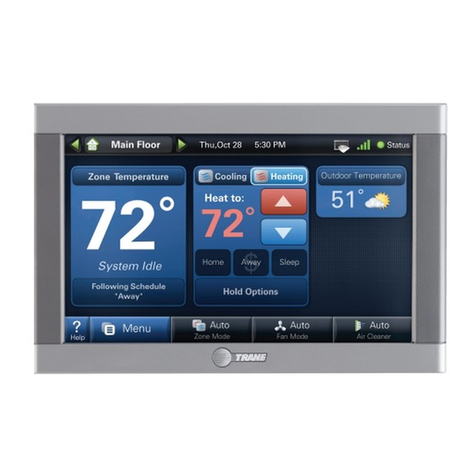
Riello Touchscreen N User manual

06/2017
Equipment
Settings
Zone
Settings
Schedule
Settings
Sistem
Settings
Details
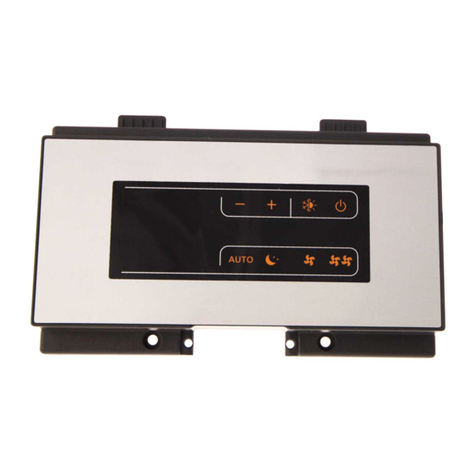
Touchscreen N
CENTRALISED CONTROL
cod.Doc-0086545rev.0
EN USER INSTRUCTIONS

2
RANGE
Model Code
Touchscreen N centralised control 20133642
Dear customer,
Thank you for choosing a Rproduct, an innovative and high quality appliance that guar-
antees wellbeing for a long time.
This manual contains information we deem necessary for correct and easy use.
Thanks again.
RIELLO
COMPLIANCE
The appliances are in conformity with European Directives:
—Low Voltage Directive 2014/35/EU
—Electromagnetic Compatibility Directive 2014/30/EU
—RoHS Directive 2011/65/EU
—WEEE Directive 2012/19/EU
Find the nearest Authorised Technical
Support by visiting the website
9
WARNING
Keep the product purchase documents for tax purposes to be presented to the Authorised
Technical Support upon request of a service call under warranty.
www.riello.it
Support // Authorized
Support Centre
9
The product must be used for its intended purpose, as stated by Rfor which it has
been expressly manufactured. Rshall bear no responsibility, whether of a contrac-
tual or non-contractual nature, for any damage caused to people, animals, or property
due to incorrect installation, adjustments, or maintenance, or improper use.
WARRANTY
Rproduct has a Conventional Warranty (valid for Italy, Republic of San Marino, Vatican
City), starting from the product's date of purchase.

3
TABLE OF CONTENTS
1 GENERAL INFORMATION . . . . . .
1.1 General Notices . . . . . . . . . . . . . . . . .
1.2 Safety precautions . . . . . . . . . . . . . . .
1.3 Energy saving tips . . . . . . . . . . . . . . .
1.4 Unit description . . . . . . . . . . . . . . . . .
Main functions. . . . . . . . . . . . . . . . . .
1.5 Layout . . . . . . . . . . . . . . . . . . . . . . . .
2 INSTALLATION . . . . . . . . . . . . . . .
2.1 Receiving the product . . . . . . . . . . . .
2.2 Dimensions and weight . . . . . . . . . . .
2.3 Storage . . . . . . . . . . . . . . . . . . . . . . .
2.4 Place of installation . . . . . . . . . . . . . .
2.5 Positioning. . . . . . . . . . . . . . . . . . . . .
2.6 Wiring diagrams. . . . . . . . . . . . . . . . .
AARIA MULTI . . . . . . . . . . . . . . . . . . . .
AARIA PRO MULTI S . . . . . . . . . . . . . . . .
2.7 Electrical connection . . . . . . . . . . . . .
3 USE . . . . . . . . . . . . . . . . . . . . . . . . .
3.1 Keys . . . . . . . . . . . . . . . . . . . . . . . . . .
3.2 Display. . . . . . . . . . . . . . . . . . . . . . . .
3.3 Switching on the command. . . . . . . .
3.4 Navigation . . . . . . . . . . . . . . . . . . . . .
3.5 System settings . . . . . . . . . . . . . . . . .
Local . . . . . . . . . . . . . . . . . . . . . . . . .
Extra . . . . . . . . . . . . . . . . . . . . . . . . .
Energy . . . . . . . . . . . . . . . . . . . . . . . .
Password . . . . . . . . . . . . . . . . . . . . . .
3.6 Unit settings. . . . . . . . . . . . . . . . . . . .
Changing the settings . . . . . . . . . . . .
Changing name of indoor unit . . . . . .
Activation and deactivation . . . . . . . .
3.7 Zone settings . . . . . . . . . . . . . . . . . . .
Creation of a zone . . . . . . . . . . . . . . .
Changing a zone . . . . . . . . . . . . . . . .
3.8 Displaying details. . . . . . . . . . . . . . . .
3.9 Hourly programming . . . . . . . . . . . . .
Creation of a period . . . . . . . . . . . . . .
Applying a period. . . . . . . . . . . . . . . .
Activation and deactivation . . . . . . . .
Changing a period . . . . . . . . . . . . . . .
3.10 Reset .........................
3.11 Screensaver function .............
3.12 Switching off the control ..........
4 DISPOSAL. . . . . . . . . . . . . . . . . . . .
The following symbols are used in this
publication:
9
WARNING = actions requiring special
care and appropriate training.
0 DO NOT = actions that MUST ON NO
ACCOUNT be carried out. This booklet cod.Doc-0086545 rev. 0 (06/2017)
consists of 32 pages.

4
GENERAL INFORMATION
1
GENERAL INFORMATION
1.1
General Notices
9
When you get the product, check imme-
diately that the contents are all present
and undamaged. Contact the dealer
Rif you notice any problems.
9
The product' s installation must be car-
ried out by an authorised company that
will issue a declaration of the installa-
tion's conformity to the product's owner
once the work has been completed, in-
dicating that the work has been carried
out in accordance with the standards of
good practice, current National and Local
regulations, and the indications provid-
ed by Rin the instruction booklet ac-
companying the device.
9
The product must be used for its in-
tended purpose, as stated by Rfor
which it has been expressly manufac-
tured. Rshall bear no responsibility,
whether of a contractual or non-con-
tractual nature, for any damage caused
to people, animals, or property due to
incorrect installation, adjustments, or
maintenance, or improper use.
9
During storms, set the main switch to
“Off”.
9
Comply with the legislation in force on
the country of deployment with regard
to the use and disposal of packaging,
of cleaning and maintenance products
and for the management of the unit's
decommissioning.
9
Any repair and maintenance inter-
ventions must be carried out by R
Technical Support Service, in accordance
with the provisions contained in this
publication. Do not modify or tamper
with the unit as dangerous situations
may arise and the unit manufacturer will
not be liable for any damage caused.
9
This booklet is an integral part of the
device, and must therefore be carefully
preserved, and must ALWAYS accompany
it, even in the event that it is sold to an-
other Owner or User, or is transferred to
another system. If it is damaged or lost,
another copy can be requested to R
Technical Support Service in your Area.
1.2
Safety precautions
It should be noted that the use of products
that utilize electric energy requires certain
essential safety regulations to be respected,
including the following:
0 Do not allow children or unassisted dis-
abled people to use the unit.
0 It is forbidden to touch the device while
barefoot or with wet body parts.
0 Do not spray or throw water directly on
the unit.
0 Do not pull, detach or twist the electrical
wires coming out of the unit, even when
the unit is disconnected from the power
grid.
0 The packing material must not be dis-
posed of in the surrounding environ-
ment and must be kept out of children
reach, as it can be dangerous. It must be
disposed of according to the regulations
in force.

5
GENERAL INFORMATION
1.3
Energy saving tips
9
Cover windows with shutters or curtains
to stop sunlight coming through and
hence increase the cooling effect.
9
Maintaining moderate temperature set-
tings will help save energy.
Recommended temperature settings:
—for cooling: 26-28 °C
—for heating: 20-24 °C
1.4
Unit description
Control with Touch screen display for the
centralised management of the units is sys-
tems with the AARIA MULTI and AARIA PRO
MULTI S ranges.
AARIA PRO MULTI S: up to a maximum of 32
outdoor units and 256 indoor units.
AARIA MULTI: up to a maximum of 16 outdoor
units and 80 indoor units.
Main functions
The centralised control has the following
functions:
—monitoring of the main parameters of
the indoor units (operating mode, air
speed, temperatures, settings, ON/OFF,
etc.)
—Setting the main parameters of the
single indoor units
—Setting the main parameters of the
single zones
—Setting the global parameters
—monitoring and saving the errors of the
individual indoor units
—hourly timer
—weekly timer
—organisation of several groups in one
zone
—deactivating the indoor units due to an
external alarm (e.g. fire alarm signal)
• Monitoring other parameters:
—Indoor temperature
—Piping temperature
—etc...

6
GENERAL INFORMATION
1.5
Layout
1 Display
2 Screensaver key
3 Ignition indicator light
4 On-Off key
5 Reset button
6 Touch panel
7 Terminal blocks
8 Control base
9 Transformer module
1
23
7
6
4
5
9
8

7
INSTALLATION
2
INSTALLATION
2.1
Receiving the product
The appliance is delivered in a single pack,
protected by cardboard packaging.
The following items can be found inside the
packaging:
Document envelope:
—instruction booklet for the installer and
user in English
It is also supplied as kit:
—transformer module
—metal template
—screws
—"mammut" terminal board
9
The Instruction book comes with the
equipment and it should be taken, read
and kept carefully.
9
The document envelope must be kept
in a safe place. Any duplicate must be
requested from Riello S.p.A. which re-
serves to charge the cost.
2.2
Dimensions and weight
258
217
53
CONTROLS
190
125
20
TRANSFORMER MODULE
80 25
35
2.3
Storage
9
The product must be stored of according
to the regulations in force.
2.4
Place of installation
The location of the appliance should be de-
cided by the system designer or by an expert
in the field and should take into account
purely technical requirements and also cur-
rent local legal requirements.

8
INSTALLATION
The control should be installed indoors and
placed on a wall.
1,5 m
OK
Check that:
—the position is about 1.5 m off the
ground
—installed taking into consideration the
maximum length of the connecting
cable.see the chapter "Electrical con-
nection"
Avoid:
—installation on a perimeter wall
—walls crossed by cold or hot piping
—installation near doors or windows,
cooking equipment, radiators, fan coils
or generally in conditions that might
alter the measured temperatures
—the positioning of the unit at least 3
metres from video and radio systems
2.5
Positioning
The installation requires the positioning of
the control and the transformer for the elec-
trical power in a flush-mounted box.
1 Electric connection input
2 Transformer
3 Touch panel
4 Fixing screws
5 Base
6 Flush mounted box (not supplied)
1
2
3
4
5
6

9
INSTALLATION
—insert the flush-mounted box in the
wall
—fix the transformer to the bottom of the
box
1 Touch panel
2 Base
2
1
—separate the touch Panel from the base
1 Fastening holes
1
1
1
168
120
78
82
4141
1 Base
2 Fixing screws
3 Hooks for touch panel
2
3
1
—fix the base onto the box

10
INSTALLATION
2.6
Wiring diagrams
The control can be used with the AARIA MULTI and AARIA PRO MULTI S ranges.
AARIA MULTI
the control is connected directly to the Trial,
Quadri, Penta outdoor units, up to a maxi-
mum of 32.
The indoor units can be managed individu-
ally or by zone.
9
It is not possible to connect Dual outdoor
units.
A Touchscreen N centralised control
B AARIA MULTI range outdoor unit C AARIA range outdoor unit
1
A
C
2
C
3
C
1
C
2
C
3
C
4
C
1
C
2
C
3
C
4
C
5
C
B
1
B
....
32
Max 32
B
Max 80
9
For the maximum number of indoor
units that can be linked to each outdoor
unit, see the latter's manual.
This manual suits for next models
1
Table of contents
Other Riello Control Panel manuals

Riello
Riello Wired Touch panel User manual

Riello
Riello CPD 35 User manual

Riello
Riello CBD 25 User manual

Riello
Riello 20081467 User manual

Riello
Riello CBD 20 PLUS User manual

Riello
Riello 4030011 User manual

Riello
Riello NexSirius User manual

Riello
Riello 20147241 User manual

Riello
Riello RIELLOtech CLIMA TOP User manual

Riello
Riello RIELLOtech PRIME User manual