manuals.online logo
Brands
  1. Home
  2. •
  3. Brands
  4. •
  5. SICK
  6. •
  7. Accessories
  8. •
  9. SICK WI180C-EN User manual

SICK WI180C-EN User manual

This manual suits for next models

1

Other SICK Accessories manuals

SICK SureSense-HTF18 User manual

SICK

SICK SureSense-HTF18 User manual

SICK PowerProx WTT12L-A Series User manual

SICK

SICK PowerProx WTT12L-A Series User manual

SICK OLS20 User manual

SICK

SICK OLS20 User manual

SICK WSE16 Series User manual

SICK

SICK WSE16 Series User manual

SICK GRTE18 User manual

SICK

SICK GRTE18 User manual

SICK W24-2 User manual

SICK

SICK W24-2 User manual

SICK AS30 Prime Edge User manual

SICK

SICK AS30 Prime Edge User manual

SICK DL100 Pro User manual

SICK

SICK DL100 Pro User manual

SICK Lector64x Flex User manual

SICK

SICK Lector64x Flex User manual

SICK OD1000 User manual

SICK

SICK OD1000 User manual

SICK TiM8 DistanceGuard Series User manual

SICK

SICK TiM8 DistanceGuard Series User manual

SICK OL1 User manual

SICK

SICK OL1 User manual

SICK GRTB18SV User manual

SICK

SICK GRTB18SV User manual

SICK GRTE18V User manual

SICK

SICK GRTE18V User manual

SICK TiM781 User manual

SICK

SICK TiM781 User manual

SICK CS81-P3612S02 User manual

SICK

SICK CS81-P3612S02 User manual

SICK LUT9 User manual

SICK

SICK LUT9 User manual

SICK LFV 200 User manual

SICK

SICK LFV 200 User manual

SICK OLS20 User manual

SICK

SICK OLS20 User manual

SICK WT18-3 User manual

SICK

SICK WT18-3 User manual

SICK SIM2000 User manual

SICK

SICK SIM2000 User manual

SICK TiM4 Series User manual

SICK

SICK TiM4 Series User manual

SICK TriSpector1000 User manual

SICK

SICK TriSpector1000 User manual

SICK RAY26 User manual

SICK

SICK RAY26 User manual

Popular Accessories manuals by other brands

Quincy lab 140AE-1 operating manual

Quincy lab

Quincy lab 140AE-1 operating manual

HomePro ZIR000 user manual

HomePro

HomePro ZIR000 user manual

DOL 20SCR Technical user guide

DOL

DOL 20SCR Technical user guide

RAB Smart Task installation manual

RAB

RAB Smart Task installation manual

Kemppi KMS 300 quick guide

Kemppi

Kemppi KMS 300 quick guide

Stearns 57,500 Series Installation and service instructions

Stearns

Stearns 57,500 Series Installation and service instructions

iGuzzini TWILIGHT COPENAGHEN manual

iGuzzini

iGuzzini TWILIGHT COPENAGHEN manual

Adelaide Annexe & Canvas Avan Deluxe installation guide

Adelaide Annexe & Canvas

Adelaide Annexe & Canvas Avan Deluxe installation guide

OHAUS 5000 instruction manual

OHAUS

OHAUS 5000 instruction manual

HOME8 WLS1300 quick start guide

HOME8

HOME8 WLS1300 quick start guide

MAXBOTIX MaxSonar quick start guide

MAXBOTIX

MAXBOTIX MaxSonar quick start guide

ioSmart iSmart56 Installation and user guide

ioSmart

ioSmart iSmart56 Installation and user guide

Focusrite Scarlett 18i8 user guide

Focusrite

Focusrite Scarlett 18i8 user guide

Velleman ED38105 user manual

Velleman

Velleman ED38105 user manual

JumpSport SkyBounce user manual

JumpSport

JumpSport SkyBounce user manual

Prima-Temp PRIYA Instructions for use

Prima-Temp

Prima-Temp PRIYA Instructions for use

Tefcold BC85I-BC85I W user manual

Tefcold

Tefcold BC85I-BC85I W user manual

Vaisala WMS302 user guide

Vaisala

Vaisala WMS302 user guide

manuals.online logo
manuals.online logoBrands
  • About & Mission
  • Contact us
  • Privacy Policy
  • Terms and Conditions

Copyright 2025 Manuals.Online. All Rights Reserved.

OPERATING INSTRUCTIONS
WI180C-EN
WI180C-EN Ethernet/IP coupler
Described product
WI180C-EN
Manufacturer
SICK AG
Erwin-Sick-Str. 1
79183 Waldkirch
Germany
Legal information
This work is protected by copyright. Any rights derived from the copyright shall be
reserved for SICK AG. Reproduction of this document or parts of this document is only
permissible within the limits of the legal determination of Copyright Law. Any modifica‐
tion, abridgment or translation of this document is prohibited without the express writ‐
ten permission of SICK AG.
The trademarks stated in this document are the property of their respective owner.
© SICK AG. All rights reserved.
Original document
This document is an original document of SICK AG.
2006/42/EC
NO
SAFETY
2O P E R A T I N G I N S T R U C T I O N S | WI180C-EN 8024950/2019-11-04 | SICK
Subject to change without notice
Contents
1 About this document........................................................................ 5
1.1 Purpose of this document........................................................................ 5
1.2 Target group.............................................................................................. 5
1.3 Information depth..................................................................................... 5
1.4 Explanation of symbols............................................................................ 5
1.5 Product information.................................................................................. 6
1.6 Further information................................................................................... 6
2 Safety information............................................................................ 7
2.1 General safety notes................................................................................ 7
2.2 Correct use................................................................................................ 7
2.3 Reasonably foreseeable misuse.............................................................. 7
3 Product description........................................................................... 8
3.1 Product characteristics............................................................................ 8
3.2 Structure and function............................................................................. 8
3.3 Interfaces.................................................................................................. 8
3.3.1 Ethernet/IP............................................................................... 8
3.3.2 Power supply............................................................................ 9
3.3.3 Grounding................................................................................. 9
4 Transport and storage....................................................................... 10
4.1 Transport................................................................................................... 10
4.2 Storage...................................................................................................... 10
5 Mounting............................................................................................. 11
5.1 Required materials................................................................................... 11
5.2 Preparing mounting location.................................................................... 11
5.3 Scope of delivery....................................................................................... 11
5.4 Mounting procedure................................................................................. 11
5.5 Connecting the device.............................................................................. 12
6 Commissioning.................................................................................. 13
6.1 Parameterization....................................................................................... 13
6.2 Integration as a generic module.............................................................. 13
6.3 Integration using an EDS file.................................................................... 15
6.4 IP address of the WI180C-EN.................................................................. 15
6.5 Switching on.............................................................................................. 16
7 Operation............................................................................................ 17
7.1 Security...................................................................................................... 17
7.2 Daily thorough check................................................................................ 17
7.3 LED status indicators............................................................................... 17
7.4 Device slots and classes.......................................................................... 18
7.5 Supported classes.................................................................................... 19
CONTENTS
8024950/2019-11-04 | SICK O P E R A T I N G I N S T R U C T I O N S | WI180C-EN 3
Subject to change without notice

7.6 Identity Object........................................................................................... 21
7.7 Assembly object........................................................................................ 23
7.7.1 I/O assemblies......................................................................... 23
7.7.2 I/O assemblies with process data.......................................... 24
7.7.3 Configuration assemblies....................................................... 25
7.8 Manufacturer-specific classes................................................................. 26
7.8.1 Class 100 gateway information.............................................. 26
7.8.2 Class 101 WLL180T................................................................ 27
7.8.3 Class 102 KTL180................................................................... 30
7.8.4 Class 103 OD1 on AOD1......................................................... 32
7.8.5 Class 104 OL1 on AOD1......................................................... 36
7.8.6 Class 128 module configuration............................................ 38
8 Diagnostics......................................................................................... 40
9 Decommissioning............................................................................. 41
9.1 Dismantling............................................................................................... 41
9.2 Disposal..................................................................................................... 41
10 Technical data.................................................................................... 42
10.1 Dimensional drawings.............................................................................. 42
10.2 Technical data........................................................................................... 42
10.3 UL Satisfaction Ratings............................................................................ 44
10.4 Ordering information, accessories........................................................... 44
CONTENTS
4O P E R A T I N G I N S T R U C T I O N S | WI180C-EN 8024950/2019-11-04 | SICK
Subject to change without notice
1 About this document
1.1 Purpose of this document
These operating instructions contain information required during the life cycle of the
device.
These operating instructions must be made available to all those who work with the
device.
Please read these operating instructions carefully and make sure that you understand
the content fully before working with the device.
1.2 Target group
These operating instructions are intended for the following target groups: Project devel‐
opers (planners, developers, designers), installers, electricians, programmers, opera‐
tors and maintenance personnel.
The structure of these operating instructions is based on the life-cycle phases of the
device: Project planning, mounting, electrical installation, commissioning, operation,
maintenance and disposal.
1.3 Information depth
These operating instructions contain information about the following topics relating to
the device:
•Product description
•Mounting
•Electrical installation
•Commissioning and configuration
Furthermore, when planning and using sensors such as the device, technical expertise
is required, which is not covered in this document.
Official and legal regulations for operating the device volume measurement system
must always be complied with.
You can find further information on the Internet at www.sick.com.
1.4 Explanation of symbols
Warnings and important information in this document are labeled with symbols. The
warnings are introduced by signal words that indicate the extent of the danger. These
warnings must be observed at all times and care must be taken to avoid accidents, per‐
sonal injury, and material damage.
DANGER
… indicates a situation of imminent danger, which will lead to a fatality or serious
injuries if not prevented.
WARNING
… indicates a potentially dangerous situation, which may lead to a fatality or serious
injuries if not prevented.
ABOUT THIS DOCUMENT 1
8024950/2019-11-04 | SICK O P E R A T I N G I N S T R U C T I O N S | WI180C-EN 5
Subject to change without notice

CAUTION
… indicates a potentially dangerous situation, which may lead to minor/slight injuries if
not prevented.
NOTICE
… indicates a potentially harmful situation, which may lead to material damage if not
prevented.
NOTE
… highlights useful tips and recommendations as well as information for efficient and
trouble-free operation.
1.5 Product information
Table 1: Product information
Product name WI180C-EN
Part number 6068090
Device version Ethernet/IP
Manufacturer SICK AG
1.6 Further information
www.sick.com
The following information is available on the Internet:
•Other language versions
•Data sheets and application examples
•CAD data of drawings and dimensional drawings
•Certificates (e.g. EU declaration of conformity)
•Current device files
1 ABOUT THIS DOCUMENT
6O P E R A T I N G I N S T R U C T I O N S | WI180C-EN 8024950/2019-11-04 | SICK
Subject to change without notice
2 Safety information
2.1 General safety notes
•The mounting, electrical installation and configuration of the device must be car‐
ried out by professionally qualified personnel only.
•Before mounting, it is imperative that you familiarize yourself with the operating
instructions for the connected devices.
•When mounting and electrical installation work is being carried out, always comply
with applicable health and safety and environmental regulations.
•The device must not be used outdoors or in areas with flammable/explosive
atmospheres!
•When installing the device, always consider the electrical connected loads.
•Replace faulty or damaged cables and male connectors immediately.
•Replace damaged or faulty couplers immediately.
•When mounting the device, it is imperative that you use suitable mounting equip‐
ment and that you consider their specific requirements.
•Ensure a constant power supply to the device within the set parameters.
•Only operate the device within the set operating parameters.
•Regularly check that the device is functioning properly.
•Structural modifications to the device are not permitted.
•The device is not designed as a safety product.
•This device complies with the Radio Safety Requirements (EMC) for the industrial
sector (Radio Safety Class A). It may cause radio interference if used in a residen‐
tial area.
2.2 Correct use
Correct use requires that the device is used industrially indoors without any specific cli‐
matic and atmospheric requirements. Any use outside of the areas mentioned in each
case will be considered to be incorrect use and void any warranty claims against
SICK AG.
2.3 Reasonably foreseeable misuse
Not taking the pin assignment into account or using an incorrect adapter cable may
damage or destroy the connected Ethernet/IP coupler.
Connecting the Ethernet/IP coupler to signal or power cables that are too long may lead
to a loss of data and damage to the Ethernet/IP coupler.
SAFETY INFORMATION 2
8024950/2019-11-04 | SICK O P E R A T I N G I N S T R U C T I O N S | WI180C-EN 7
Subject to change without notice

3 Product description
3.1 Product characteristics
The device is an interface coupler that can be used to connect connected devices
(e.g. WLL180T) to the Ethernet/IP network. The relevant devices are connected via a
simple plug system on the side of the coupler.
Normally the entire system is installed on a mounting rail near the application.
The coupler supports up to 16 connected devices, which are likewise connected to one
another via the plug system.
Further properties:
•Ethernet/IP adapter
•Configuration via CIP classes, config assembly object
•EDS, DLR and QoS support
•BootP/DHCP support
•Address conflict monitoring (ACD)
•2 Ethernet connections with transmission rate of 100 Mbaud
Further specifications can be found in the technical data (see "Technical data",
page 42).
3.2 Structure and function
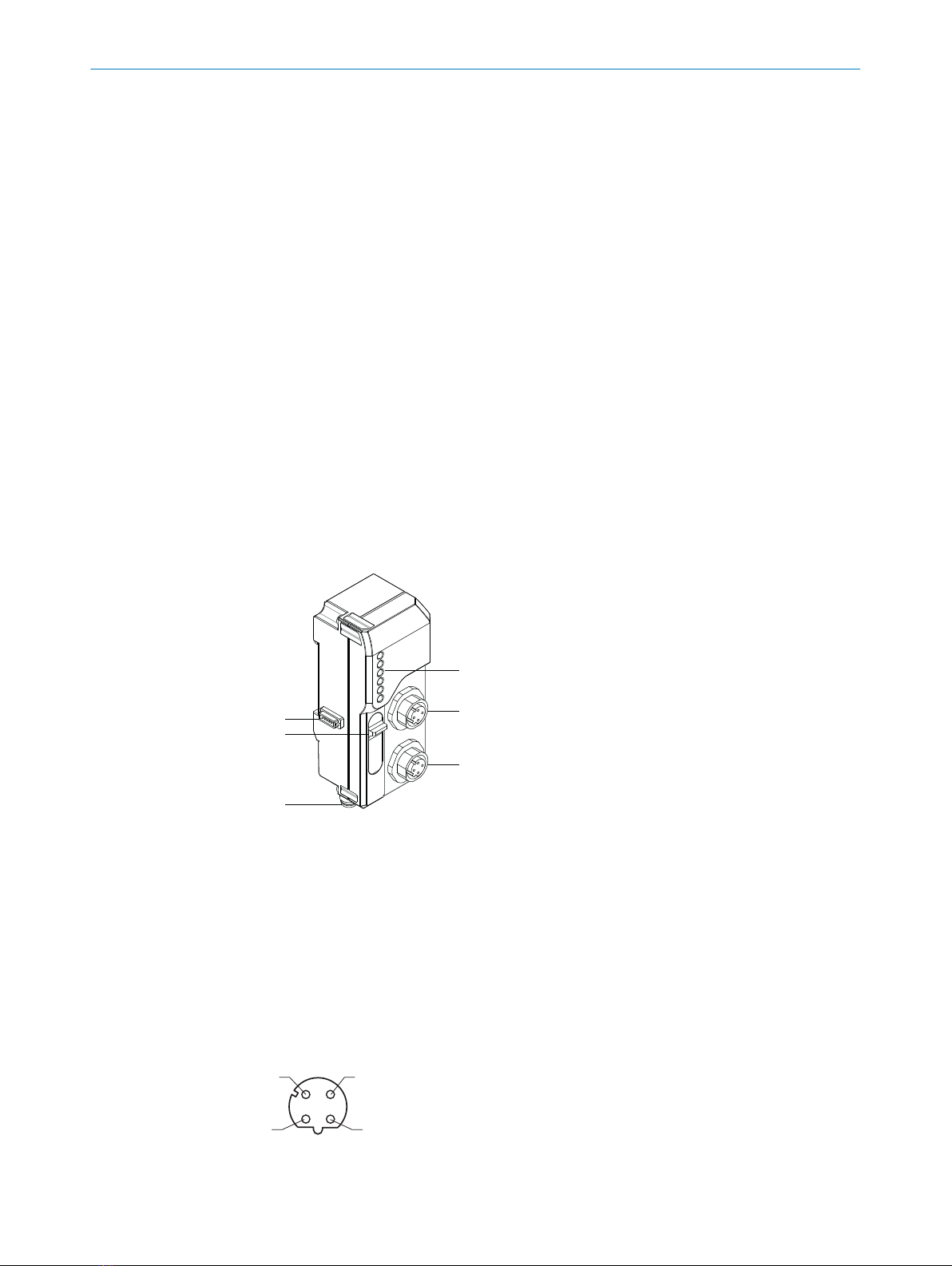
1
2
3
6
5
4
1Bus male connector (system bus)
2Maintenance port
3Voltage supply connection M8, 4-pin
4D-coded plug connector M12, 4-pin, Ethernet/IP
5D-coded plug connector M12, 4-pin, Ethernet/IP
6Status LEDs
3.3 Interfaces
3.3.1 Ethernet/IP
1
43
2
3 PRODUCT DESCRIPTION
8O P E R A T I N G I N S T R U C T I O N S | WI180C-EN 8024950/2019-11-04 | SICK
Subject to change without notice

Table 2: Ethernet/IP pin assignment
Pin Pin assignment
1 Tx+
2 Rx+
3 Tx-
4 Rx-
3.3.2 Power supply
2 4
13
Table 3: Power supply pin assignment
Pin Pin assignment
1 +12 – 24 VDC
2 Not assigned
3 GND
4 Not assigned
3.3.3 Grounding
The device is grounded via the mounting rail by means of a spring contact:
PRODUCT DESCRIPTION 3
8024950/2019-11-04 | SICK O P E R A T I N G I N S T R U C T I O N S | WI180C-EN 9
Subject to change without notice

4 Transport and storage
4.1 Transport
Either transport the device in the original packaging or use a padded transport con‐


tainer. Make sure that you comply with the maximum permitted environmental condi‐
tions (see "Technical data", page 42).
4.2 Storage
If you want to store the devicefor a relatively long time, pack it as you would for trans‐
port. Make sure that the storage location complies with the permitted environmental
conditions (see "Technical data", page 42).
4 TRANSPORT AND STORAGE
10 O P E R A T I N G I N S T R U C T I O N S | WI180C-EN 8024950/2019-11-04 | SICK
Subject to change without notice