manuals.online logo
Brands
  1. Home
  2. •
  3. Brands
  4. •
  5. STI
  6. •
  7. Security System
  8. •
  9. STI Fire Stopper Series User manual

STI Fire Stopper Series User manual

This manual suits for next models

1

Other STI Security System manuals

STI Exit Stopper STI-6404 Instructions for use

STI

STI Exit Stopper STI-6404 Instructions for use

STI Exit Stopper STI-6400 Series User manual

STI

STI Exit Stopper STI-6400 Series User manual

STI STI-6400 User manual

STI

STI STI-6400 User manual

STI STI-SA5500 User manual

STI

STI STI-SA5500 User manual

STI Rex Plus II User manual

STI

STI Rex Plus II User manual

STI Stopper Station Series User manual

STI

STI Stopper Station Series User manual

STI Stopper SS2 0 Series User manual

STI

STI Stopper SS2 0 Series User manual

STI STI-WS109 User manual

STI

STI STI-WS109 User manual

STI Mugger Stopper Plus User manual

STI

STI Mugger Stopper Plus User manual

STI STI-SA5500 User manual

STI

STI STI-SA5500 User manual

STI UB-2PN User manual

STI

STI UB-2PN User manual

STI STI-SA5600 User manual

STI

STI STI-SA5600 User manual

STI Home & Work Series User manual

STI

STI Home & Work Series User manual

STI STI-34501 User manual

STI

STI STI-34501 User manual

STI Exit Stopper STI-6400 Series Instructions for use

STI

STI Exit Stopper STI-6400 Series Instructions for use

STI 6400 User manual

STI

STI 6400 User manual

STI Theft Stopper STI-6200 Series Instruction sheet

STI

STI Theft Stopper STI-6200 Series Instruction sheet

STI SELECT-ALERT SA5000 Series User manual

STI

STI SELECT-ALERT SA5000 Series User manual

STI SS2 6 Series User manual

STI

STI SS2 6 Series User manual

STI Alert Point Troubleshooting guide

STI

STI Alert Point Troubleshooting guide

STI SA5500 User manual

STI

STI SA5500 User manual

Popular Security System manuals by other brands

Inner Range Concept 2000 user manual

Inner Range

Inner Range Concept 2000 user manual

Climax Mobile Lite R32 Installer's guide

Climax

Climax Mobile Lite R32 Installer's guide

FBII XL-31 Series installation instructions

FBII

FBII XL-31 Series installation instructions

Johnson Controls PENN Connected PC10 Install and Commissioning Guide

Johnson Controls

Johnson Controls PENN Connected PC10 Install and Commissioning Guide

Aeotec Siren Gen5 quick start guide

Aeotec

Aeotec Siren Gen5 quick start guide

IDEAL Accenta Engineering information

IDEAL

IDEAL Accenta Engineering information

Swann SW-P-MC2 Specifications

Swann

Swann SW-P-MC2 Specifications

Ecolink Siren+Chime user manual

Ecolink

Ecolink Siren+Chime user manual

Digital Monitoring Products XR150 user guide

Digital Monitoring Products

Digital Monitoring Products XR150 user guide

EDM Solution 6+6 Wireless-AE installation manual

EDM

EDM Solution 6+6 Wireless-AE installation manual

Siren LED GSM operating manual

Siren

Siren LED GSM operating manual

Detection Systems 7090i Installation and programming manual

Detection Systems

Detection Systems 7090i Installation and programming manual

Se-Kure Controls MicroMini SK-4841 instructions

Se-Kure Controls

Se-Kure Controls MicroMini SK-4841 instructions

Siemens FDM273 manual

Siemens

Siemens FDM273 manual

DSC PC 4010 Programming manual

DSC

DSC PC 4010 Programming manual

UniPOS 6202L quick start guide

UniPOS

UniPOS 6202L quick start guide

AJAX DoubleButton user manual

AJAX

AJAX DoubleButton user manual

Rondish Nexus User instructions

Rondish

Rondish Nexus User instructions

manuals.online logo
manuals.online logoBrands
  • About & Mission
  • Contact us
  • Privacy Policy
  • Terms and Conditions

Copyright 2025 Manuals.Online. All Rights Reserved.

®
Safety Technology International, Inc.
2306 Airport Road • Waterford, Michigan 48327-1209
Phone: 248-673-9898 • Fax: 248-673-1246
Toll Free: 800-888-4784 • E-mail: [email protected]
Web: www.sti-usa.com
Safety Technology International (Europe) Ltd.
Unit 49G Pipers Road • Park Farm Industrial Estate • Redditch
Worcestershire • B98 0HU • England • Tel: 44 (0) 1527 520 999
Fax: 44 (0) 1527 501 999 • Freephone: 0800 085 1678 (UK only)
E-mail: [email protected]om • Web: www.sti-europe.com
INSTALLATION OF SS-2000 FIRE SERIES STOPPER®STATION
All specifications and information shown were current as of publication, and are subject to change without notice. SHEET 1
10277IS JAN99
.69 in.
(17mm)
SUB-102722-R
PLASTIC SPACER MOLDED
IN RED (OPTIONAL)
TERMINAL BLOCK ASSEMBLY
BACKPLATE ASSEMBLY
WITH STAINLESS STEEL
GROUND PLATE AND LUG
MOLDED BUTTON
WITH KEY RESET
MOLDED
POLYCARBONATE
FACEPLATE
TURN CLOCKWISE
ONE QUARTER TURN
TO RESET
19001 HOUSING
RETENTION SCREW
#8-32 x 3/8 in.
(1) PROVIDED
19015 3/32 in. ALLEN
WRENCH (1) PROVIDED
BUTTON LOCK NUT
F
I
R
E
P
U
S
H
E
R
E
STANDARD SINGLE OUTLET BOX
NOTE: TO MOUNT STOPPER STATION ON A STANDARD
OUTLET BOX SUB-102722-R IS REQUIRED
F
I
R
E
19030 KEY
(2) PROVIDED
F
I
R
E
10197H CONTACT HOLDER
SCREWS (2) PROVIDED
19010 #6-32 x 1 in. WITHOUT SUB-102722-R
19045 #6-22 x 1 1/2 in. WITH SUB-102722-R
TO PROVIDE ADEQUATE
CLEARANCE FOR INSTALLATION
TO ANY STANDARD SINGLE
GANG OUTLET BOX,
STI RECOMMENDS THE USE OF
SUB-102722-R SPACER.
2.25 in.
(57mm)
1.62 in.
(41mm)
4.87 in. (124mm)
3.25 in. (82mm)
PRODUCT DIMENSIONS
F
I
R
E
F
I
R
E
F
I
R
E
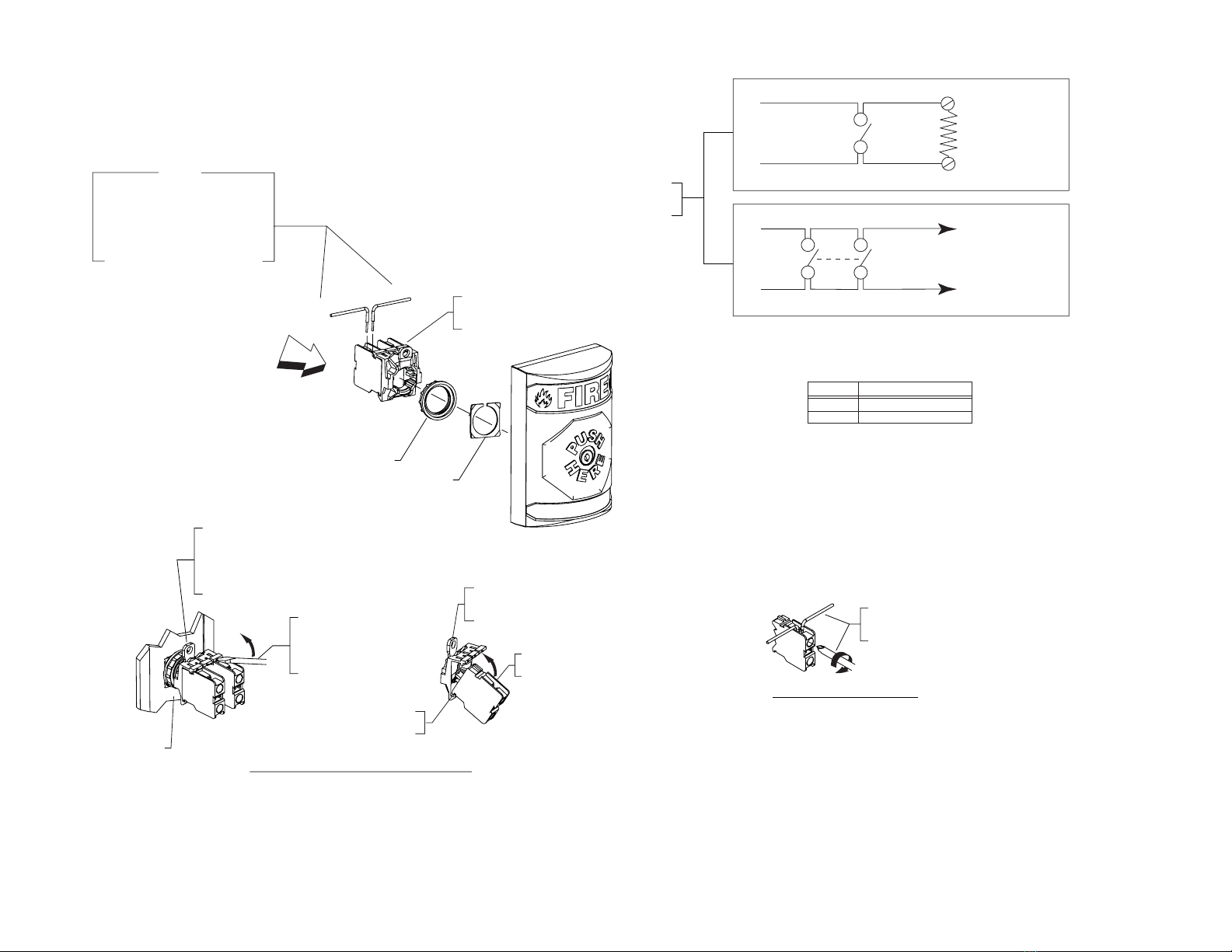
PRY BACK LEVER 'A' IN
DIRECTION OF ARROW
THEN USING A FLATHEAD
SCREW DRIVER, INSERT
AS SHOWN AND ROTATE
UPWARD.
REMOVAL OF TERMINAL BLOCKS
A
F
I
R
E
F
I
R
E
F
I
R
E
INSERT TERMINAL
BLOCK NOTCH AS
SHOWN AND ROTATE
UPWARD.
INSTALLATION OF TERMINAL BLOCKS
F
I
R
E
F
I
R
E
F
I
R
E
ADA
compliant
F
I
R
E
F
I
R
E
F
I
R
E
IF LAST
STATION ON
CIRCUIT,
CONNECT E.O.L.
RESISTOR
12-18 AWG
CLOSE ON
ALARM
SINGLE DEVICE
DIAGRAM DEPICTING
MULTIPLE DEVICES
12-18 AWG
CLOSE ON
ALARM
SUPERVISED LOOP (SEE CAUTION NOTE)
CLOSE ON
ALARM
BE SURE ALL ELECTRICAL
POWER IS DISCONNECTED
BEFORE STARTING THE INSTALLATION.
NOTE: JUMPER NOT PROVIDED
F
I
R
E
F
I
R
E
F
I
R
E
A
VIEW IN DIRECTIONS OF ARROW
INSTALLATION AND REMOVAL OF TERMINAL BLOCKS AND
TERMINAL BLOCK ASSEMBLY FROM BUTTON ASSEMBLY
TO SEPARATE TERMINAL
AND BUTTON ASSEMBLY
GRASP TERMINAL HOUSING, USING
THUMB APPLY PRESSURE
DOWNWARD, REMOVE TERMINAL
HOUSING AS SHOWN.
REMOVAL OF TERMINAL BLOCK
FROM TERMINAL HOUSING
INSERT SMALL SCREWDRIVER
AS SHOWN AND PRY
UPWARD, REMOVE TERMINAL.
BACKPLATE ASSEMBLY
INSERT NOTCH
AS SHOWN THEN
ROTATE UPWARD
TERMINAL BLOCK RELEASE LEVER
MUST FACE UPWARD
AS SHOWN FOR SWITCH
TO FUNCTION CORRECTLY.
ELECTRICAL TERMINAL
1, 2, OR 3 TERMINALS
MAY BE USED
F
I
R
E
F
I
R
E
F
I
R
E
STRIP 1/4 in. OF WIRE INSULATION,
INSERT IN TERMINAL (AS SHOWN).
THEN USING A PHILLIPS SCREWDRIVER
TURN CLOCKWISE UNTIL TIGHT.
A
VIEW IN DIRECTIONS OF ARROW
INSTALLATION OF ELECTRICAL
WIRE INTO TERMINAL BLOCK
F
I
R
E
F
I
R
E
F
I
R
E
OUTGOING
INCOMING
BUTTON LOCK NUT
10196 N.O. TERMINAL BLOCK
(2) PROVIDED UP TO 3
TERMINALS MAY BE USED FOR
EACH STATION ASSEMBLY.
A
AN UNINSULATED SECTION OF A SINGLE
CONDUCTOR SHOULD NOT BE LOOPED
AROUND THE TERMINAL AND SERVE AS
TWO CONNECTIONS.
THE WIRE MUST BE SEVERED, THEREBY
PROVIDING SUPERVISION OF THE
CONNECTION IN THE EVENT THE WIRE
BECOMES DISLODGED FROM THE DEVICE.
CAUTION
METAL WASHER
F
I
R
E
F
I
R
E
F
I
R
E
ALL TERMINALS ACCEPT TWO 12 TO 18 (AWG)
VOLTAGE RATED AVERAGE CURRENT
250 VDC 1 AMP
24 VAC 3 AMP
SAFETY TECHNOLOGY INTERNATIONAL, INC. • 2306 AIRPORT ROAD • WATERFORD • MICHIGAN 48327-1209 • PHONE: 248-673-9898 • FAX: 248-673-1246 • INFO @ www.sti-usa.com SHT. 2
10277IS JAN99